RS-1_instruction manual.pdf - 第995页
Part 2 D etaile d Descript ion of E ach Functi on Chapter 12 Handling th e Optional Device s 12 - 111 12.16.2.1 Removing a diffuser (only when you selec t a nozzle 7111) If you use the manu al nozzle att achment funct io…
Part 2 Detailed Description of Each Function Chapter 12 Handling the Optional Devices
12-110
12.16 Manual Nozzle Attachment Function
12.16.1 Overview
When you use a customized nozzle that cannot be set on the ATC, you can manually attach the
nozzle on a head without using the ATC. (Manual nozzle attachment function)
To use this manual nozzle attachment function, the machine is set exclusively to allow a nozzle to
be attached on a head manually, and it cannot replace nozzles with using any ATC.
When you attach a nozzle on a head manually, the machine uses the nozzle that is attached on a
head manually before PWB production to produce PWBs without replacing any nozzles during
production.
12.16.2 Preparation
To use the manual nozzle attachment function, set the Z-axis of the heads adjacent to the head on
which a nozzle is to be attached manually so that it cannot be used. Fix the head whose Z-axis is
set not to be used with following the description of the Chapter 8 “Machine Setup.”
WARNING
To avoid any accident caused by sudden activation of the machine,
turn off the power.
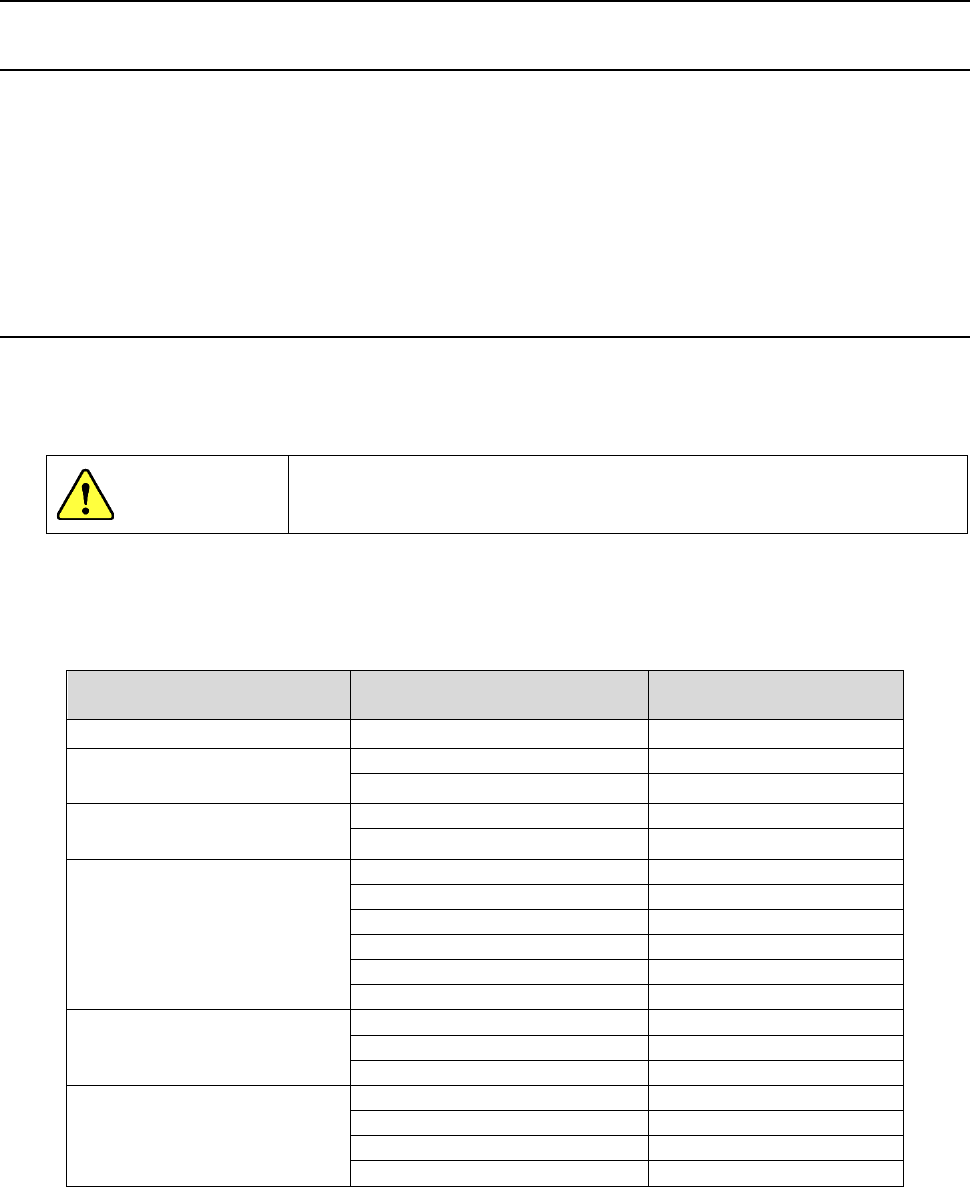
Select a head on which you are to attach a nozzle manually with taking into consideration
interference of the nozzles manually attached on heads and the size of components to be used for
production.
Component size
Head on which a nozzle is
to be attached manually
Unused head
□
7.0 mm or less
1,2,3,4,5,6,7,8
None
More than
□
7.0 mm but
□
14.9 mm or less
1,3,5,7
2,4,6,8
2,4,6,8
1,3,5,7
More than
□
14.9 mm but
□
20.0 mm or less
1,4,7
2,3,5,6,8
2,5,8
1,3,4,6,7
More than □
20.0 mm but
□23.4 mm or less
2,5
1,3,4,6,7,8
3,6
1,2,4,5,7,8
4,7
1,2,3,5,6,8
2,6
1,3,4,5,7,8
3,7
1,2,4,5,6,8
2,7
1,3,4,5,6,8
More than □
31.9 mm but
□35.0 mm or less
2,6
1,3,4,5,7,8
3,7
1,2,4,5,6,8
2,7
1,3,4,5,6,8
More than □35.0 mm
3
1,2,4,5,6,7,8
4
1,2,3,5,6,7,8
5
1,2,3,4,6,7,8
6
1,2,3,4,5,7,8
Note: When you use a nozzle that is to be attached on a head manually and whose shape is
designed for a component that is to be recognized with a VCS, you have to set an unused
head depending on the outer dimension of the nozzle.
Part 2 Detailed Description of Each Function Chapter 12 Handling the Optional Devices
12-111
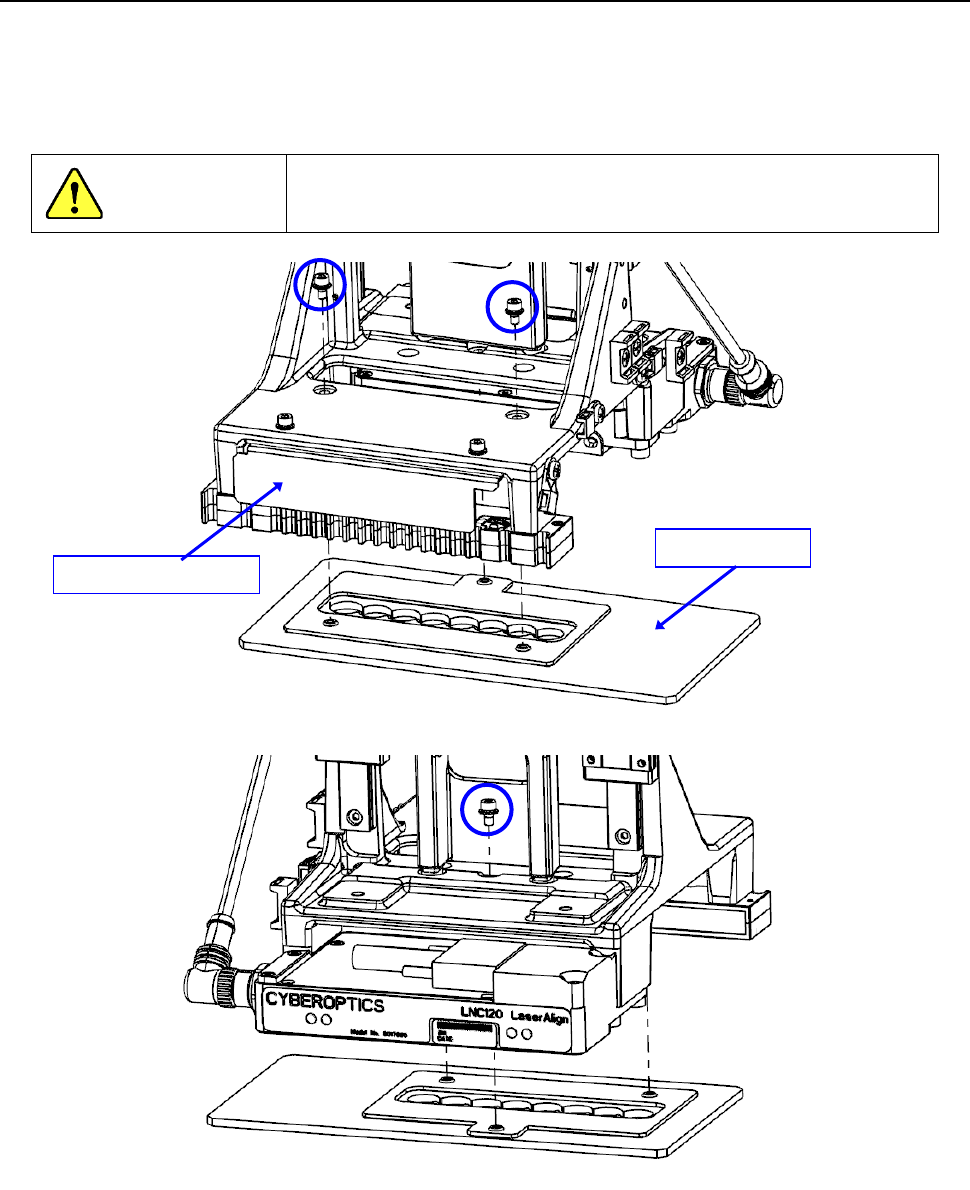
12.16.2.1 Removing a diffuser (only when you select a nozzle 7111)
If you use the manual nozzle attachment function when a nozzle 7111 (40211594) is selected,
remove three fixing screws shown in the figure below, and then remove the diffuser from the
LNC120 sensor.
If you do not remove the diffuser, select a nozzle 7111L (40249881).
WARNING
To avoid any accident caused by sudden activation of the
machine, turn off the power.
Diffuser
LNC120 sensor
Part 2 Detailed Description of Each Function Chapter 12 Handling the Optional Devices
12-112
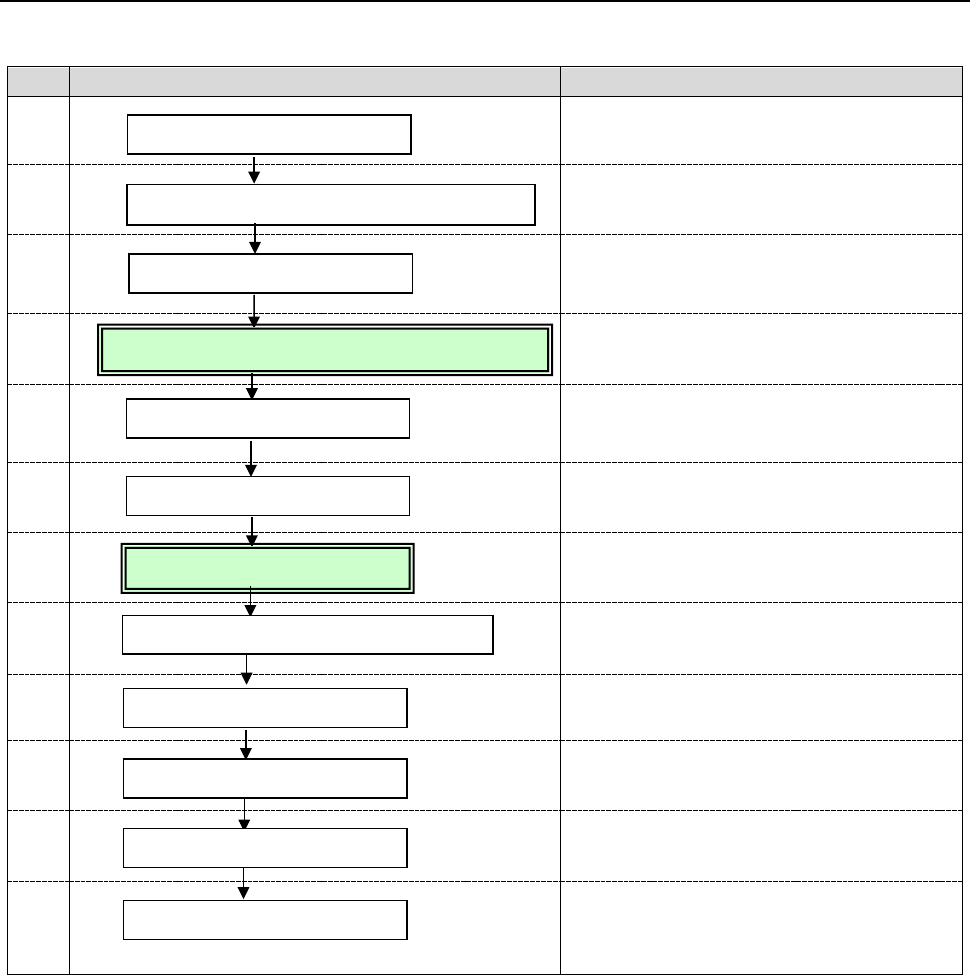
12.16.3 Flowchart
When you attach a nozzle on a head manually, follow the procedure below.
No.
Flowchart
Remarks
1
Refer to Chapter 8 “Machine Setup” of the
Instruction Manual.
2
Insert a nozzle until it is locked.
3
Refer to Chapter 2 “Production” of the
Instruction Manual
4
(See Section 4.4.1.)
5
Refer to Chapter 2 “Production” of the
Instruction Manual
6
Refer to Chapter 8 “Machine Setup” of the
Instruction Manual.
7
(See Section 4.4.2.)
8
Refer to Chapter 4 “Creating a Production
Program” of the Instruction Manual.
9
Refer to Chapter 2 “Production” of the
Instruction Manual
10
Refer to Chapter 2 “Production” of the
Instruction Manual
11
Refer to Chapter 2 “Production” of the
Instruction Manual
12
Perform inspections at the regular
intervals.
(Refer to Chapter 3 “Maintenance” of the
Instruction Manual.)
Manually attach a nozzle on a head.
Turn on the power.
Fix the adjacent heads.
Enable the manual nozzle attachment function.
Assign nozzles.
Load the nozzle data.
Create/edit a production program.
Daily inspection
Return to the origin.
Production
Finish the production.
Turn off the power.