RS-1_instruction manual.pdf - 第281页
Part 1 B asic O peration Chapter 2 Pr oduction 2- 170 Changing the mac hine operation mode The Non - sto p operation f unction allo ws you to swit ch the operation mode between t w o modes, Non - stop op eration mode and…
Part 1 Basic Operation Chapter 2 Production
2-169
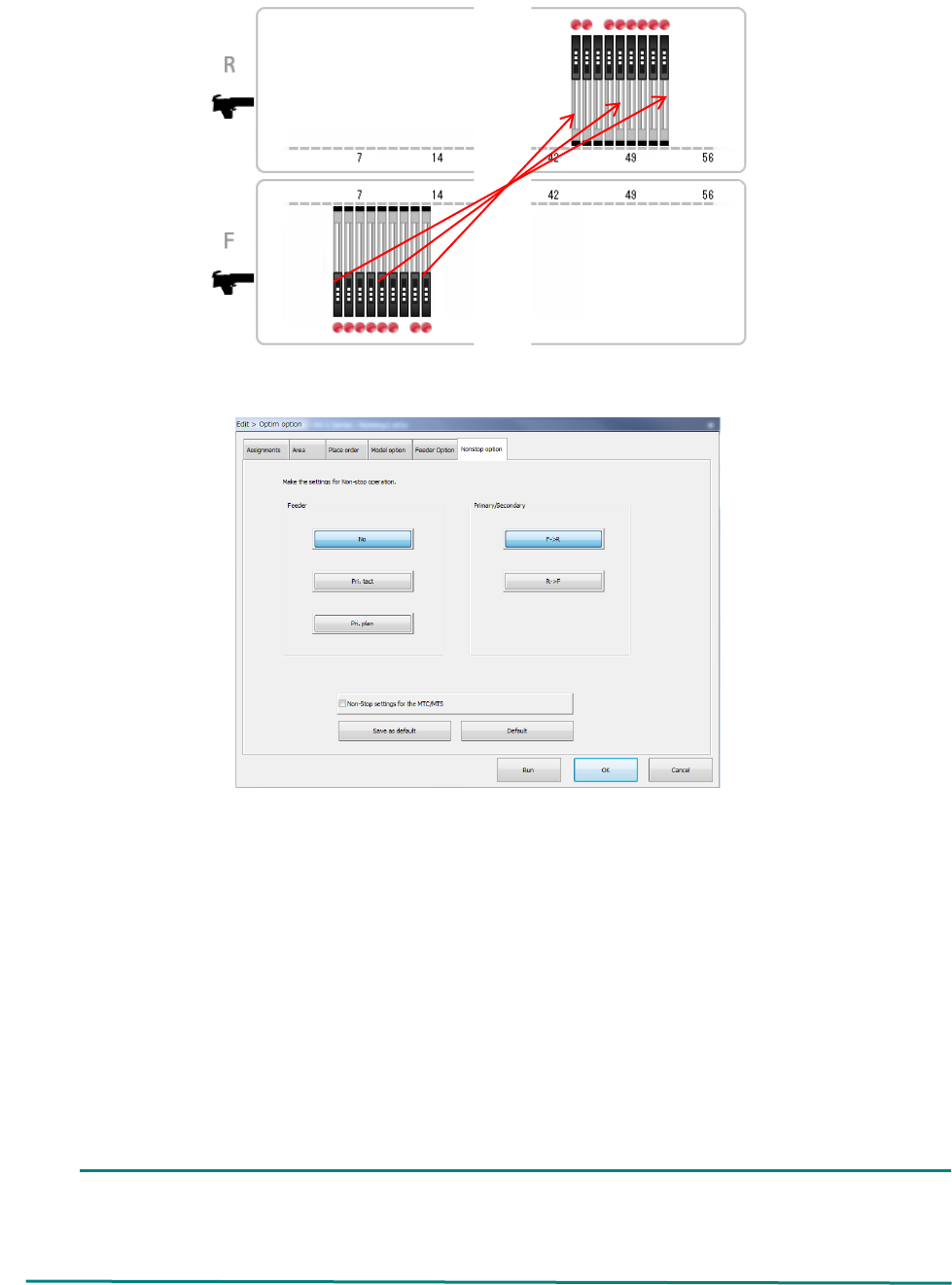
(3) Create a feeder layout for non-stop operation with the Optimization function.
Specify the optimization requirements, and then perform the optimization function.
Feeder: Specify how to assign feeders during Non-stop operation.
- No : The system does not perform Non-stop operation.
- Pri. tact : The system creates the feeder layout by giving priority to the cycle time (line
symmetry).
- Pri. plan : The system creates the feeder layout by giving priority to the planning (setup)
(point symmetry).
Primary/Secondary: Specify which side is to be used mainly during Non-stop operation, the
front or the rear.
Select the <F ->R> button when the reference side is set to the front or
the <R -> F> button when it is set to the rear side.
Non-Stop settings for the MTC/MTS: Specify whether an MTC/MTS is to be used for Non-stop
operation or not.
When the RF/EF bank is specified for the front side, an EF type feeder is used on this side,
and the RF bank is specified for the rear side, any EF type feeder cannot be assigned to the
RF bank. Therefore, the system cannot perform PWB production in optimized order.
In such a case, produce a PWB in input order.
Part 1 Basic Operation Chapter 2 Production
2-170
Changing the machine operation mode
The Non-stop operation function allows you to switch the operation mode between two modes,
Non-stop operation mode and Normal operation mode (referred as to “JUKI standard mode”
hereinafter).
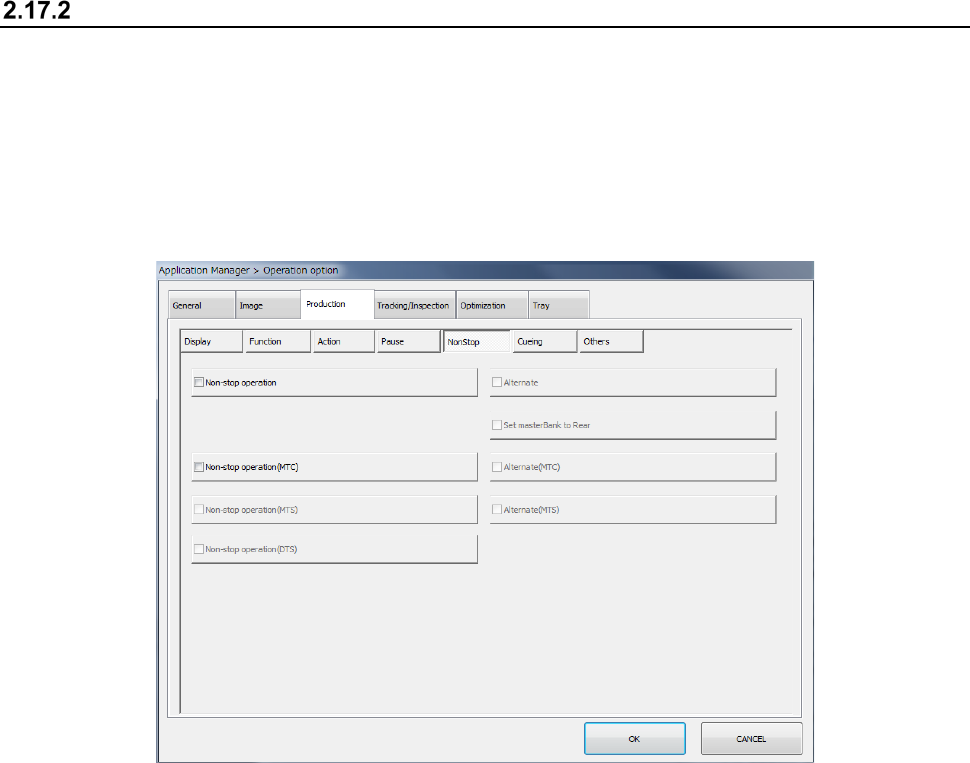
To switch the operation mode, display the “NonStop” tab of the “Production” tab invoked from the
“Operation option” screen.
When you check off the “Non-stop operation” check box on the “NonStop” tab of the “Production”
tab, the system is put in “Non-stop operation mode.” When you uncheck this check box, the
system is put in “JUKI standard mode.”
In Non-stop operation mode, priority is given to pick-up of components from the master feeder bank.
Even while a component is being picked up from the slave feeder bank, the next component is
picked up from the master feeder bank when the master feeder bank is refilled with components and
you set the bank switch to ON.
When you check off the “Alternate” check box, the system is put in “Alternate production mode.” In
Alternate production mode, the banks are switched alternately if components run out on one of
these banks during PWB production in Non-stop operation mode (that is, even though the master
feeder bank is refilled with components, components continue to be picked up from the slave bank
until components run out on the slave bank).
When you check off the “Non-stop operation” check box, the following items are set to the “unused”
state without precondition, and you cannot select any of them.
1. When components run out, production pauses.
2. Stop system on any error.
3. Measure component height when restarting after component run out.
4. Perform component verification when restarting after component run out.
Components are picked up from mainly the master feeder bank during PWB production. The
master feeder bank can be switched to another one, and the rear feeder bank can be used as the
master feeder bank also.
To use the rear feeder bank as the master feeder bank, check off the “Set masterBank to Rear”
check box. When the “Set masterBank to Rear” check box is unchecked, the front feeder bank is
used as the master feeder bank.
Part 1 Basic Operation Chapter 2 Production
2-171
Production operation
When production starts
(1) When the master feeder bank is enabled, components are picked up from the master feeder
bank.
When the “Feeder trolley” check box or the “Feeder Float Detector” check box is unchecked
on the “Machine Setup” screen, the message “There is no trolley option in the setup data.”
or the message “There is no feeder float sensor in the setup data.” appears on the screen.
When you clear the displayed message in this case, and then press the Start key of the
panel switches, production starts.
(2) When the master feeder bank is disabled and the slave feeder bank is enabled
- Immediately after changeover (a production program is switched to another one)
The message “No completion change plan. Please use Feeder Bank.” appears on the
screen. When you clear this message, and then press the Start key of the panel switches
after enabling the master feeder bank in this case, components are picked up from the
master feeder bank.
If you press the Start key without enabling the master feeder bank, components are picked
up from the slave feeder bank.
- When production starts with the same production program
Components are picked up from the slave feeder bank.
(3) When both the master feeder bank and the slave feeder bank are disabled
The system temporarily stops with displaying the “Retry list.”