RS-1_instruction manual.pdf - 第681页
Part 2 D etaile d Descript ion of E ach Functi on Chapter 7 Operation Option 7-6 No. Menu item Description Status Operation and det ailed explanation 1 BOC alignm ent Specify wh ether BO C correcti on is performed at pla…
Part 2 Detailed Description of Each Function Chapter 7 Operation Option
7-5
7.3 Images
Specify operation options for images.
7.3.1 Teaching
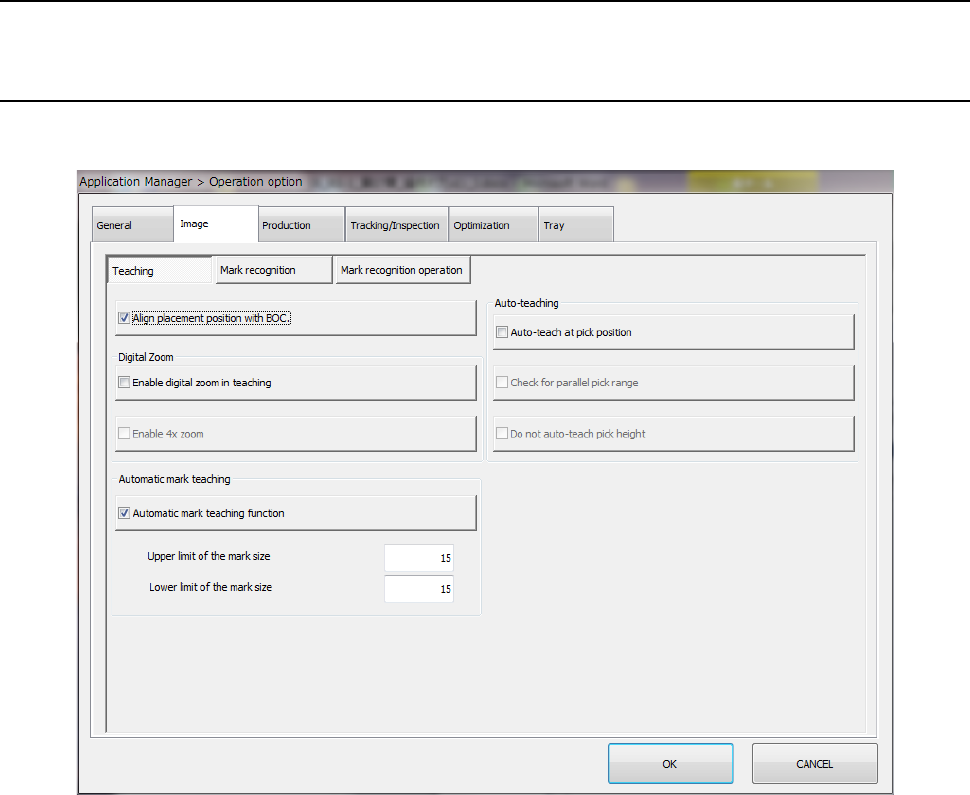
When you press the <Teaching> button, the “teaching option setting” screen appears.

Part 2 Detailed Description of Each Function Chapter 7 Operation Option
7-6
No. Menu item
Description
Status Operation and detailed explanation
1
BOC alignment
Specify whether BOC correction is performed at placement position
teaching of data editing and others.
Movement is performed to the coordinates after BOC
correction at placement position teaching and reverse
correction is executed when fetching a value.
Accordingly, the correct placement position coordinates can
be taught for the PWB.
2
Digital zoom
Perform
digital zoom
at teaching.
Specify whether digital zoom is performed by WINDOW button at teaching
during tracking.
Digital zoom is performed by WINDOW button during
teaching.
3
Use a x4
digital zoom.
Specify whether x4 digital zoom is performed when “Digital zoom is
performed at teaching” is set.
An x4 magnified display is made by digital zoom.
4
Auto teaching
Execute auto
teaching by
pick tracking.
Specify auto teaching execution by pick tracking.
* This setting is enabled when pick tracking was executed at production.
It has no effect on the auto teaching to be called by program editing.
Auto teaching is performed by pick tracking.
5
Check the
simultaneous
pick enable
range.
When “Auto teaching is executed by pick tracking” is checked off, the
simultaneous pick enable range can be checked.
The simultaneous pick enable range is checked.
6
Do not
perform auto
teaching of
pick height.
When “Auto teaching is executed by pick tracking” is checked off, it is set
whether the auto teaching of pick height Z-coordinates is executed or not.
The auto teaching of Z-coordinates is not executed by auto
teaching.
7
Mark auto
teaching
Mark auto
teaching
function
Specify whether the auto teaching of the BOC mark is executed or not.
The auto teaching of the mark is executed.
8
Upper limit
value of mark
size
Specify the upper limit value of mark size when “Mark auto teaching
function” is checked off.
Input
The upper limit value (%) of the mark size is specified.
9
Lower limit
value of mark
size
Specify the lower limit value of mark size when “Mark auto teaching
function” is checked off.
Input
The lower limit value (%) of the mark size is specified.
Part 2 Detailed Description of Each Function Chapter 7 Operation Option
7-7
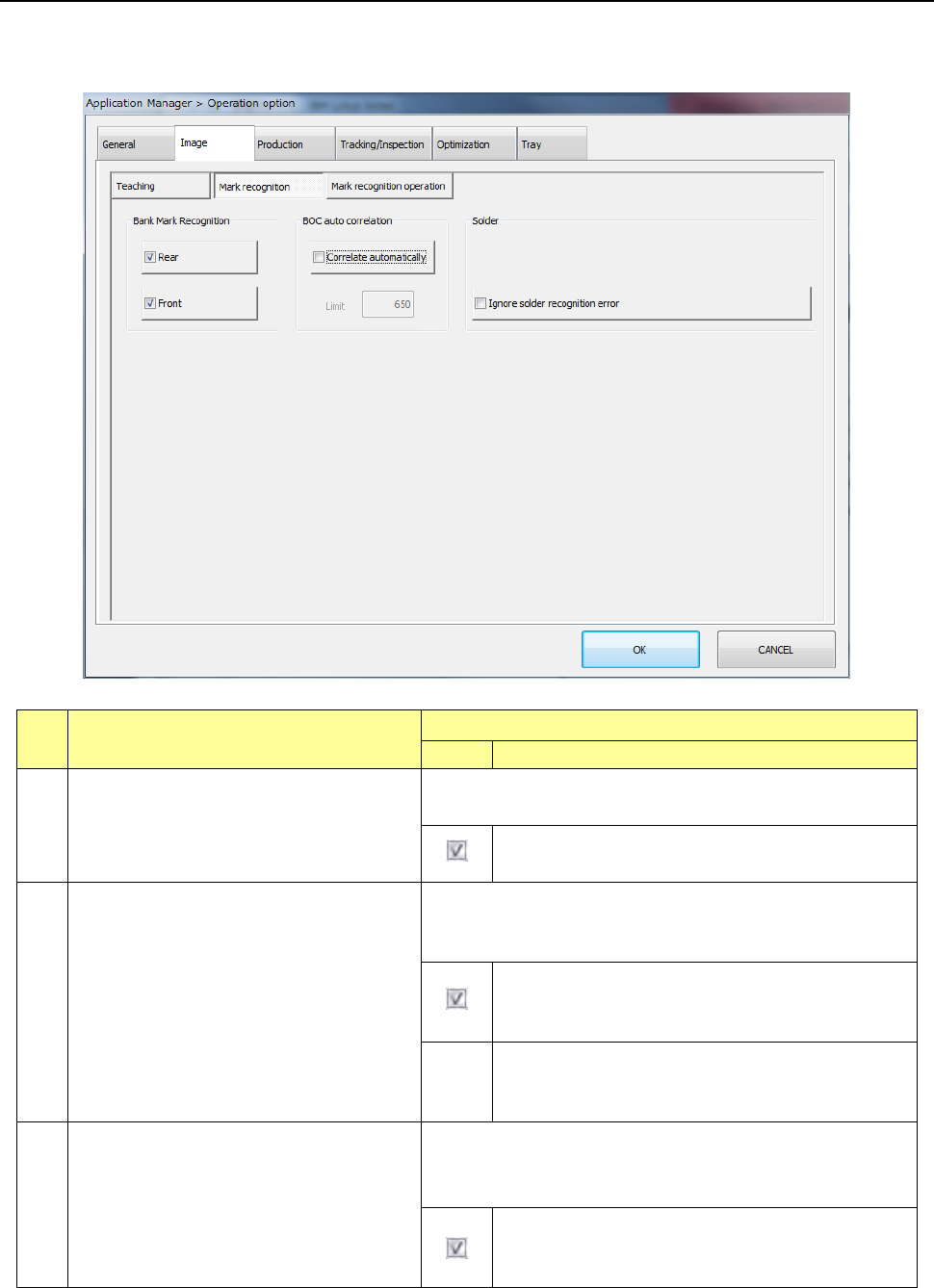
7.3.2 Mark recognition
When you press the <Mark recognition> button, the “mark recognition option setting screen”
appears.
No.
Menu item
Description
Status
Operation and detailed explanation
1
Feeder bank recognition
Specify a function to correct the pick position by bank mark
recognition.
Bank mark recognition is performed and the pick
position is corrected.
2
Auto change of BOC mark threshold value
Specify whether the threshold value is automatically changed to
the automatically set lower limit value when oxidized BOC
cannot be recognized.
When the oxidized BOC cannot be recognized, the
threshold value is automatically changed to the
automatically set lower limit value for recognition.
Lower
limit
value
Specify the lower limit value of threshold value.
When “Automatic change of BOC mark threshold
value” is checked off, this item is enabled.
3
Placement on the placement coordinates
ignoring a solder recognition error
Specify a function to ignore an error at occurrence of a solder
recognition error.
It can be specified when the solder option is enabled.
Placement is performed on the placement coordinates
by ignoring the error when a solder recognition error
occurs.