RS-1_instruction manual.pdf - 第27页
Part 1 B asic O peration Chapter 1 Overv iew of the Machine 1-9 ♦ T o open the cov er , push up the cov er and push the lock lev er in the directi on of the arrow (LOCK) for l ocking. Rel eas e it afte r confirming the l…
Part 1 Basic Operation Chapter 1 Overview of the Machine
1-8
①
②
⑦
③
⑤
⑧
⑥
④
⑤
⑨
⑫
⑩
⑪
⑩
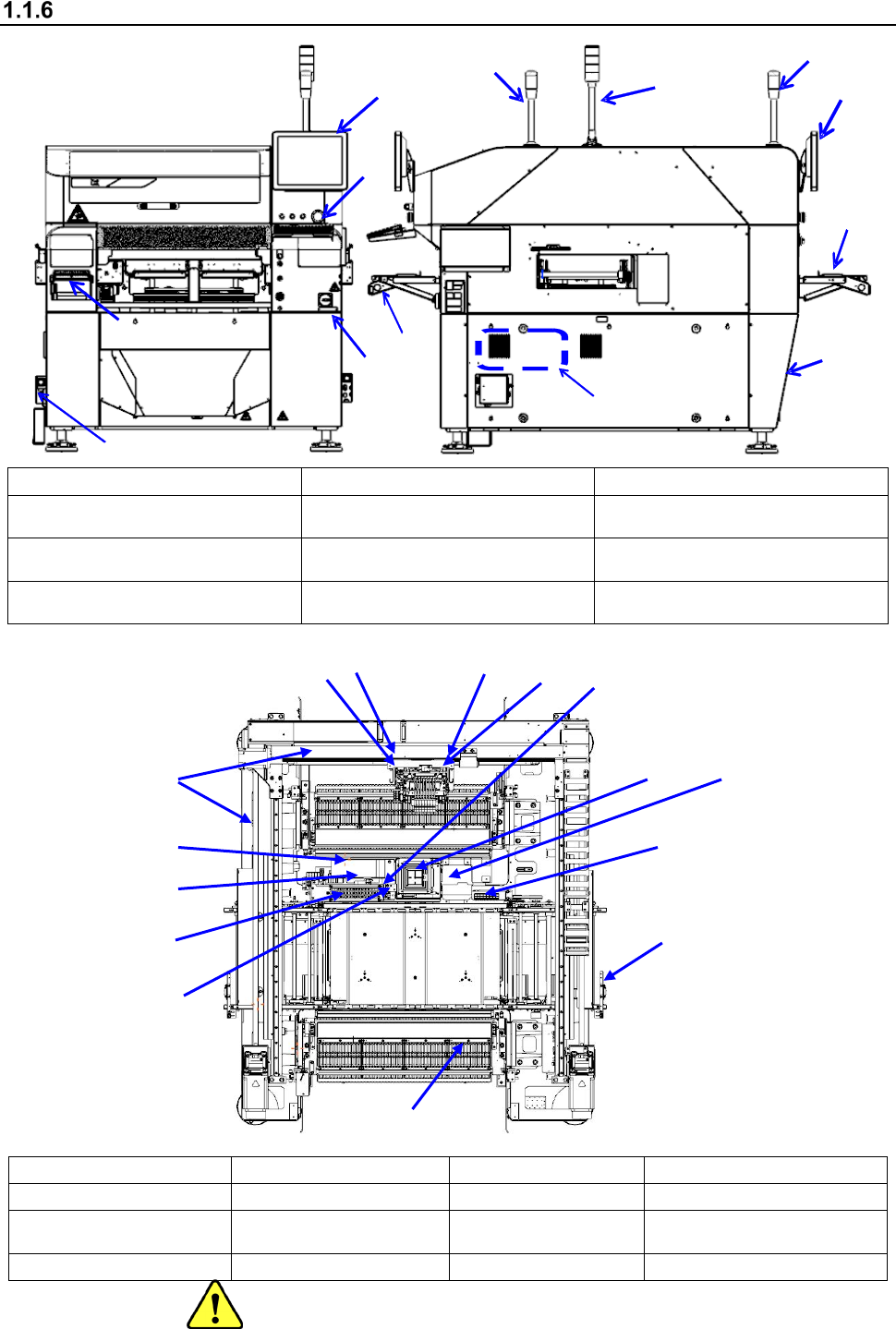
Configuration of the machine
① Front liquid crystal monitor ⑤ Mini signal light (option) ⑨ Rear liquid crystal monitor
② Operation panel ⑥ Air regulator (Under the cover)
⑩
Front tape setting unit
* In and after Rev. D
③ Power switch
⑦
Vacuum pump
(Right side inside the machine)
⑪
Rear tape setting unit (Option)
* In and after Rev. D
④ Signal light
⑧
Breaker
(On the right side of the rear)
⑫ Keyboard (option)
①
ATC unit
⑤
PWB transport unit
⑨
CAL block unit
⑬
Load control unit (option)
②
LNC120 head unit
⑥
VCS unit
⑩
Feeder bank unit
⑭ Coplanarity unit (option)
③
Head unit
8-head
⑦ X-Y unit ⑪ HMS unit
⑮
NozzleRFID reader
(option)
④
OCC unit (L)
⑧
CVS unit (option)
⑫
Trash box
③
①
②
⑥
⑦
⑨
④
⑩
⑪
⑫
⑬
⑤
⑧
⑭
⑮
Part 1 Basic Operation Chapter 1 Overview of the Machine
1-9
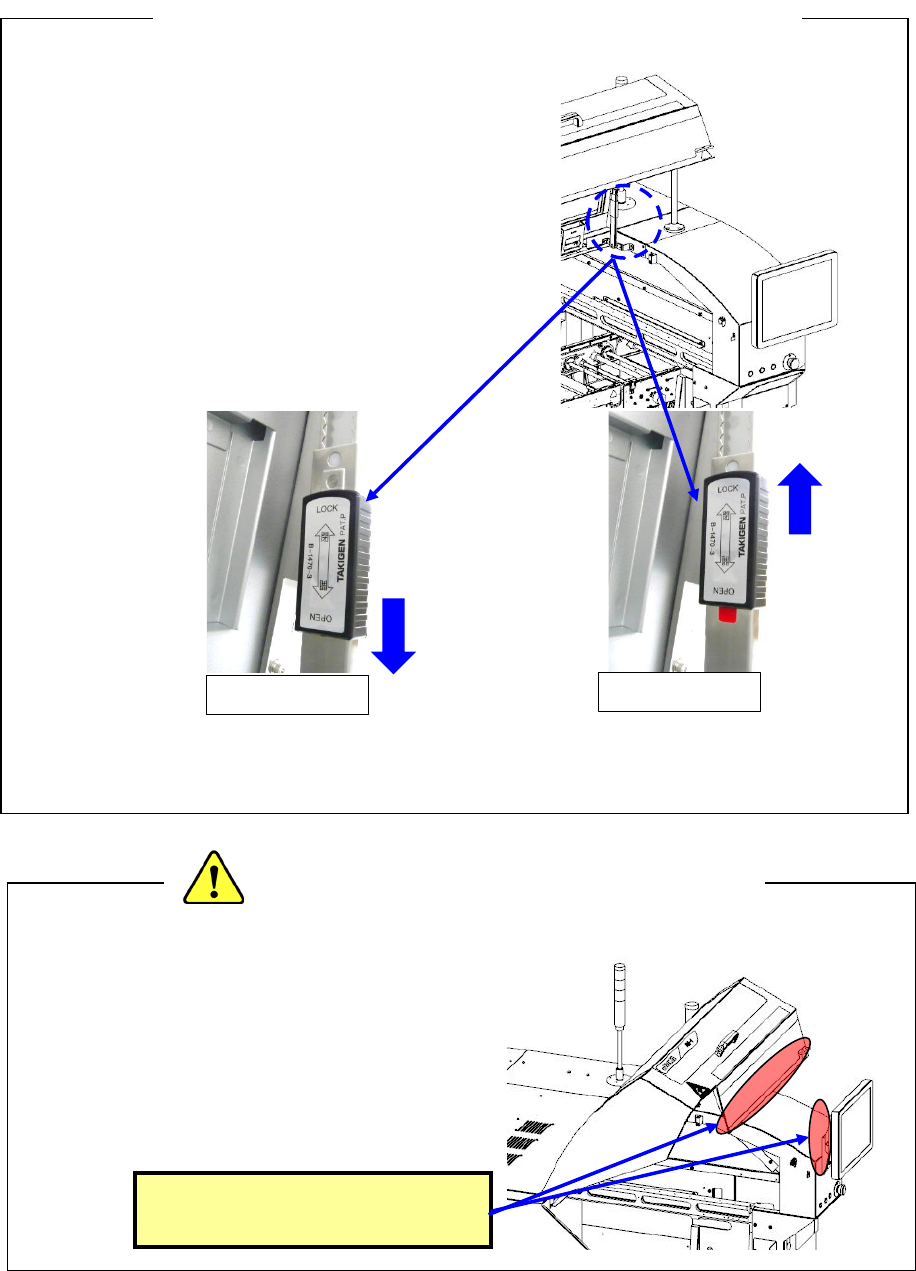
♦ To open the cover, push up the cover and push
the lock lever in the direction of the arrow
(LOCK) for locking.
Release it after confirming the locked status.
* If the cover is released in a non-locked status,
it may fall.
♦ When closing the cover, release the locked status
and then close the cover. Raise the cover and pull
the lock lever in the OPEN direction to release the
lock status.
(During a release operation, take care not to get hurt due to falling of the cover.)
* Do not apply an excessive load to the cover, handle, etc.
♦ When you service the ATC, the XY-axes or
the head, or when you enter the machine to
operate its inside, be extremely careful not to
bump into the cover or the monitor from the
rear side or hit your head on any part to avoid
injury.
<Precaution for operation inside the machine>
<Precautions for opening/closing the safety cover>
Be careful not to hit your head
or other part on these parts.
OPEN
LOCK
Part 1 Basic Operation Chapter 1 Overview of the Machine
1-10
Configuration of the machine
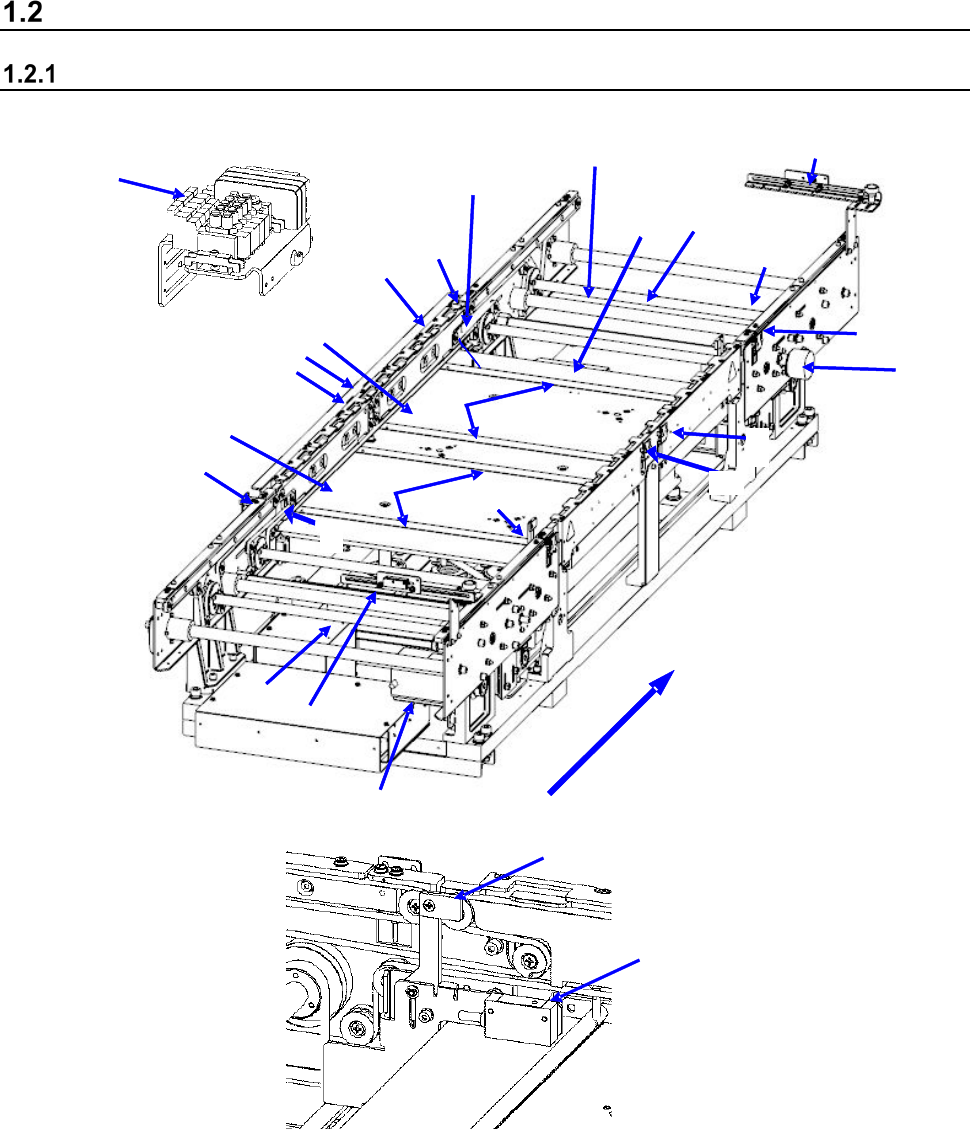
Configuration of the board transfer section
・ Configuration of the board transfer section (for a single-lane conveyor)
2
1
15
11
3
4
8
10
11
12
10
13
14
17
16
18
11
7
5
9
12
6
21
20
22
23
Board transfer direction
1 IN sensor
9 Board transport electromagnetic
valve
17 Support pin detection sensor light receiving
section
2 OUTsensor
10 Conveyor motor
18 Stopper sensor
3 WAIT sensor fiber light receiving section
11 Drive shaft
19 Stopper
4 WAIT sensor fiber light emitting section
12 Side beam
20 (WAIT2 sensor fiber light receiving section)
5 C-OUT sensor fiber light receiving section
13 Support table IN
21 (WAIT2 sensor fiber light emitting section)
6 C-OUT sensor fiber light emitting section
14 Support table OUT
22 (WAIT2 sensor fiber light receiving section)
7 PWB guide
15 Automatic width adjustment motor
23 (WAIT2 sensor fiber light emitting section)
8 Support table origin sensor
16 Support pin detection sensor light
emitting section
18
19