RS-1_instruction manual.pdf - 第938页
Part 2 D etaile d Descript ion of E ach Functi on Chapter 12 Handling th e Optional Device s 12 - 54 12.11 Offset Placeme n t After S older Sc reen - Printing 12.11.1 Functional Overview There are t wo coordinate sy stem…
Part 2 Detailed Description of Each Function Chapter 12 Handling the Optional Devices
12-53
12.10 Light for Recognizing Solder
If there is not any BOC mark on a board or a circuit, the system can make the printed solder light
on to integrate it with a pad and recognize it as a BOC mark.
This function is to be used, for example, to place a component in an area in which a BOC mark
cannot be detected when a long-sized board is clamped twice.
If a soldered position is shifted from a pad largely, this function may not be able to be used.
If the “solder” shape is similar with that of a normal mark, which does not require any user template,
you can register it in the mark database and use it.
* Since the shape of printed solder is not clear as a mark, the component placement accuracy
may not become sufficient.
12.10.1 Teaching with using the light for recognizing solder
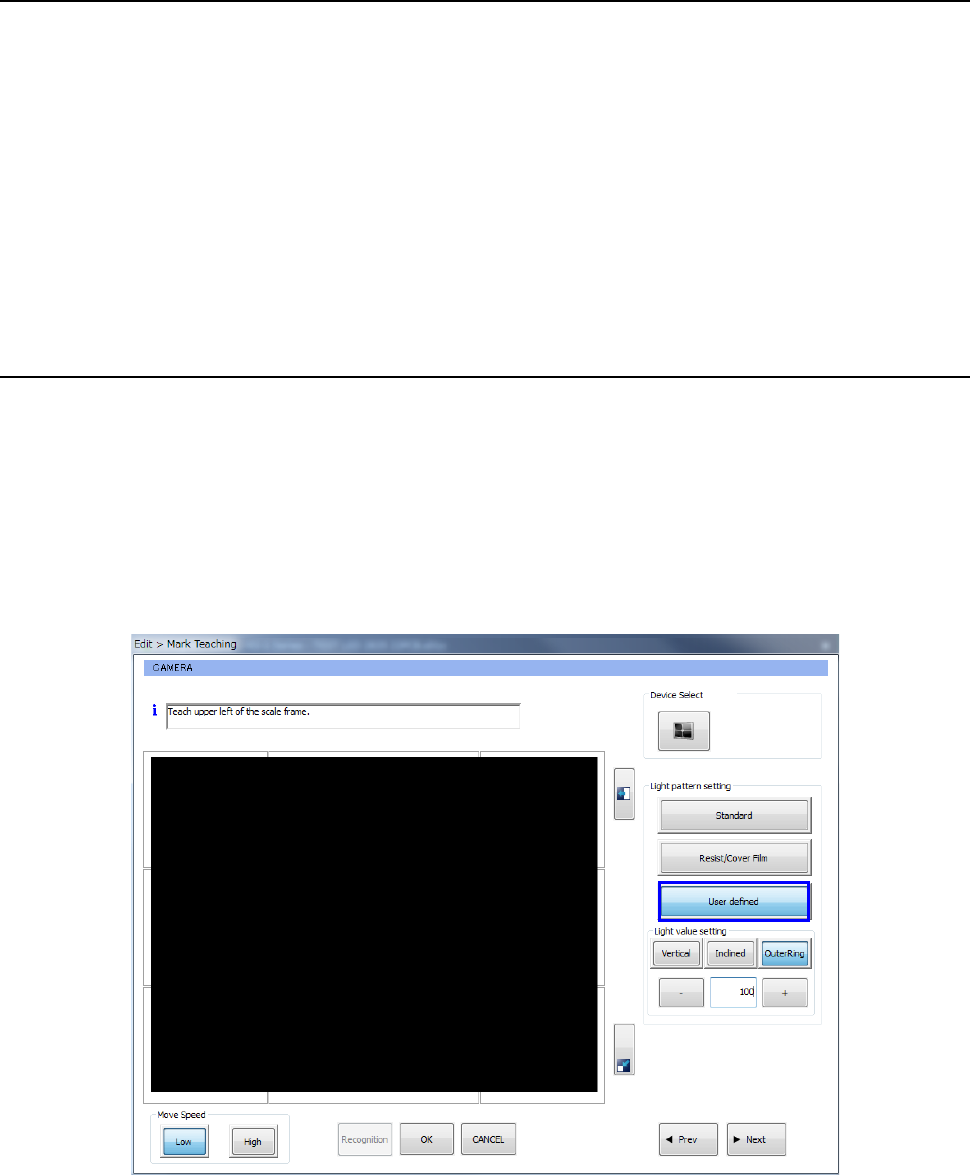
To improve the contrast between printed solder and a board, adjust each of the “Light value setting”
parameters: <Vertical>, <Inclined> and <OuterRing>.
<Procedure>
① Move the cursor to the mark position to be taught.
② Make the “Light pattern setting” before specifying the top left hand corner of the measurement
frame.
Select the <User defined> button and the <OuterRing> button, and then set the light value.
③ The procedure you shall follow after Step 2 above is the same as the normal procedure.
Part 2 Detailed Description of Each Function Chapter 12 Handling the Optional Devices
12-54
12.11 Offset Placement After Solder Screen-Printing
12.11.1 Functional Overview
There are two coordinate systems. One recognizes the BOC mark (pad) and the other recognizes
the solder. You can place components using either coordinate system on the basis of placing point.
When printing misalignment has occurred due to expansion/contraction of the PWB, the accuracy of
placing position after reflow can be improved by placing chip components, etc. on the solder and
using the self-alignment effect.
12.11.2 Specifications
12.11.2.1 Object to be recognized
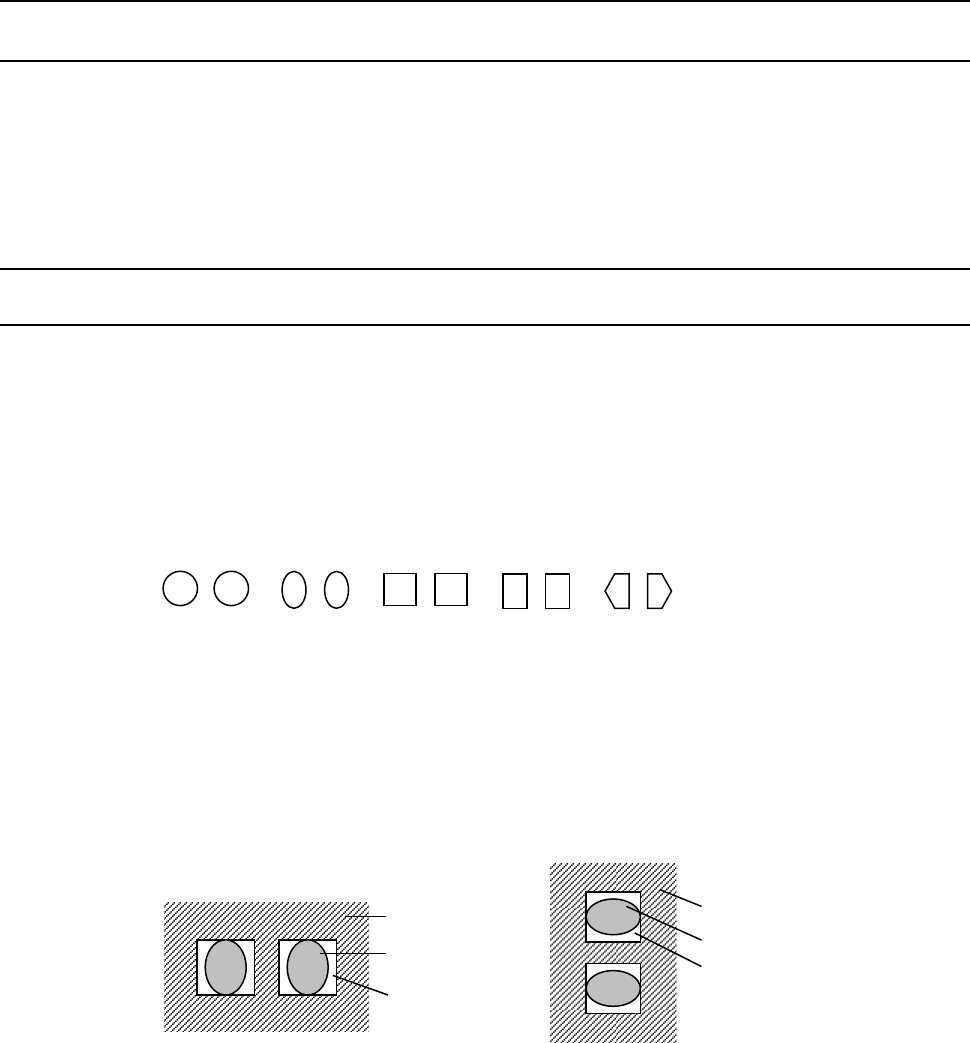
① Applicable solder shape
A pair of cream solders, which are symmetrical, screen-printed on a PWB pad for a square
chip
* The shape of screen-printed solder should be symmetrical. The system cannot
accurately detect how much to correct the gap unless the shape is symmetrical.
The applicable shapes should be: circle, oval, square, rectangle and pentagon.
(* Recognition of other shapes should be checked.)
② Applicable chip size
0402, 0603, 1005, 1608, 2012, 3216
* Note that image of a set of solder whose shorter side is 0.16 mm or more and whose
longer side is 3.2 mm or less has to be obtained.
* Printing shall by stably conducted.
➂ Applicable solder angle
0°, 90°, 180°, 270° (Angle error for a camera: within ± 3°)
<Solder angle 0°,180°> <Solder angle 90°,270°>
④ Applicable board material and pad material
− Board material: glass epoxy, paper phenol, flexography, ceramic
− Pad material: gold, copper, hot air leveling
* The solder paste should have a certain level of contrast. If there is a portion whose
brightness is the same as that of solder in the area to be detected due to the condition
of the printed solder, serigraph, a pattern or PWB, and so any image that only solder
looks bright cannot be obtained, the system may not be able to correct the component
placement position by recognizing it. In such a case, you have to set the position of
solder paste again so that it can have the certain level of contrast.
PWB
Solder
Pad
PWB
Solder
Pad
Part 2 Detailed Description of Each Function Chapter 12 Handling the Optional Devices
12-55
12.11.2.2 What to check
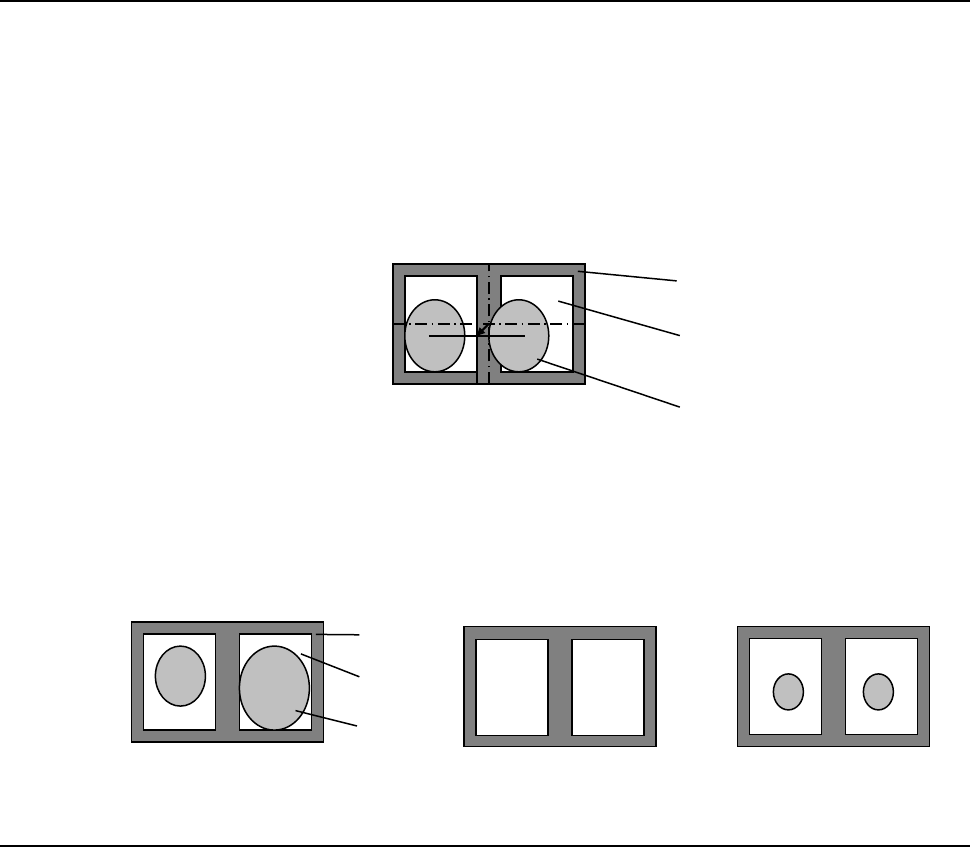
This option detects the gravity of the screen-printed solders (at two positions) and corrects the
difference from the programmed component placement coordinates to place a component.
The option checks the “position error” of the screen-printed solder and “its condition.”
① Checking the position error
If screen-printed solder misalignment detected when the system recognizes solder exceeds
the threshold value set in advance, the system detects an error. The system also calculates
the default solder detection area by referring to the misalignment check value.
② Checking the condition
If the area ratio of a pair of solder printed areas exceeds the threshold set in advance when
the system recognizes solder, the system detects an error. Set the threshold value in
percent as the allowable difference of the areas based on the larger solder area. If there is
no solder printed or if the outer size of the solder is different from the taught size by
approximately 30% or more, a recognition error occurs.
12.11.2.3 Others
− A BOC mark should be always used to use this Offset Placement After Solder Screen-Printing
option.
− To set a solder recognition mark with an external device, it is recommended to name the mark
ID such as a [S001] so that it can be distinguished from a normal fiducial mark easily. You
have to check a solder mark to be registered in advance.
− If any adhesive is applied to a mark, you cannot use this Offset Placement After Solder
Screen-Printing option.
PWB
Pad
Solder
PWB
Pad
Solder