RS-1_instruction manual.pdf - 第605页
Part 1 B asic O peration Chapter 4 Cr eating a Produc tion Progra m 4- 270 ③ Inclination teachin g T eaching to correct t he i nc lination of t he component is execute d. a) Pattern movem ent (for div i sion reco gnition…
Part 1 Basic Operation Chapter 4 Creating a Production Program
4-269
(3) Operating method for each teaching processing
① Component measurement
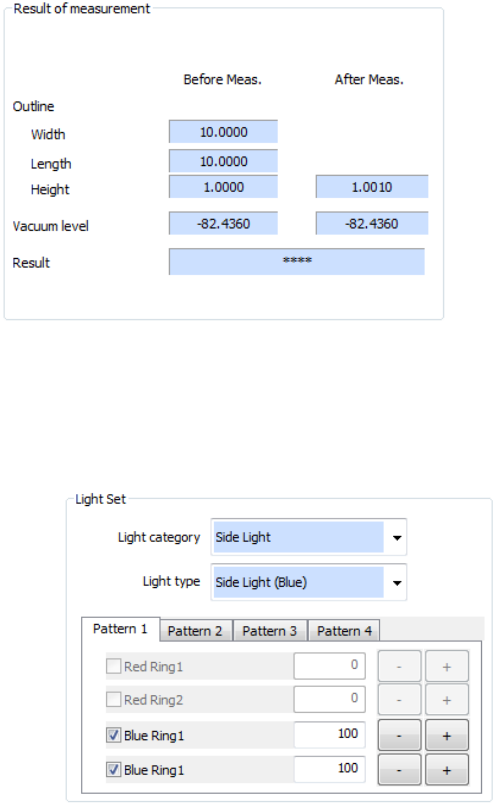
When you select "Component height" or "Pick vacuum pressure" in the measurement items
on the setting dialog box, component measurement is executed. When you press the
<Next> button in the "Start" status, component measurement is performed. After
completion of the measurement, values are displayed in the “After Meas.” field of the “Result
of measurement” column.
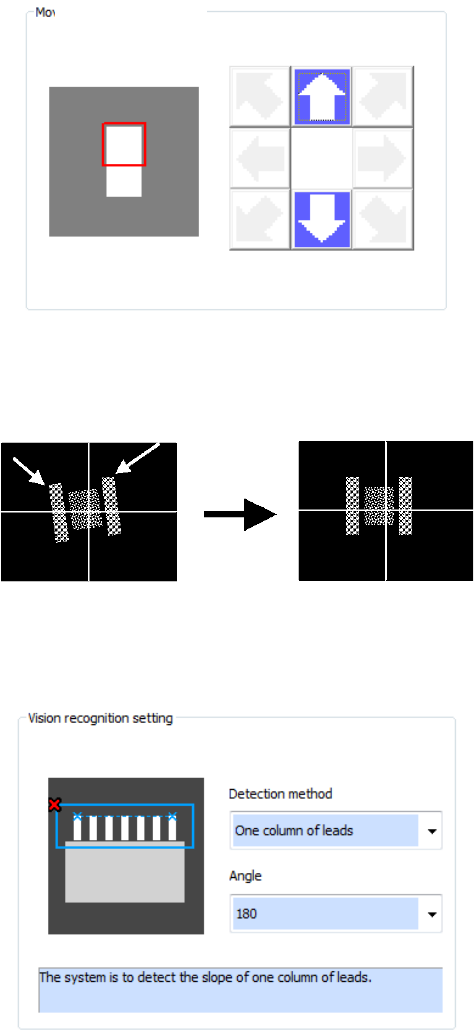
② Light Set
Set the VCS lighting type to be used for component measurement and adjust the brightness.
After component measurement is performed or when component measurement is not
performed, it is executed after a start. Adjust the brightness so that the pole, lead, and
outline of a component can be recognized.
a) Select the VCS light type in the “Light category” list box and the “Light type” list box.
b) Specify whether to use each light unit or not and its brightness (20 to 200).
c) The values of Pattern 1 to Pattern 4 can be saved. Select a pattern to be used by the
corresponding tab.
d) After completion of lighting setting, press the <Next> button to proceed to inclination
teaching.
Part 1 Basic Operation Chapter 4 Creating a Production Program
4-270
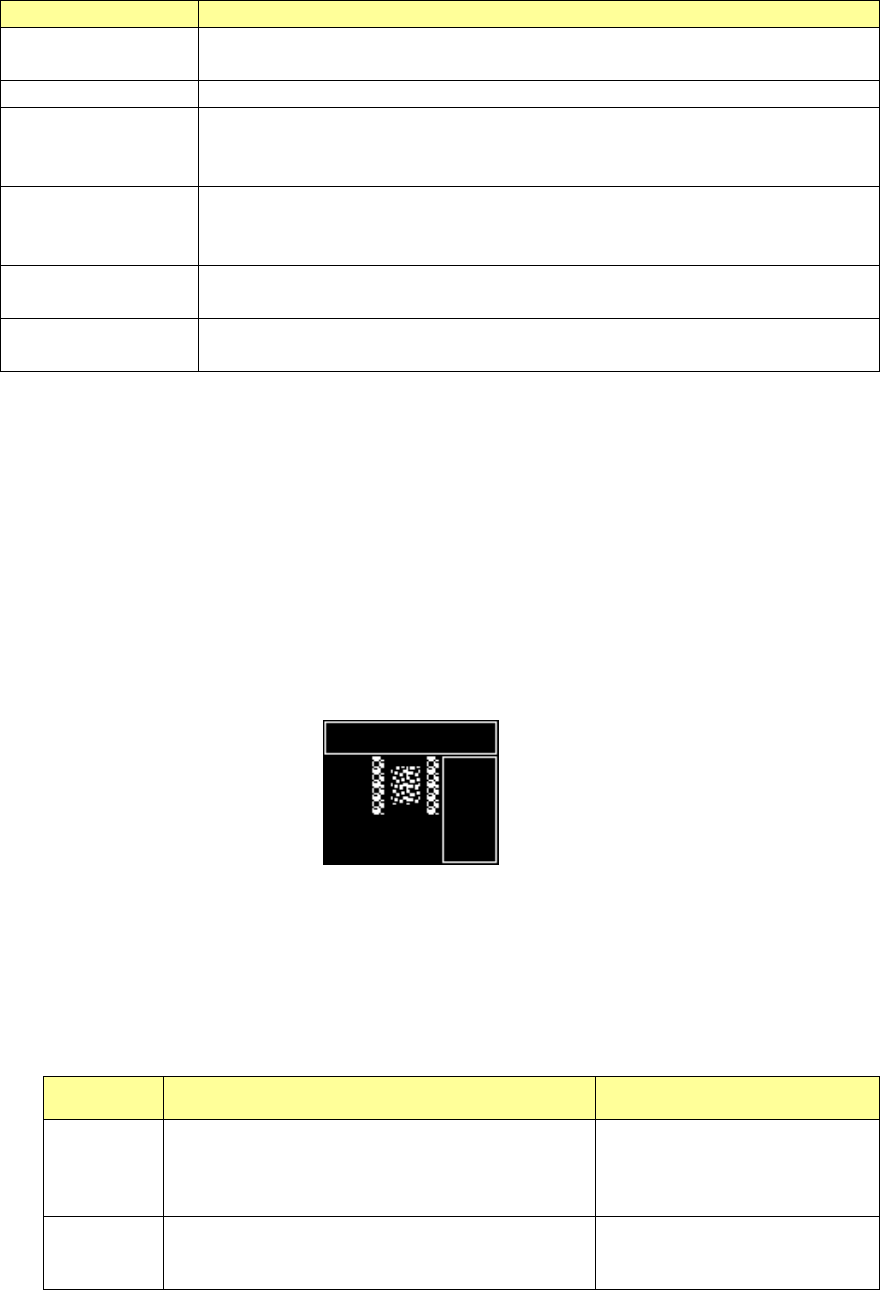
③ Inclination teaching
Teaching to correct the inclination of the component is executed.
a) Pattern movement (for division recognition)
The pattern is moved to the pattern position where a component portion to be used for
inclination correction is displayed. Unless division recognition is not performed, pattern
movement is not required because the whole component can be displayed.
b) Specifying the upper left/upper right pole position (for pole/land setting)
The upper left and upper right poles of the component are detected and the inclination of the
2 poles is corrected.
c) Vision recognition setting (for lead/outline setting)
Auto detection of a component portion is performed and the inclination is corrected. At this
time, set the detecting method and detecting angle.
Pattern movement
Part 1 Basic Operation Chapter 4 Creating a Production Program
4-271
Detecting method
Explanation
1 side
The inclination of a component side is automatically detected and
corrected.
1 lead column
The inclination of a lead column is automatically detected and corrected.
2 lead columns
The mid-point of 2 lead columns is automatically detected and the
inclination is corrected so that the straight line connecting 2 points may be
parallel.
2 leads
The end coordinates of 2 leads are automatically detected and the
inclination is corrected so that the straight line connecting 2 points may be
parallel.
2 corners
Two corners are automatically detected and the inclination is corrected so
that the straight line connecting 2 corners may be parallel.
Optional 2 points
The inclination is corrected so that the optional 2 points specified by user
may be parallel.
d) Division vision photographing (for division recognition)
At division recognition, the divided visions are photographed after the component inclination
is corrected. After that, the photographed visions are composed into a single vision, and
then this vision is displayed in a superimposed form.
④ Exclusion area setting (BGA component)
In case there is bright portion other than electrodes, specify an exclusion area. To specify
this exclusion area, press the <Add> button.
The window frame corresponding to the component outline is displayed on the VCS monitor.
Then, specify the exclusion area (bright portion other than electrodes). Press the <End
Teaching> button to finish the exclusion area specification. The number of exclusion areas
may be zero.
⑤ Component center teaching (general-purpose vision component)
a) For pole/land setting
Specify the center of the component by shifting the cursor. Specify the center of a
component by vision recognition or manually.
The specifying method for the center of a component depends on a combination of
component center setting (vision recognition or manual) and cursor type (cross or window).
Image recognition Manual
Cross
Specify the upper left and upper right poles of a
component and obtain the center of each pole.
Specify the mid-point between center positions of
these poles as the center of the component.
Specify the center of a
component directly.
Window Obtain the center of a component from the pole
layout provided in the set window frame.
Specify the center of the set
window frame as the center of
the component.