RS-1_instruction manual.pdf - 第671页
Pa r t 2 D et ai l ed Des c r i pt i o n of Ea c h F unc t i o n Chapte r 6 G e neral - Purpose Vision Co mpone nt 6- 40 Outline r ec ognition c ompon en t grou p (Ele men t grou p/Elem ent for mat) 6.5.3 ♦ A n exam ple …
Part 2 Detailed Description of Each Function Chapter 6 General-Purpose Vision Component
6-39
the lower right corner, the “Element Data” screen reappears.
If you have another element group to be defined, click the <Add> button again to enter
data on the element group. In the example, there are four element groups. Define
four element groups.
When you finish defining all element groups, click the <OK> button at the lower left
corner to finish entering the vision data on a general-purpose vision complex array
component.
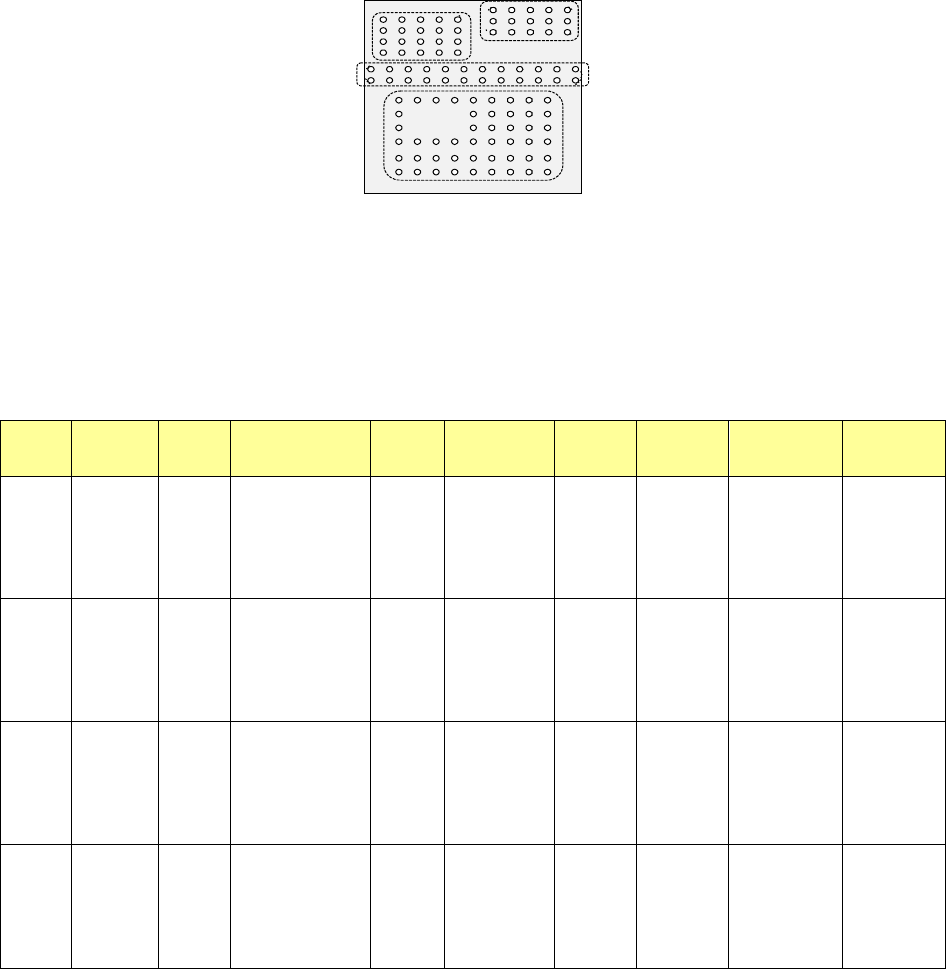
All of the entered data is shown below.
Element
Group
Name
First element
position
Layout
inspection
(Dimension)
Missing
Elements
Element
Element
Offset
Element size (Shape) Inspection
ELG0001 X: -6.0
Y: -5.0
Z: 0
θ: 0
Tolerance:
All set to “0”.
0% √ 2D
Count of Column: 9
Pitch: 1.5
Count of Row: 6
Pitch: 1.27
Tolerance: 0
Column
Start: 22
Count: 3
Row
Start: 4
Count: 2
Type: Ball
Reference pos.:
Center of element
Polarity: Bright
Offset: all
set to “0”.
Tolerance:
all set to “0”.
Element size
Width: 0.5
Length: 0.5
Tolerance: all
set to “0”.
(Since an element
is a ball, the
selection screen
does not appear
which allows you to
select a circular or
rectangular shape.)
Diameter: 50
Area: 50
Ball exist?: 30
Average
diameter: 0
ELG0002 X: -8.25
Y: 1.5
Z: 0
θ: 0
Tolerance:
All set to “0”.
0% √ 2D
Count of Column: 12
Pitch: 1.5
Count of Row: 2
Pitch: 1.0
Tolerance: 0
Type: Ball
Re
ference pos.:
Center of element
Po
larity: Bright
Offset: all
set to “0”.
Tolerance:
all set to “0”.
Element size
Width: 0.5
Length: 0.5
Tolerance: all
set to “0”.
(Since an element
is a ball, the
selection screen
does not appear
which allows you to
select a circular or
rectangular shape.)
Diameter: 50
Area: 50
Ball exist?: 30
Average
diameter: 0
ELG0003 X: -7.5
Y: 4.0
Z: 0
θ: 0
Tolerance:
All set to “0”.
0% √ 2D
Count of Column: 5
Pitch: 1.5
Count of Row: 4
Pitch: 1.0
Tolerance: 0
Type: Ball
Re
ference pos.:
Center of element
Po
larity: Bright
Offset: all
set to “0”.
Tolerance:
all set to “0”.
Element size
Width: 0.5
Length: 0.5
Tolerance: all
set to “0”.
(Since an element
is a ball, the
selection screen
does not appear
which allows you to
select a circular or
rectangular shape.)
Diameter: 50
Area: 50
Ball exist?: 30
Average
diameter: 0
ELG0004 X: 1.5
Y: 5.5
Z: 0
θ: 0
Tolerance:
All set to “0”.
0% √ 2D
Count of Column: 5
Pitch: 1.5
Count of Row: 3
Pitch: 0.8
Tolerance: 0
Type: Ball
Re
ference pos.:
Center of element
Po
larity: Bright
Offset: all
set to “0”.
Tolerance:
all set to “0”.
Element size
Width: 0.5
Length: 0.5
Tolerance: all
set to “0”.
(Since an element
is a ball, the
selection screen
does not appear
which allows you to
select a circular or
rectangular shape.)
Diameter: 50
Area: 50
Ball exist?: 30
Average
diameter: 0
Bottom View
Third element group
(X, Y): (-7.5, 4.0) mm
Pitch of Column: 1.5 mm, Count: 5
Pitch of Row: 1.0 mm, Count: 4
Missing Elements: none
Ball diameter: 0.5 mm
Inspection: Area 50 %
Diameter 50 %
Ball exist? 30 %
Forth element
(X, Y): (1.5, 5.5) mm
Pitch of Column: 1.5 mm, Count: 5
Pitch of Row: 0.8 mm, Count: 3
Missing Elements: none
Ball diameter: 0.5 mm
Inspection: Area 50 %
Diameter 50 %
Ball exist? 30 %
Second element
(X, Y): (-8.25, 1.5) mm
Pitch of Column: 1.5 mm, Count: 12
Pitch of Row: 1.0 mm, Count: 2
Missing Elements: none
Ball diameter: 0.5 mm
Inspection: Area 50 %
Diameter 50 %
Ball exist? 30 %
First element
(X, Y): (-6.0, -5.0) mm
Pitch of Column: 1.5 mm, Count: 9
Pitch of Row: 1.27 mm, Count: 6
Missing Elements:
Start 2 Count 3
Start 4 Count 2
Ball diameter: 0.5 mm
Inspection: Area 50 %
Diameter 50 %
Ball exist? 30 %
Part 2 Detailed Description of Each Function Chapter 6 General-Purpose Vision Component
6-40
Outline recognition component group (Element group/Element format) 6.5.3
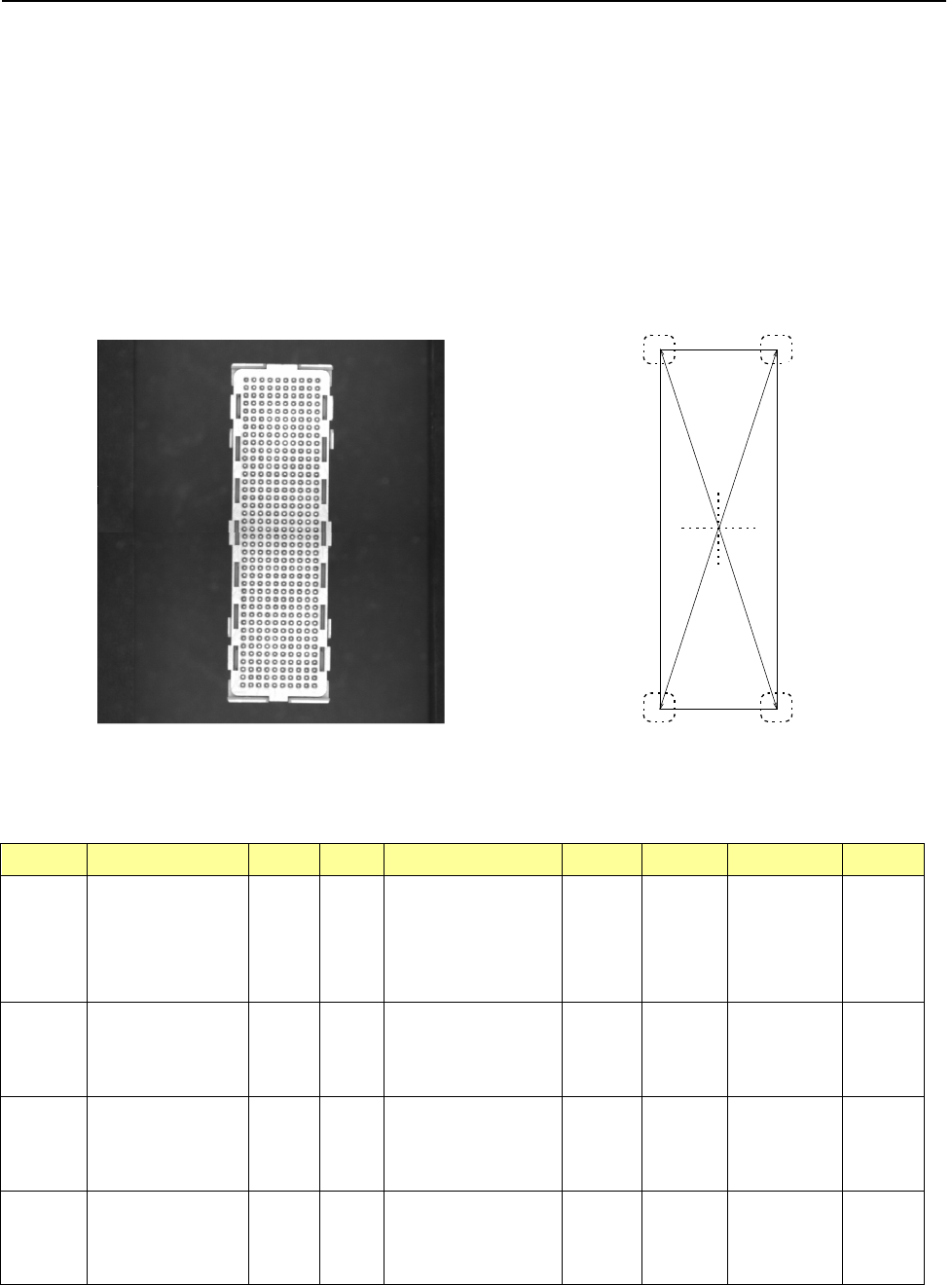
♦ An example for entering data on an outline recognition component is shown below.
1. "Element Data" screen
• Select “Outline component” in the “Component Type” field.
• Select check box “Element group/Element format” in the “Define data format” column.
• Click the <Add> button on the “Element Group List.”
2. Component example 1
• Component appearance and element group positions
<Image of a component displayed on the
component monitor: Bottom view>
<Top view>
Summary of the input data
Element
Group Name
First element position (Layout)
Missing
Elements
Element
Element
Offset
Element
dimensions
(Corner) Remarks
ELG0001 X: -8.25
Y: -27.6
Z: 0
θ: 0
Tolerance:
all values are set to “0.”
Point Type: Corner
Reference pos.: Bottom left
Polarity: Bright
Offset: all
values are
set to “0.”
Tolerance:
all values are
set to “0.”
Radius: 0.5 Light data:
standard
settings of the
reflectance
light
Vertical
two-Split
recognition
ELG0002
X: 8.25
Y: -27.6
Z: 0
θ: 90
Tolerance:
all values are set to “0.”
Point
Type: Corner
Reference pos.: Bottom left
Polarity: Bright
Offset: all
values are
set to “0.”
Tolerance:
all values are
set to “0.”
Radius: 0.5
ELG0003 X: 8.25
Y: -27.6
Z: 0
θ: 90
Tolerance:
all values are set to “0.”
Point Type: Corner
Reference pos.: Bottom left
Polarity: Bright
Offset: all
values are
set to “0.”
Tolerance:
all values are
set to “0.”
Radius: 0.5
ELG0004
X: -8.25
Y: -27.6
Z: 0
θ: 0
Tolerance:
all values are set to “0.”
Point
Type: Corner
Reference pos.: Bottom left
Polarity: Bright
Offset: all
values are
set to “0.”
Tolerance:
all values are
set to “0.”
Radius: 0.5
第 1 エレメントグループ
第 2 エレメントグループ
第
3
エレメントグループ
第 4 エレメントグループ
Fourth element group
Second element group
First element group
Third element group
Part 2 Detailed Description of Each Function Chapter 6 General-Purpose Vision Component
6-41
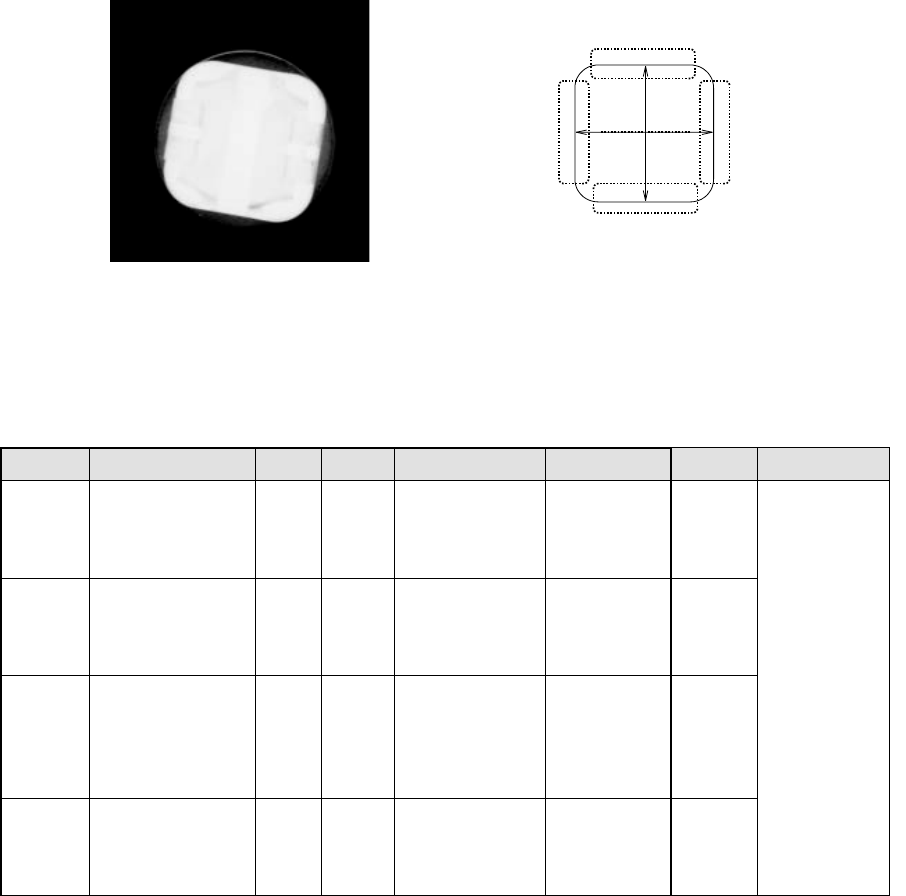
3. Component example 2
Component appearance and element group positions
<Image of a component displayed on the
component monitor: Bottom view>
<Top view>
Summary of the input data
Element
Group Name
First element position (Layout)
Missing
Elements
Element Element Offset
Element
dimensions
Inspection
ELG0001 X: 0
Y: -6
Z: 0
θ: 0
Tolerance: all values are
set to “0.”
Point Type: Side
Reference pos.: Bottom
Center
Polarity: Bright
Offset: all values
are set to “0.”
Tolerance: all
values are set to “0.”
Light data:
Transmittance light
ELG0001 X: 6
Y: 0
Z: 0
θ: 90
Tolerance: all values are
set to “0.”
Point Type: Side
Reference pos.: Bottom
Center
Polarity: Bright
Offset: all values
are set to “0.”
Tolerance: all
values are set to “0.”
ELG0001 X: 0
Y: 6
Z: 0
θ: 180
Tolerance: all values are
set to “0.”
Point Type: Side
Reference pos.: Bottom
Center
Polarity: Bright
Offset: all values
are set to “0.”
Tolerance: all
values are set to “0.”
ELG0001
X: -6
Y: 0
Z: 0
θ: 270
Tolerance: all values are
set to “0.”
Point
Type: Side
Reference pos.: Bottom
Center
Polarity: Bright
Offset: all values
are set to “0.”
Tolerance: all
values are set to “0.”
Fourth element group
Second element group
Third element group
First element group