RS-1_instruction manual.pdf - 第206页
Part 1 B asic O peration Chapter 2 Pr oduction 2- 95 PWB conveyor When you se lect the <P WB conveyor > butt on, the state of each sens or is displ ayed on the scr een. Adjust the boar d transport operat ion whi le…
Part 1 Basic Operation Chapter 2 Production
2-94
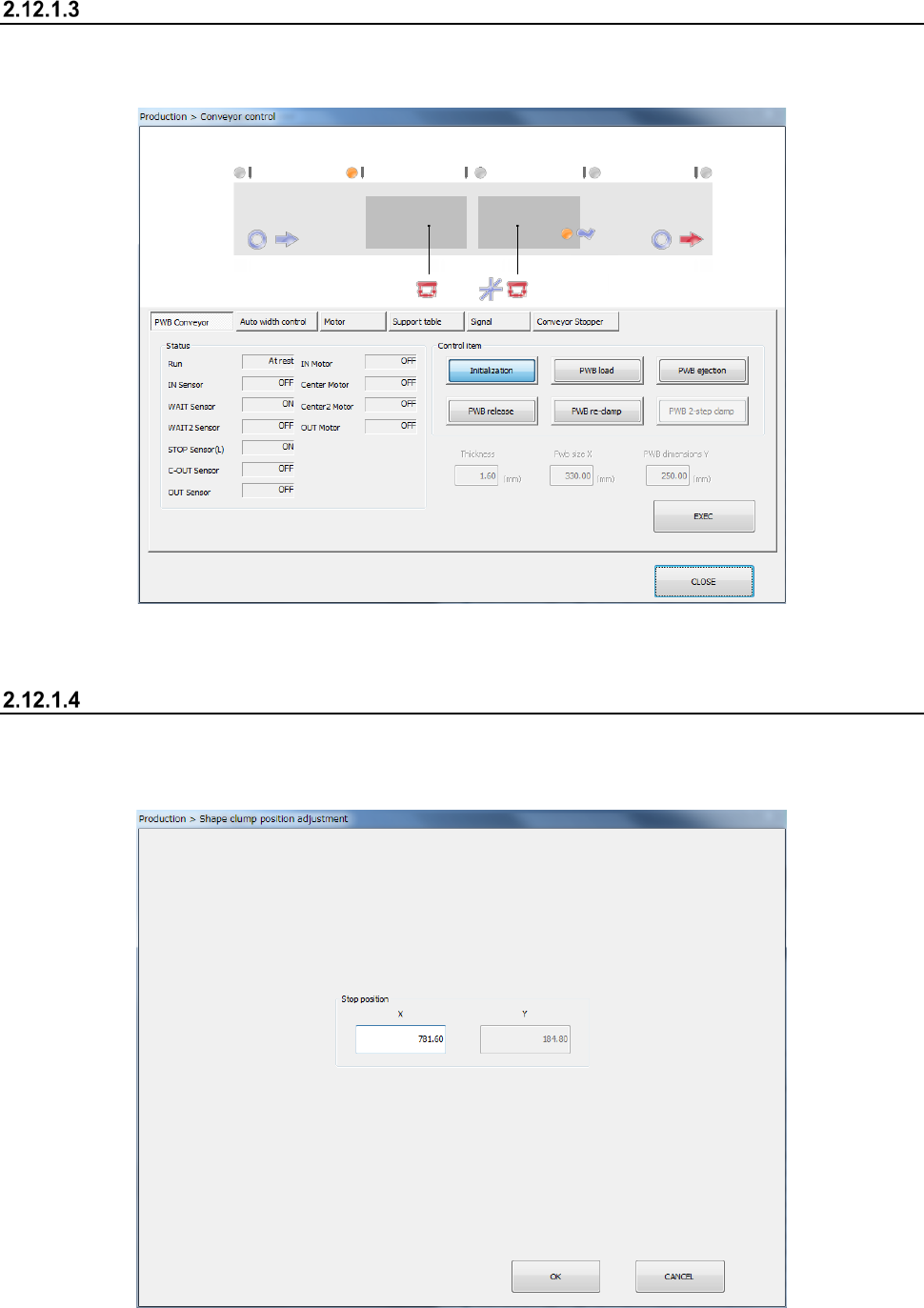
Conveyor Control
When you press the < Conveyor Control> button, the system displays the condition of the conveyor
path. Operate the conveyor and control the motor and the support table.
See the descriptions of Section 9.4.1 “PWB conveyor” of Chapter 9 “Manual Control.”
Shape clamp position adjustment
Adjust the shape clamp reference position.
- Shape clamp position adjustment
Part 1 Basic Operation Chapter 2 Production
2-95
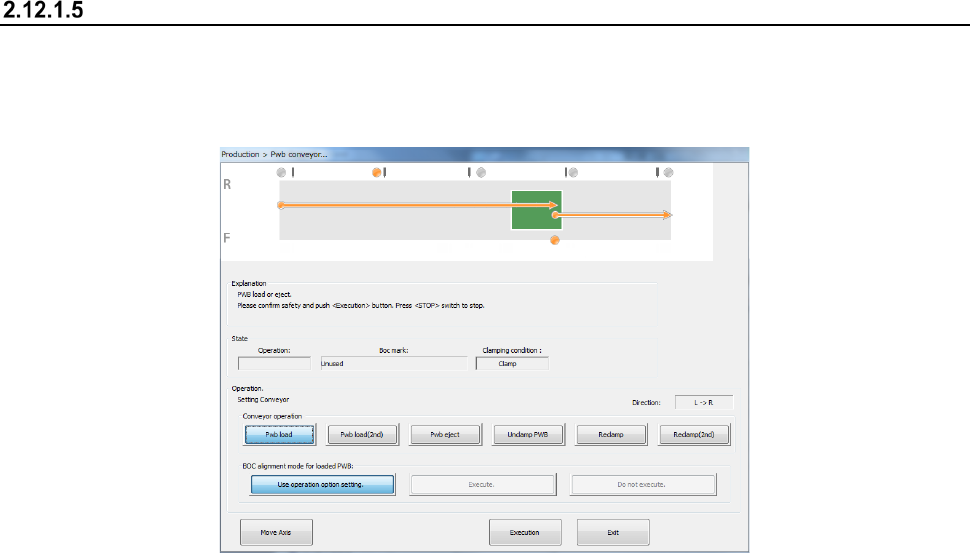
PWB conveyor
When you select the <PWB conveyor> button, the state of each sensor is displayed on the screen.
Adjust the board transport operation while loading a board, ejecting a board, releasing a fixed board,
controlling each part independently and automatically adjusting the board transport width of the
conveyor.
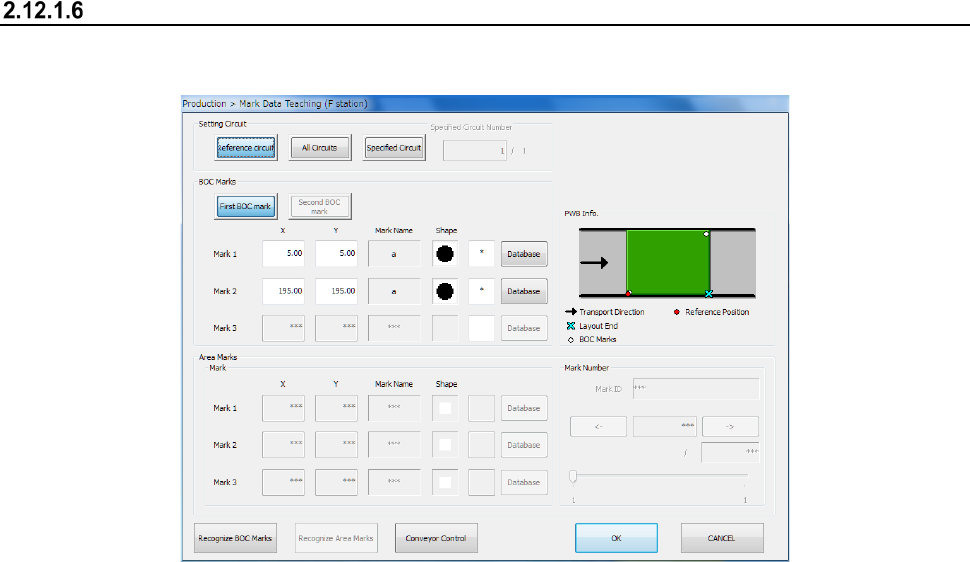
(1) Operation
① Conveyor operation
You can select a board transport operation with selecting one of the following buttons:
<Pwb load>, <Pwb eject>, <Unclamp PWB> <Reclamp>and <Reclamp(2nd)>.
When the machine starts up, the <Pwb load> button is selected.
② Board transport operation graphics
The board transporting condition varying depending on the specified board transport
operation and the station being operated is shown as the graphics.
③ BOC alignment mode for loaded PWB
Select whether to perform BOC alignment operation immediately after a board is loaded to
the machine.
<Use operation option setting>: The system determines whether to recognize a BOC mark
or not according to the setting of the corresponding operation option.
<Execute> : The machine always recognizes a BOC mark.
<Do not execute> : The machine does not recognize any BOC mark.
④ State
This menu item displays information obtained during board transportation.
The board transport direction, the BOC mark information and the clamping condition are
displayed here.
⑤ Move Axis
This button moves the axis to the waiting position.
⑥ Execution
When you press this button, the system executes the operation corresponding to each of the
buttons: <Pwb load>, <Pwb eject>, <Unclamp PWB> and <Reclamp>.
⑦ Exit
This button quits the “Pwb conveyor” screen.
To transport a board, press the <START> switch (or the <Execution> button).
To finish the operation, press the <Exit> button.
To abort the operation for some reason while a board is being transported, press the
<STOP> switch.
Part 1 Basic Operation Chapter 2 Production
2-96
(2) Transport path operation state
① When the <Pwb load> button is selected
A board is loaded to the buffer that clamps it, and then clamped.
The clamping position varies depending on the Setup setting or the external size of a
board.
If any board is already located at the clamping position, a new board is loaded after
the board at the clamping position is ejected.
② When the <Pwb load (2nd)> button is selected
A board is clamped for the second time.
Make the clamp using the HMS.
③ When the <Pwb eject> button is selected
A board is ejected from the clamping position.
④ When the <Unclamp PWB> button is selected
If any board is clamped, it is released.
⑤ When the <Reclamp> button is selected
If a board is located at the clamping position, the machine clamps it again.
⑥ When the <Reclamp (2 steps)> button is selected
When the board is in the clamping position, perform reclamping operation using HMS
and clamp the board.
Mark Data Teaching
When you select this button, the system displays the BOC marks and area marks of the specified
station to allow you check them.
(1) Operation
① Setting Circuit
Set a circuit on which the system recognizes a BOC mark or an area mark.
For the reference circuit only, you can select whether the system is to recognize
marks on all circuits or the specified circuit only.
② BOC Marks
You can instruct the system to teach each BOC mark position.
To teach the mark actually, use the <Teaching> button of the function bar.