RS-1_instruction manual.pdf - 第1009页
Part 2 D etaile d Descript ion of E ach Functi on Chapter 12 Handling th e Optional Device s 12 - 125 12.16.9 Production 12.16.9.1 Production operation When you se lect [Devic e enable] – [Head], and t hen enable t he “M…
Part 2 Detailed Description of Each Function Chapter 12 Handling the Optional Devices
12-124
12.16.8 Program Editor
12.16.8.1 Component data
When you select [Device enable] – [Head], and then enable the “Manual nozzle” check box, a
nozzle to be attached manually is selected by default in Component data.
12.16.8.2 Measurement/inspection
Be sure to attach a nozzle on a head manually in advance before starting a single or continuous
inspection or a speed check.
12.16.8.3 Teaching
Before starting a teaching operation that uses a head, attach a nozzle on the head manually in
advance.
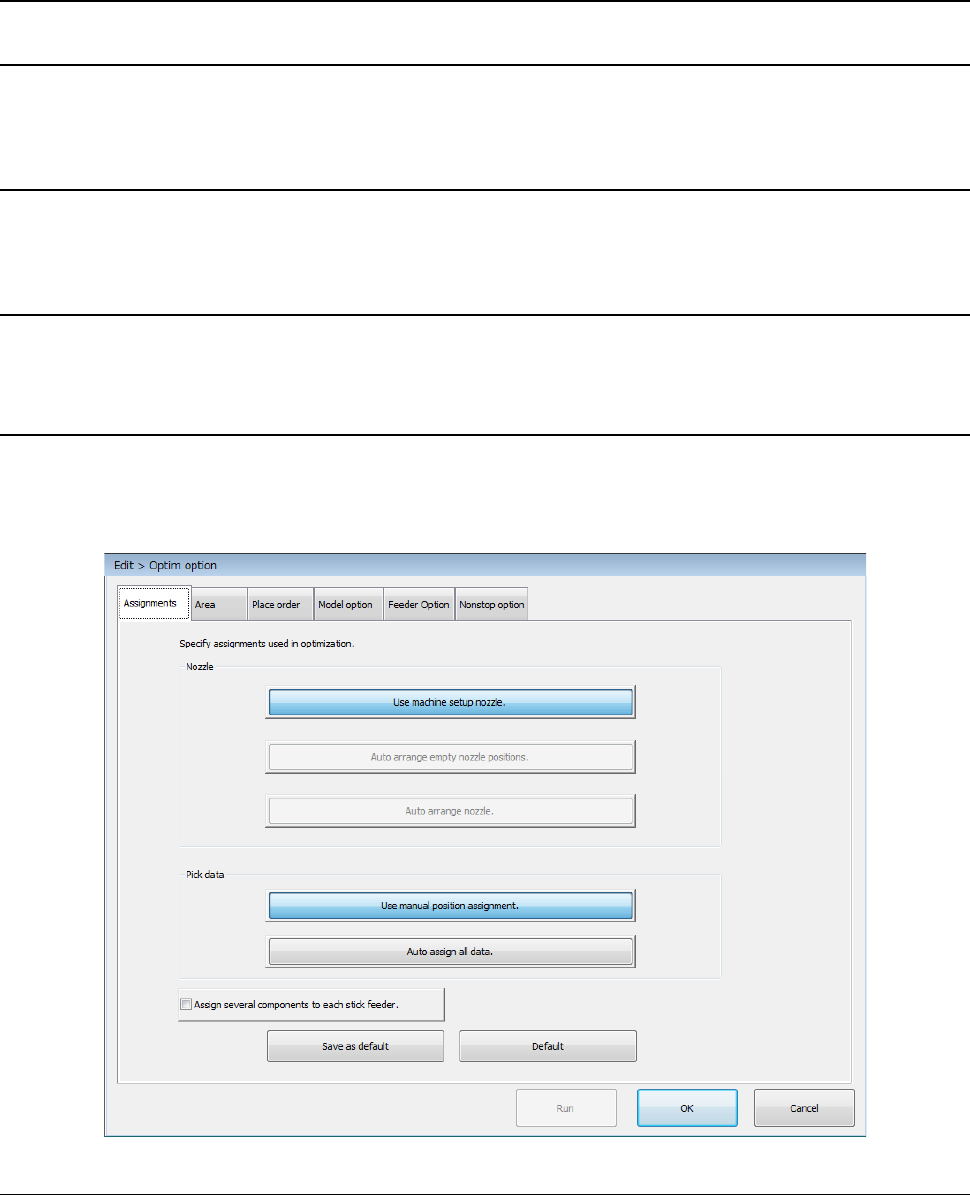
12.16.8.4 Optimization option
When you select [Device enable] – [Head], and then enable the “Manual nozzle” check box, you can
select only the <Use machine setup nozzle.> button of the menu item “Nozzle” on the “Assignments”
tab invoked from the “Operation option” screen. You cannot set the Optimization function to assign
nozzles automatically.
12.16.8.5 Nozzle layout
When you select [Device enable] – [Head], and then enable the “Manual nozzle” check box, the
system does not display any nozzle layout on the screen.
Part 2 Detailed Description of Each Function Chapter 12 Handling the Optional Devices
12-125
12.16.9 Production
12.16.9.1 Production operation
When you select [Device enable] – [Head], and then enable the “Manual nozzle” check box, the
system cannot produce any PWB with a production program that uses a nozzle other than the nozzle
to be attached manually.
Before starting production, assign nozzles on the “Machine Setup” screen.
12.16.9.2 Support
12.16.9.2.1 Plan support
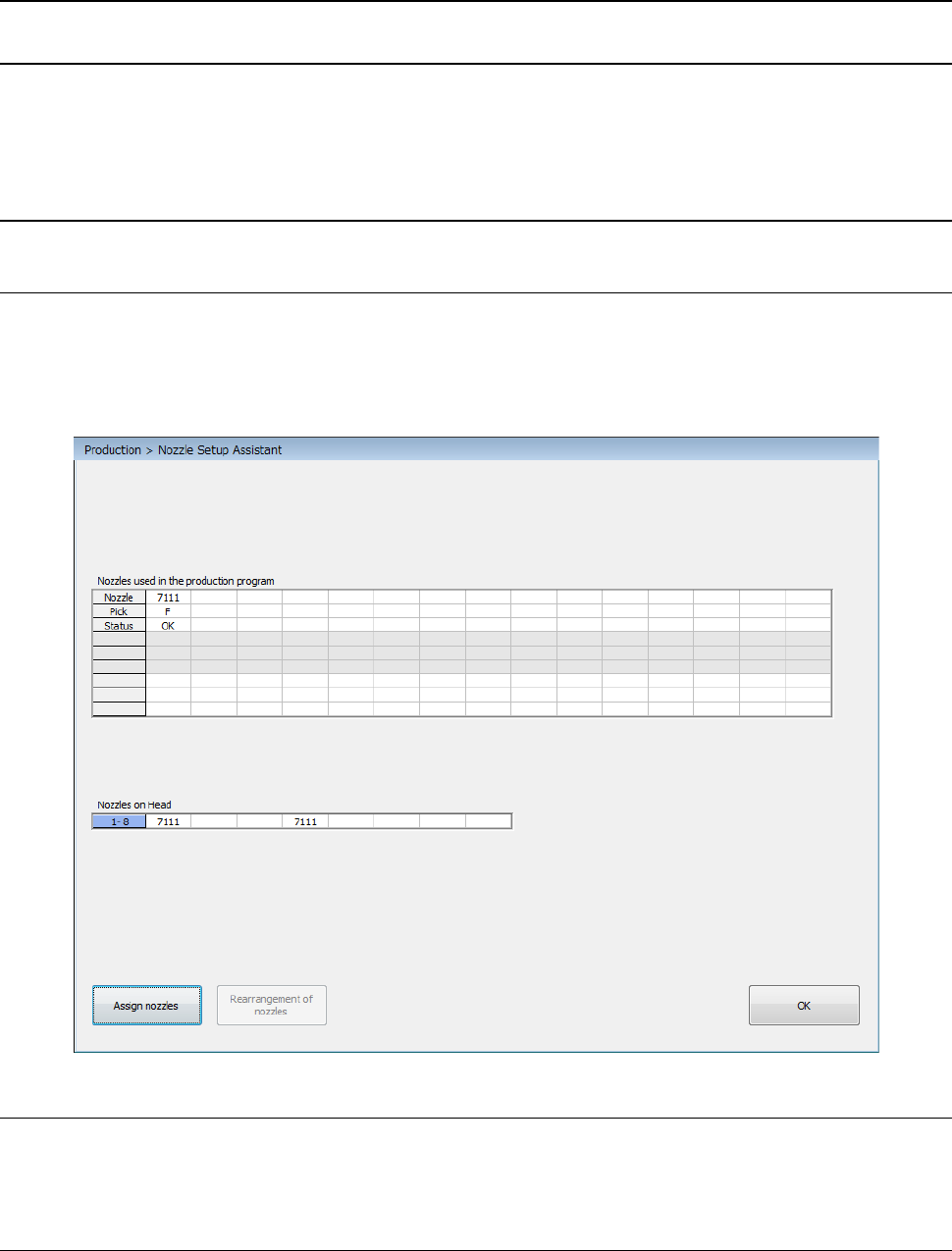
When you select [Device enable] – [Head], and then enable the “Manual nozzle” check box, the
“Nozzle Setup Assistant” screen is displayed as shown below. This screen shows the nozzle
layout specified with a production program and the actual nozzle assignment for heads. If there is
any difference, it is displayed in red.
12.16.9.2.2 General-purpose vision component direction check
Before starting a general-purpose vision component direction check, manually attach a nozzle on a
head.
12.16.9.2.3 Laser height check
Before starting a laser height check, manually attach a nozzle on a head.
Part 2 Detailed Description of Each Function Chapter 12 Handling the Optional Devices
12-126
12.17 Individual Nozzle Management System (RFID)
12.17.1 Overview of the function
By recognizing an RFID tag bonded on the side of a nozzle with the antenna when the machine
allocates a nozzle, the machine obtains the RFID (individual management ID) of the nozzle and
associates it with the nozzle operation information to manage nozzles individually.
The purpose of this function is collecting and accumulating nozzle operation information of nozzles
having RFIDs such as the total number of picked components, the total number of components
placed on boards and the number of component pick-up errors continuously to summarize the
information with the production assistance system (JaNets) or the production management system
(IFS-NX).
12.17.2 Device configuration
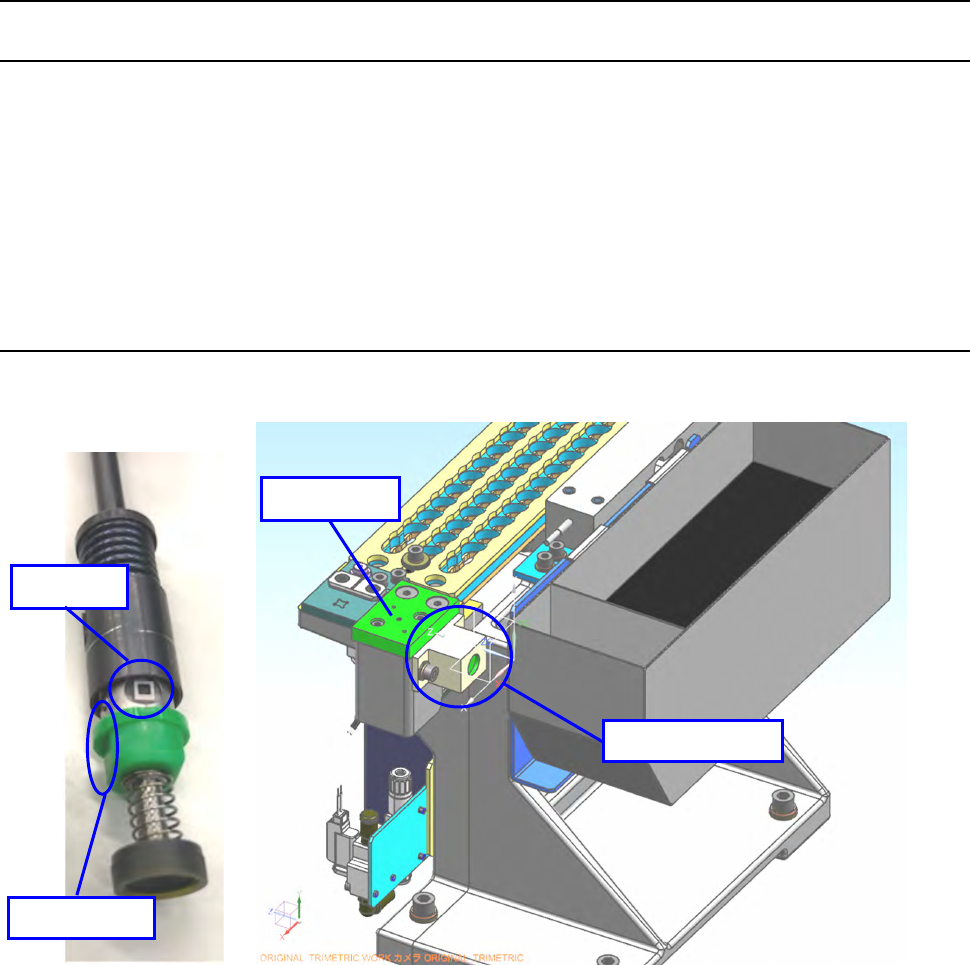
Read the RFID tag pasted on the nozzle with the antenna attached on the side of the CAL block.
* The communication radio wave specification of a nozzle RFID reader (optional) varies depending
on its destination.
Never use it in any area other than the regulated one because such use of the reader violates the
radio wave law.
Nozzle RFID readers for an RS-1R are designed for the following destinations.
- 40214759 NOZZLE RFID READER_ASM_Japan (for Japan)
- 40218744 NOZZLE RFID READER_ASM_China (for China)
- 40218745 NOZZLE RFID READER_ASM_USA (for the U.S.A.)
- 40218746 NOZZLE RFID READER_ASM_Europe (for the EU)
* The factory shipment option is not set for the nozzle RFID reader (optional). All options are
assembled at the installation.
* When the nozzle is set on ATC, the tag of standard nozzle can face both of right and left sides,
RFID tag
D-cut side
RFID antenna
CAL block