RS-1_instruction manual.pdf - 第289页
Part 1 B asic O peration Chapter 2 Pr oduction 2- 178 Production oper ation When production starts (1) When the main stacker i s enabled, component s are pul l out from the m ain sta cker . (2) When the main stacker i s …
Part 1 Basic Operation Chapter 2 Production
2-177
2.18 Non-stop Operation Function of an MTC (TR-6D), an MTS (TR-5D)
and a DTS
Changing the machine operation mode
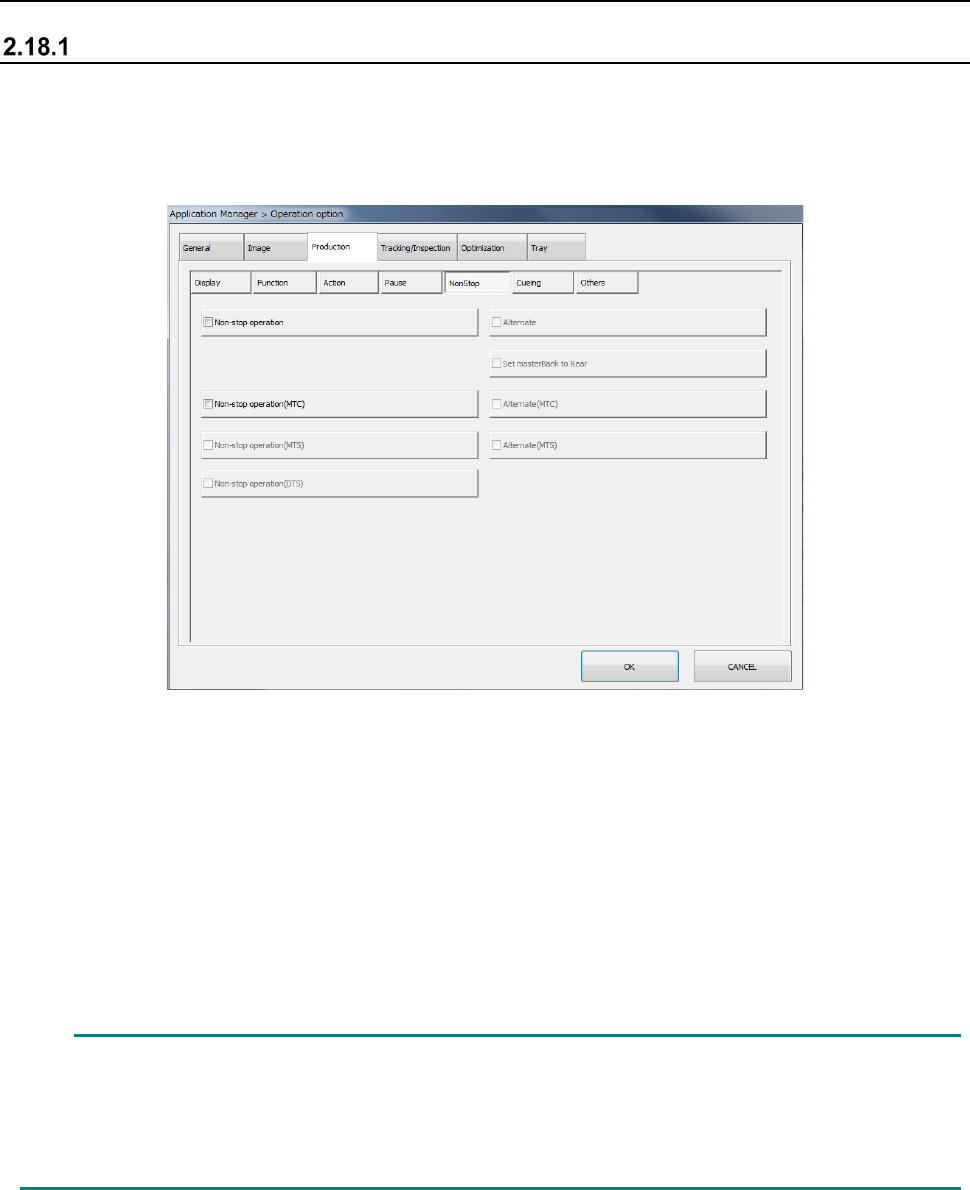
To switch the operation mode, display the “NonStop” tab of the “Production” tab invoked from the
“Operation option” screen.
When you check off the “Non-stop operation (MTC)” check box, the “Non-stop operation (MTS)”
check box and/or the “Non-stop operation (DTS)” check box on the “NonStop” tab of the “Production”
tab, the MTC, MTS and/or DTS is (are) put in “Non-stop operation mode.”
In Non-stop operation mode, priority is given to pick-up of components from the main stacker.
Even while a component is being picked up from the sub stacker, the next component is picked up
from the main stacker when the main stacker is refilled with components.
When you check off the “Alternate (MTC)” check box and/or the “Alternate (MTS)” check box, the
MTC and/or the MTS is (are) put in “Alternate production mode.” In Alternate production mode, the
stackers are switched alternately if components run out on either of the stackers during PWB
production for using the MTC or the MTS in Non-stop operation mode (that is, even though the main
stacker is refilled with components, components continue to be picked up from the sub stacker until
components run out at the sub stacker).
When you make these settings on the main unit, the same settings are made at the MTC/MTS
automatically.
In the same manner as the main unit, the Non-stop operation function cannot be performed for
the MTC/MTS unless data for Non-stop operation is prepared with a production program (that is,
the same type of components are prepared at the main stacker and the sub stacker).
However, if data not for Non-stop operation is used in Non-stop operation mode, these devices
function normally although the Non-stop operation function is not performed.
Part 1 Basic Operation Chapter 2 Production
2-178
Production operation
When production starts
(1) When the main stacker is enabled, components are pull out from the main stacker.
(2) When the main stacker is disabled and the sub stacker is enabled, components are pulled out
from the sub stacker.
(3) When both the main stacker and the sub stacker are disabled, the machine displays the “Retry
List” screen, and it is put in the pause state.
When components run out
When components run out, the mini revolving lamp lights, and the lamp of the stacker switch that
indicates the condition of the stacker on the corresponding side goes off.
(1) Since the stacker is disabled, detach the stacker from the machine.
(2) Replace the tray on which components run out with another one, and then set the stacker on
the machine.
(3) Press the stacker switch to enable the stacker.
The revolving lamp indicating that components run out goes off.
Component discarding operation
Components of the MTC/MTS are not discarded, and they are to be returned to the tray from which
they are pulled out.
Even though the system aborts production without finishing it completely, components are returned
to the tray pulled out.
Note that components are not returned to a tray in the following cases:
(1) The IC collection belt is used for a component to be recognized with a VCS.
(2) Protection of a component to be recognized with a VCS is selected.
(3) The shuttle pad of the MTC is a mechanical chuck type (for components such as a BGA
component).
(4) An error that prevents a component from being collected has occurred.
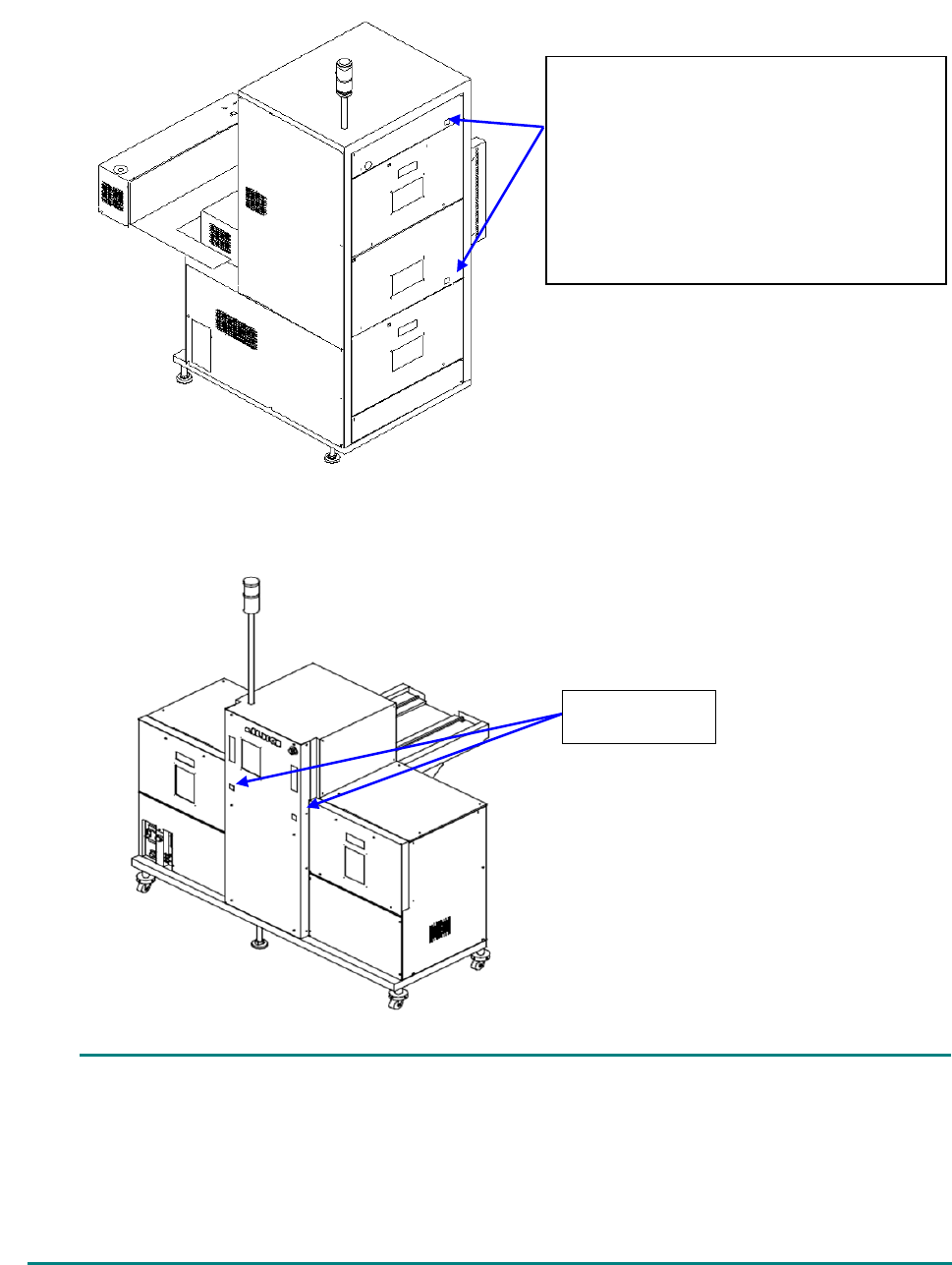
Stacker switch
This switch allows you to select whether components can be pulled out from the corresponding
stacker, the main stacker or the sub stacker.
If you press this switch when the lamp inside the switch does not light, the stacker is enabled.
(The lamp lights up due to this operation. However, if the stacker is not set on the machine
normally, the lamp does not light and the stacker is not enabled either.)
While the lamp is lighting, it indicates that components will be pulled out. When the lamp does not
light, components will not be pulled out.
(1) Every time you press this switch when the stacker is set on the machine normally, the lamp
lights/goes off repeatedly (that is, the stacker is enabled/disabled repeatedly).
If you press the switch during production to disable the stacker, the stacker cannot become
able to be refilled with components immediately. Unless the switch lamp geos off completely
(it flashes during operation), the stacker cannot be refilled with components, and the door lock
cannot be unlocked.
(2) Even though you press the switch when the stacker is not set on the machine normally, the
switch does not light.
(3) When you cause the machine to enter “JUKI standard mode” on the “Operation option” screen,
both of the lamps of the main and sub stackers go off by your pressing the switch on either of
the stackers, and the door interlocks of both stackers are unlocked.
Part 1 Basic Operation Chapter 2 Production
2-179
(1) MTC TR-6D
(2) MTS TR-5D
When you press this switch to disable the stacker, the lamp may not go off immediately in some
cases.
While the MTC/MTS is operating: a component is being picked up or the shuttle is being pulled
out, the switch flashes, and when the MTC/MTS finishes operating, the lamp goes off.
In such a case, the interlock keeps functioning until the lamp goes off, and the door cannot be
opened.
Confirm that the lamp goes off, and then open the door to replenish the device with components.
Stacker switch
When the switch lights: the corresponding
stacker is enabled.
When the switch does not light: the
corresponding stacker is disabled.
While the stacker is set on the machine
normally, the lamp inside the switch lights and
goes off (the corresponding stacker is enabled
and disabled) repeatedly.
Stacker switch