RS-1_instruction manual.pdf - 第267页
Part 1 B asic O peration Chapter 2 Pr oduction 2- 156 (3) Operation option “ Perf orm GNRL. V i sion d irection in spection when rest arting after component run out.” When the oper ation opt ion “Perf orm GNRL. V i sion …
Part 1 Basic Operation Chapter 2 Production
2-155
Restart mode
When the system restarts PWB production after an error occurs, its operation varies depending on
the setting of the Operation options.
If you do not check any of the following operation options, press the <START> switch and follow
your setting of the “Restart mode” to restart the production.
(1) Operation option “Run pick tracking when restarting after component run out”
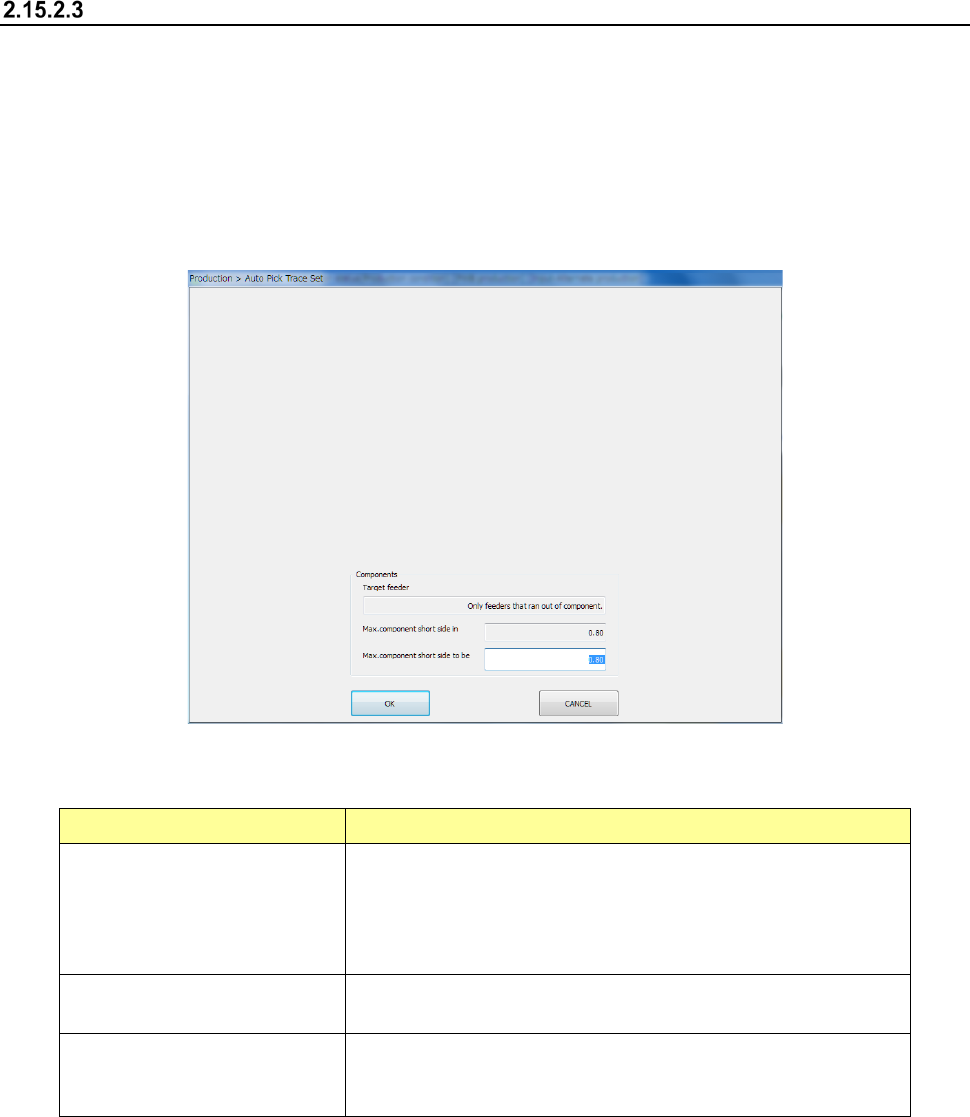
When the check box “Run pick tracking when restarting after component run out” of the
Operation option is checked, the system displays the “Auto Pick Trace Set” screen on the
screen before restarting the production.
1) Components
The system displays and allows you to specify a component whose pick-up position is to be
tracked automatically.
Menu item Description
Max. component short side to be
Enter the new maximum value of the shorter side length of a
component whose pick-up position is to be tracked automatically.
When the actual length of the component shorter side is longer than
this value, the system does not track its pick-up position
automatically.
Max. component short side in
Displays the maximum value of the shorter side length of a
component whose pick-up position is to be tracked automatically.
Target feeder
Displays the type of a feeder whose component pick-up position is to
be tracked automatically. This item is set on the “Operation option”
screen.
2) <START>/<STOP> switch
When you press the <START> switch of the operation panel, the system starts tracking a
component pick-up position.
When you press the <STOP> button, the system quits the “Auto Pick Trace Set” screen
without tracking a component pick-up position.
(2) Operation option “Measure component height when restarting after component run out.”
When the check box “Measure component height when restarting after component run out.” of
the Operation option is checked, the system measures the height of a chip or Melf component
that runs out before restarting the suspended production.
Part 1 Basic Operation Chapter 2 Production
2-156
(3) Operation option “Perform GNRL. Vision direction inspection when restarting after component
run out.”
When the operation option “Perform GNRL. Vision direction inspection when restarting after
component run out.” is checked off, the system resumes the suspended production only after
inspecting the direction of a general-purpose vision component that has run out.
- To check off the operation option “Perform GNRL. Vision direction inspection when
restarting after component run out.,” remove the check mark from the operation option
“Check GNRL. Vision direction after pick tracking.”
(4) Operation option “Perform component verification when restarting after component run out.”
When the operation option “Perform component verification when restarting after component
run out.” is checked off, the system resumes the suspended production only after performing
verification for a chip or an MELF component that has run out.
- To check off the operation option “Perform component verification when restarting after
component run out.,” remove the check mark from the operation option “Perform component
verification after pick tracking.”
If the operation option “Perform component verification when restarting after component
run out.” or “Perform GNRL. Vision direction inspection when restarting after component
run out.” is checked off also when the operation option “Measure component height when
restarting after component run out.” is checked off, the system performs “verification of a
chip or an MELF component” or “inspection of the direction of a general-purpose vision
component” after measuring all components whose height is set to be measured. The
system does not perform these operations, that is, measurement of the height and
verification of a chip or MELF component or inspection of a general-purpose vision
component direction, alternately.
The system performs neither “verification of a chip or an MELF component” nor “inspection
of the direction of a general-purpose vision component” if it fails to measure the height of
such a component.
Tracking when components are run out
If you press the <Tracking> button displayed on the function bar when the “Pause” screen is
displayed, you can put the system into Component Pick-up Position Tracking mode.
The system can track a component pick-up position of all feeders that supply components that
caused a retry over or run out. However, the system cannot track a pick-up position of any feeders
that are set not to be used.
Part 1 Basic Operation Chapter 2 Production
2-157
If a mark recognition error occurs
Overview of the error
If a mark recognition error occurs while the system is recognizing a BOC mark or an area mark, the
system stops the current production temporarily and displays the following dialog box.
- When you press the <START> switch, the system restarts the suspended production.
- When you press the <STOP> switch, the system proceeds to the production interruption
operation.
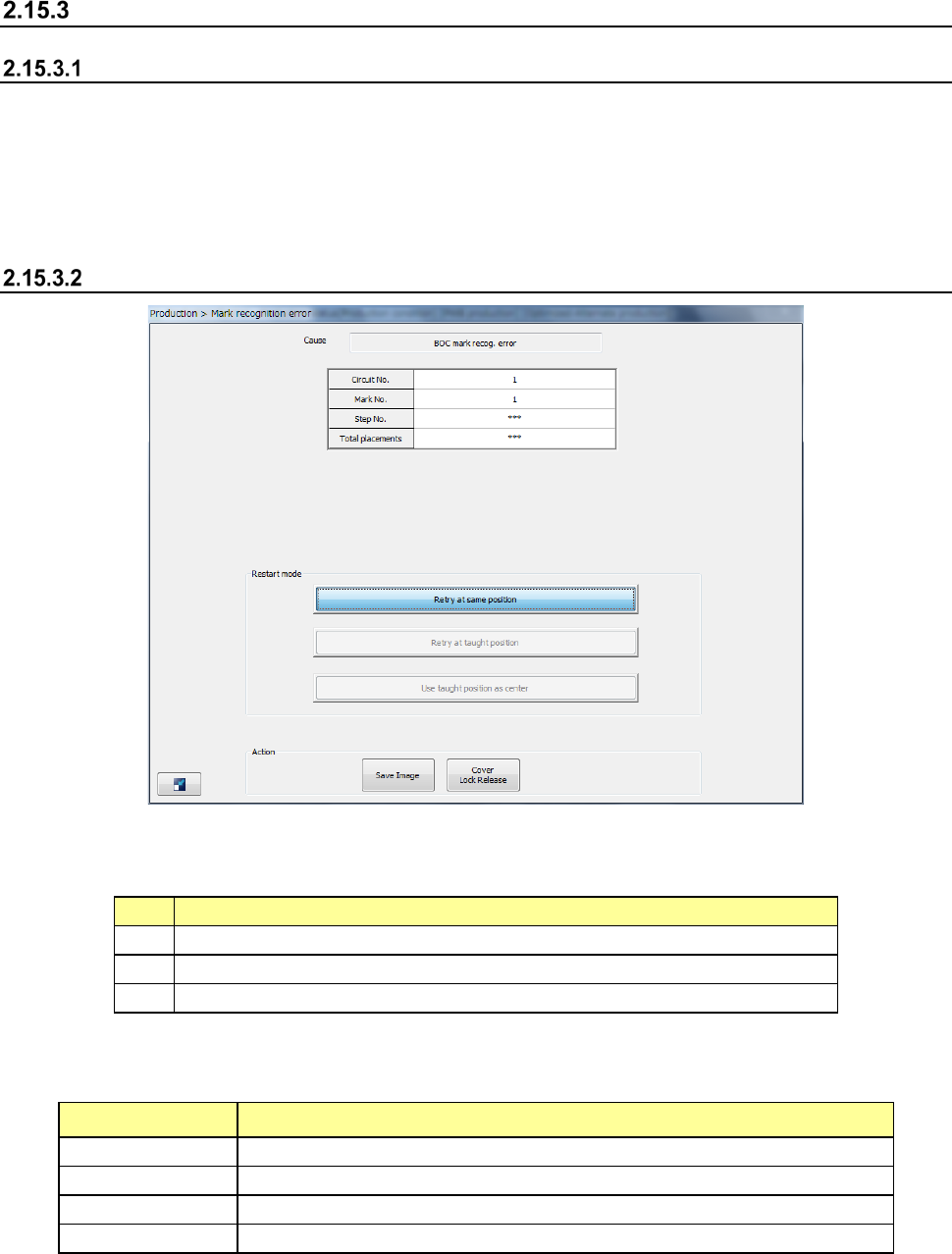
Displayed screen
(1) Cause
This field shows the cause of pauses
No.
Cause
1
BOC mark recog. (recognition) error
2
Area mark recog. error
3
Bank mark recog. error
(2) Production information
The production information obtained when an error occurred is shown here.
Menu item Description
Circuit No.
Displays the circuit number of a component that caused an error.
Mark No.
Displays the mark number of a component that caused an error.
Step No.
Displays the step number of a component that caused an error.
Total placements
Displays the total number component placement operations.