RS-1_instruction manual.pdf - 第772页
Part 2 D etaile d Descript ion of E ach Functi on Chapter 8 Machine Set up 8- 64 8.4.7 Unit 2 Controls the M TS tray . W hen yo u sel ec t “ Speed ” of “ T ray Control ” a nd then press the < Extract> button, t he …
Part 2 Detailed Description of Each Function Chapter 8 Machine Setup
8-63
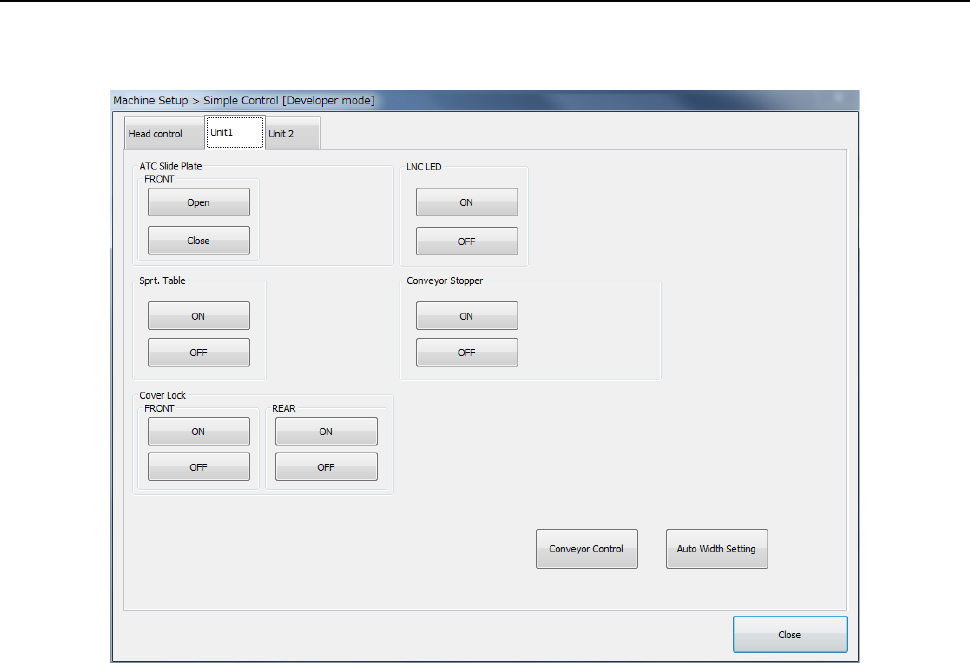
8.4.6 Unit 1
The “Unit 1” tab allows you to control the ATC slide plate, the support table, the cover lock, the
LNC LED, the conveyor stopper, the conveyor and/or the AWC.
(1) ATC slide plate
You can exert slide plate “OPEN/CLOSE” control of each ATC.
(2) Support table
You can exert “UP/DOWN” control of the support table.
(3) Cover lock
You can perform “Cover lock ON/OFF” of the front/rear.
(4) LNC LED
You can set the LNC LED to “ON” or “OF F.”
(5) Conveyor Stopper
You can set the conveyor stopper to “ON” or “OF F.”
(6) Conveyor control
When you press the <Auto Width Setting> button, the PWB wide adjustment screen appears.
When you select <Conveyor Control> button, the PWB conveyor main screen appears.
Part 2 Detailed Description of Each Function Chapter 8 Machine Setup
8-64
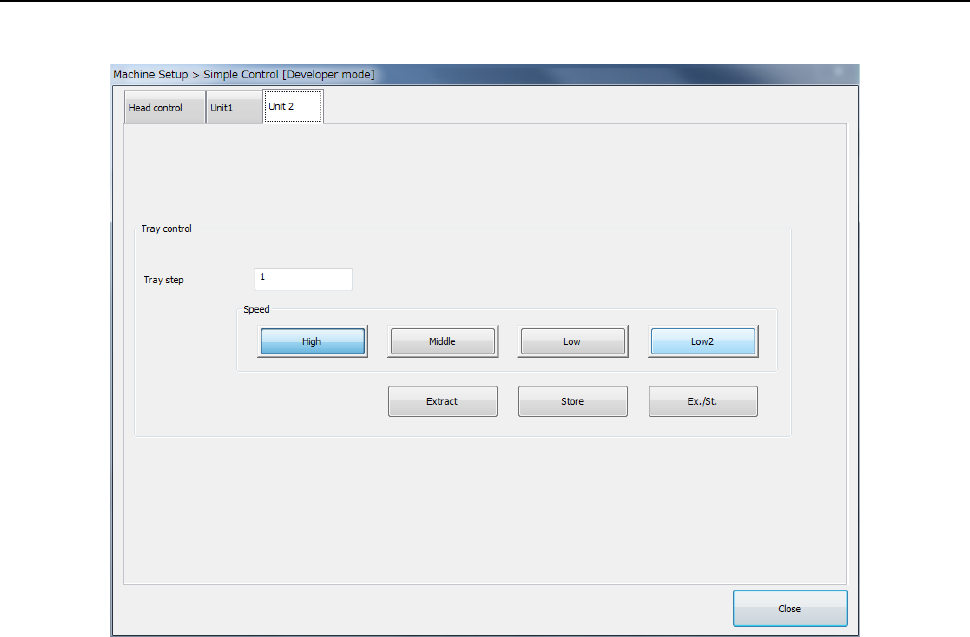
8.4.7 Unit 2
Controls the MTS tray.
When you select “Speed” of “Tray Control” and then press the <Extract> button, the tray can be
extracted at the selected speed.
(1) Tray step
Designates the tray step controlled.
(2) Speed
Designates the speed of tray extraction.
(3) Extraction
Executes tray extraction.
Part 2 Detailed Description of Each Function Chapter 9 Manual Control
9-1
Chapter 9 Manual Control
9.1 Overview
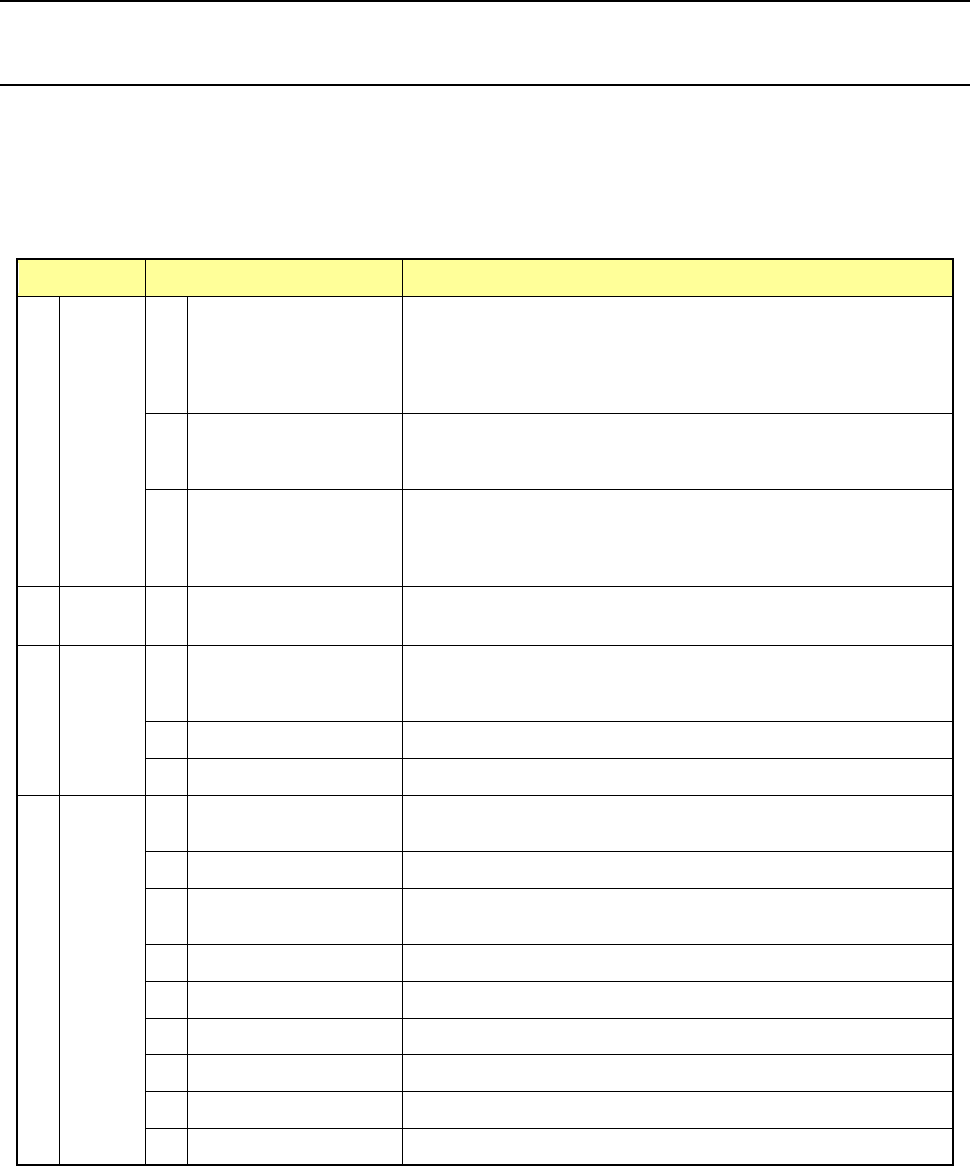
The Manual control utility provides you with the items for checking various types of operations and
for checking the ON/OFF status of each sensor.
The functions such as changeover of a PWB (see Section 2.7.1 “Setting up a PWB”), moving of a
head and checking of laser are mainly used. In addition, you can check an LED that may
malfunction (with turning it on and off).
Main menu Sub menu Description
1 Head
1
Head control
XY axes movement control and display in X and Y coordinates
relative to each head.
Z, θ and ZA axes movement control and coordinate display of
each head Vacuum control, blow control, and pressure value
display of each head.
2 Head device control
XY axes movement control and display in X and Y coordinates of
each head device (OCC, bad mark sensor, HMS).
Control of each head device and display of sensor status
3 Laser/sensor control
Vacuum control of each head, vacuum ON.OFF display, Z-axis
movement control of each head, coordinate display, algorithm
changeover measurement, result display, image display edge
check, and edge check display
2 Conveyor
1 Conveyor control
Board conveyor, auto PWB width adjustment, conveyor motor
control, support table control, and signal status display
3 Feeder
1 Electric feeder control
Return-to-home, forward rotation (reverse rotation) one-pitch feed,
optional amount feed, forward rotation (reverse rotation) step
operation, profile setting, and cutter control
2 MTS control Tray control and status control
3 MTC control Tray control and status control
4 Others
1 ATC control
ATC slide plate control, sensor status display, and nozzle pick-up
control
2 Signal light control Signal light control, buzzer control, and status display
3 Other controls
LED control, vacuum control, status control, and vacuum pump
control
4 Other sensors Status display of the air pressure drop sensor, etc.
5 Driver status Status display of the X/Y/Z theta axis driver status
6 Servo status Servo status display
7 Component verification Probe control, component measurement, and status display
8 Cutter control Cutter control
9 VCS control VCS control