RS-1_instruction manual.pdf - 第472页
Part 1 B asic O peration Chapter 4 Cr eating a Produc tion Progra m 4- 137 2) Calculating meth od for placement peak point Specify the ca l culat i ng met hod for the st arting point of feeder layout. a) Arrange a feeder…
Part 1 Basic Operation Chapter 4 Creating a Production Program
4-136
(5) Feeder Option
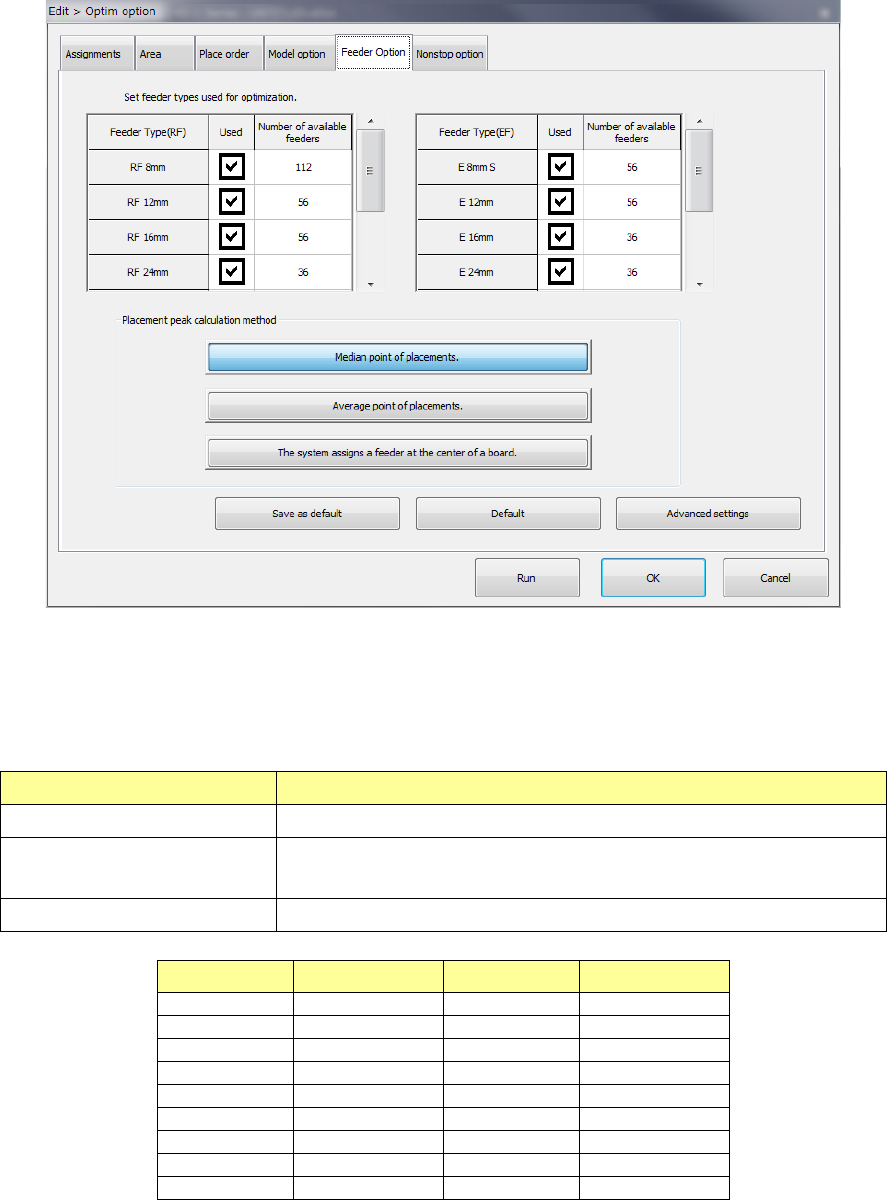
Set the calculating method for the feeder type to be used for optimization and feeder layout.
1) Feeder type setting
For an electric feeder that has two or more feeder types for the same tape width, set a
“feeder type used for optimization.” When you select two or more feeder types, the system
uses the optimal feeder among the selected feeder types to generate Pick data.
Item name Contents
Feeder Type (EF, RF) Shows the electric tape feeder type.
Used
Select whether the target feeder is used for optimization.
When checked on, the feeder is used for optimization.
Number of available feeders Set an upper limit to the number of target feeders used for optimization.
Feeder type Input range Feeder type Input range
RF 8 mm
1 - 112
E 8 mm S
1 - 56
RF 12 mm
1 - 56
E 12 mm
1 - 56
RF 16 mm
1 - 56
E 16 mm
1 - 36
RF 24 mm
1 - 36
E 24 mm
1 - 36
RF 32 mm
1 - 28
E 32 mm
1 - 28
RF 44 mm
1 - 22
E 44 mm
1 - 22
RF 56 mm
1 - 18
E 56 mm
1 - 18
RF 72 mm
1 - 12
-
-
RF 88 mm
1 - 10
-
-
If the number you set on the screen for setting the number of components exceeds the total
of the number set in the “Number of available feeders” for the electric tape feeder when you
press the <Run> button, the Optimization utility cannot be executed.
Part 1 Basic Operation Chapter 4 Creating a Production Program
4-137
2) Calculating method for placement peak point
Specify the calculating method for the starting point of feeder layout.
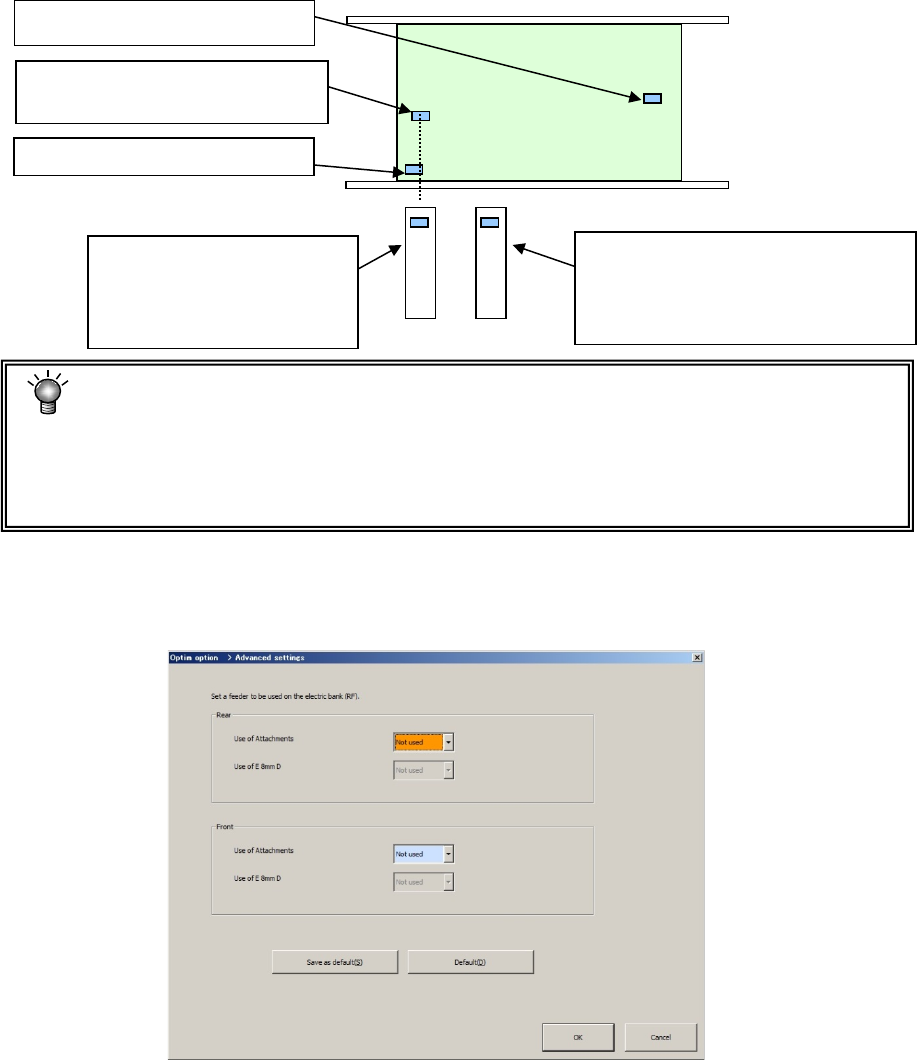
a) Arrange a feeder in the mid-point of placement points
Arrange a feeder in a position close to the placement point that is a mid-point counted
from the smallest coordinate value when each placement point is arranged in the order
starting from the smallest coordinate value.
b) Arrange a feeder in the mean point of placement points.
Arrange a feeder in the position closest to the mean coordinate value of all the placement
points.
c) Arrange a feeder in the center point of the PWB.
Arrange a feeder in the position corresponding to the center coordinates of the PWB.
• When there are many components and placement points are made uniform over the
PWB, both cases leads to the same result.
• Generally, when a part of placement points is separated among all the placement
points, "Mid-point" is advantageous. Otherwise, "Mean point" tends to be
advantageous.
3) Advanced settings
When you assign a feeder, specify whether to assign an EF type feeder with using the
attachment.
When the attachment is not used, the system does not assign any EF type feeder.
The 2nd closest placement point
(Mid-point in this case)
The 3rd closest placement point
The first closest placement point
Feeder layout when "Feeder
layout in the mid-point" is
selected. (Layout on the
base of the mid-point)
Feeder layout when "Feeder layout in
the mean point" is selected
(Located on the basis of the mean
coordinates among placement points)
Part 1 Basic Operation Chapter 4 Creating a Production Program
4-138
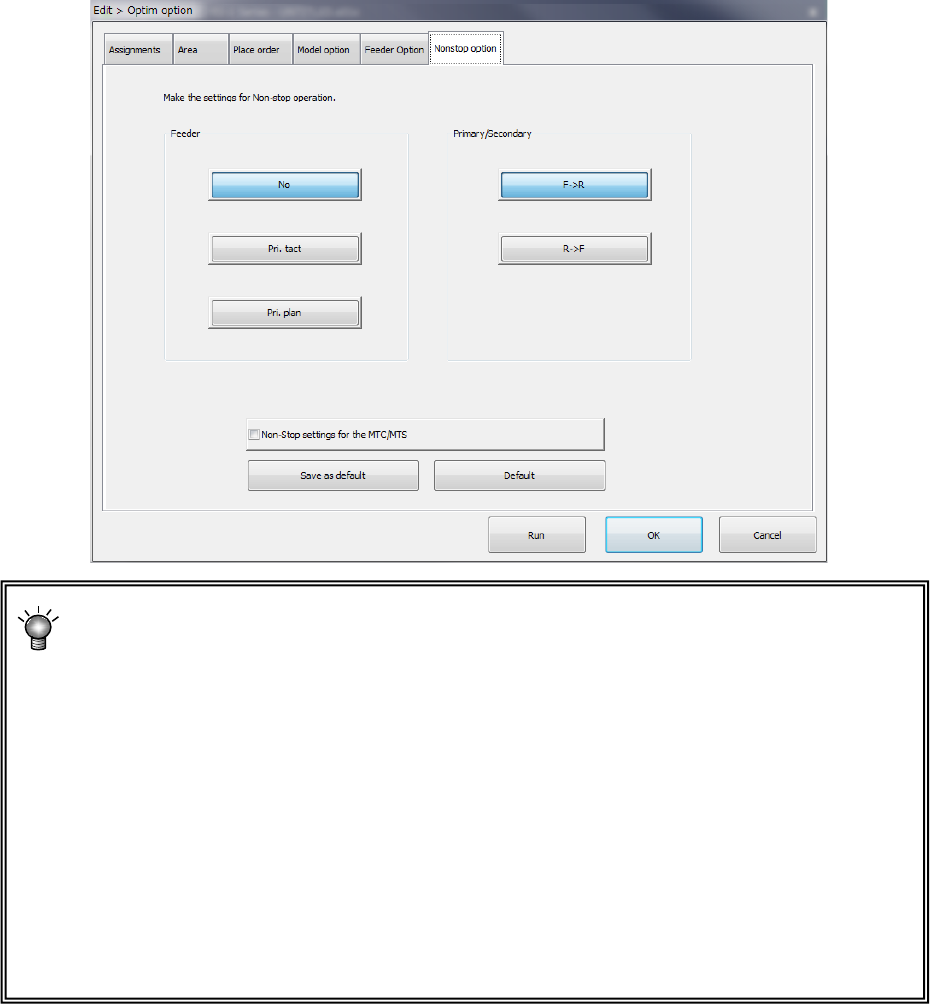
(6) Nonstop option (option to be set at the factory)
Only when the system is equipped with the “Non-stop option,” the settings on this tab are
enabled.
*Non-stop operation: this is a function for producing a PWB without stopping the
machine.
Example: When the front side is the primary side, set all feeders to be used for
production on the front feeder bank, and assign to the rear feeder bank the same type
feeders as those you set on the front feeder bank.
If you make such an assignment of feeders, components are automatically picked up
from a feeder on the rear side when components run out at a feeder on the front side.
Until an operator press the switch (for Non-stop operation) of the main unit, the machine
will never move to the front side, so that the operator can replenish the front side with
components during production. When the operator press the switch after replenishing
the feeder with components, the machine picks up components from the feeder bank on
the front side to continue the current production.