RS-1_instruction manual.pdf - 第700页
Part 2 D etaile d Descript ion of E ach Functi on Chapter 7 Operation Option 7- 25 7.5 Tr acking/Inspe ction Specify op eration opti ons for tracking/insp ection. 7.5.1 Inspection e nabled When you pres s < Inspection…

Part 2 Detailed Description of Each Function Chapter 7 Operation Option
7-24
No. Menu item
Description
Status Operation and detailed explanation
4
Pre-pick feed
Specify a function to perform a feed knock immediately before component
picking. This item can be selected when “Knock before pick” of the “MS
parameter” knock option is effective.
A feed knock is performed immediately before component picking.
When this function is enabled, the “feed setting immediately before
picking for each feeder” of function setting can be selected and a
setting can be performed.
5
Ceramic PWB is used.
Specify whether to use ceramic PWBs.
Ceramic PWBs are used.
6
When the nozzle is
returned, posture is not
detected.
Specify a function to detect the nozzle return posture.
The return posture of the nozzle is not detected.
7
Tray draw speed:
Low Speed 2
Specify whether “Low Speed 2” can be applied as the tray draw speed.
“Low Speed 2” can be selected.
8
Hide message on
production start.
Specify whether to perform the pre-pick feed at the production start.
This item can be selected when “Pre-pick Feed” is effective.
The message that prompts you to select the pre-pick feed “Yes” or “No”
is not displayed at the production start. The pre-pick feed is not
operated in the first pickup and the pre-pick feed is operated from the
second pickup.
9
High-density placement
Specify whether to perform production operation in a certain simultaneous pick
enable range in the case of standard production operation. Set each of 1005,
0603, and 0402.
The simultaneous pick enable range varies depending on the
component size. For very small components, the simultaneous pick
enable range is narrow and components are picked up in a position
close to the pick coordinates of the pick data. If the nozzle protrudes
from the mold section at picking, a pick offset error occurs. This
prevents a contact between the nozzle and the adjacent component at
placement.
Standard production operation is performed. Production operation is
performed in a certain simultaneous pick enable range.
10
(Print deviation feed
forward)
Component short side
Set the length of the short side of the maximum component size to which the
print offset feed forward is applied. This cannot be selected when the print
offset feed forward is not set in the machine setup.
Part 2 Detailed Description of Each Function Chapter 7 Operation Option
7-25
7.5 Tracking/Inspection
Specify operation options for tracking/inspection.
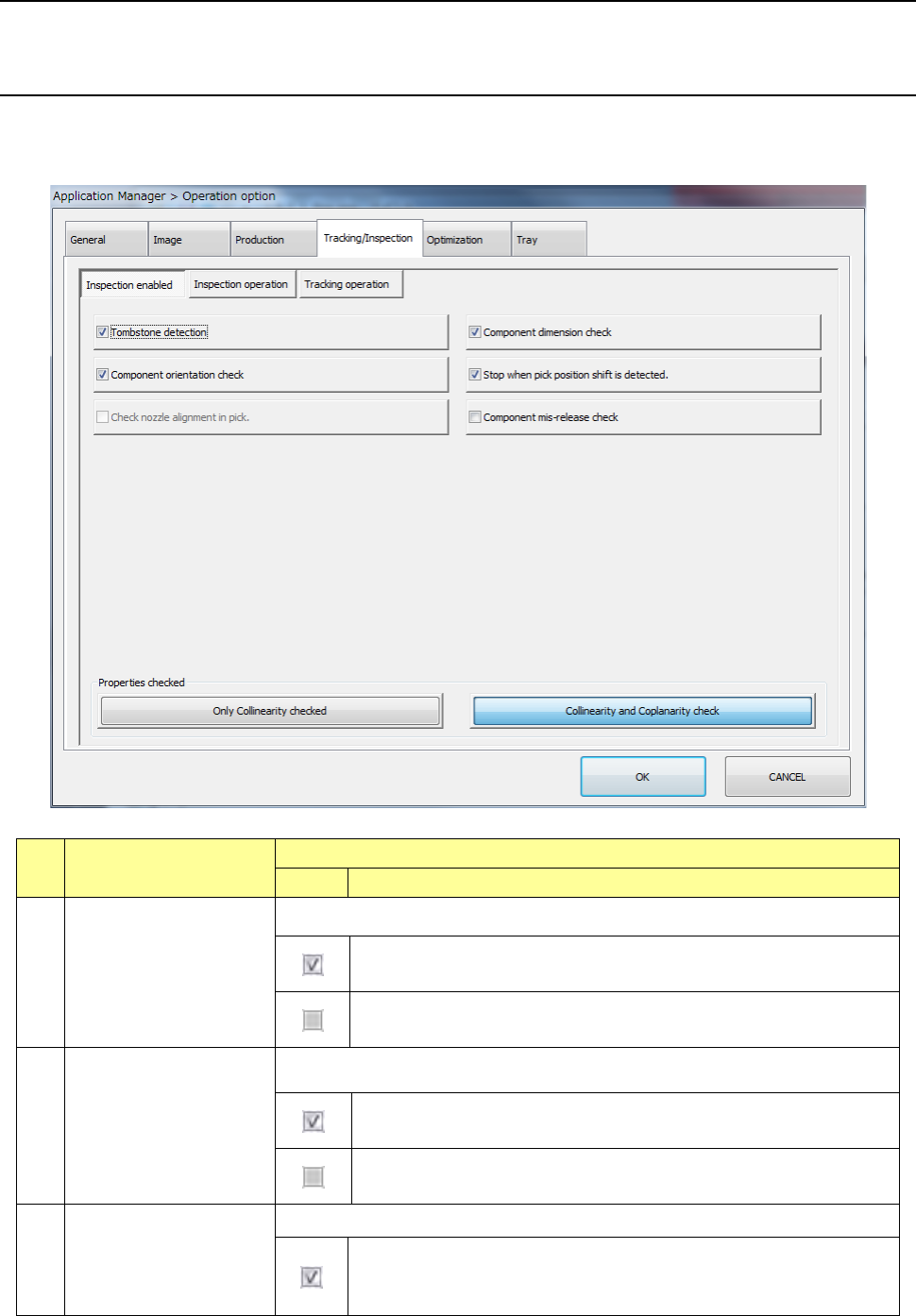
7.5.1 Inspection enabled
When you press <Inspection enabled> button, the “inspection enabled option setting screen”
appears.
No. Menu item
Description
Status Operation and detailed explanation
1
Tombstone
Specify the execution of tombstone detection.
Tombstone detection is performed for components for which
“Tombstone” of component data is effective.
Tombstone detection is performed regardless of the component data
setting.
2
Component dimension
check
Specify the execution of the component orientation check function.
A component dimension check is made for components for which
“Component dimension check” of component data is enabled.
A component dimension check is made regardless of the component
data setting.
3
Component orientation
check
Specify the execution of the component orientation check function.
The ratio between the short side and long side of component data and
the ratio resulting from measurement are compared. If the difference
is out of the certain range, this results in a component orientation error.

Part 2 Detailed Description of Each Function Chapter 7 Operation Option
7-26
No. Menu item
Description
Status Operation and detailed explanation
4
Pick position offset check
Specify the pick position offset check function.
After a component pickup, the offset value from the center of the nozzle
is judged by laser recognition. Thus, a pick position shift is detected.
5
Check nozzle alignment
in pick
Specify the execution of the nozzle alignment check function. Precision priority
is set in the machine setup, this item can be specified.
The nozzle alignment check function becomes effective. For
high-density placement, a pick position shift error occurs if the nozzle
protrudes from the component at a component pick.
6
Component mis-release
check function
Specify the execution of the component take-back check function.
The component mis-release check function becomes effective.
7
Properties checked
Specify an item to be checked.
You can select this check box only when the coplanarity unit is enabled with the
MS Parameter utility and the ratio of the colinearity is not 0.
Only Colinearity checked
The machine runs a colinearity check only.
Colinearity and
Coplanarity check
The machine runs both a colinearity check and a
coplanarity check.