RS-1_instruction manual.pdf - 第776页
Part 2 D etaile d Descript ion of E ach Functi on Chapter 9 M anual Control 9-4 2) Z m ove When you se lect the cont rol item “ X move ,” enter the coord inates of the m ove men t destinatio n and press t he <Exec>…
Part 2 Detailed Description of Each Function Chapter 9 Manual Control
9-3
9.3 Head
9.3.1 Head control
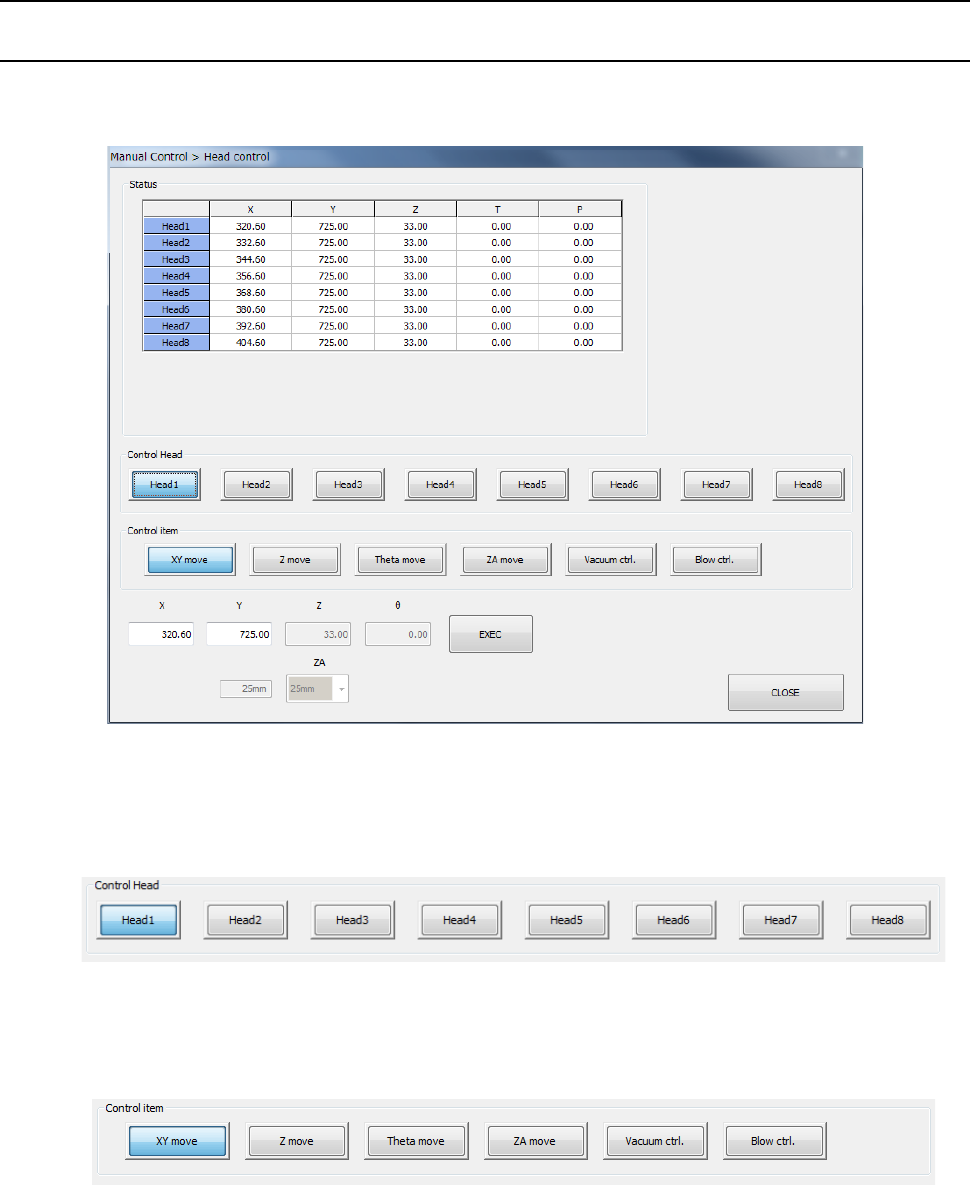
When you select [Head] – [Head control] in the menu, the head control screen appears. Each
head unit control can be selected by device select button.
(1) Control Head
You can select the head to be controlled with the corresponding push button.
This selection is not affected by the setting of the “Device enable” tab invoked from the
“Machine Setup” screen.
(2) Control item
Select the control item with the corresponding push button. You cannot select the
<Vacuum ctrl.> button and the <Blow ctrl.> button at the same time.
1) XY move
When you select the control item “XY move,” enter the coordinates of the movement
destination and press the <Exec> button. Then, the axis is moved based on the
selected control standard.
The displayed coordinates are updated when the head finish moving.
Part 2 Detailed Description of Each Function Chapter 9 Manual Control
9-4
2) Z move
When you select the control item “X move,” enter the coordinates of the movement
destination and press the <Exec> button. Then, the selected head is moved.
The displayed coordinates are updated after the head finishes moving.
3) Theta move
When you select the control item “Theta move,” enter the coordinates of the movement
destination and press the <Exec> button. Then, the selected head is moved.
The displayed coordinates are updated after the head finishes moving.
4) ZA move
When you select the control item “ZA move,” select the height of the movement
destination from the combo box and press the <Exec> button. Then, the ZA axis is
moved.
The current height lateral to the combo box is updated after the ZA axis finishes
moving.
5) Vacuum ctrl.
This button controls ON/OFF of the vacuum device of the selected head.
When you select the control item “Vacuum control,” press the <ON> button, <OFF>
button, or <ON/OFF> button for control.
The displayed pressure is updated when the system finishes controlling the vacuum
device.
6) Blow ctrl.
This button controls ON/OFF of the blow device of the selected head.
When you select the control item “Blow control,” press the <ON> button, <OFF> button,
or <ON/OFF> button for control.
The displayed pressure is updated when the system finishes controlling the blow
device.
(3) Status
This is displayed when control is completed of XY axis coordinates, Z axis coordinates, θ
axis coordinates and pressure values.
The displayed values vary depending on the selected head.
Part 2 Detailed Description of Each Function Chapter 9 Manual Control
9-5
9.3.2 Head device control
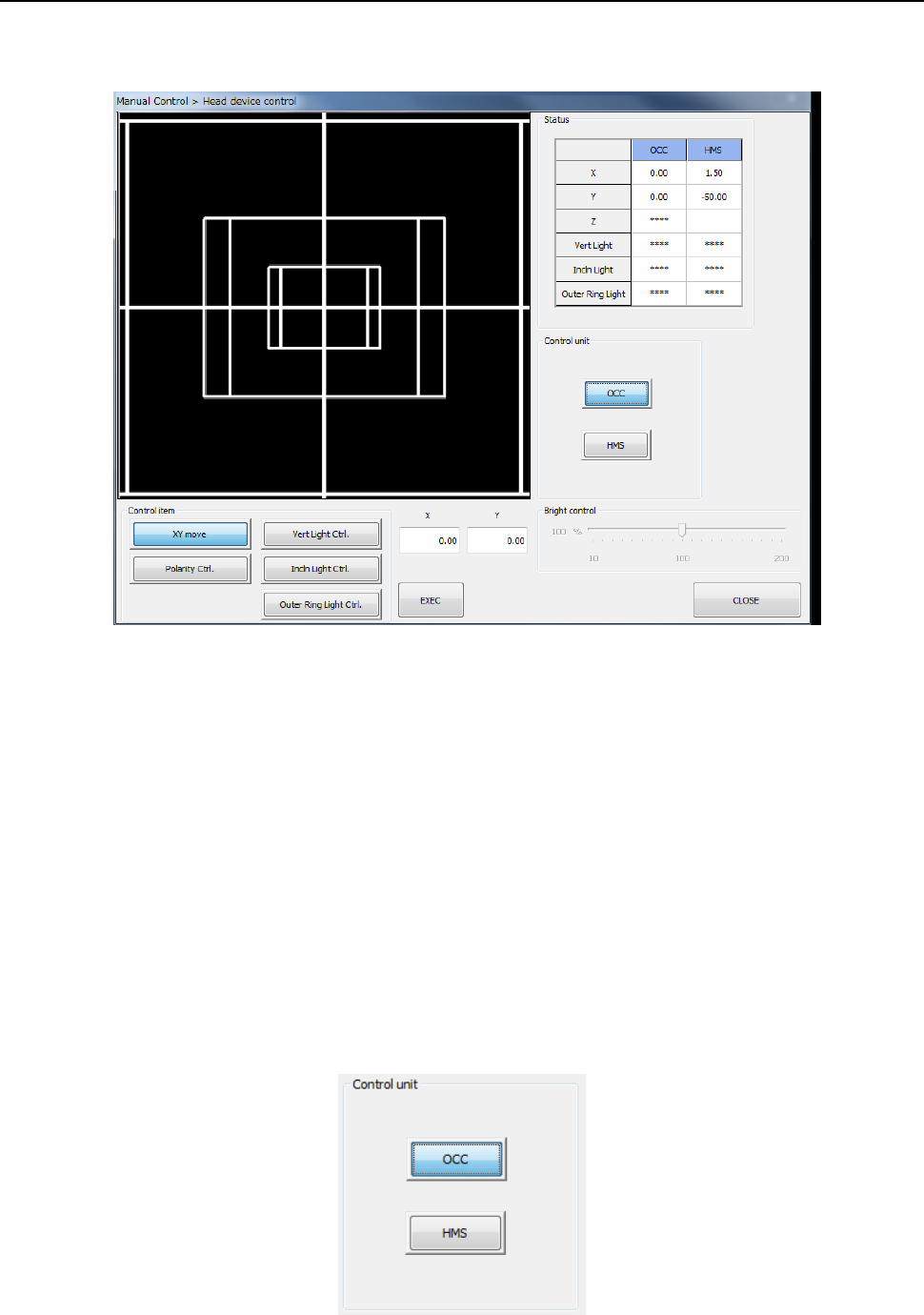
When you select [Head] – [Head device control] in the menu, the head device control screen
appears.
(1) Status
1) OCC
The XY-axes coordinates and the ON/OFF status of each light (vertical light (“Vert
Light”), inclined light (“Incln Light”) and outer ring light) are displayed when these items
are controlled completely.
When the option settings for the outer ring light are not set, the display reads “****.”
2) HMS
The XY-axes coordinates and the Z-axis coordinate are displayed when these items are
controlled completely.
(2) Control unit
Select the unit to be controlled with the corresponding push button.
You cannot select any unit that is not checked (that is, not mounted) on the “Option Unit”
screen of the MS parameter utility. The setting of the “Device enable” screen of the
Machine Setup utility does not affect this selection.