RS-1_instruction manual.pdf - 第422页
Part 1 B asic O peration Chapter 4 Cr eating a Produc tion Progra m 4- 87 Left Right Bottom Left Top Bottom Top Bottom Top Right Left Right Right Left Top Bottom 1) Component ty pe: Lead co mponent ① Lead pitch Enter the…
Part 1 Basic Operation Chapter 4 Creating a Production Program
4-86
(9) Vision data
Enter the information to perform centering for the center of the component by VCS camera.
The information to be set depends on the component type
Vision centering is performed by recognizing a bright portion (lead, call, etc.) of the component
through the VCS camera.
At vision centering, it is impossible to detect a fault such as lead vend and ball deformation. In the
vision items, set the lead, ball size, defect detecting level, etc. required for centering and defect
detection.
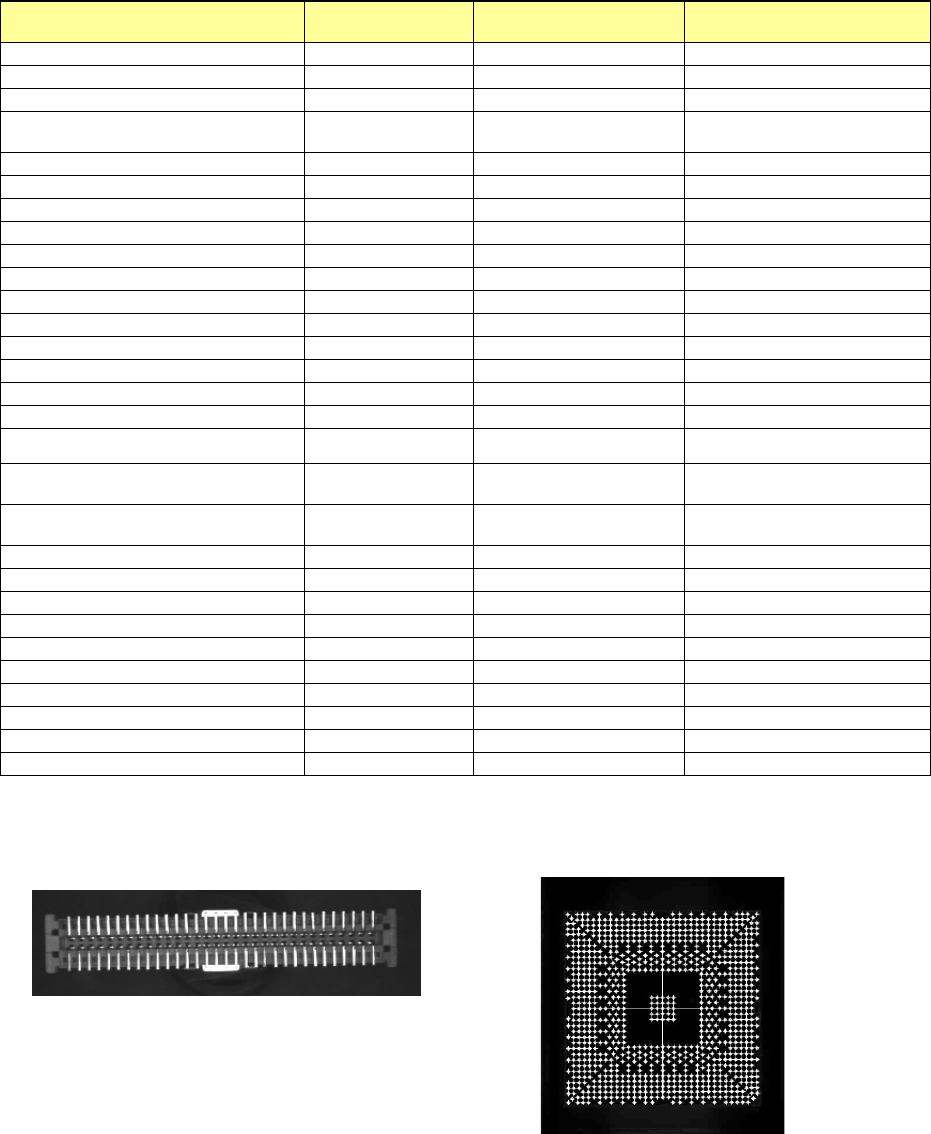
• Components for vision centering
Component type Vision recognition Lead shape, etc.
Reference: Laser recognition
enable/disable
Square chip
O
O
Square chip p (LED)
X
O
Melf
X
O
Elec. Cap. (Aluminum electrolytic
capacitor)
O
Lead component
O
GaAsFET
O
Lead component
O
SOT
X
O
SOP
O
Lead component
O
HSOP
O
Lead component
O
SOJ
O
Lead component
O
QFP
O
Lead component
O
QFN
O
Lead component
O
PLCC (QFJ)
O
Lead component
O
PQFP (BQFP)
O
Lead component
O
TSOP
O
Lead component
O
TSOP2
O
Lead component
O
BGA
O
Ball component
O
FBGA
O
Ball component
X
Outline-recognized component
O
Components whose
outline is to be recognized
X
General-purpose vision component
O
Components whose
outline is to be recognized
X
RNA (Network resistor)
X
O
Trimmer
X
O
One-direction lead connector
O
Lead component
O
Two-direction lead connector
O
Lead component
O
Z-lead connector
O
Lead component
O
Expanded-lead connector
O
Lead component
X
J-lead socket
O
Lead component
O
Gull-wing socket
O
Lead component
O
Socket with bumper
O
Lead component
O
Other
X
O
Example 1) For connector component
(lead recognition)
Example 2) For BGA component
(ball recognition)
Part 1 Basic Operation Chapter 4 Creating a Production Program
4-87
Left
Right
Bottom
Left
Top
Bottom
Top
Bottom
Top
Right
Left
Right
Right
Left
Top
Bottom
1) Component type: Lead component
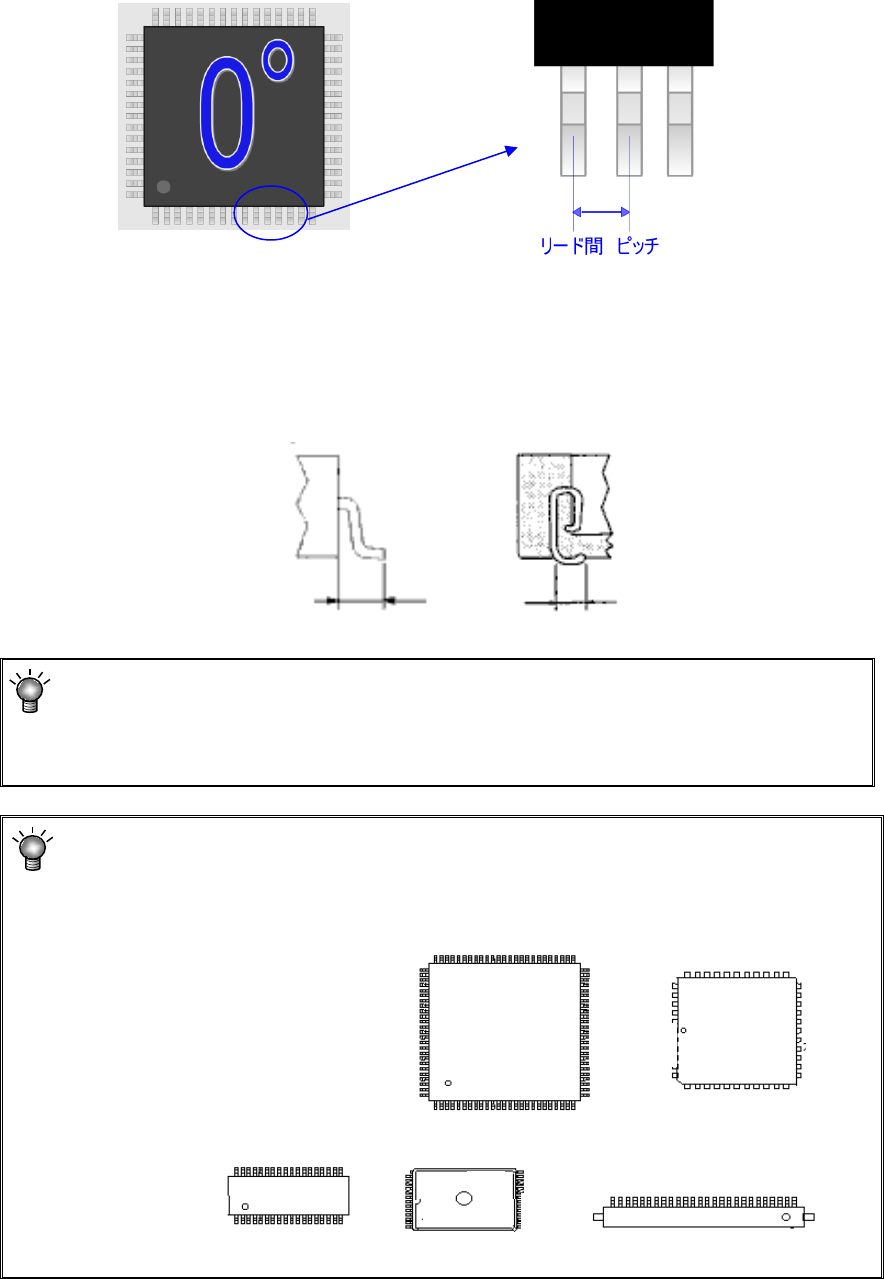
① Lead pitch
Enter the distance between two consecutive leads.
② Lead Info.
a) Length
Enter the length of leads. Enter the length of a lead here. Although four fields for the
length are provided: “Bottom,” “Right,” “Top” and “Left,” which field(s) has (have) to be
entered varies depending on the component type.
Since the lengths of four sides of a QFP component are the same as each other, you have
to enter the length in the “Bottom” field only.
Lead length Lead length
Enter into these fields a value used for recognizing a component with a VCS.
For a QFJ, leads are located even insides of the molded section (bottom of the
component), so you may enter a value a little bit greater than the length of a lead
viewed from the top of the component.
Enter a value in each field of the “Bottom,” “Right,” “Top” and “Left” on the “Vision” data
screen with regarding the component placement angle “0 degrees” defined with the
machine as the reference.
Pitch between leads
Part 1 Basic Operation Chapter 4 Creating a Production Program
4-88
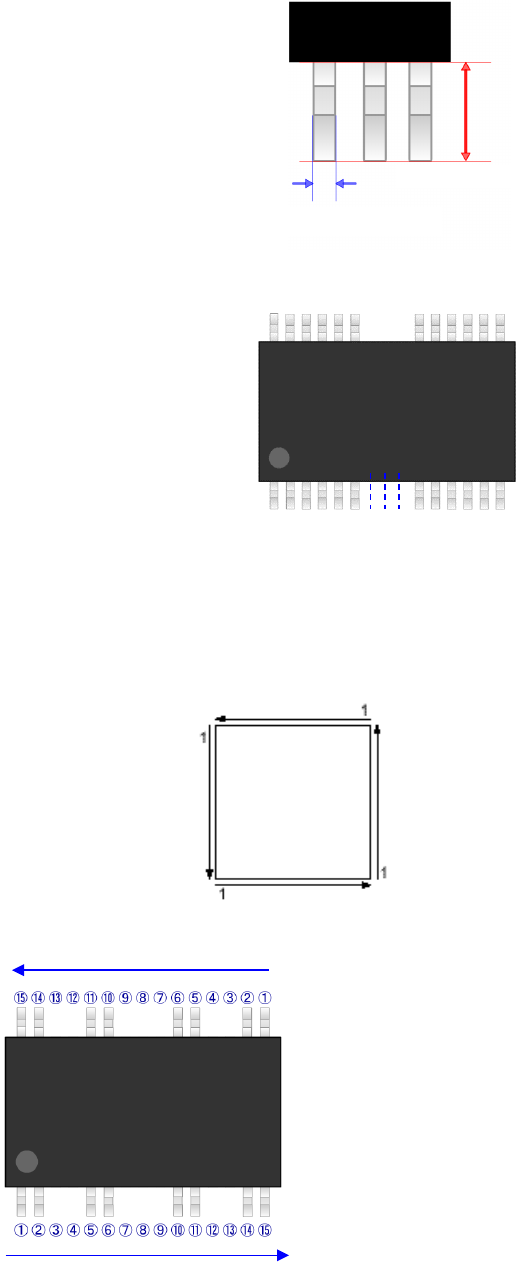
b) Width
Enter the width of a lead.
c) Number of leads (bottom, right, top and left)
Enter the number of leads of each side.
d) Start/lack (bottom, right, top and left)
When any lack of lead is found on each side, enter the lack information.
The lack information can be set independently for each side.
Up to 3 positions can be set for one side.
Leads on each side should be numbered in the direction shown in the diagram below.
Example)
①
⑥
⑩
⑮
Number of leads 15 (including the
number of the lower side missing leads)
Start 1 3 (From the 3rd lead)
Lack 1 2 (2 missing leads)
Start 2 7 (From the 7th lead)
Lack 2 3 (3 missing leads)
Start 3 12 (From the 12th lead)
Lack 3 2 (2 missing leads)
Top
Left
Bottom
Right
Lead length
Width of a lead