RS-1_instruction manual.pdf - 第695页
Part 2 D etaile d Descript ion of E ach Functi on Chapter 7 Operation Option 7- 20 7.4.5 Non - stop When you pres s the [Non - stop] but ton, the “pr oducti on non - sto p option sett ing scr een” appears. No. Menu item …

Part 2 Detailed Description of Each Function Chapter 7 Operation Option
7-19
No. Menu item
Description
Status Operation and detailed explanation
4
Add the “Replenish at
no components” button
to the temporary stop
screen.
Specify a function to fully replenish because of no components at a temporary
stop of production.
The <Component replenish> button is added to the pause dialog at a
temporary stop of production. To the pause dialog at occurrence of
no components and at occurrence of a mark recognition error, the
<Component replenish> button is not attached. When you press the
<Component replenish> button, feeder components are fully
replenished to terminate no components.
5
Temporary stop at
occurrence of a
recognition error
Specify a temporary stop function for the case where an image recognition error
occurs.
The system operation is temporarily stopped when an image
recognition error occurs.
6 When Copla check fails
Specify what to do if an error is detected with a coplanarity check. You can set
this menu item only when the coplanarity unit is enabled with the MS Parameter
utility.
Pause
If an error is detected with a coplanarity check, the machine
pauses temporarily.
Place without
checking
If an error is detected with a coplanarity check, the machine
places a component on a board without checking the
component.
Put into trash
box
If an error is detected with a coplanarity check, the machine
discards the component.
Part 2 Detailed Description of Each Function Chapter 7 Operation Option
7-20
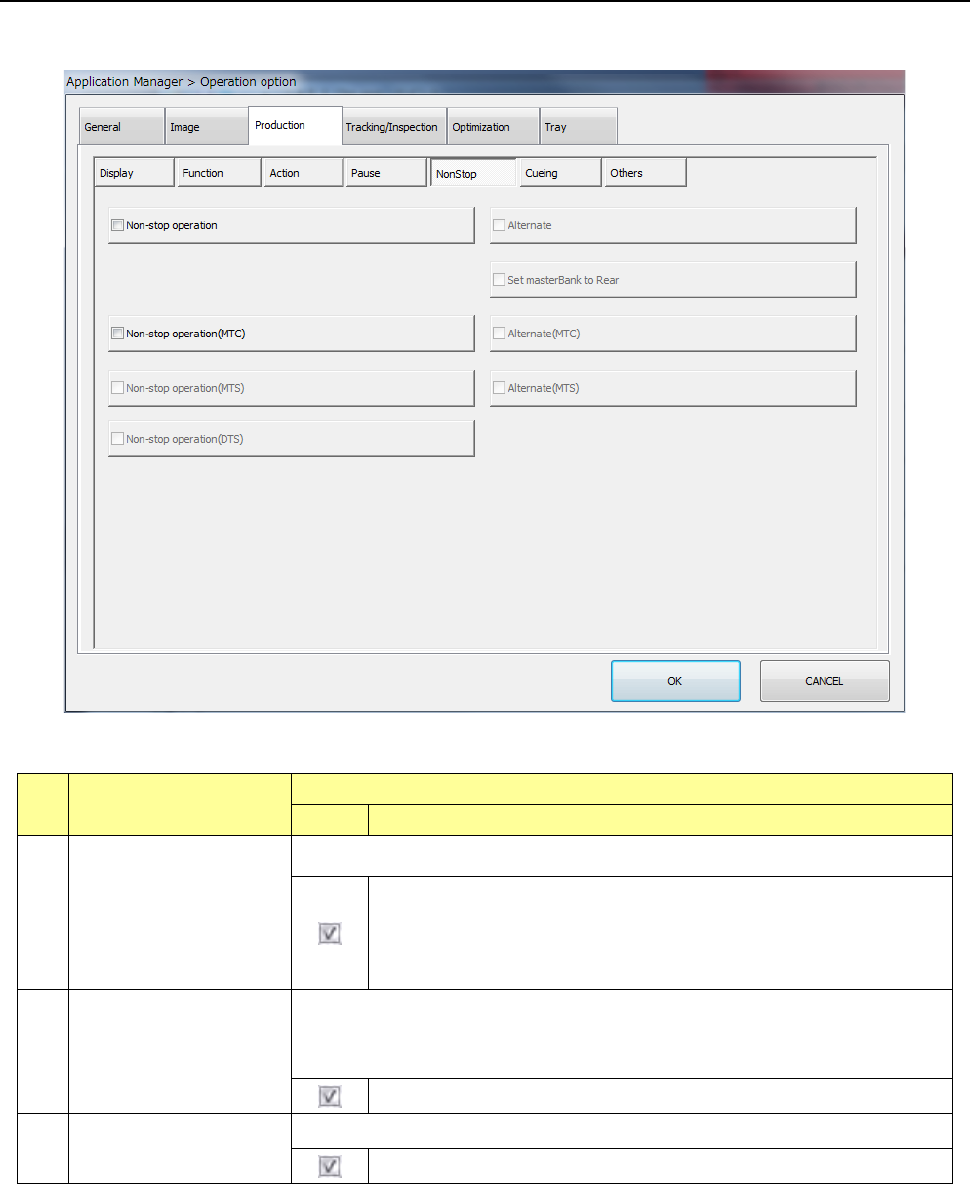
7.4.5 Non-stop
When you press the [Non-stop] button, the “production non-stop option setting screen” appears.
No. Menu item
Description
Status Operation and detailed explanation
1
Non-stop operation
Specify the execution of the non-stop operation function.
The Non-stop operation function is enabled.
When you execute the “Line symmetry” copy of the feeder layout on
the front/rear with the Program Editor, the Non-stop operation can be
performed.
2
Alternate
Make settings of the alternate production mode function to be executed during
Non-stop operation.
When you enable the Non-stop operation function, you can set this menu item.
The alternate production function is enabled.
3 Set masterBank to Rear
Specify whether to set the rear side as the master bank.
The rear side is to be set as the master bank.
Part 2 Detailed Description of Each Function Chapter 7 Operation Option
7-21
No. Menu item
Description
Status Operation and detailed explanation
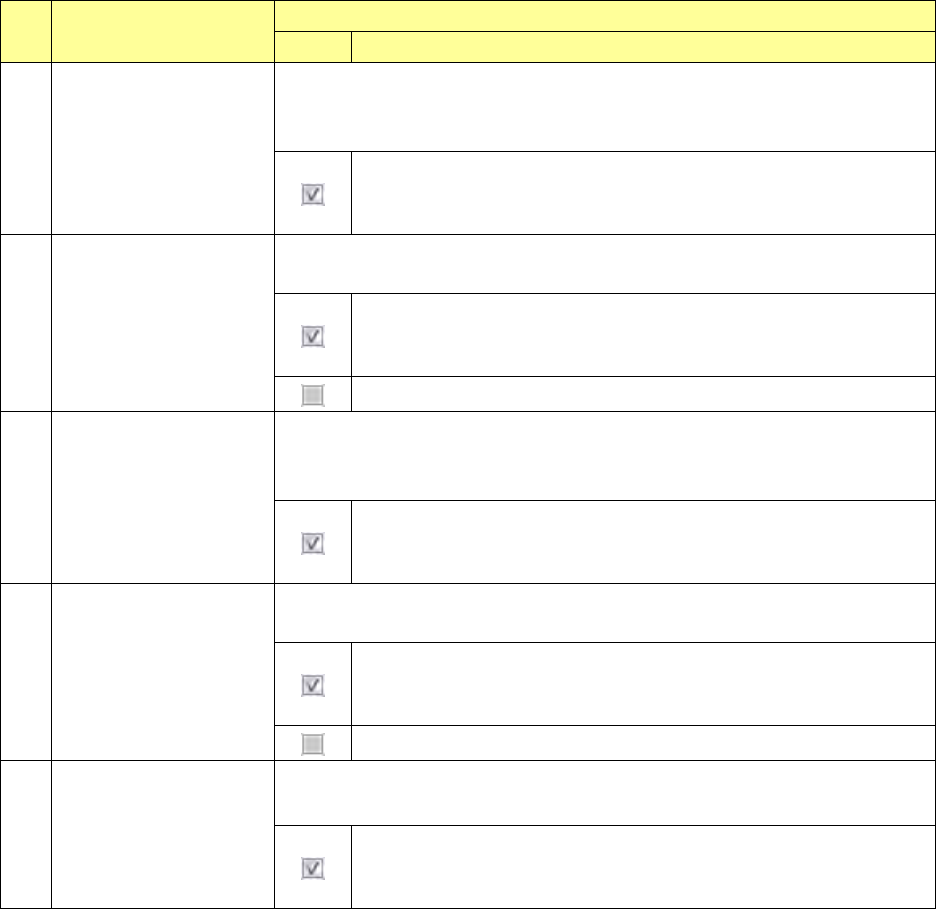
4
Non-stop operation
(MTC)
Set execution of the Non-stop operation function of an MTC.
This item is enabled only when “TR6D” is selected for the menu item “MTC” on
the “Device enable” screen invoked from the “Machine Setup” screen.
If components run out at the main stacker when both the main stacker
and the sub stacker are prepared, the machine continues to pick up
components from the sub stacker without stopping production.
5
Alternate (MTC)
Make settings of the alternate production mode function to be executed during
Non-stop operation (MTC).
Components are picked up by the sub-stacker until the sub-stacker is
put to a “no components” status even if components are replenished in
the main stacker while the sub-stacker is used.
The pick from the main stacker has priority.
6
Non-stop operation
(MTS)
Set execution of the Non-stop operation function of an MTS.
This item is enabled only when “TR5D” is selected for the menu item “MTS” on
the “Device enable” screen invoked from the “Machine Setup” screen.
If components run out at the main stacker when both the main stacker
and the sub stacker are prepared, the machine continues to pick up
components from the sub stacker without stopping production.
7
Alternate (MTS)
Make settings of the alternate production mode function to be executed during
Non-stop operation (MTS).
Components are picked up by the sub-stacker until the sub-stacker is
put to a “no components” status even if components are replenished in
the main stacker while the sub-stacker is used.
The pick from the main stacker has priority.
8
Non-stop operation
(DTS)
Set execution of the Non-stop operation function of a DTS.
This item is enabled only a DTS is connected to the mounter.
If components run out at the main stacker when both the main stacker
and the sub stacker are prepared, the machine continues to pick up
components from the sub stacker without stopping production.