RS-1_instruction manual.pdf - 第775页
Part 2 D etaile d Descript ion of E ach Functi on Chapter 9 M anual Control 9-3 9.3 Head 9.3.1 Head control When you se lect [Head] – [Head control] in th e menu, the head cont rol screen appears. Each head unit co ntrol…
Part 2 Detailed Description of Each Function Chapter 9 Manual Control
9-2
9.2 Starting Up or Quitting the Manual Control Utility
9.2.1 Starting up the Manual control utility
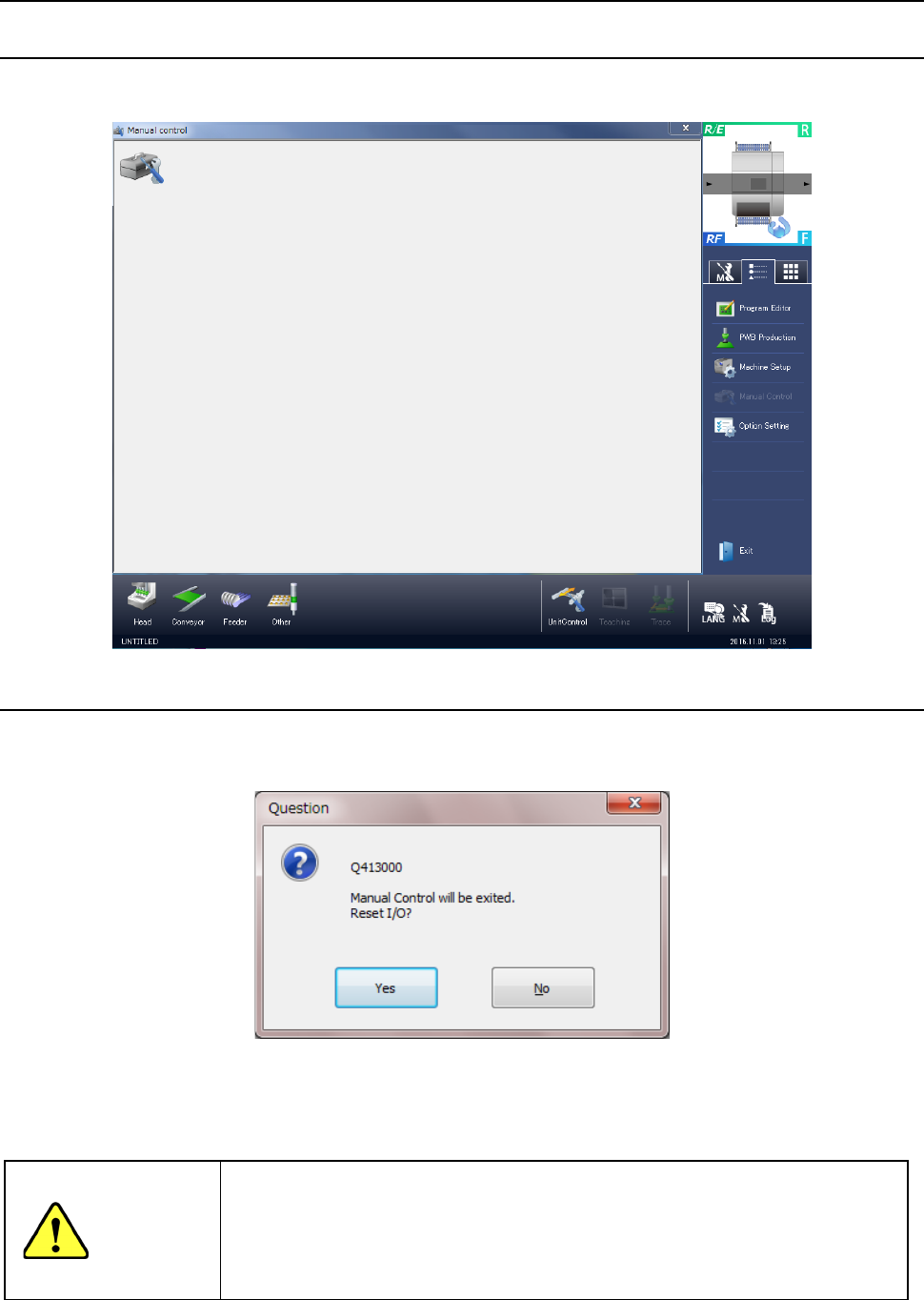
When you select [Maintenance] → [Manual control] in the menu, the manual control initial screen
shown in the following figure appears.
9.2.2 Quitting the Manual control utility
When you select “Exit” of the information area or press the close [x] button in the upper right part
of the screen, manual control is terminated.
< Ye s >: Manual control is terminated after an I/O safety direction setting is executed. As an
example, when the head is provided with a nozzle, the manual control screen is
terminated after the nozzle is returned to the ATC.
<No>: The manual control screen reappears.
WARNING
When you click the <Yes> button, the axes move, and the system starts setting each
I/O safety direction.
Before clicking the <Yes> button, be sure to check to see if there is no one who
operates the inside of the machine.
To avoid a risk of injury, do not put your hands inside the machine nor move your
face or head close the machine while the machine is operating.
Part 2 Detailed Description of Each Function Chapter 9 Manual Control
9-3
9.3 Head
9.3.1 Head control
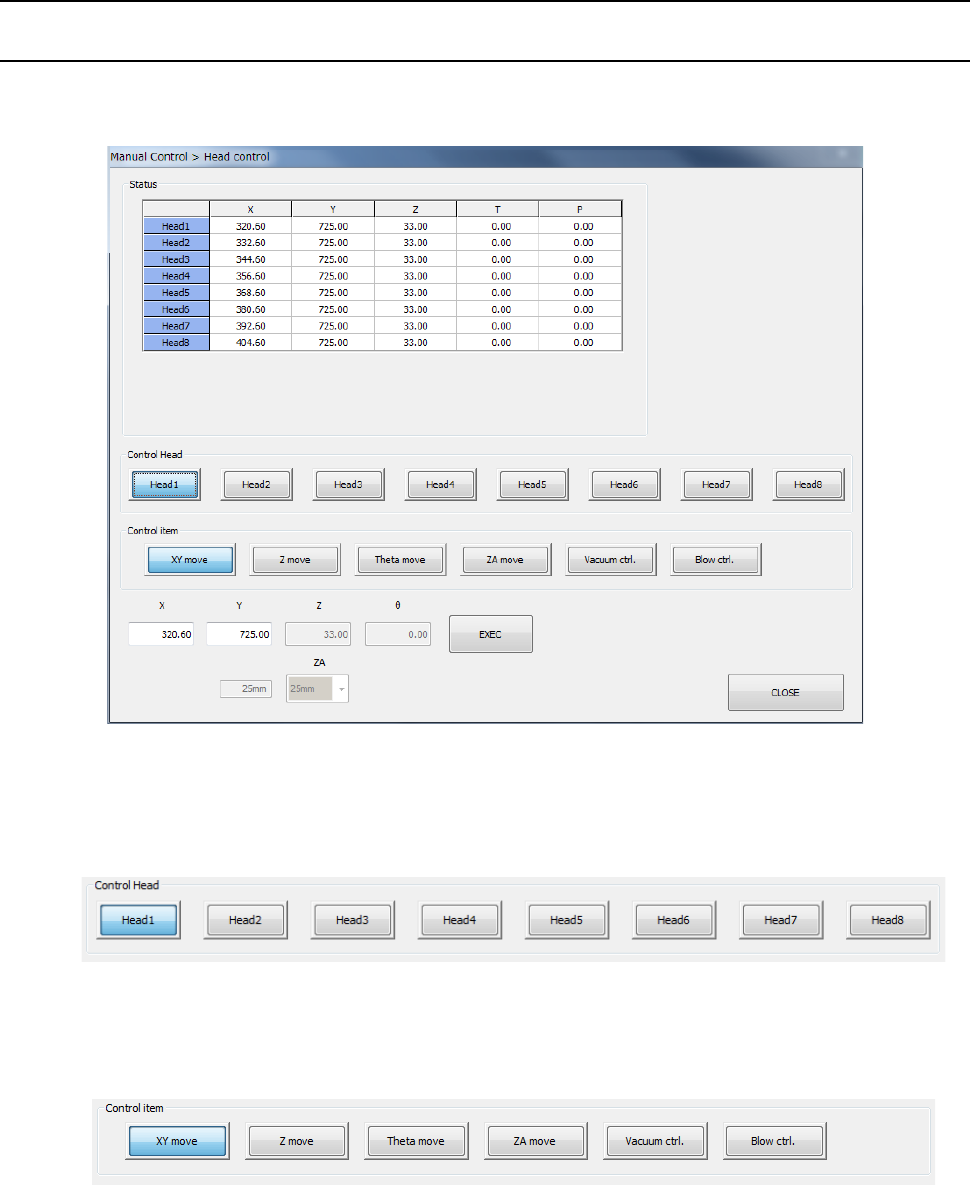
When you select [Head] – [Head control] in the menu, the head control screen appears. Each
head unit control can be selected by device select button.
(1) Control Head
You can select the head to be controlled with the corresponding push button.
This selection is not affected by the setting of the “Device enable” tab invoked from the
“Machine Setup” screen.
(2) Control item
Select the control item with the corresponding push button. You cannot select the
<Vacuum ctrl.> button and the <Blow ctrl.> button at the same time.
1) XY move
When you select the control item “XY move,” enter the coordinates of the movement
destination and press the <Exec> button. Then, the axis is moved based on the
selected control standard.
The displayed coordinates are updated when the head finish moving.
Part 2 Detailed Description of Each Function Chapter 9 Manual Control
9-4
2) Z move
When you select the control item “X move,” enter the coordinates of the movement
destination and press the <Exec> button. Then, the selected head is moved.
The displayed coordinates are updated after the head finishes moving.
3) Theta move
When you select the control item “Theta move,” enter the coordinates of the movement
destination and press the <Exec> button. Then, the selected head is moved.
The displayed coordinates are updated after the head finishes moving.
4) ZA move
When you select the control item “ZA move,” select the height of the movement
destination from the combo box and press the <Exec> button. Then, the ZA axis is
moved.
The current height lateral to the combo box is updated after the ZA axis finishes
moving.
5) Vacuum ctrl.
This button controls ON/OFF of the vacuum device of the selected head.
When you select the control item “Vacuum control,” press the <ON> button, <OFF>
button, or <ON/OFF> button for control.
The displayed pressure is updated when the system finishes controlling the vacuum
device.
6) Blow ctrl.
This button controls ON/OFF of the blow device of the selected head.
When you select the control item “Blow control,” press the <ON> button, <OFF> button,
or <ON/OFF> button for control.
The displayed pressure is updated when the system finishes controlling the blow
device.
(3) Status
This is displayed when control is completed of XY axis coordinates, Z axis coordinates, θ
axis coordinates and pressure values.
The displayed values vary depending on the selected head.