RS-1_instruction manual.pdf - 第403页
Part 1 B asic O peration Chapter 4 Cr eating a Produc tion Progra m 4- 68 (4) Pi ck Co ndit ion Pick cond i tions are setting items f or pic kup and t he default values are app l ied. Accordingly , they do not ne ed to b…
Part 1 Basic Operation Chapter 4 Creating a Production Program
4-67
⑥ Multi-recognition
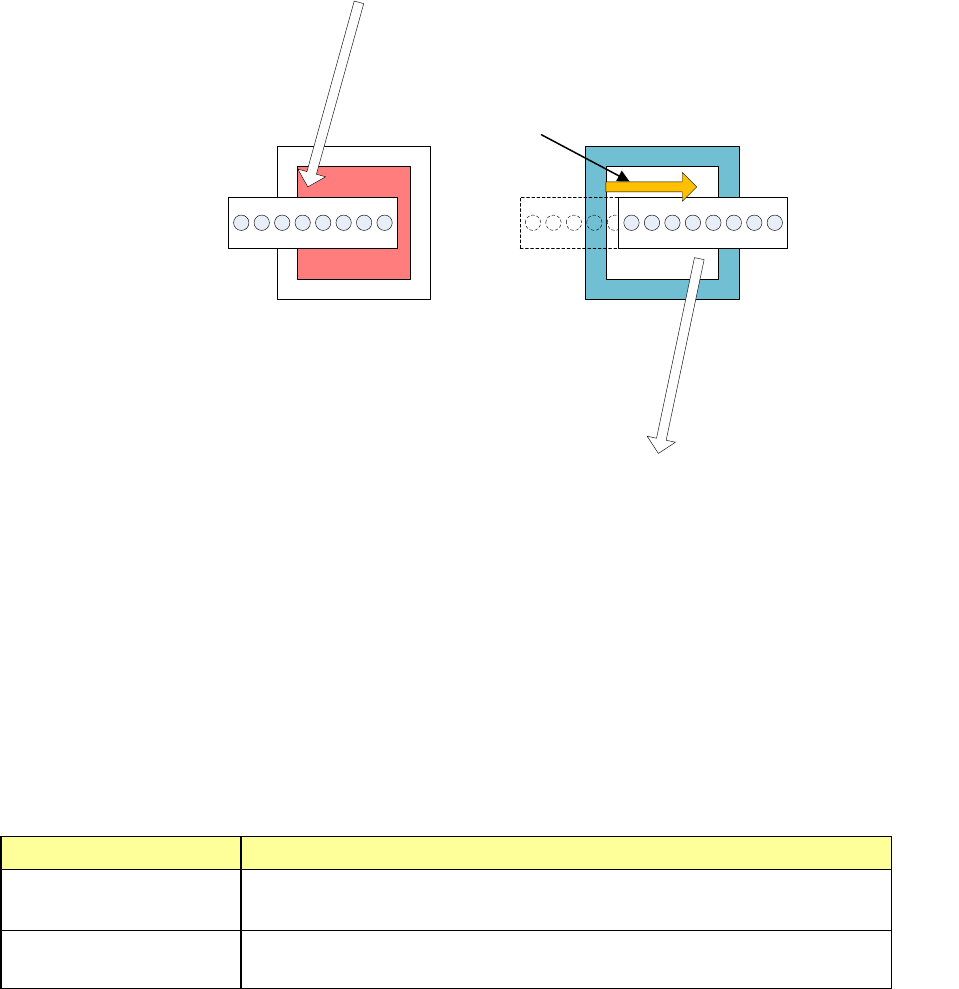
This function is described as follows. As the VCS with a field-of-view of 54 mm captures
images of up to four components and recognizes them, the XY-axis movement distance and
the number of image capturing times during VCS recognition operation are minimized.
Additionally, as the light control is optimized, the exposure time of the VCS camera is
shortened to a level that is 1/6 or less of the conventional exposure time and the placement
tact of the vision recognition is improved from the conventional S-VCS.
The S-VCS can perform the recognition only with the same light within one cycle, but the
multi-recognition can perform the recognition with different light settings using nozzles 1 to 4
and nozzles 5 to 8.
The following describes the component data conditions for the multi-recognition.
1. Vision components with a component size of □ 3 mm to □ 14 mm (Pickup offset is
considered.)
2. Boss height 0.00 mm
3. Recognition center offset (0.00 mm, 0.00 mm)
4. VCS selection is a field-of-view of 54 mm.
5. Lights other than transmission light
6. VCS focus height is 0.00 mm.
7. Batch recognition
8. The direction of a BGA component is not inspected.
When the conditions shown above are satisfied, "Used" or "Not used" can be set.
Used or not Contents
Used
(Default)
Performs the multi-recognition.
Not used
Does not perform the multi-recognition even when there are
components applicable to the multi-recognition.
① Moves to the right head
recognition position from
the pickup position.
⑤ Moves to the
placement position
from the left head
recognition position.
② Right head recognition
with the reflection light
③
Moves to the left head
recognition position
from the right head
recognition position.
④ Left head recognition
with the blue side light
Part 1 Basic Operation Chapter 4 Creating a Production Program
4-68
(4) Pick Condition
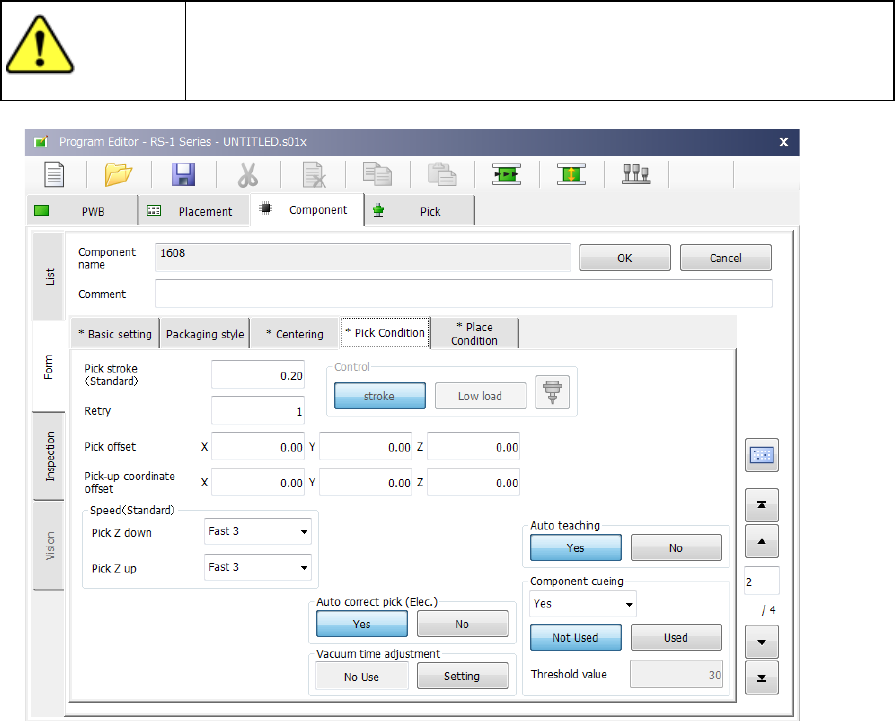
Pick conditions are setting items for pickup and the default values are applied. Accordingly,
they do not need to be changed. If pickup cannot be performed in the default value status,
change the settings.
CAUTION
If you change any of the basic settings after changing any value on the
“Pick Condition” tab, some values are reset to their defaults on the “Pick
Condition” tab.
1) Picking stroke:
Specify the distance for pushing a component during component pick-up.
If you set “0” here, the nozzle may not reach a component and may not pick up the
component, or a chip rise error may occur due to the variation of component heights. In
such a case, enter the larger value (that is, by entering a positive value) so that the nozzle
can reach a component.
The initial value is “0.2 mm” (0 mm for a 0603 or 0402 component).
2) Retry:
Set the number of times the system will pick up a component again if a component pick-up
error occurs during production.
If a retry over error occurs during PWB production, the signal light flashes in yellow to notify
you of the error.
Part 1 Basic Operation Chapter 4 Creating a Production Program
4-69
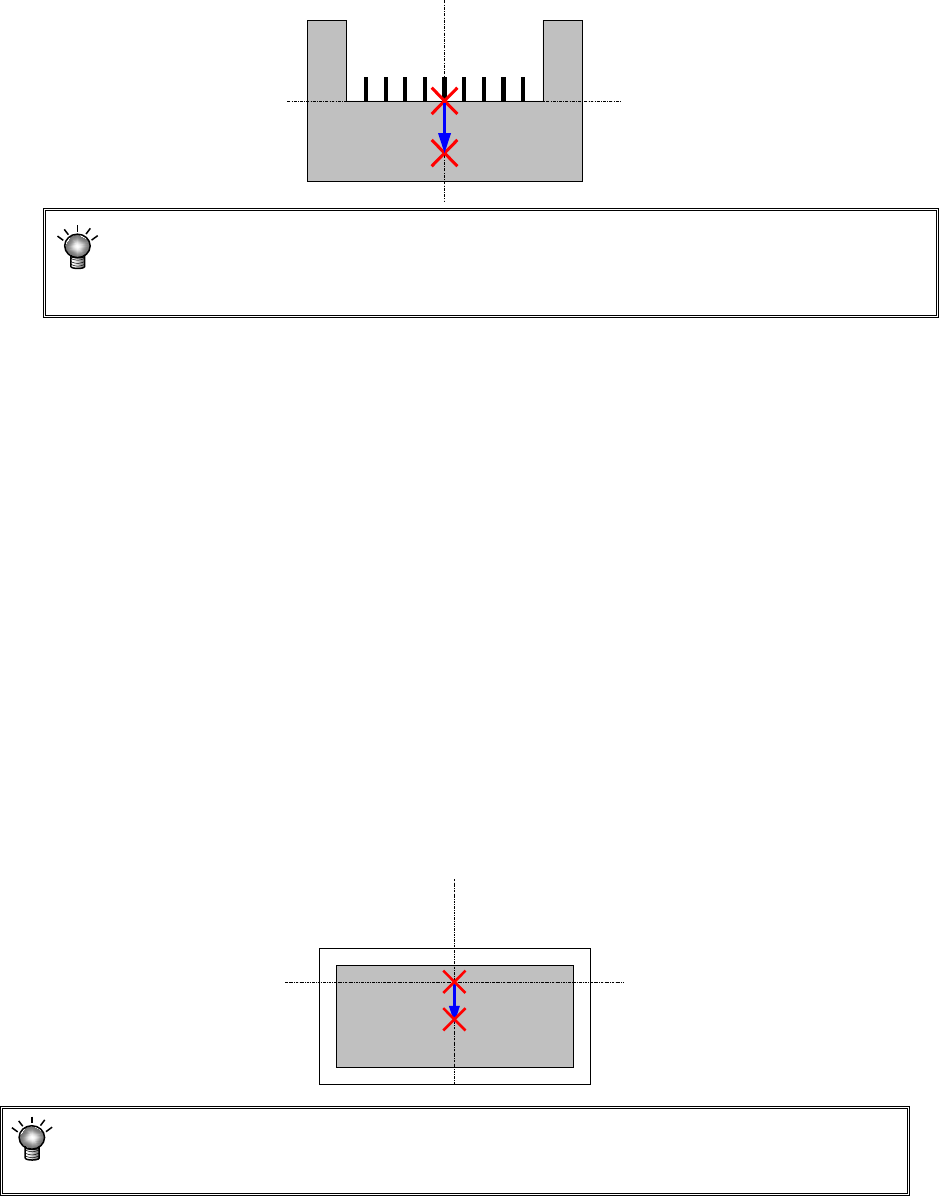
3) Picking offset X, Y
If you want to shift the component pick-up position from the center of a component because
the machine cannot pick the center of the component or for any other reason, set the
“Picking offset X, Y.” Set the distance from the center of a component to the component
pick-up coordinates to be applied when the component is picked up in the “X” and “Y” fields
of the “Picking offset” menu item. Each value is added to or subtracted from the initial
value of the “X” coordinate and that of “Y” coordinate automatically calculated when you
create Pick data.
Since the settings of the “Picking offset X, Y” are to be used to decide the recognition
window for recognizing a component or to check a component pick-up position error, it is
recommended to set them if the center of the component is different from the component
pick-up position.
4) Picking offset Z
Specify how much to push the tip of the nozzle from the pick-up height when a component is
picked up. This value is used to automatically calculate the “Z” coordinate of the “Pick
position” of the Pick data. If you change the value set in the “Z” coordinate of the “Picking
offset” even though the pick-up coordinates are already completed, the system does not
calculate the pick-up coordinates again. When you change the setting of the menu item
“Side” of the Pick data corresponding to the changed Component data to “AUTO” and
specify the pick-up position again, the system calculates the pick-up coordinates again, and
changes the value in the “Z” field also.
5) Pick-up coordinate offset
If you have to shift the component pick-up position from the default position X, Y in order to
pick up the center of a component, set the “Pick-up coordinate offset (X, Y).” The function
of a coordinate Z is not different from that of the “Picking offset Z.” Enter a correction value
to be applied to each initial value that is automatically calculated when Pick data is created.
Set the distance from the pick-up coordinates calculated automatically to the center of a
component and the height in the “Pick-up coordinate offset” fields. Each value you set in
these fields are added or subtracted to/from the corresponding initial value automatically
calculated when Pick data is created. Set these fields if any of the initial values of the
component pick-up coordinates is shifted from the center of a component or the component
pick-up height.
When you set both the “Picking offset” and the “Pick-up coordinate offset,” the total of
these offsets is reflected in automatic calculation of the pick-up coordinates as a value to
be added or subtracted.