RS-1_instruction manual.pdf - 第482页
Part 1 B asic O peration Chapter 4 Cr eating a Produc tion Progra m 4- 147 4) List When you se lect the “F eeder inform ation” tab, the det ailed inform ation on co mponents attached o n the feeder is displayed o n the s…
Part 1 Basic Operation Chapter 4 Creating a Production Program
4-146
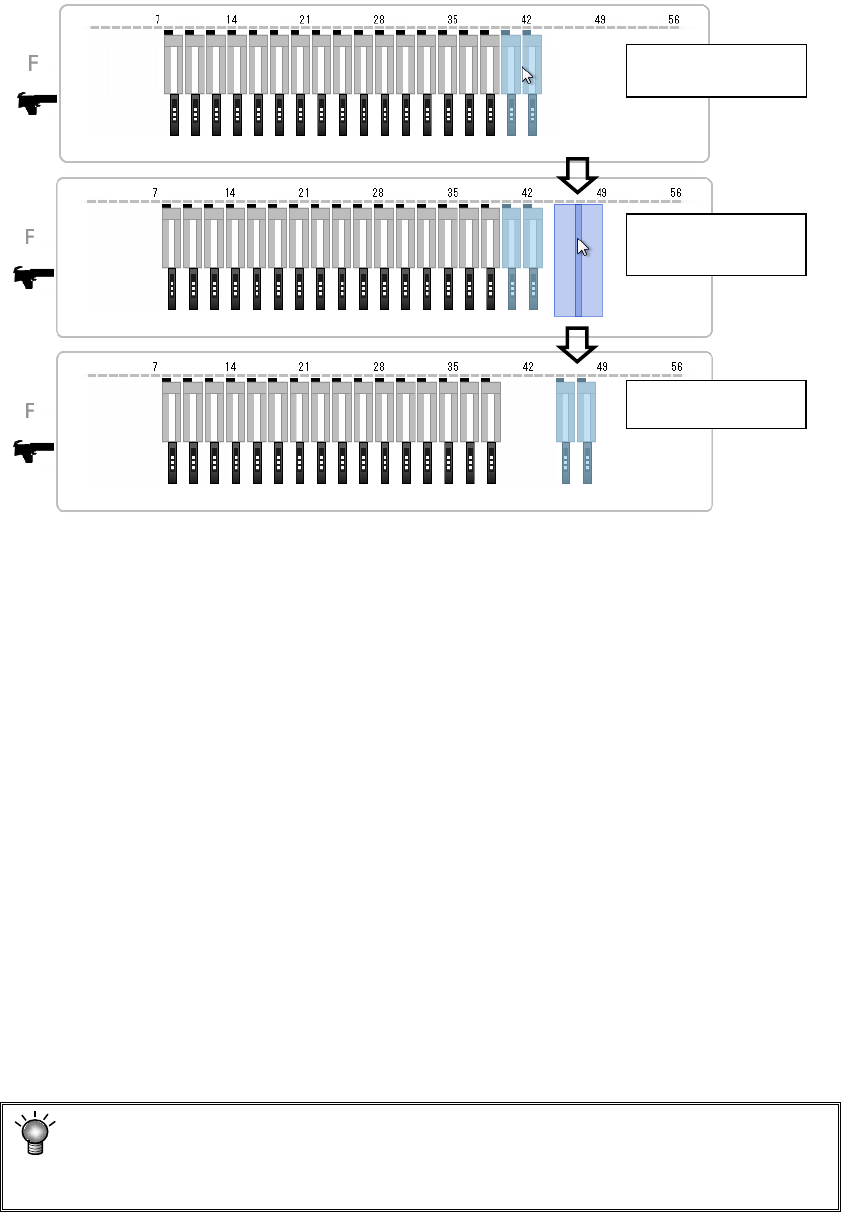
2) Moving/copying a feeder
After selecting a feeder to be moved, drag it to the desired location and drop it (that is, leave
your hand from the panel). The feeder is moved to the mounting position nearest that
position.
When you check the <Copy> button in this case, the selected feeder is copied to that
position.
3) Moving/copying a feeder symmetrically with respect to a line or a point
If you press the <Line symmetry> button or the <Point symmetry> button when a feeder is
selected, the system moves the feeder.
If the <Copy> button is checked in this case, the feeder is copied.
When a feeder on the front is selected, it is moved/copied to the rear side. When a feeder
on the rear side is selected, it is moved/copied to the front side.
If any feeder is already assigned to the copy destination, the system does not copy the
feeder.
● Line symmetry
The system moves/copies a feeder to the position on the opposite side that the current
hole number faces.
As for an electric 8-mm double-lane feeder, the system copies a feeder with respect to a
line without changing the lane.
● Point symmetry
The system moves/copies a feeder to the hole position symmetrical to the current
position so that both feeder exchange trollies on the front/rear sides can use.
4) Deleting a feeder
If you press the <Delete> button when a feeder is selected, the system deletes the feeder.
When a “rear component supply device” option is disabled, any feeder cannot be
moved or copied from the front to the rear.
In addition, you can select neither the <Line symmetry> button nor the <Point
symmetry> button.
Touch a feeder.
Drag the feeder.
Drop the feeder.
Part 1 Basic Operation Chapter 4 Creating a Production Program
4-147
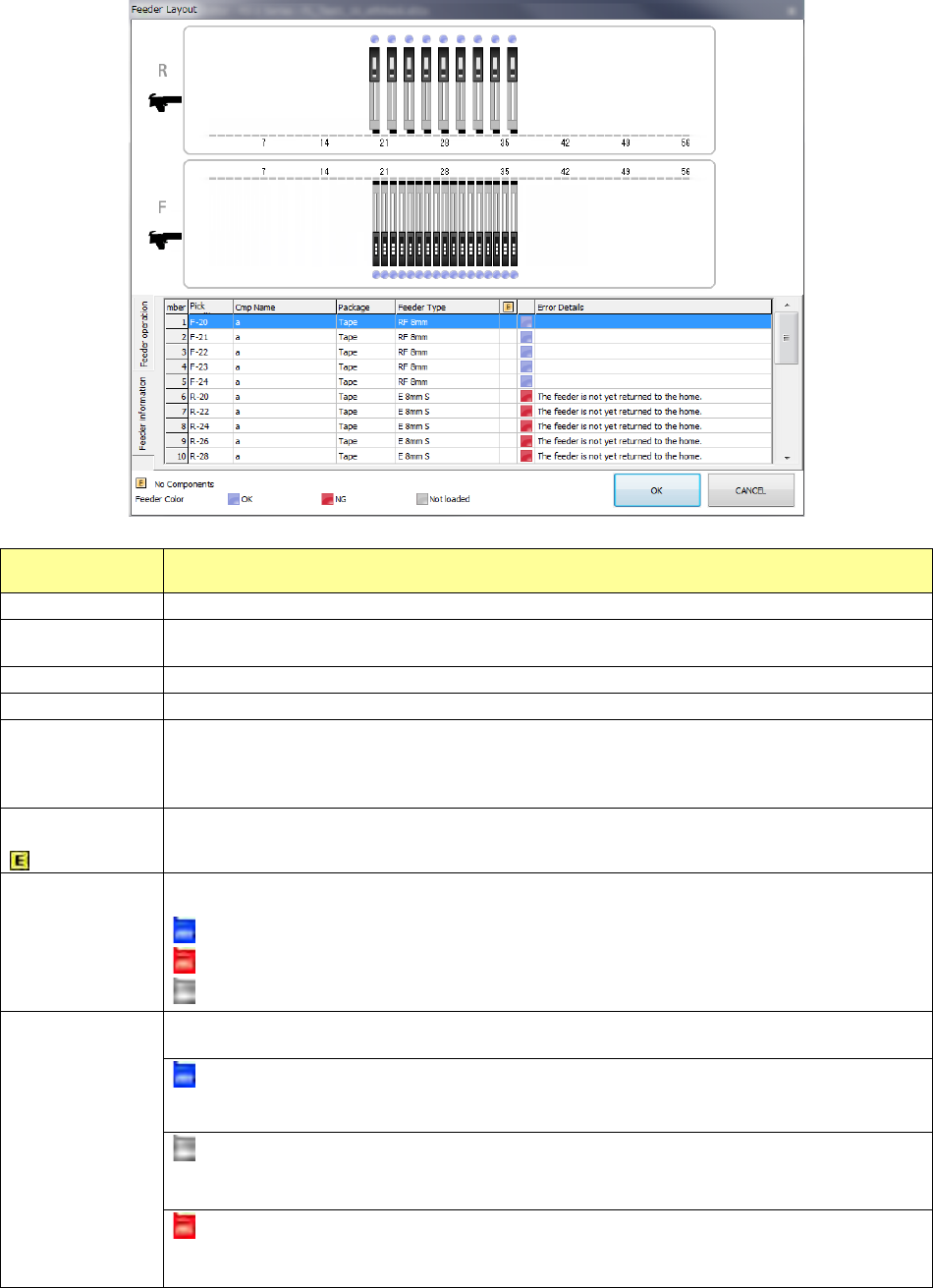
4) List
When you select the “Feeder information” tab, the detailed information on components
attached on the feeder is displayed on the screen.
Menu item Description
No.
Displays a feeder number.
Pick position
Displays a component pick-up position in the format: “Bank-Hole number.”
The lane number is not displayed if not needed.
Component name
Displays a component name specified with a production program.
Package
Displays a package of a feeder specified with a production program.
Feeder type
Displays a feeder type specified with a production program.
When a feeder type is an electric feeder (EF), “E xxxx” is displayed.
When a feeder type is an electric stick feeder, “E stick xxxx” is displayed.
When a feeder type is an electric feeder (RF), “RF xxxx” is displayed.
Components run
out.
This icon is displayed on a feeder whose components run out.
You have to unload the corresponding feeder/components, and then reload components.
Icons for an
electric feeder
setting mistake
Displays the result of an electric feeder setting state check.
The following icons show the various states respectively: “OK,” “NG” and “Unloaded.”
: Electric feeder is OK.
: Electric feeder is NG.
: Electric feeder is not loaded yet.
Error details
Displays information on a feeder.
The following errors are displayed.
An electric feeder is specified with a production program, and it is attached on the electric bank
correctly.
Unloaded
This error is displayed if an electric feeder is specified with a production program, but it is not
attached on the electric bank yet. Attach an electric feeder on the electric bank.
An electric bank has not been connected yet.
If an electric feeder is specified with a production program and the electric bank has not been
connected yet, this error is displayed on the screen. Attach the electric bank onto the machine.
Part 1 Basic Operation Chapter 4 Creating a Production Program
4-148
Menu item Description
The feeder type is different (XXX).
If an electric feeder is specified with a production program and an electric feeder whose type is
different f
rom that of the production program is attached on the electric bank, this error is
displayed on the screen. The type (XXX) of the electric feeder attached on the bank is
displayed also. Attach an electric feeder whose type is the same as that specified with the
production program on the machine.
The tape pitch is different (PRG: X mm ETF: Y mm).
If an electric feeder is specified with a production program and an electric feeder whose tape
pitch is different from that of the former is attached on the electric feeder, this error is displayed
on the screen. The tape pitch (PRG: X mm) of a component specified with the production
program and that (ETF: Y mm) of the electric feeder attached on the electric bank are
displayed also. Attach an electric feeder whose tape pitch is the same as that specified with the
production program on the electric bank.
The tape type is different (PRG: XXX ETF: YYY).
If an electric feeder is specified with a production program and an electric feeder whose tape
type is different from that of the former is attached on the electric bank, this error is displayed on
the screen. The tape type (PRG: XXX) of a component specified with the production program
and that (ETF: YYY) of the electric feeder attache
d on the electric bank are displayed also.
(Emboss: an embossed tape, Paper: a paper tape) Attach an electric feeder whose tape
type is the same as that specified with the production program on the electric bank.
The component height is different (PRG: X ETF: Y)
If an electric feeder is specified with a production program and an electric feeder whose
component height is quite different from that of the former is attached on the electric bank, this
error is displayed on the screen. The height of a
component specified with the production
program (PRG: X) and that of the attached electric feeder (ETF: Y) are displayed also.
Attach an electric feeder whose component height is the same as that specified with the
production program on the electric bank.
(“The component height is quite different” means that it is twice or more high as that of a
production program or it is “0.”)
The panel switch is being operated.
If an electric feeder is specified with a production program, and that attached on the electric bank
is being operated with the panel switch, this error is displayed on the screen. Stop operating
the panel switch.
Tension error
If an electric feeder is specified with a production program and a tension error has occurred at an
electric feeder attached on the electric bank, this error is displayed on the screen. Adjust the
tension of the electric feeder.
A command is being processed.
If an electric feeder is specified with a production program, and that attached on the electric bank
is processing any command, this error is displayed on the screen. Wait for the electric feeder to
finish processing the command.
Power supply voltage reduction error
If an electric feeder is specified with a production program, and a power voltage reduction error
occurs on the electric feeder attached on the electric bank, this error is displayed on the screen.
Adjust the power supply voltage of the electric feeder.
Feeder origin return not performed
If an electric feeder is specified with a production program, and origin return of the electric feeder
attached on the electric bank has not been performed yet, this error is displayed on the screen.
Perform origin return of the electric feeder.
Feeder step out
If an electric feeder is specified with a production program, and that attached on the electric bank
loses synchronism, this error is displayed on the screen. Adjust the electric feeder.
Feeder is returning to the origin.
If an electric feeder is specified with a production program, and that attached on the electric bank
is returning to the origin, this error is displayed on the screen. Wait for the electric feeder to
finish returning to the origin.