RS-1_instruction manual.pdf - 第265页
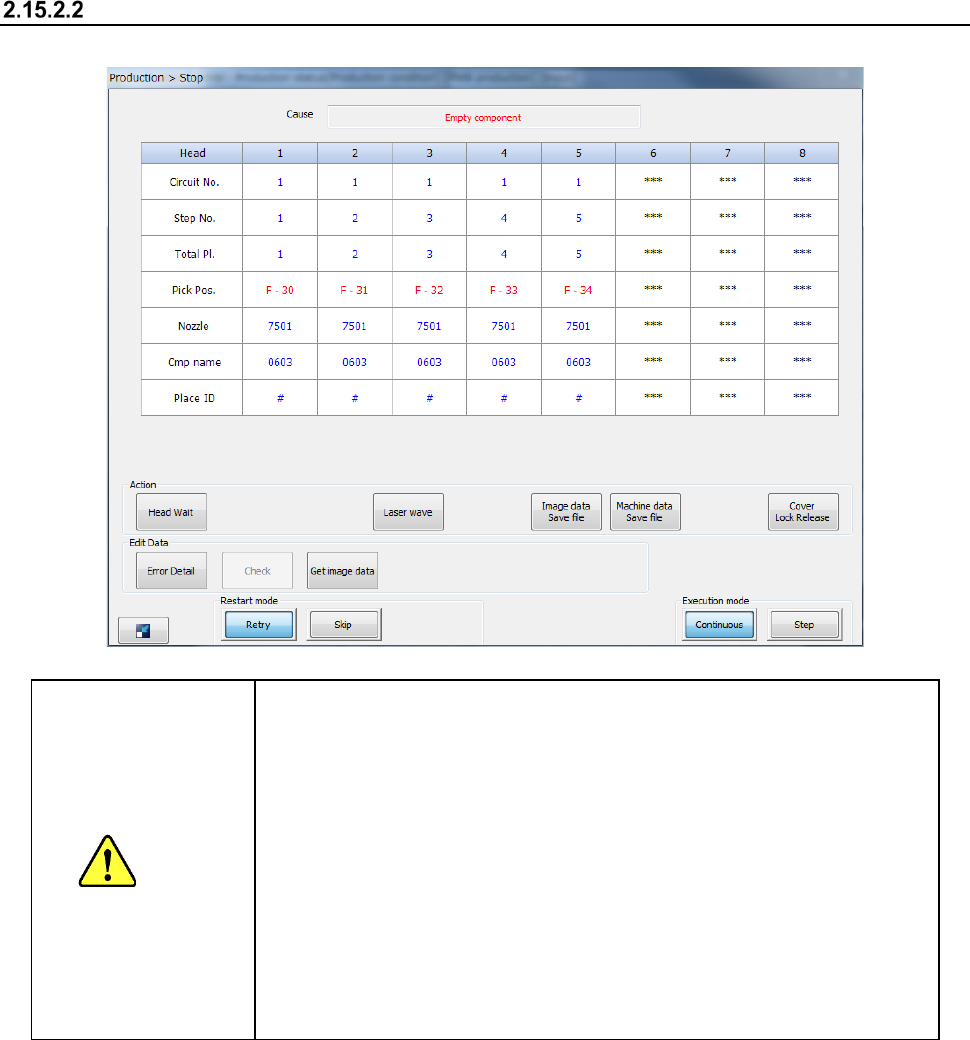
Part 1 B asic O peration Chapter 2 Pr oduction 2- 154 Displayed screen When the syst em pause s because component s run out , it displays t he following dialog box. CAUTION When you pres s the <START> s w itch, the…

Part 1 Basic Operation Chapter 2 Production
2-153
When components run out
Overview of a component run-out error
If a retry over error occurs when the system picks up a component from a feeder, the system judges
that components have run out.
If you check the option “Stop system when components run out” on the “Operation option” screen,
the system stops PWB production temporarily when components run out, and then displays the
“Pause” screen.
When you do not check this option, the system searches an alternate feeder to continue the current
PWB production. If the system cannot continue the current PWB production, the “Retry list”
appears on the screen.
• “Stop system when components run out.” of the Operation option
If this check box is checked, the system aborts the current PWB production and displays
the “Stop” screen when components run out.
Otherwise, the system searches the alternate feeder and continues the current production.
If the system cannot continue the production, it displays the Retry list.
(See Section 2.11.4 “Retry list” for details.)
• Continuation of the process
The system places a component(s) on another (other) position(s) at which the system can
place it (them).
When the check box “Stop system when components run out.” of the Operation option is
not checked, the system uses the alternate feeder from the next pick-up/placement cycle if
there is.
• Replenishment of components and setting of the number of components
If you replenish a component supply device with components when components run out,
set the number of components when necessary.
(See Section 2.11.1 “When the stocked components run out” for details.)
• Signal light
The signal light flashes in yellow.
(The signal light flashes if the JUKI standard settings are made.
See Section 8.3.6.1 “Signal lights” of Chapter 8 “Machine Setup.”
- When you press the <START> switch, the system restarts production operation. See the
section on “Restart mode” described later also.
- When you press the <STOP> switch, the system displays the “Question” message for
temporarily stopping or aborting another station to abort PWB production.
Part 1 Basic Operation Chapter 2 Production
2-154
Displayed screen
When the system pauses because components run out, it displays the following dialog box.
CAUTION
When you press the <START> switch, the head moves immediately
and PWB production starts.
To prevent any accident causing injuries, never put your hand in the
machine or never bring your face or head close to the machine while it
is operating.
Be sure to check to see if there is no one who is operating the insides
of the machine before pressing the <START> switch.
Be sure to check to see if there is no one who is near the machine and
may be injured before pressing the <START> switch.
Be sure to check to see if any substance (such as an adjustment tool)
that prevents each operation of the insides of the machine is not
attached or located on/in the machine before pressing the <START>
switch.
Part 1 Basic Operation Chapter 2 Production
2-155
Restart mode
When the system restarts PWB production after an error occurs, its operation varies depending on
the setting of the Operation options.
If you do not check any of the following operation options, press the <START> switch and follow
your setting of the “Restart mode” to restart the production.
(1) Operation option “Run pick tracking when restarting after component run out”
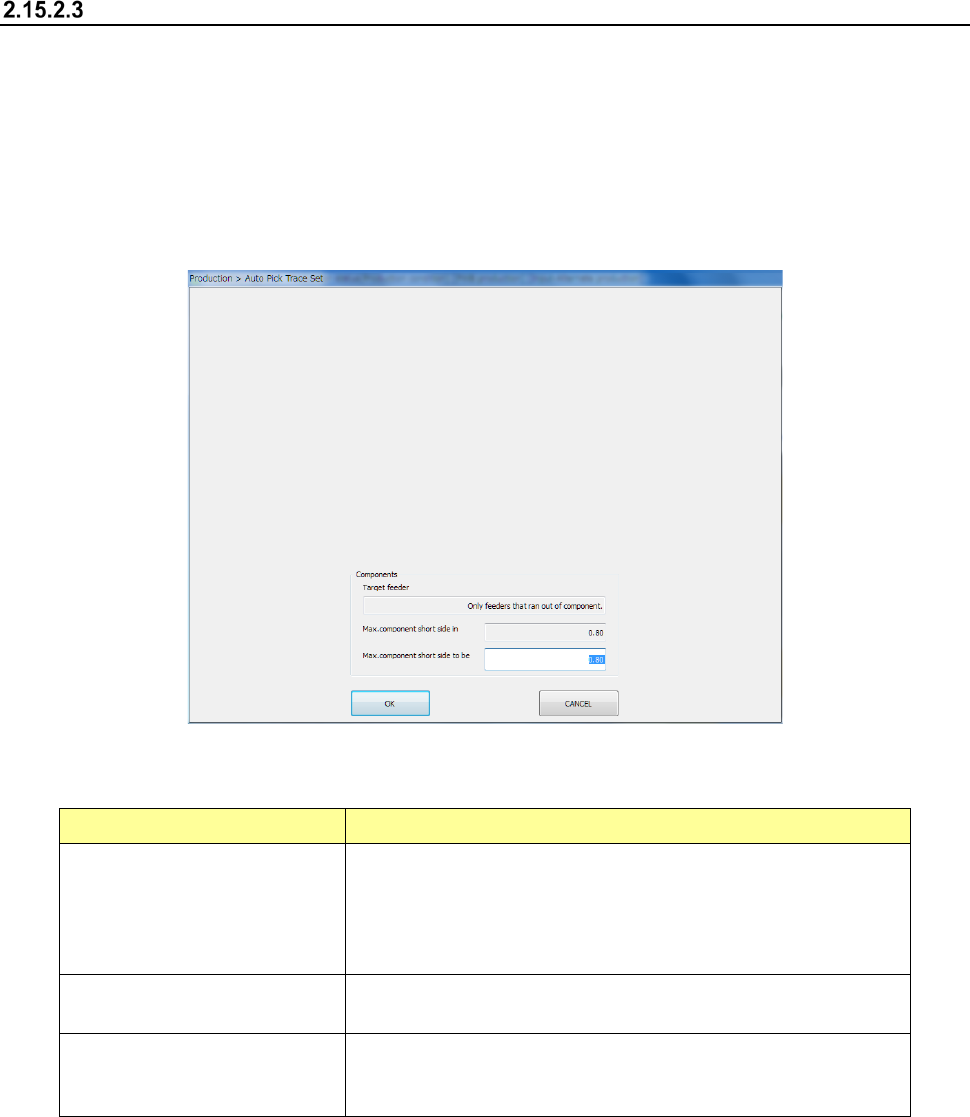
When the check box “Run pick tracking when restarting after component run out” of the
Operation option is checked, the system displays the “Auto Pick Trace Set” screen on the
screen before restarting the production.
1) Components
The system displays and allows you to specify a component whose pick-up position is to be
tracked automatically.
Menu item Description
Max. component short side to be
Enter the new maximum value of the shorter side length of a
component whose pick-up position is to be tracked automatically.
When the actual length of the component shorter side is longer than
this value, the system does not track its pick-up position
automatically.
Max. component short side in
Displays the maximum value of the shorter side length of a
component whose pick-up position is to be tracked automatically.
Target feeder
Displays the type of a feeder whose component pick-up position is to
be tracked automatically. This item is set on the “Operation option”
screen.
2) <START>/<STOP> switch
When you press the <START> switch of the operation panel, the system starts tracking a
component pick-up position.
When you press the <STOP> button, the system quits the “Auto Pick Trace Set” screen
without tracking a component pick-up position.
(2) Operation option “Measure component height when restarting after component run out.”
When the check box “Measure component height when restarting after component run out.” of
the Operation option is checked, the system measures the height of a chip or Melf component
that runs out before restarting the suspended production.