RS-1_instruction manual.pdf - 第730页
Part 2 D etaile d Descript ion of E ach Functi on Chapter 8 Machine Set up 8- 22 b) Program Editor - M achine operat ion: when each function of measurement is ex ecute d - M achine operat ion: when each function of inspe…
Part 2 Detailed Description of Each Function Chapter 8 Machine Setup
8-21
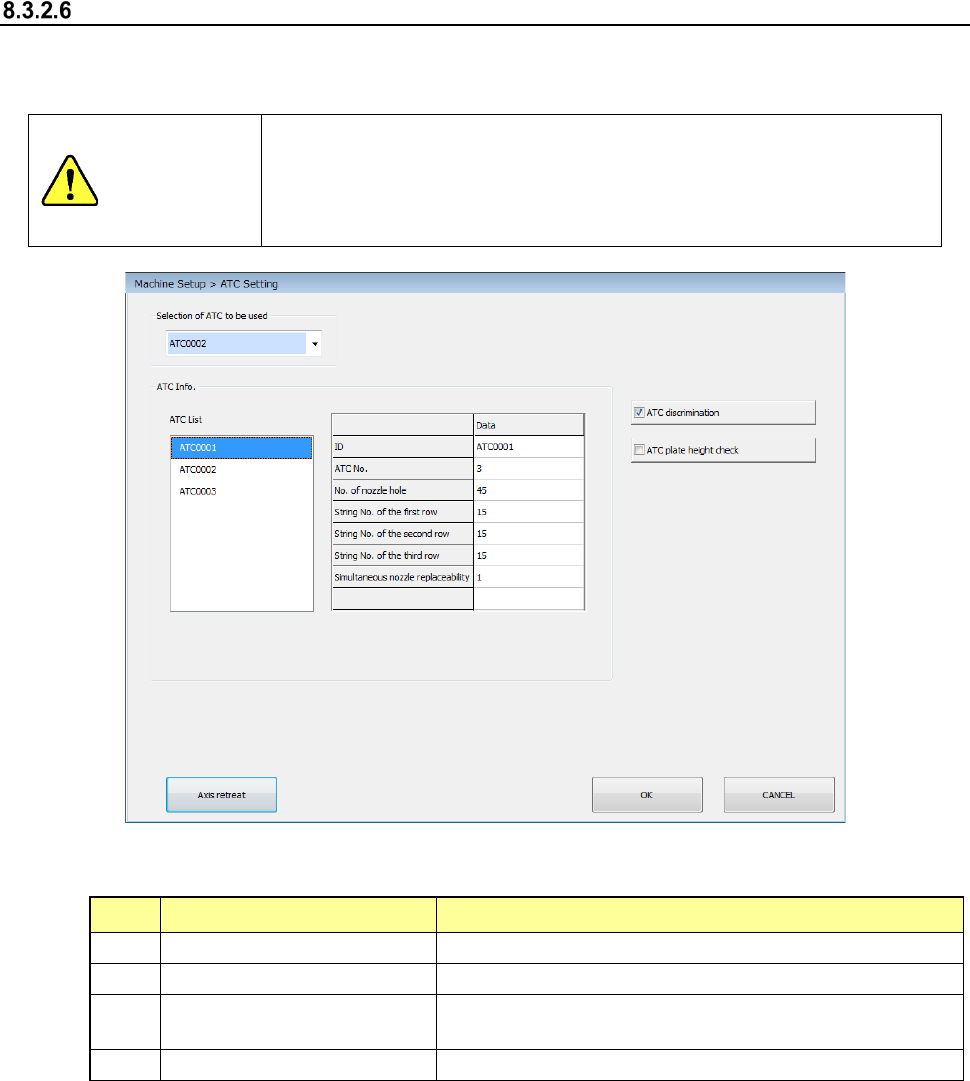
ATC Setting
Set information on an ATC to be used.
When you select the [ATC Setting] command, the following screen appears.
CAUTION
Be sure to turn off the machine before attaching/detaching or replacing
an ATC plate.
After replacing an ATC plate with another one, be sure to make
settings of the ATC plate on this screen.
If you do not follow this procedure, a nozzle may be damaged.
(1) Setting items
No. Item Description
1
Selection of ATC to be used
Select an R-ATC to be used.
2
ATC Info.
Displays the list of registered ATCs and ATC information.
3
ATC discrimination
Sets the function for discriminating the mounted ATC to
ON/OFF.
4 ATC plate height check Sets the height check of the mounted ATC plate to ON/OFF.
(2) How to set
1) Select an R-ATC to be used from the combo box.
2) Specify whether to discriminate the ATC with the check box.
(3) ATC discrimination operation
1) When you enable the “ATC discrimination” check box, the system discriminates the ATC
at the following timing.
Except for during d) production below, when the system succeeds in discriminating the
ATC on each screen, it does not discriminate the ATC again unless you close the
screen.
a) Machine Setup
- When you change the ATC
Part 2 Detailed Description of Each Function Chapter 8 Machine Setup
8-22
b) Program Editor
- Machine operation: when each function of measurement is executed
- Machine operation: when each function of inspection is executed
c) Manual Control
- When you open the “Atc control” screen
d) Production
- When production starts from the “Production” top screen
- When you restart the suspended production from the pause state caused due to
pressing of the STOP switch
* The system does not discriminate an ATC when you restart the suspended
production from the pause state caused because components run out or an error
occurs.
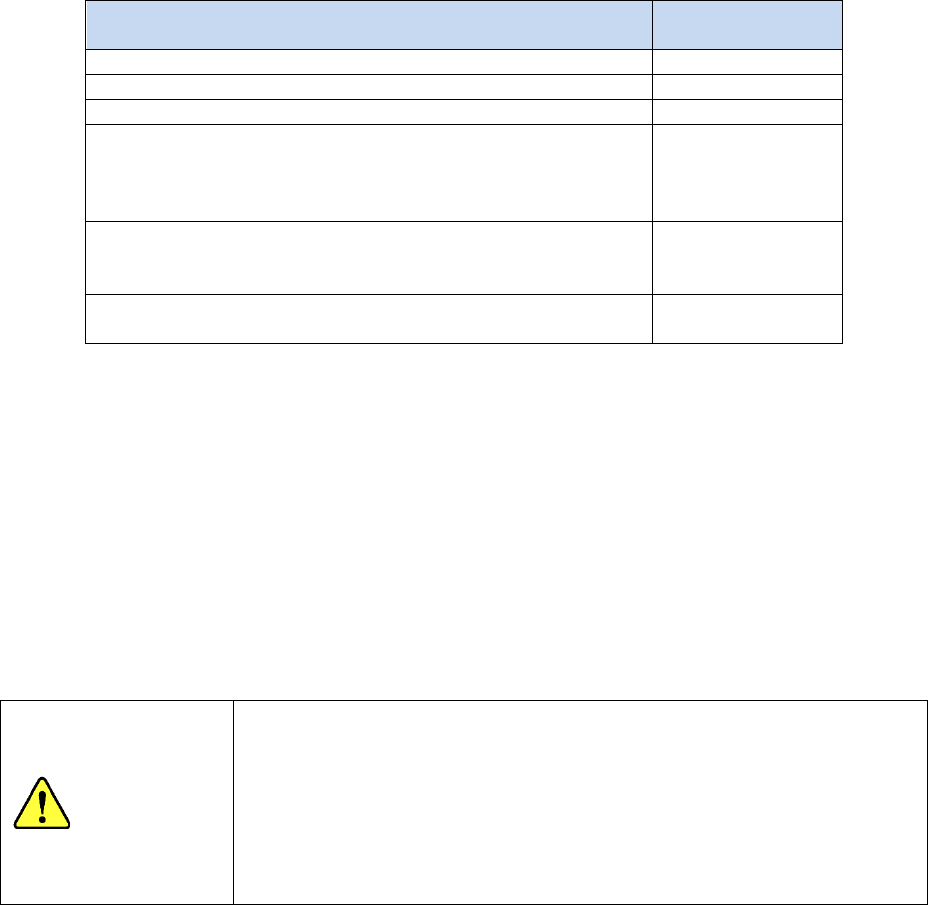
Condition
ATC discrimination
operation
When the initial production starts
○
When production starts after the previous production finishes
○
When continuous production starts
○
When you restart the production suspended due to a
temporary stop requested by a user
(When you restart the production suspended by the <STOP>
switch)
○
When you restart the production suspended due to an error
(For example, components run out or a laser recognition
error occurs.)
×
When you restart the production suspended as indicated on
the Retry List.
×
e) Teaching
- When you switch the selected device to be taught to a head
2) The system discriminates an ATC at the following timing regardless of the setting of the
“ATC discrimination” check box.
- When the semi-automatic nozzle return operation is performed
(4) ATC plate height check
When you check off this check box, the system measures four corners of the plate with the
HMS before discriminating an ATC to check to see if the plate is mounted on the machine
correctly.
CAUTION
When you disable the “ATC discrimination” check box, the system
allows a nozzle to be attached/detached on/from an ATC without
discriminating the ATC. Note that even though the mounted ATC
does not match the ATC specified in a production program, it
attaches/detaches a nozzle on/from the ATC.
Do not replace the ATC with another one without changing the setting of
the “Selection of ATC to be used.” A nozzle may be damaged.
Part 2 Detailed Description of Each Function Chapter 8 Machine Setup
8-23
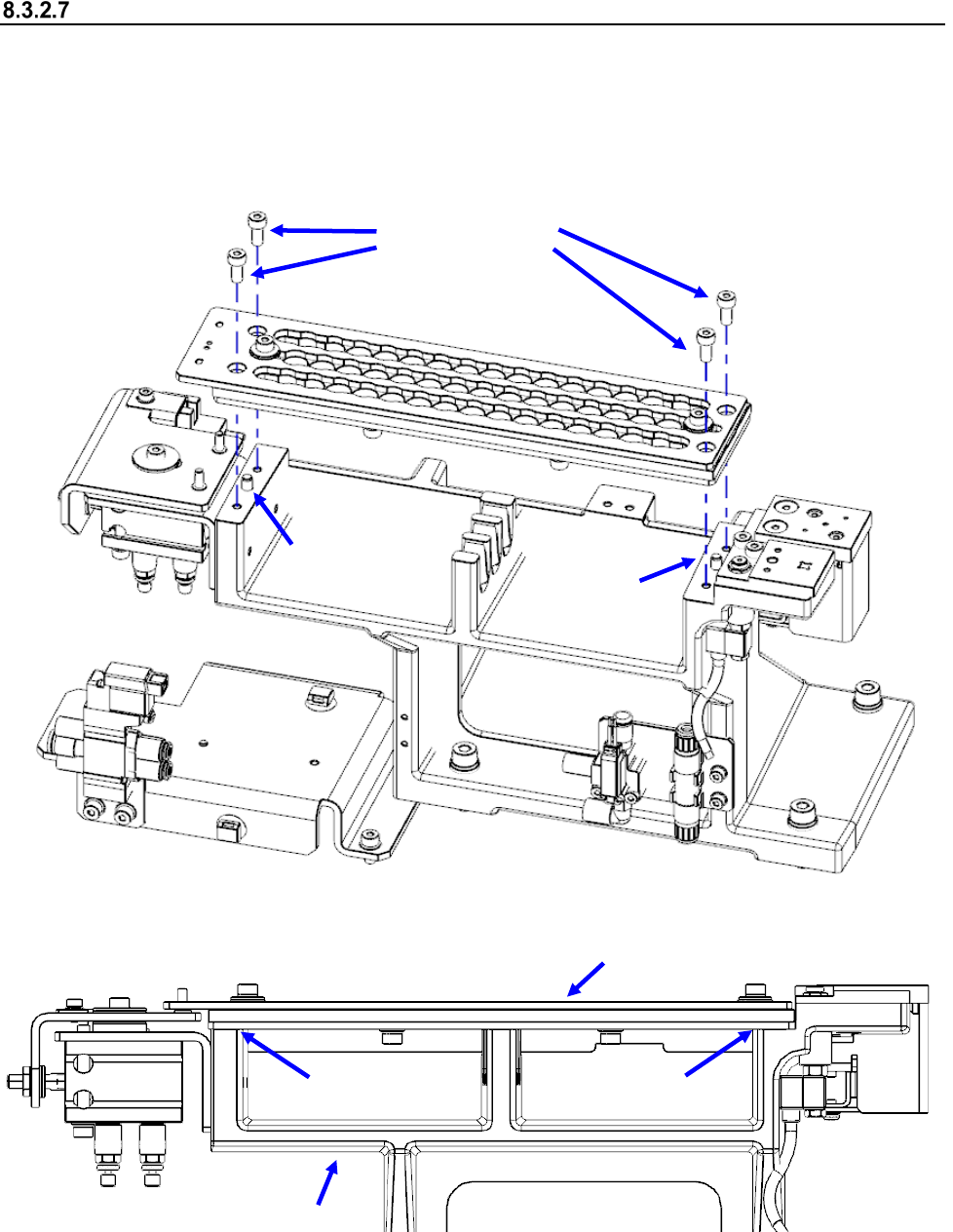
Attaching the R-ATC
To attach the R-ATC on the machine, pay attention to the descriptions below, and then attach it
securely.
(1) Check to see if the reference pins at two positions are positioned to the R-ATC securely.
(2) Check to see if the plate fixing screws (M4 hexagon-socket-head screws) are set at four
positions securely, and the R-ATC adheres to the ATC base.
Reference pin
Reference pin
Plate fixing screws
R-ATC
ATC base
* No gap
* No gap