RS-1_instruction manual.pdf - 第497页
Part 1 B asic O peration Chapter 4 Cr eating a Produc tion Progra m 4- 162 4.5.1 .9 Production program copy This functi on allows t w o or mor e matrix circ uits to be def ined with in the same boar d. T wo or more m atr…
Part 1 Basic Operation Chapter 4 Creating a Production Program
4-161
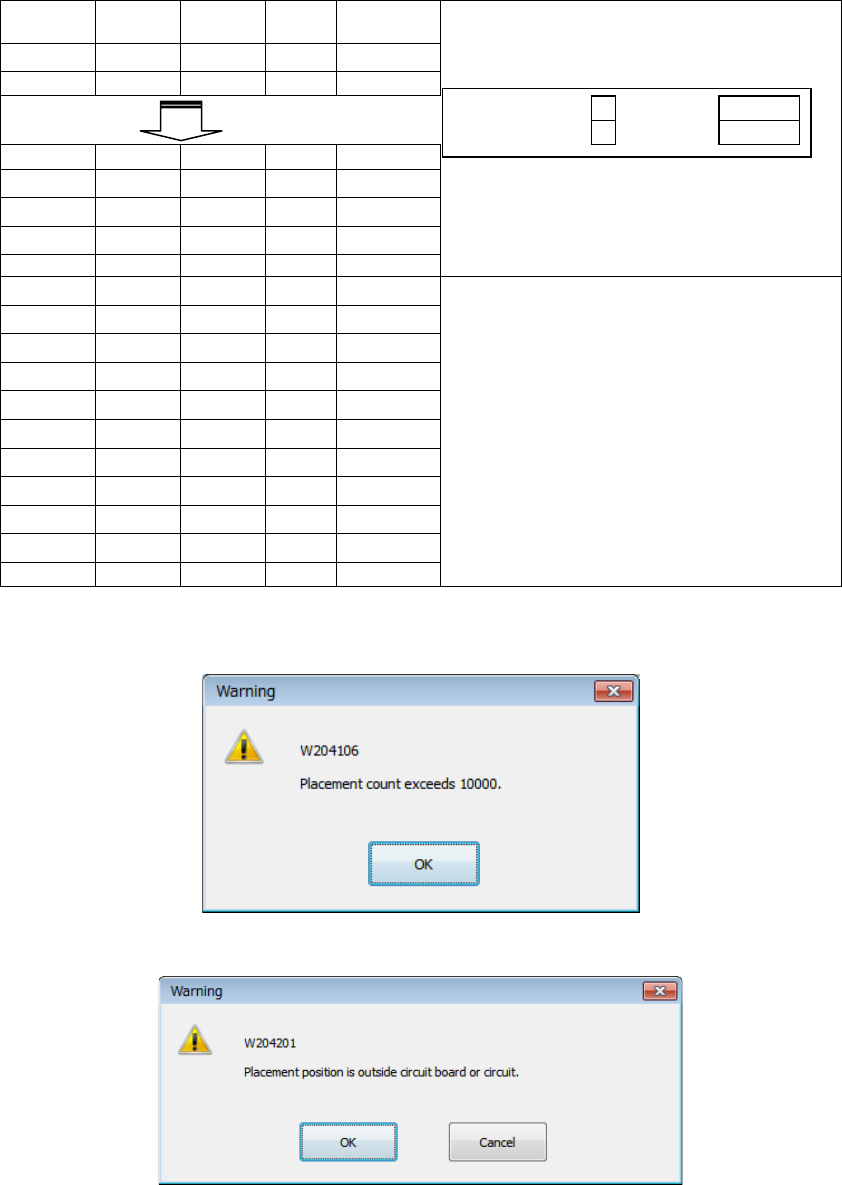
An example of the result of execution of the [Matrix copy] command for the Placement data is
shown below.
Placement
ID
X
Y
Angle
Component
name
R1
5.000
10.000
45.000
1608-A
R2
10.000
10.000
0.000
1608-A
No. of copies X
3
X Pitch:
0.500
No. of copies Y
1
Y Pitch:
1.000
R1
5.000
10.000
45.000
1608-A
R1
10.000
10.000
0.000
1608-A
#
5.500
10.000
45.000
1608-A
- The copied block is inserted above
the specified line.
- All placement IDs are set to “#.”
#
10.500
10.000
0.000
1608-A
#
6.000
10.000
45.000
1608-A
#
11.000
10.000
0.000
1608-A
- The input focus is positioned in the
first “Placement ID” column of the
inserted block.
#
6.500
10.000
45.000
1608-A
#
11.500
10.000
0.000
1608-A
#
5.000
11.000
45.000
1608-A
#
10.000
11.000
0.000
1608-A
#
5.500
11.000
45.000
1608-A
#
10.500
11.000
0.000
1608-A
#
6.000
11.000
45.000
1608-A
#
11.000
11.000
0.000
1608-A
#
6.500
11.000
45.000
1608-A
#
11.500
11.000
0.000
1608-A
If the number of data records exceeds the maximum number, the message like one shown below
appears on the screen, and the copy operation is aborted. In this case, no data is copied.
If the placement position is outside the board or the circuit, the message like one shown below
appears on the screen.
OK: The system continues copying data. A mark indicating that the placement
position is outside the regulated range is appended to the copied data.
Cancel: The system aborts the copy operation.
Part 1 Basic Operation Chapter 4 Creating a Production Program
4-162
4.5.1.9 Production program copy
This function allows two or more matrix circuits to be defined within the same board.
Two or more matrix circuits are defined within the same board.
Two or more circuits are arranged, and the positions of the arranged circuits are corrected with
area marks, and then placed on a board.
Source PWB Destination PWB Result
Single-plane PWB Single-plane PWB Single-plane PWB
Multi-plane matrix PWB Single-plane PWB
Multi-plane non-matrix PWB Single-plane PWB
Multi-plane matrix
PWB
Single-plane PWB Single-plane PWB
Multi-plane matrix PWB Single-plane PWB or multi-plane matrix PWB
When the number of divisions is equal to the
pitch between the consecutive circuits, and
the offset theta is 0 or 180 degrees, the board
is copied as a multi-plane matrix PWB.
Multi-plane non-matrix PWB Single-plane PWB
Multi-plane
non-matrix PWB
Single-plane PWB Single-plane PWB
Multi-plane matrix PWB Single-plane PWB
Multi-plane non-matrix PWB Single-plane PWB
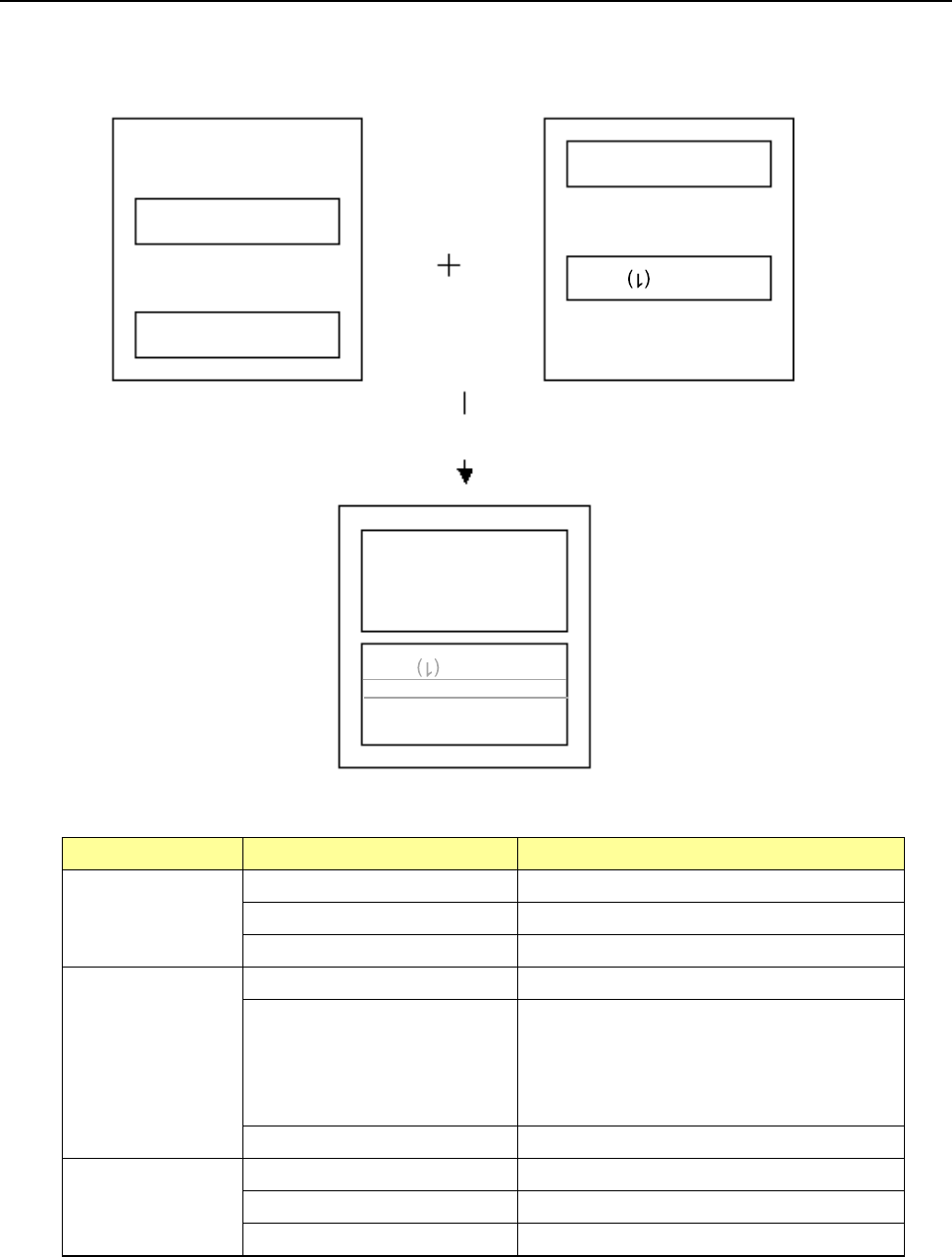
If there are two or more board configuration candidates to be arranged after copy, or if two or more
circuits are overlapped with one another after copy, the system asks you how circuits will be
arranged on the board.
Source production program
Execution of the [Production program copy] command
Side A (2)
Side A (1)
Destination production program
Side B
Side B
(2)
Side B
Side A (1)
Reference circuit
Part 1 Basic Operation Chapter 4 Creating a Production Program
4-163
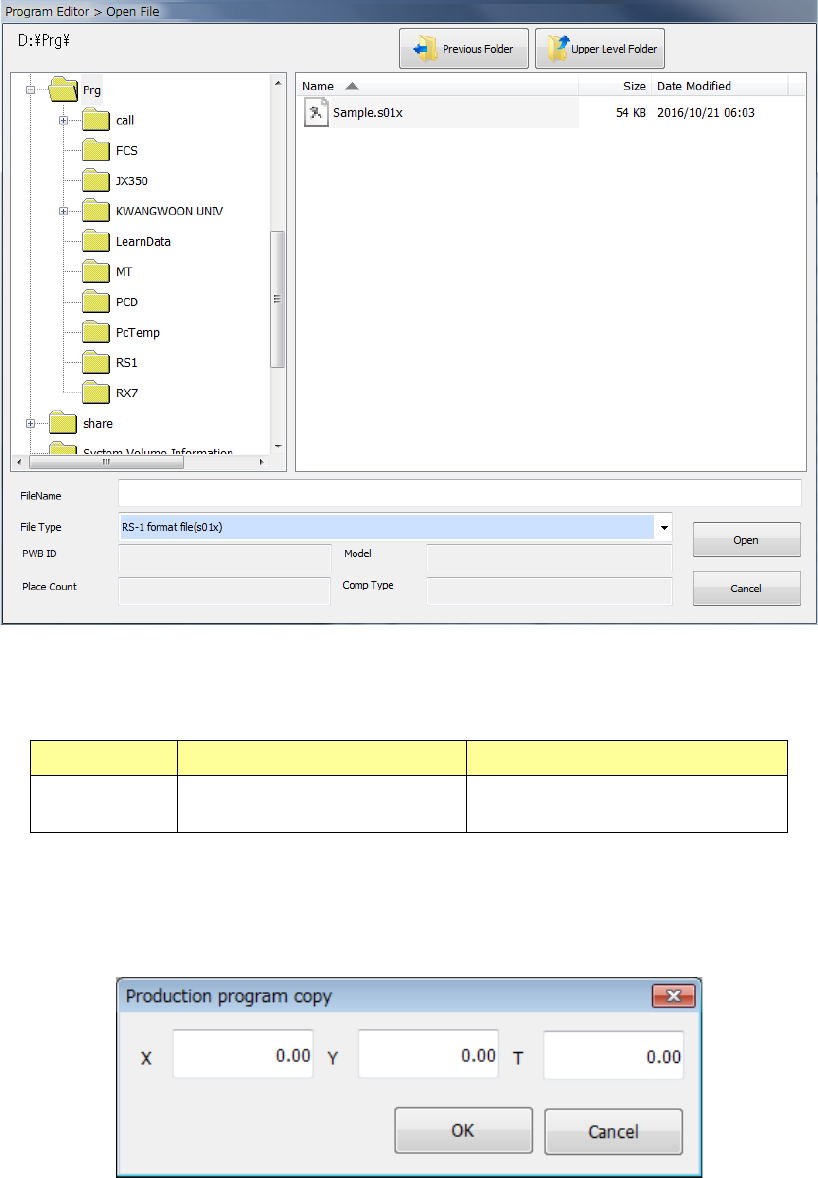
When you select the [Production program copy] command from the menu, the “Open File” dialog
box appears on the screen.
Combination of the file formats of production programs that can be copied is shown in the table
below.
Model Source file format Destination file format
RS-1/1R RS-1/1R format file (s01x) RS-1/1R format file (s01x)
Note: Combination of any other formats of files is impossible.
When the system reads a file, the following dialog box for entering an offset to the next reference
board position opens. Enter an offset value.