RS-1_instruction manual.pdf - 第299页
Part 1 Basic Operat ion Chapter3 D aily maintenance 3-7 Inspection it e m Transport belt Inspection freq uenc y : Ev er y w eek What to inspe ct Check to see if the transpor t belt is not worn o ut, dam aged or s tretche…
Part 1 Basic Operation Chapter3 Daily maintenance
3-6
Inspection item
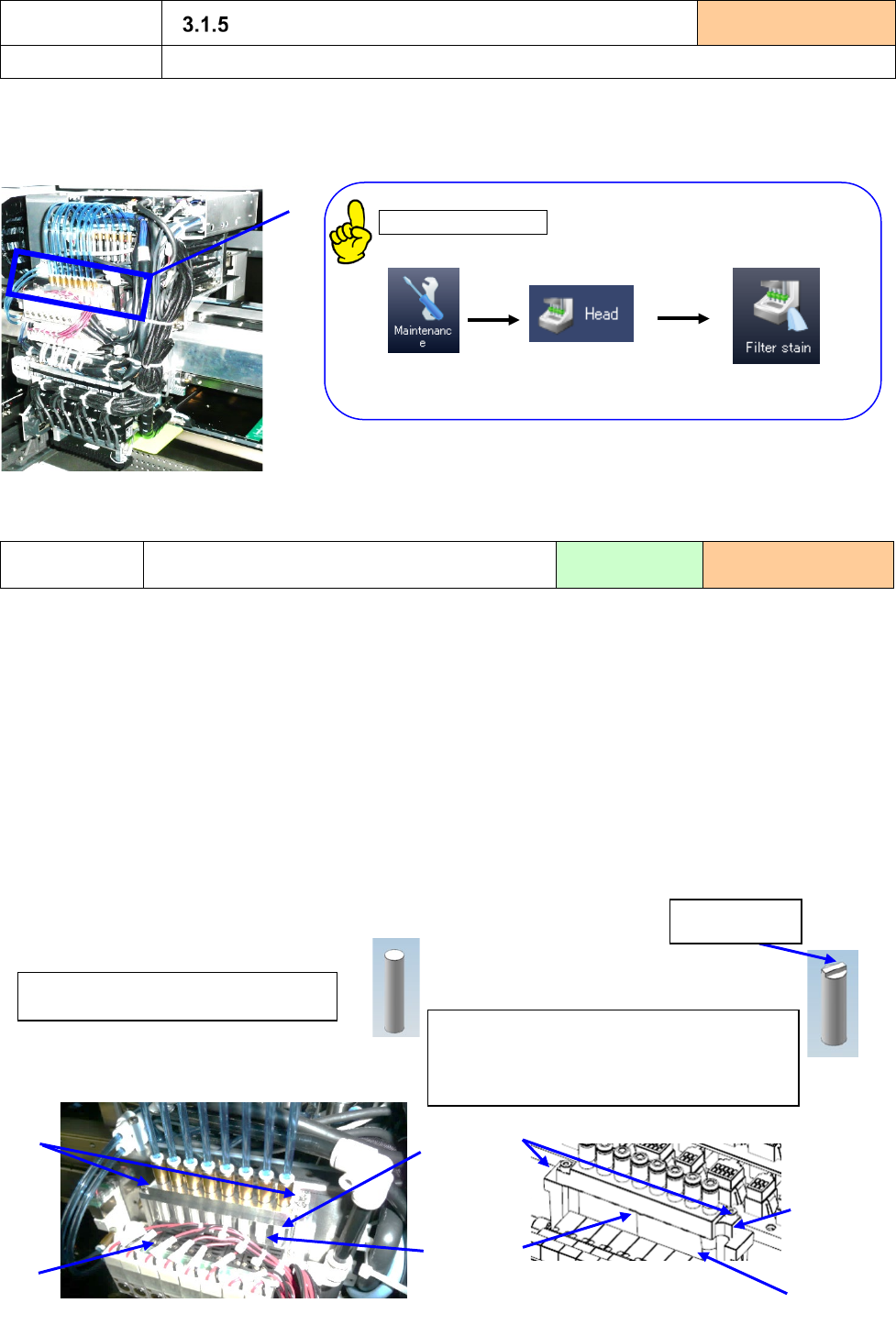
Air filter (LNC120-8 head)
Inspection frequency:
Every month
What to inspect
Check to see if the air filter is not stained.
1) Check to see if “the air filter①” inside the filter box located on the front side of the head unit is not
stained with your eyes.
2) Make sure that there is no problem in Filter stain check.
. Filter stain check
“Instruction manual 11.3.3.2 Filter stain check”
If there is problem, the message to which exchange of a
filter is urged is displayed.
3) If the air filter is stained, replace it with a new one.
Replacement
Replacement of the head air filter
Tool to be used:
Driver
When to replace:
Every six months
1) Loosen the “setscrews ②” (Two positions on the left and right sides) of the filter box to remove the
“filter box U ①.”
*① ③ shape varies depending on the serial number.
2) Check to see if the “filter ③” is stained.
3) If it is, replace the “filter ③” of the “filter box L ④” with a new one.
* Filter with flat tip and no protrusion. Part No.:40046646
* Filter with protrusion at the tip. Part No.:E3052729000
(RS-1 machine Rev. N, RS-1R machine Rev. D, RS-1/1R head Rev. C or later)
4) Insert the new “filter ③” into the “filter box L ④” securely and fix them with the “setscrew ②.”
(Tightening torque: 0.7N·m)
Check to see if the “O-ring F2 ⑤” is fit into the groove of the “filter box L ④” also.
5) Get the vacuum value without nozzle again.
①
Filter ③ Part No.:E3052729000
(RS-1 machine Rev. N, RS-1R machine
Rev. D, RS-1/1R head Rev. C or later)
Filter ③ Part No.:40046646
②
①
③
④
protrusions.
①
④
③
②
Part 1 Basic Operation Chapter3 Daily maintenance
3-7
Inspection item
Transport belt
Inspection frequency: Every week
What to inspect
Check to see if the transport belt is not worn out, damaged or stretched.
1) Check that the belt is severely worn-out, damaged, or stretched.
2) If the transport belt is worn out or damaged, replace it with a new one.
Replacement
Replacement of the transport belt
Tool to be used:
Driver and wrench
When to replace:
Every six months
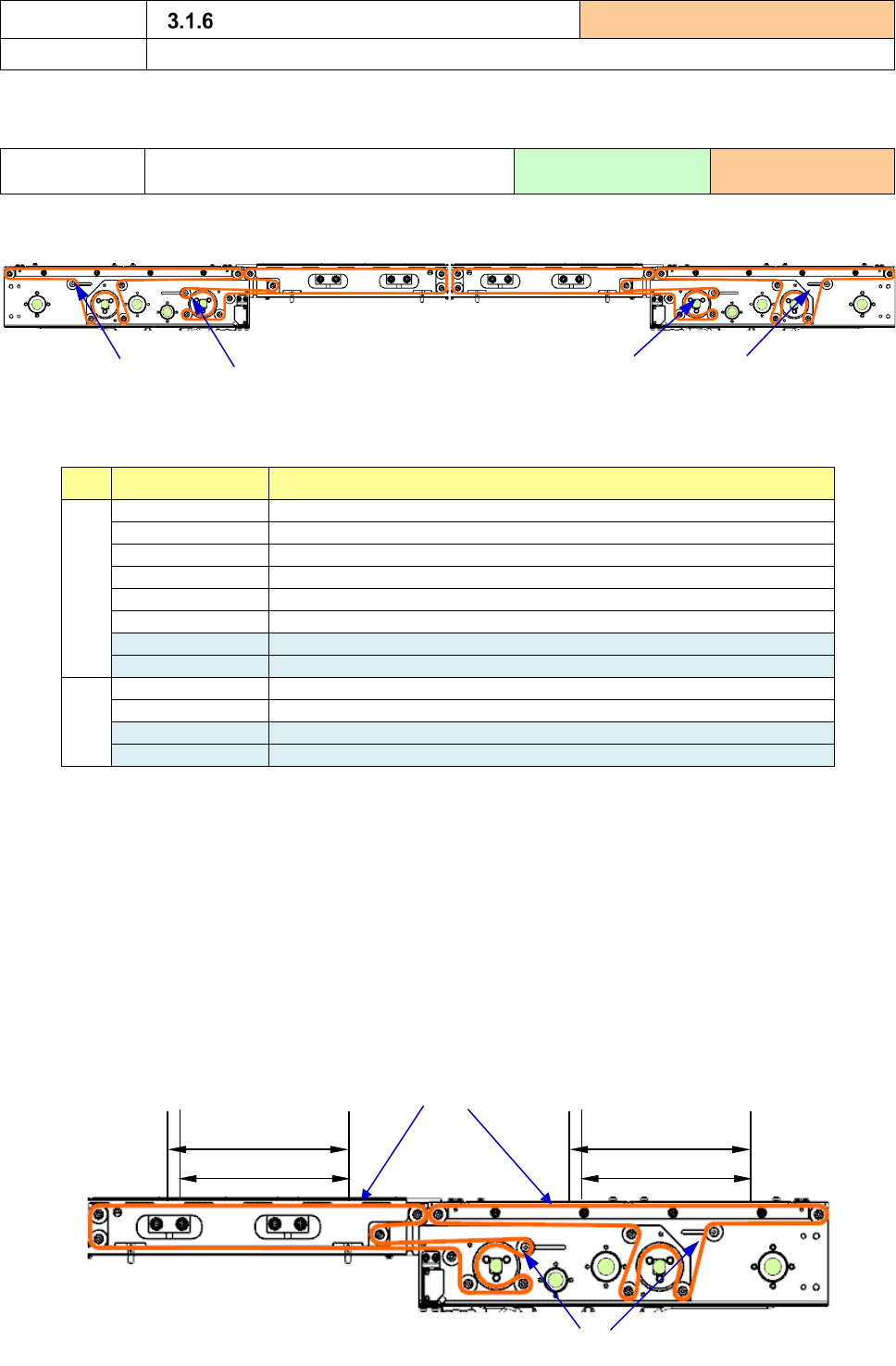
1) Loosen the pulleys for adjusting the belt tension that are attached into the elongated holes of the
sections A and B.
2) Remove the conveyor belt from the conveyor pulley, and replace the belt with a new one whose part
number is shown below.
Product No.
Product name
A
40183028
CONVEYOR_BELT_S
40188357
CONVEYOR_BELT_S_ESD (OP)
40186617
CONVEYOR_BELT_S_150 (OP)
40186618
CONVEYOR_BELT_S_250 (OP)
40188359
CONVEYOR_BELT_S_150_ESD (OP)
40188360
CONVEYOR_BELT_S_250_ESD (OP)
40113952
CONVEYOR_BELT_C_M (for an extra-large board)
40215581
CONVEYOR_BELT_S_XL_ESD (option for an extra-large board)
B
40183030
CONVEYOR_BELT_C
40188358
CONVEYOR_BELT_C_ESD (OP)
40073709
CONVEYOR_BELT_150 (for an extra-large board)
40215582
CONVEYOR_BELT_C_XL_ESD (option for an extra-large board)
3) Adjust the tension of the transport belt.
① While the transport belt is loosened (that is, the transport belt is held under no tension), find a
flat portion of the transport belt and use a permanent marker to write down two marks at the
positions whose distance is 200 mm.
② In the reverse order to 1) above, move the “transport pulleys” at “Part A” to tension the transport
belt until the distance between two marks becomes 201 mm, and fix the transport pulleys.
Be careful so that the station section cannot be raised when the belt of the conveyor rail S is
tensed.
③ After attaching the transport belt, operate it on the “Manual Control” screen for several minutes
to check to see if there is no problem such as noise or detachment of the belt.
④ Check the tension of the transport belt again one week later.
A
A
B
B
Conveyor belt
Transport pulley
201mm
200mm
201mm
20
0mm
Part 1 Basic Operation Chapter3 Daily maintenance
3-8
Inspection item
Transport pulley
Inspection frequency: Every week
What to inspect
Check of the transport pulley operation
1) Operate the conveyor motor on the “Manual control” screen to check to see if the pulley rotates
smoothly.
2) If the pulley does not rotate well or does not rotate at all, replace it with a new one.
Inspection item
Lock stay
Inspection frequency: Every week
What to inspect
Check the lock stay condition.
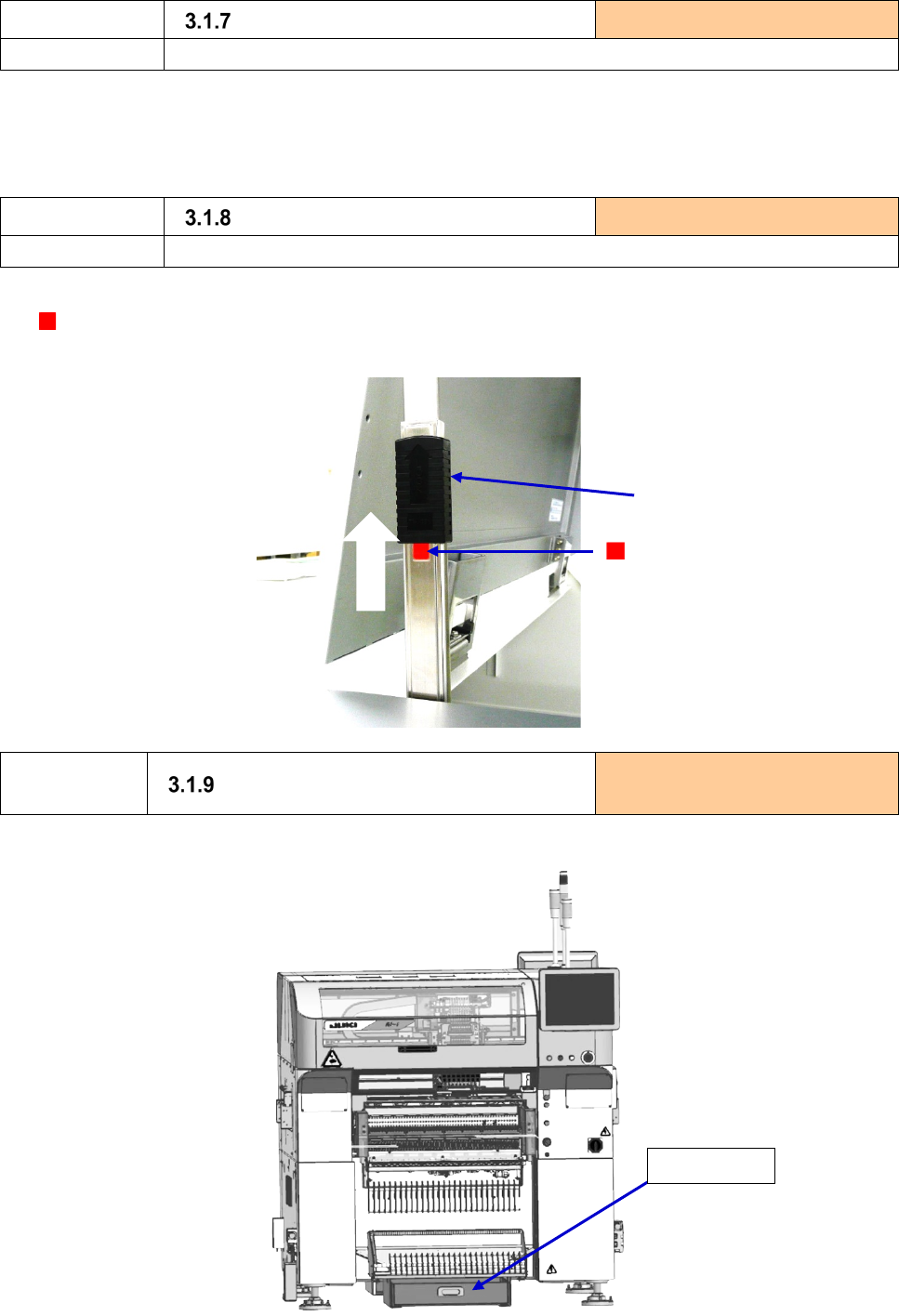
1) Push up the lock lever and check to see if the cover does not drop off at the position where the mark
can be seen (i.e. a locked status). While checking, to prevent possible injury, pay extreme
caution to the cover which may drop.
Inspection/
Replacement
Trash box
Inspection/replacement frequency:
everyday
If the trash box is filled with remaining material tapes, dispose of them.
Lock lever
Lock.
Mark
Trash box