RS-1_instruction manual.pdf - 第245页
Part 1 B asic O peration Chapter 2 Pr oduction 2- 134 Continuous PWB production Overview If a PWB prod uction is ter minated abnorma l ly (due to an asy nchro nou s event or abnorm al terminati on of PWB pro duction), yo…
Part 1 Basic Operation Chapter 2 Production
2-133
Resuming return of all axes to their home positions
When you press the <START> switch if the system can return the axes to their home positions
respectively to resume PWB production, the screen for returning them to the home positions
including the <Servo lock> button appears.
To display the screen for returning the axes to the home positions to resume PWB production, all
axes have returned to their home positions at least once.
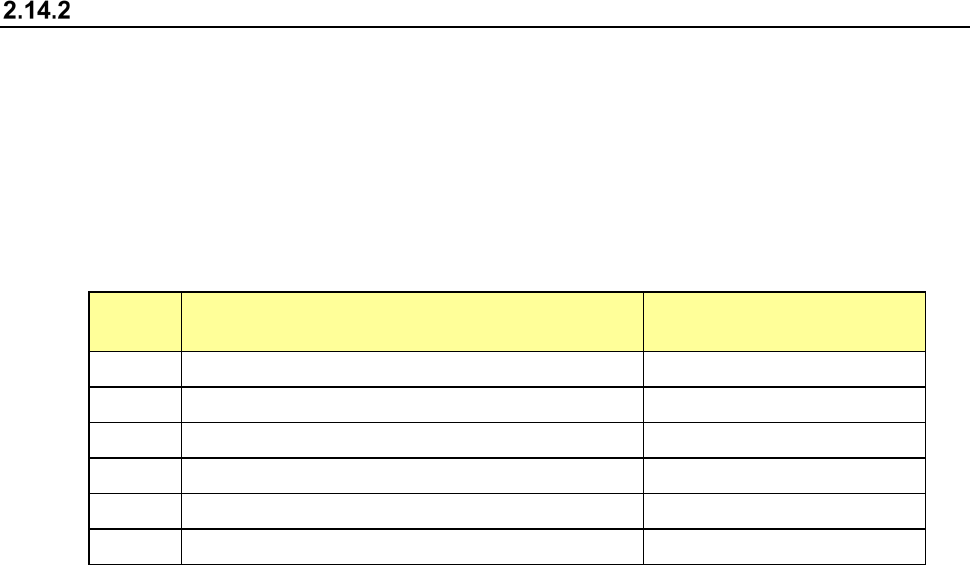
The requirements for returning the axes to the home positions to resume PWB production
after an asynchronous event that turns off the servo power supply occurs are shown below.
No. Asynchronous event
Resuming returns of all axes
to the home positions
1 The main unit is in Emergency Stop mode. O
2 The feeder floats, and the system stops temporarily. O
3 The limit sensor of each axis is activated. O
4 The alarm is raised at each axis. O
5 The area sensor is activated. O
6 POWER OFF (CE machine) O
◆ If either of the following events occurs, the system cannot resume returning all axes to their
home positions:
① All axes have not been returned to their home positions at least once.
② Although the system already tried to resume returning all axes to their home positions, it
failed.
Part 1 Basic Operation Chapter 2 Production
2-134
Continuous PWB production
Overview
If a PWB production is terminated abnormally (due to an asynchronous event or abnormal
termination of PWB production), you can perform continuous production with following the
procedure below.
Continuous production is to be performed only after at least one component is picked up or placed
on a board. If the system neither picks up nor places a component on a board, new PWB
production is to be performed.
If a board is located on the conveyor board transport path at start of PWB production, you have to
eject it or re-clamp it before starting the suspended PWB production. This is called “PWB
production without feeding a board.”
- When you resume the suspended PWB production as “PWB production without feeding a
board” although you reload the production program or quit the production program, the
system does not know the board transport condition under which the production was
terminated. Therefore, some component may be missing or placed at a wrong position of
the board.
- When the system tries to re-clamp a board during production without feeding the board, it
may fail to re-clamp the board if the board is very heavy. (For example, if the board is very
large or if many components are already placed on the board)
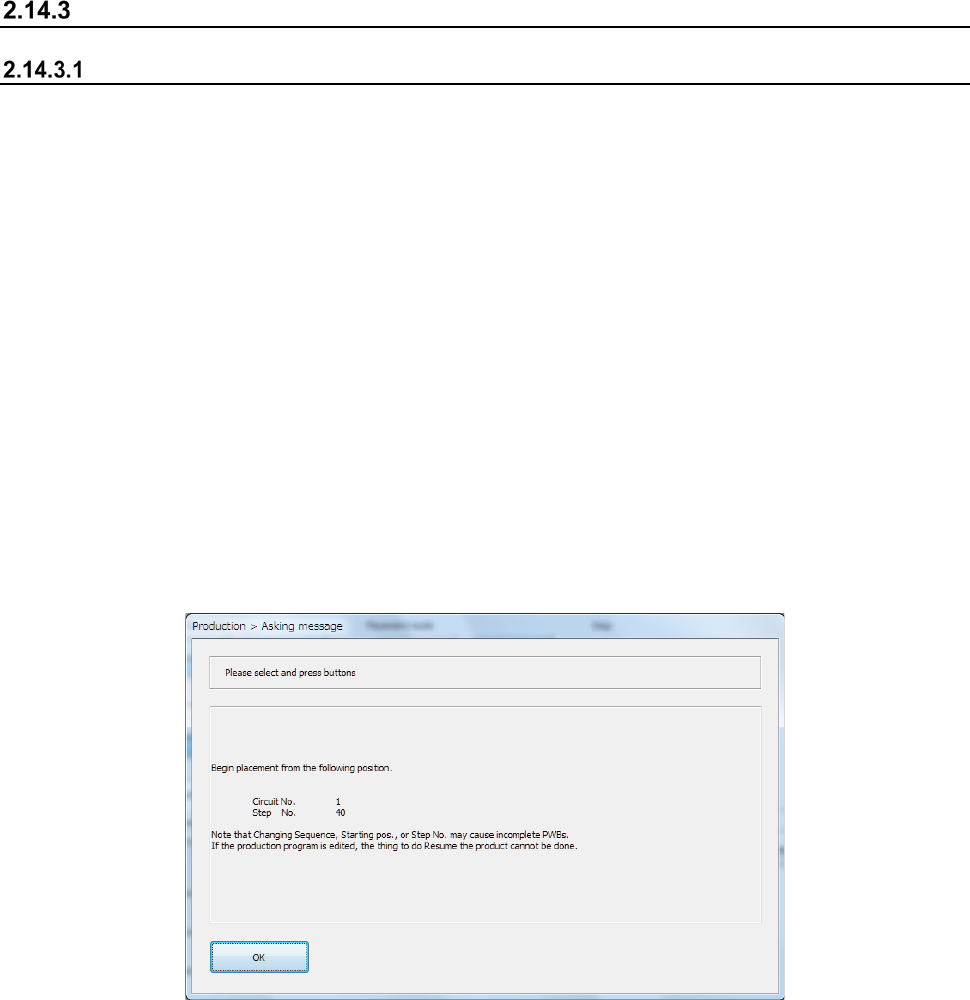
When PWB production is aborted due to an error, the system displays the message that shows you
the production restart position.
This message shows you the start position of the next placement operation for a board on which
any component is not placed yet.
When you press the <OK> button at this point, the screen is switched back to the “Prod Cond”
(production condition) screen.
At start of the next PWB production, the confirmation message appears on the screen to ask you
whether to resume the suspended production from the point recorded in the continuous production
data. At the same time, the system confirms the process to be performed before the production
starts.
However, if you edit the production program after an error is corrected, but before the next
production starts, the screen shown in the next section does not appear, and the system performs
normal PWB production.
(If you add or delete a PWB ID and/or a component placement position or change a component to
be placed at the placement position.)
Part 1 Basic Operation Chapter 2 Production
2-135
Deleting a continuous production file
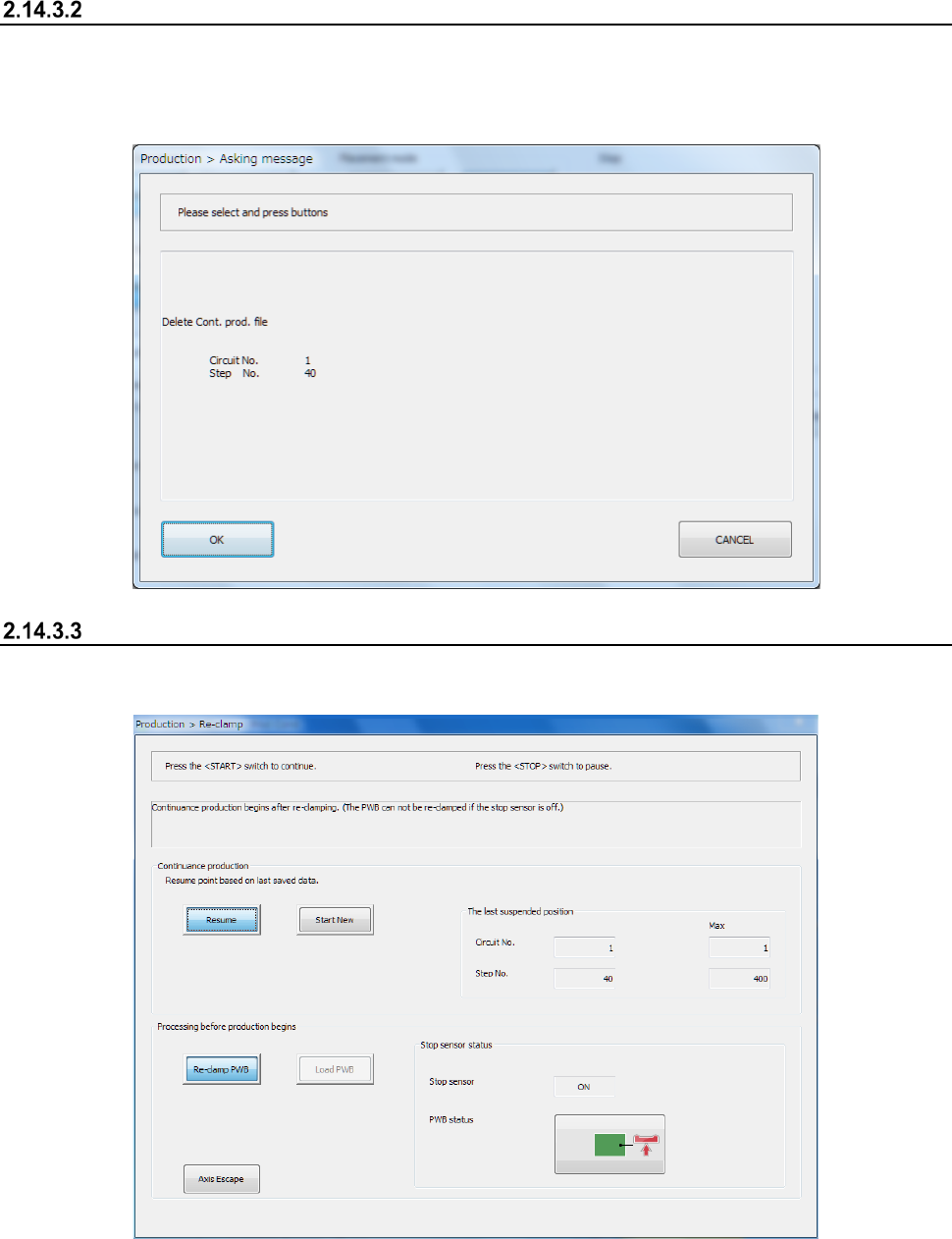
If there is a continuous production file, the [Cont. prod. file Delete] command on the “File” menu
invoked from the “Product” menu become active.
When you select this item, the confirmation message for deleting a continuous production file
appears on the screen.
Re-clamping a board
If there is any board on the transport path of the conveyor before start of continuous PWB
production, the “Re-clamp” screen for re-clamping a board appears on the screen.
(1) Message
This screen shows you the condition of the conveyor, notes on re-clamping/loading of a board,
operation to be performed after continuous production and so on for each station.