RS-1_instruction manual.pdf - 第1048页
Gl oss ary A − 2 AT C An ab br evi ati on f or Auto T ool C hang er In RS-1 /1R uni t, nozzl es t hat are s ui ted t o th e com ponent si ze ar e m ounted on t he h ead in order to c onduc t com ponent p ic ki ng and p…

Glossary
A−1
Glossary
− List of contained terms
ATC
Bad mark
BGA, FBGA
BOC alignment
BOC mark
Centering
Component data
Component shape (“Comp
Shape”)
Coordinate
Current memory
Data compatibility
Directory
EPU
Extension
Feed
Feeder (and similar units)
Feeder bank
Head (unit)
HMS
I/O safety direction setting
IC mark
IFS-NX
JaNets
Land
Lead
Machine coordinate origin
Mounter
MTC
MTS
Nozzle
OCC
Off-line
On-line
Origin return
Pick data
Picking
Pitch
Placement
Placement data
Placement station
PLCC
Program (production
program)
PWB data
PWB origin (coordinates of
the origin)
QFP
SOJ
SOP
Square chip
Support table
S-VCS
Teaching
Tray holder
VCS (unit)
Verify
Vision data
Glossary
A−2
ATC
An abbreviation for Auto Tool Changer
In RS-1/1R unit, nozzles that are suited to the component size are mounted on the head in
order to conduct component picking and placement. This is the storage place for these
nozzles.
Bad mark
A bad mark is as follows: On a gang processing PWB, a mark (bad mark) is affixed to a specific
part of the circuit that the user does not want to execute placement, the coordinates of the bad
mark are entered into Bad mark position of PWB data, and during production, the bad mark
reader moves to the coordinate position entered by the PWB data, and the OCC checks the
presence of bad mark, and as a result, the component will not be placed for a circuit that has a
bad mark
PWBs available for this system are gang processing PWBs. PWBs of single PWB processing
are not applicable. Use a bad mark with the diameter of 2.5 mm φ or larger, and the color
must be distinct in its light and shade.
Use of a white bad mark is preferable for a PWB of which color is relatively strong, such as
Glass Epoxy PWB while use of a blackish bad mark for a PWB of which color is light such as
ceramic PWB.
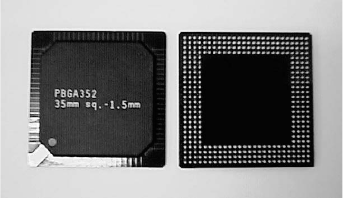
BGA, and FBGA
An abbreviation for Ball Grid Array, and Fine pitch BGA.
Solder bumps (balls) are arrayed in a grid pattern on the component placement surface. This
arrangement has a feature of having resistance against deformation and easiness of handling.
Since they were recently employed in Intel's peripheral circuits for personal computer, they are
adopted in the field of personal computer in a significant upsurge.
BOC alignment
This function recognizes the BOC mark and
calculates the correction rate by means of BOC
mark.
When to use BOC mark for placement, BOC
Alignment must be acquired. Otherwise,
placement position will be slipped when teaching of
placement position is conducted.
BOC mark
An abbreviation for Board Offset Correction mark.
A mark or marks provided on PWB to correct slippage between the periphery used in PWB
positioning or machine processing part such as positioning pin hole and the pad (land).
In RS-1/1R unit, two or three points of marks may be specified. Use of two points can correct
rotation and expansion/contraction. If three points are used, X and Y distortion can be
corrected in addition to the above.

Glossary
A−3
Centering
Centering is a system that detects the position, angle, and picking position of the component
before placing the picked up component on the PWB, and corrects the position slippage, and
angle slippage of the component that are obtained from the above actions in order to place the
component on the PWB.
Centering is divided into two types. The first type is called “LNC120.” This type uses a
dedicated recognition unit and rotates a component by applying light to the component, so that
a pick offset or angle offset can be found out for the center position of the component and then
this offset can be corrected. Since no contact with the component is made except picking, this
centering type is called “touchless centering.”
The other type is “image centering” and is called “Vision centering” or “VCS centering.”
Components with a lead pitch of less than 0.65 mm, for which LNC120 cannot perform
centering, can be placed through inspection by using a dedicated camera. The camera to be
used for this purpose is called VCS camera. This camera is mainly used for centering of QFP,
PLCC, connector, BGA, etc. It permits inspecting pitch, lead bend, lad length, and poll
deformation that cannot be inspected by LNC120. Furthermore, if an optional VCS camera
(0.3 mm VCS) is used, components with a finer lead pitch of 0.3 to 0.4 mm can be placed by
centering. This option corrects an offset for the center position and angle of the component
(However, this is a factory-delivery option) in the same way as centering by LCN120.
Component data
Based on the Component name entered by the previous placement data, entry of information of
that component is made on the component data. In addition to the above, setting of
packaging style of the component, the speed of X, Y, Z, and θ when placing the component,
various checks, and inspection functions are made here.
Component shape (“Comp Shape”)
The “Comp Shape” sets a shape of a component for the system to recognize it roughly when it
centers the component with LNC120.
Five shapes of components are to be measured with this LNC120: they are indicated with
“Config1,” “Config2,” “Config3,” “Config5” and “Config0” respectively.
0.25mm or more