RS-1_instruction manual.pdf - 第292页
Part 1 B asic O peration Chapter 2 Pr oduction 2- 181 If you are to perform changeover of the sub stacker during produc tion (1) D isab le the sub stack er . Press the sta cker switch of the sub stacker t o turn off t he…
Part 1 Basic Operation Chapter 2 Production
2-180
If you are to replace the stacker with another one during production
(1) Check to see if the stacker to be replaced with another one is disabled.
If it is enabled, press the stacker switch of the corresponding side (main/sub) to turn off the
lamp (that is, disable the stacker).
(2) Detach the stacker from the machine.
(3) Set a new stacker on the machine.
(4) When the stacker set on the machine in Step (3) is specified in the production program that is
used for the current production, use the HOD of the MTC/MTS to enter the number of
components, and then press the stacker switch to enable the stacker.
If you are to perform changeover of the main stacker during production
(1) Check to see if the lamp of the main stacker switch does not light.
If it is lighting, press the stacker switch to turn off the lamp.
(2) Detach the main stacker from the machine.
(3) After changeover of trays, set the stacker on the main side of the machine.
(4) When changeover is performed (that is, a production program is switched to another one),
enter the number of components on the “Parts no. setup” screen invoked from the production
screen of the main unit, and then press the stacker switch of the main side to enable the main
stacker.
(5) When you press the Start switch of the main unit to start production, components are pulled out
from the main stacker.
Even though the sub stacker is enabled, priority is given to the main stacker. Therefore,
unless the main stacker is disabled, any component is not pulled out from the sub stacker.
(6) Press the sub stacker switch to disable the sub stacker before the main stacker is disabled
(that is, before components run out at the main stacker).
If a production program specifying a tray set on the main stacker is different from that for a tray
set on the sub stacker, it may cause a component to be placed at a wrong position.
(7) Perform changeover of the sub stacker, and set the sub stacker on the machine. Then, use
the HOD of the MTC/MTS to enter the number of components, and press the stacker switch to
enable the sub stacker.
An MTC/MTS has production program data internally in the same manner as the main unit.
Since this data is transferred to the MTC/MTS from the main unit when production starts, the
main unit may have a new production program while the MTC/MTS may have an old production
program due to changeover (that is, because a production program is switched to another one).
Therefore, when you enter the number of components with the HOD of the MTC/MTS, the
production program data of the MTC/MTS may become inconsistent with that of the main unit.
To prevent such an inconsistency, be sure to enter the number of components from the main
unit after changeover before production starts.
Part 1 Basic Operation Chapter 2 Production
2-181
If you are to perform changeover of the sub stacker during production
(1) Disable the sub stacker.
Press the stacker switch of the sub stacker to turn off the lamp of the stacker switch.
(2) Detach the sub stacker form the machine.
(3) After changeover of trays, set the stacker on the sub side of the machine.
(4) After the machine finishes producing the planned number of PWBs and stops, press the
stacker switch of the sub stacker to enable the sub stacker.
(5) Switch a production program to the desired one, and then disable the main stacker.
(6) Enter the number of components on the “Parts no. setup” screen invoked from the production
screen of the main unit, and then start production. Components are pulled out from the sub
stacker.
(7) After changeover of the main stacker, set the stacker on the machine. When you press the
stacker switch of the main stacker to enable the main stacker, components are pulled out from
the main stacker.
An MTC/MTS has production program data internally in the same manner as the main unit.
Since this data is transferred to the MTC/MTS from the main unit when production starts, the
main unit may have a new production program while the MTC/MTS may have an old production
program due to changeover (that is, because a production program is switched to another one).
Therefore, when you enter the number of components with the HOD of the MTC/MTS, the
production program data of the MTC/MTS may become inconsistent with that of the main unit.
To prevent such an inconsistency, be sure to enter the number of components from the main
unit after changeover before production starts.
Part 1 Basic Operation Chapter3 Daily maintenance
3-1
Chapter 3 Daily maintenance
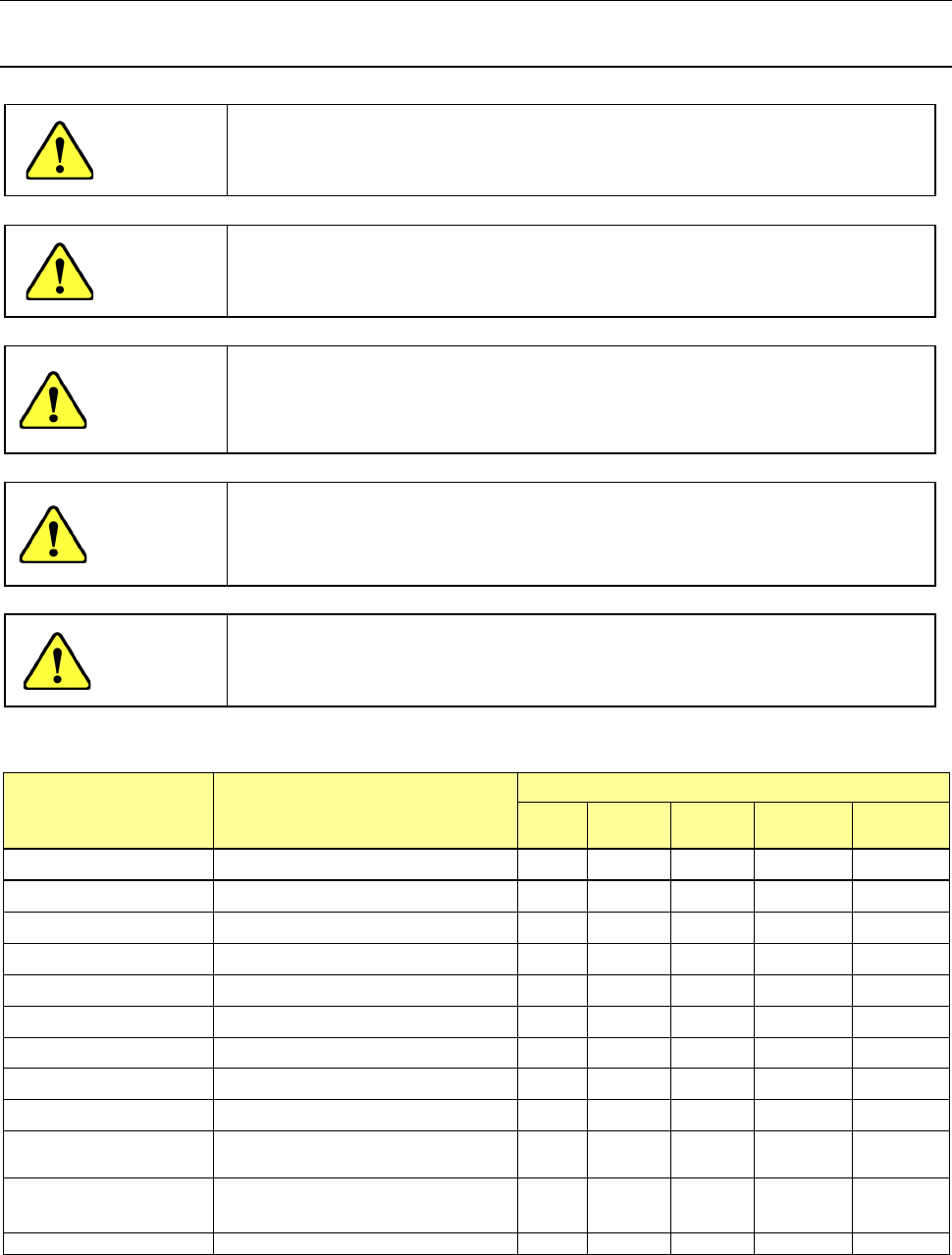
3.1 List of Daily Routine Checks
DANGER
To prevent the body from injury which can be caused by accidental
activation of the machine, cut off the power to the machine before
starting to work.
DANGER
When operating the machine, do not put the hand and head in the
equipment in any case.
WARNING
To avoid a risk of serious injury or death caused by electric shock
hazard, turn off the main power switch of the house current which is
installed in the building where the machine is used.
Note that it is not the main power switch of the machine.
WARNING
Before switching on the machine, be sure that the machine is in a
safe conditions.
Before switching on the machine, be sure that there is no one who is
working in the machine.
CAUTION
Turn off the machine to supply air.
(1) Inspection
Check point Check
Check frequency
Daily Weekly Monthly Bimonthly
Every
half year
Air pressure Check that the air pressure is 0.5 MPa
○
Drain bottle Discard oil or water collected in the bottle
○
Vacuum pressure Pressure check
○
Piping and joint Air leakage
○
Unit air cylinder Check operation. ○
Air filter (Head) No dirt
○
Transfer belt Worn out, damage, or stretch
○
Transfer pulley Check operation
○
Lock lever Keep the front/rear safety cover opened.
○
Trash box
Dispose of remaining material tapes from
the trash box.
○
Air filter (feeder exchange
trolley)
Check to see if the filter is not stained
and if any foreign substance is not put
into the filter.
○
Nozzle
Check the nozzle mounting condition.
○
One year = 6,600 hours