RS-1_instruction manual.pdf - 第419页
Part 1 B asic O peration Chapter 4 Cr eating a Produc tion Progra m 4- 84 1) Coplanarity check (optio n) When a com ponent is to b e centered w ith a V C S, sp eci fy whether t o check a lead (ball) float error and sp ec…
Part 1 Basic Operation Chapter 4 Creating a Production Program
4-83
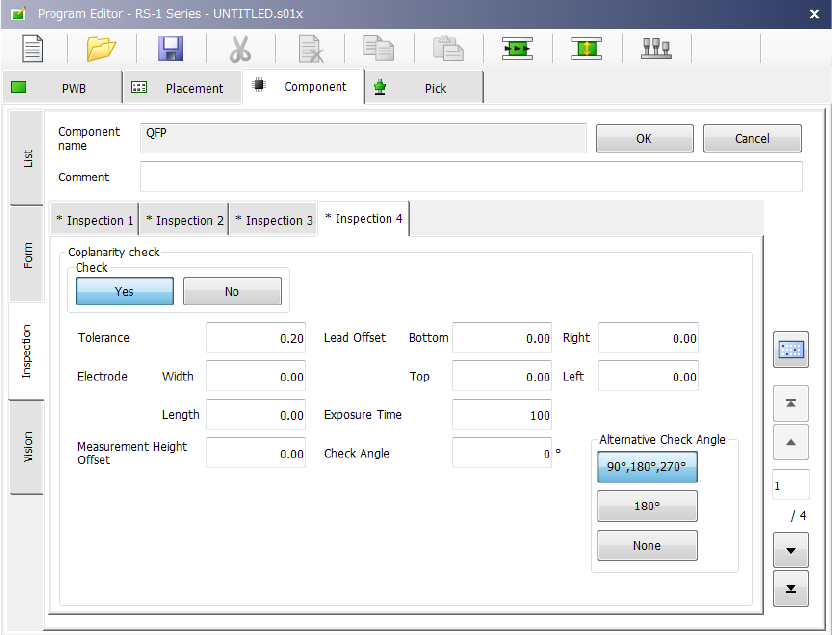
(10) Inspection 4
Set the “Coplanarity check” data on this tab.
Part 1 Basic Operation Chapter 4 Creating a Production Program
4-84
1) Coplanarity check (option)
When a component is to be centered with a VCS, specify whether to check a lead (ball) float
error and specify a tolerance value for checking a float error.
The machine runs a coplanarity check immediately after a component is centered with a
VCS during PWB production.
When you select the <Yes> button, set the following data.
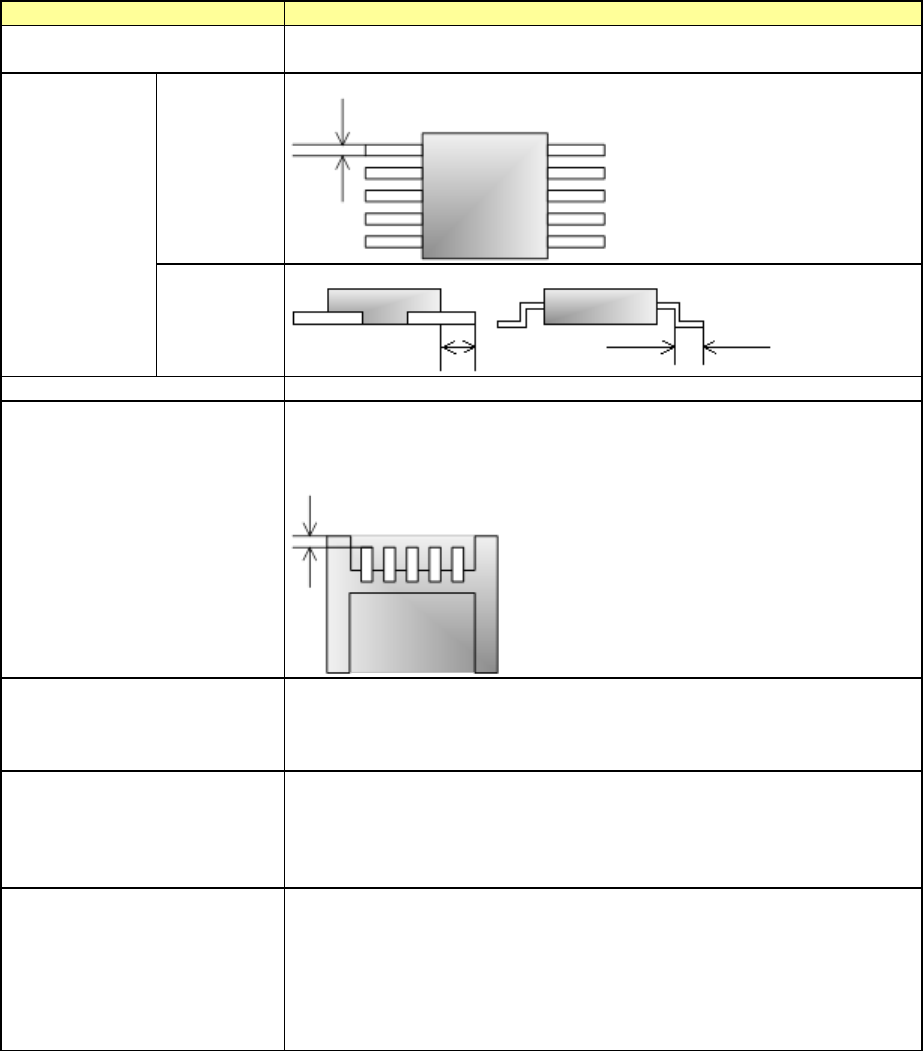
Setting item
Description
Tolerance
Set a tolerance value. If any lead (ball) exceeds this value, an error
occurs.
Electrode
Width
Set the width of the electrode size.
Length
Set the length of the electrode size.
Measurement Height Offset
Set the measurement height offset.
Lead Offset
Set the length from the end point of the component outer dimension to
the tip of the lead.
The items for which you can enter a value vary depending on the
component type.
Exposure Time
Set the exposure time of the camera built in the coplanarity sensor.
If the machine cannot run this check normally with the default value, set
a value from 30 to 90 for a glossy component or a value from 110 to
200 for a matte component.
Check Angle
Set the component angle to be applied when the machine runs a
coplanarity check.
If the machine cannot run this check normally with the default value,
you can specify the check angle in increments of 1 degree.
The check angle can be measured with a coplanarity check.
Alternative Check Angle
Specify whether to allow a component to be rotated against the check
angle to be applied when a coplanarity check is run.
By allowing a component to be rotated at two angles, the machine
becomes able to run a coplanarity check at t
he angle almost equivalent
with the recognition angle, and this prevents the cycle time from
becoming longer.
This alternative check angle can be measured with a coplanarity check.
When the lead width is less than 0.3 mm, the machine may not be able to detect a terminal
correctly unless you specify the correct lead width and the correct electrode size. Enter the
correct values for these menu items.
Part 1 Basic Operation Chapter 4 Creating a Production Program
4-85
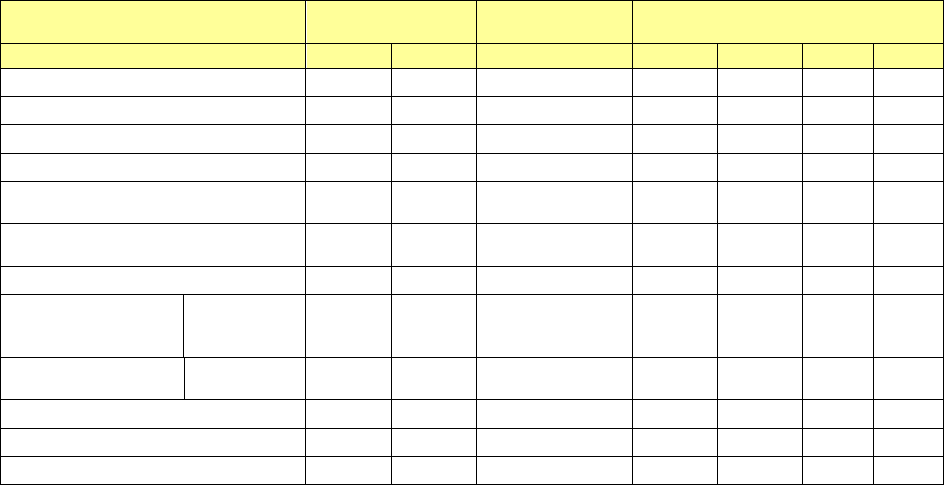
Setting items for each component type
Electrode
Measurement
Height Offset
Lead Offset
Width
Length
Bottom
Right
Top
Left
QFP
○
○
○
○
○
○
○
PQFP (BQFP)
○
○
○
○
○
○
○
SOP
○
○
○
○
×
○
×
TSOP2
○
○
○
○
×
○
×
CON2
(Bidirectional lead connector)
○ ○ ○ ○ × ○ ×
CONZ
(Z-lead connector)
○ ○ ○ ○ × ○ ×
TSOP
○
○
○
×
○
×
○
CONN
(Unidirectional lead
connector)
Leads On
Top
○ ○ ○ × × ○ ×
Leads On
Bottom
○ ○ ○ ○ × × ×
BGA
×
×
○
×
×
×
×
FBGA
×
×
○
×
×
×
×
Others
×
×
×
×
×
×
×