RS-1_instruction manual.pdf - 第780页
Part 2 D etaile d Descript ion of E ach Functi on Chapter 9 M anual Control 9-8 9.3.3 Laser and sensor c ontrol When you se lect [Head] – [Laser/sensor control] in t he menu, the laser /sensor control dialog is displayed…
Part 2 Detailed Description of Each Function Chapter 9 Manual Control
9-7
2) HMS
a) XY move
This button functions in the same manner as the <XY move> button displayed on the
“Head control” screen does.
b) Measurement
This button measures the height.
- When the control item “Measurement” is checked off, press the <Exec> button for
control.
- The measurement result in the “Status” table is updated when the system finishes
controlling the HMS.
Part 2 Detailed Description of Each Function Chapter 9 Manual Control
9-8
9.3.3 Laser and sensor control
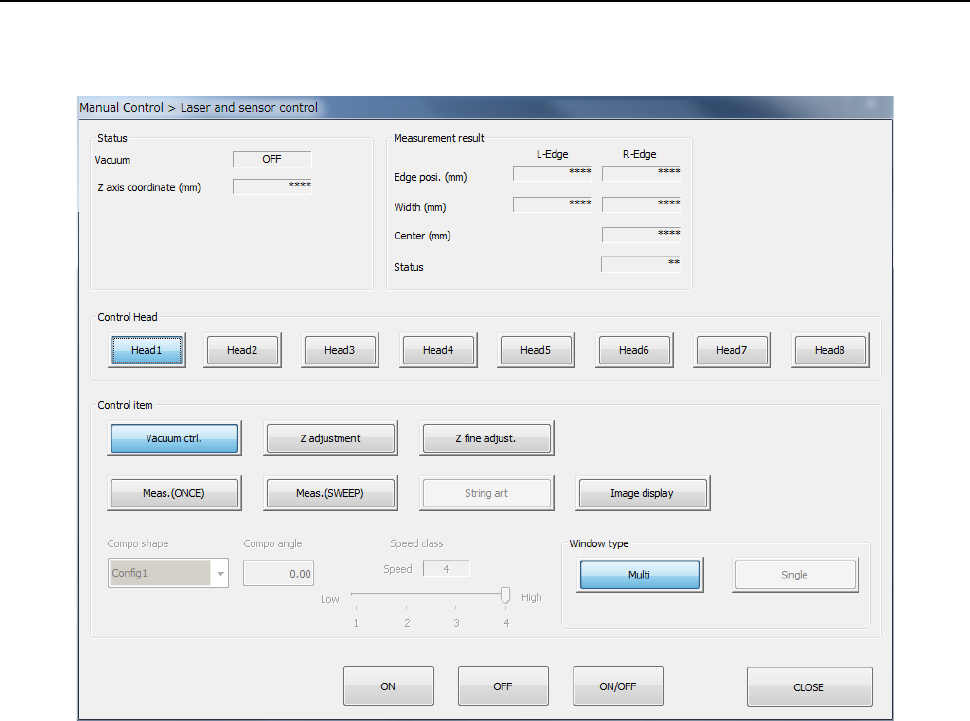
When you select [Head] – [Laser/sensor control] in the menu, the laser/sensor control dialog is
displayed.
(1) Status/Measurement result
The vacuum ON/OFF status of the control head, Z-axis coordinates, and measurement
result by laser are displayed at the completion of control.
A table of statuses which may be returned, when measurement results (SWEEP and ONCE)
are obtained, is shown on the next page.

Part 2 Detailed Description of Each Function Chapter 9 Manual Control
9-9
Status
Description
0
Indicates that the command was finished.
1
Indicates that the command was normally executed.
11
Indicates that the window at the left end is closed. Check the component position.
12
Indicates that the window at the right end is closed. Check the component position.
13
Indicates that the windows at both ends are closed. Check the component position.
20
An error occurred in communication with LNC120.
21
The communication with LNC120 failed. Check whether LNC120 is correctly
connected. (The IP address may not be set correctly.)
22
A component can be detected on the laser at all times.
The nozzle may be too long or the laser surface may be damaged.
23
No component can be detected by lowering the Z-axis.
25
An error occurred in axis movement during laser measurement.
26
An error occurred during communication with the laser sensor. However, the
communication was restored.
27
An error occurred during communication with the laser sensor. Because the
communication could not be restored, restart the equipment.
28
No shadow could be detected during measurement.
30
An illegal parameter was detected in the command.
31
Illegal data was detected.
32
Laser recognition was not completed.
33
Measurement resulted in an error for other cause.
34
Encoder input error. Check the encoder cable or connector contact.
40
A packet number error was detected in the data received from the laser.
41
A command error was detected in the data received from the laser.
42
An address error was detected in the data received from the laser.
43
A data number error was detected in the data received from the laser.
44
A timeout error occurred in the communication with the laser.
45
A timeout error occurred in receiving data from the laser.
46
A timeout error occurred in sending data to the laser.
47
A retry over error occurred in sending data to the laser.
50
A recognition error occurred in ONCE recognition processing.
51
A sensor error was detected during ONCE recognizing processing.
60
A request to obtain a measurement result was executed though no measurement was
executed.
61
No measurement data could be obtained.
62
A request to obtain a measurement result was executed during measurement rotation.
63
A request to obtain a measurement result was executed during measuring processing.
64
Correct data for measurement could not be obtained.
65
Measurement cannot be performed because the center of rotation to be measured is
out of the center of measurement.
66
Measurement is now interrupted.
67
Sufficient data for measurement could not be obtained.
68
A request to obtain a measurement result was executed during measurement rotation.
(Hold OFF angle)
70
The sensor function was executed unless the laser was not initialized.
71
An unexpected error occurred in the laser.
72
Measuring processing cannot be executed because the set window size is small.