RS-1_instruction manual.pdf - 第223页
Part 1 B asic O peration Chapter 2 Pr oduction 2- 112 (2) E xecut ion of a chec k 1) Pr ogr ess s it uati on The current progress sit uat ion is shown with the progress bar. 2) Component be i ng insp ected Data on a co m…
Part 1 Basic Operation Chapter 2 Production
2-111
Verify Current check
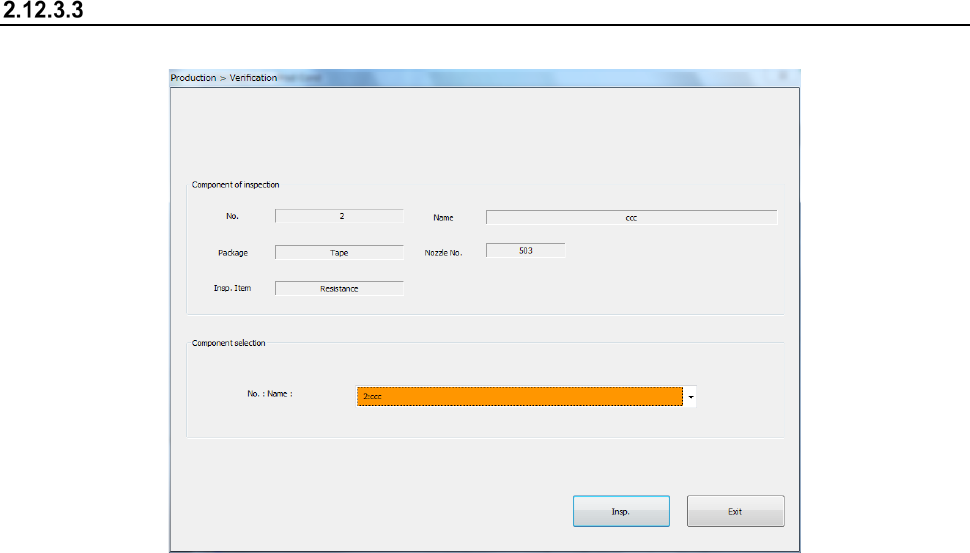
(1) Selecting a component
1) “Component of inspection” and “Component selection”
Data on the component appears in these fields. Names of components whose
“Component verification” setting is “Yes” on the “Component” data screen are displayed as
the list in the “Name” combo box. Select a component to be checked here.
Part 1 Basic Operation Chapter 2 Production
2-112
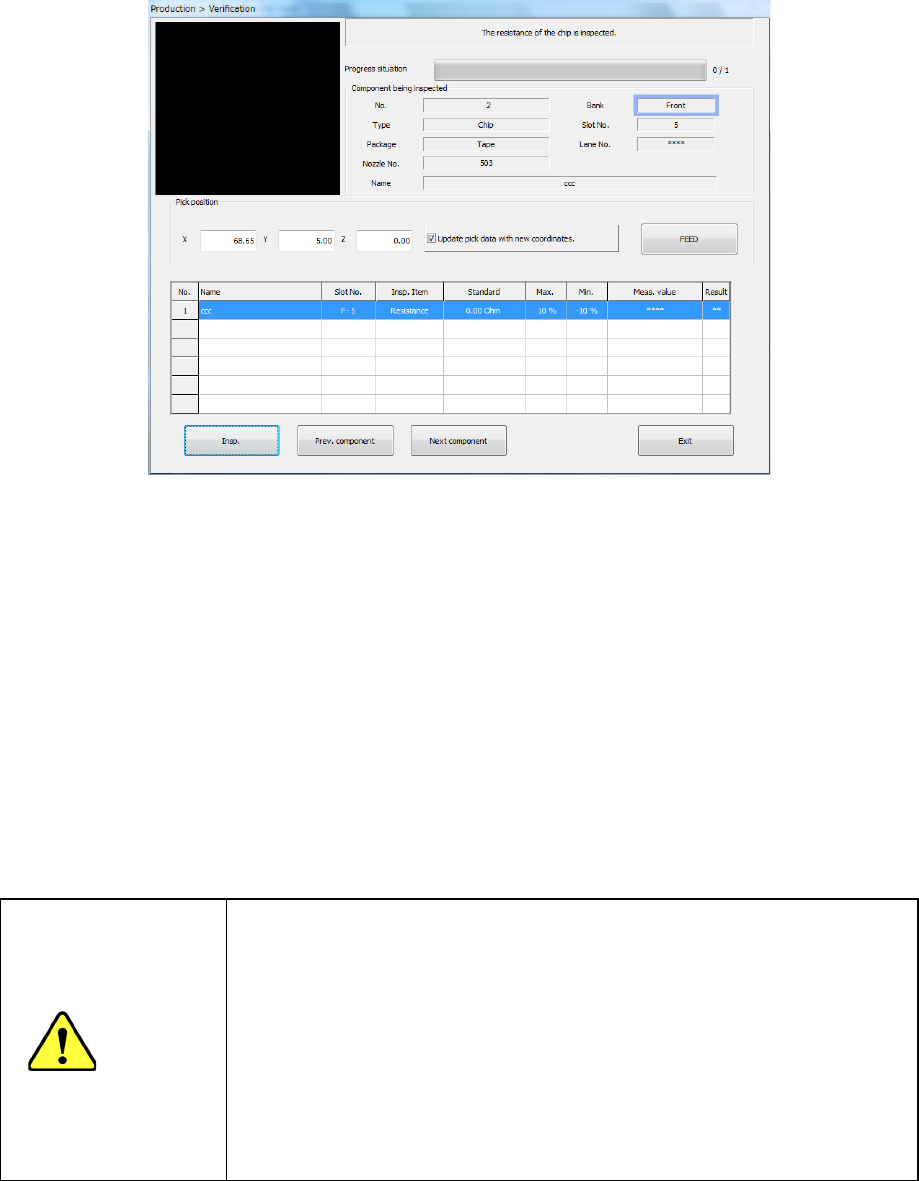
(2) Execution of a check
1) Progress situation
The current progress situation is shown with the progress bar.
2) Component being inspected
Data on a component you selected to check appears here.
3) Pickup position
Data on the component pick-up position appears here. You can change the pick-up position
to that of the previous alternate component or the next alternate component also.
4) Verification result
The following data on the component being currently selected appears on the screen:
component name (“Name”), fixing hole (“Slot No.”), inspection item (“Insp. Item”), standard
value (“Standard”), upper limit of the tolerant value (“Max.”), lower limit of the tolerant value
(“Min.”), measured value (“Meas. value”) and check result (“Result”). After the component is
checked, the check result is displayed in the “Meas. value” field.
5) <Insp.> button
This button performs a verify check for the specified component alone.
CAUTION
Immediately after you press the <Insp.> button, the head starts moving
and the system starts inspection.
To avoid injuries, do not put your hands inside the machine or keep
your face or head away from the machine.
Before pressing the < Insp.> button, check to see if there is no one who
is working the internal parts of the machine.
Before pressing the < Insp.> button, check to see if there is no one who
is near the machine and may be injured.
Before pressing the < Insp.> button, check to see if there is no obstacle
such as an adjustment tool that is located or attached inside the
machine and may prevent the machine from operating normally.
6) <Prev. component> button/<Next component> button
The system changes a component to be inspected to the alternative component.
Part 1 Basic Operation Chapter 2 Production
2-113
Verify All check
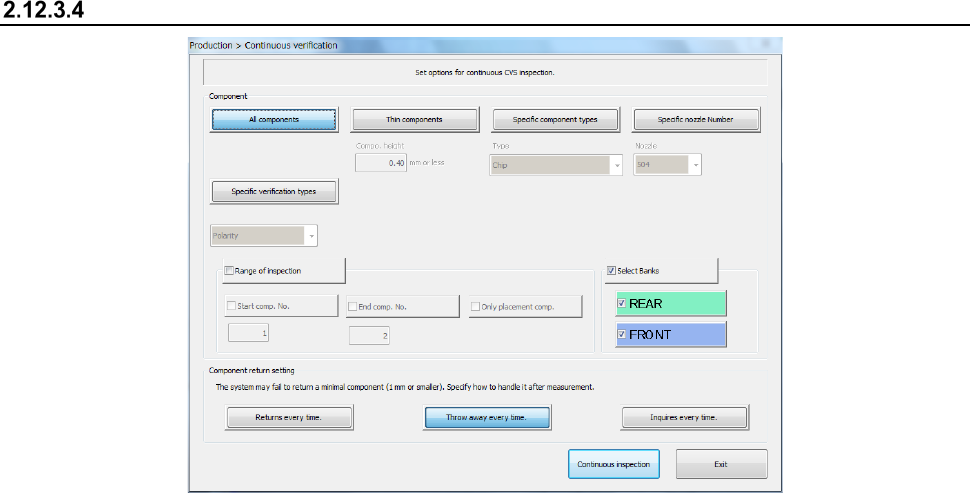
(1) Component
Specify whether to check only components that satisfy a certain requirement(s) among
components whose data is stored in Component data.
1) All components
When you check this radio button, the system checks all components whose data is
specified in Component data.
2) Thin components
This button instructs the system to check only components whose height is specified in
the edit box or lower.
3) Specific component types
This button instructs the system to check only components that use a nozzle selected in
the combo box.
4) Specific nozzle Number
This button instructs the system to inspect only components that use the nozzle
selected in the combo box.
5) Specific verification types
This button instructs the system to inspect only components whose verify type (resistor,
capacitor, or polarity) is selected.
(2) Range of inspection
Check this check box if you want to check the components whose numbers are specified here
among the components that satisfy the requirement(s) specified at the “Inspection type”
column.
When you check this check box, you can specify the following items.
1) Start comp. No.
Enter the number of the first component to be checked here.
The system performs a verify check and changes the value in the “Start comp. No.”
(start component number) edit box.
2) End comp. No.
Enter the number of the last component to be checked here.
The system performs a verify check and changes the value in the “End comp. No.” (end
component number) edit box.
3) Only placement comp.
Check this check box if you want to check only components whose data is stored in
Placement data also.