RS-1_instruction manual.pdf - 第249页
Part 1 B asic O peration Chapter 2 Pr oduction 2- 138 Continuous production Operation for production Information on the board transpor t path of the conveyor Continuous production dat a Operation to b e performed Ye s Re…
Part 1 Basic Operation Chapter 2 Production
2-137
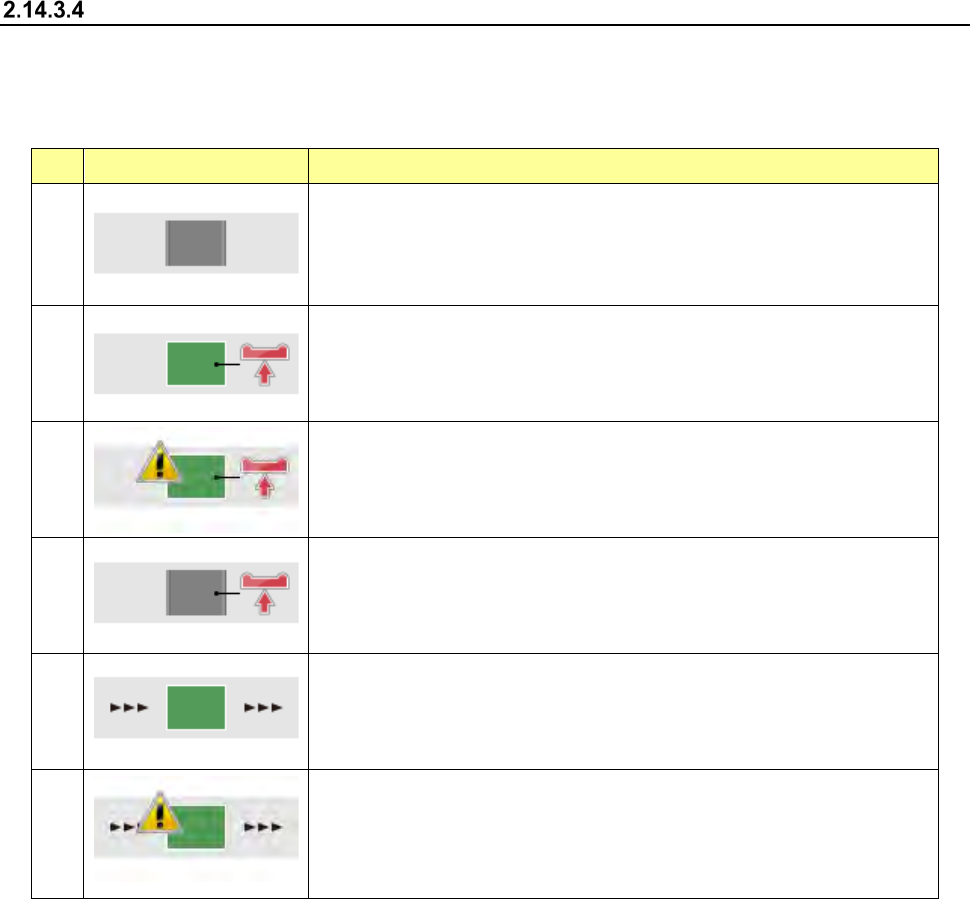
Condition of a board on the conveyor and what each image means
The image indicating the condition of a board changes depending on your selection of continuous
production, selection of a production operation, or the condition of a board located on the conveyor.
When you press each image, the system re-clamps a board or ejects a board.
No. Menu item Description
①
There is no board on the conveyor.
②
The system re-clamps a board located on the conveyor. (When you select
the<Re-clamp PWB> button as “Processing before production begins”)
③
The system re-clamps a board located on the conveyor. (When you select
the <Re-clamp PWB> button as “Processing before production begins.”)
Some components may be missing or the system may malfunction.
④
The system re-clamps a board located on the conveyor. (When you select
the <Re-clamp PWB> button as “Processing before production begins”)
There is not any board on the conveyor.
⑤
The system ejects a board from the conveyor. (When you select the <Load
PWB> button as “Processing before production begins”)
Although there is a board on the conveyor, all components have been placed
on a board already. Therefore, you have to eject the board.
⑥
The system ejects a board from the conveyor. (When you select the <Load
PWB> button as “Processing before production begins”)
Since the system ejects a board on which all components have not been
placed, some component may be missing or the system may malfunction.
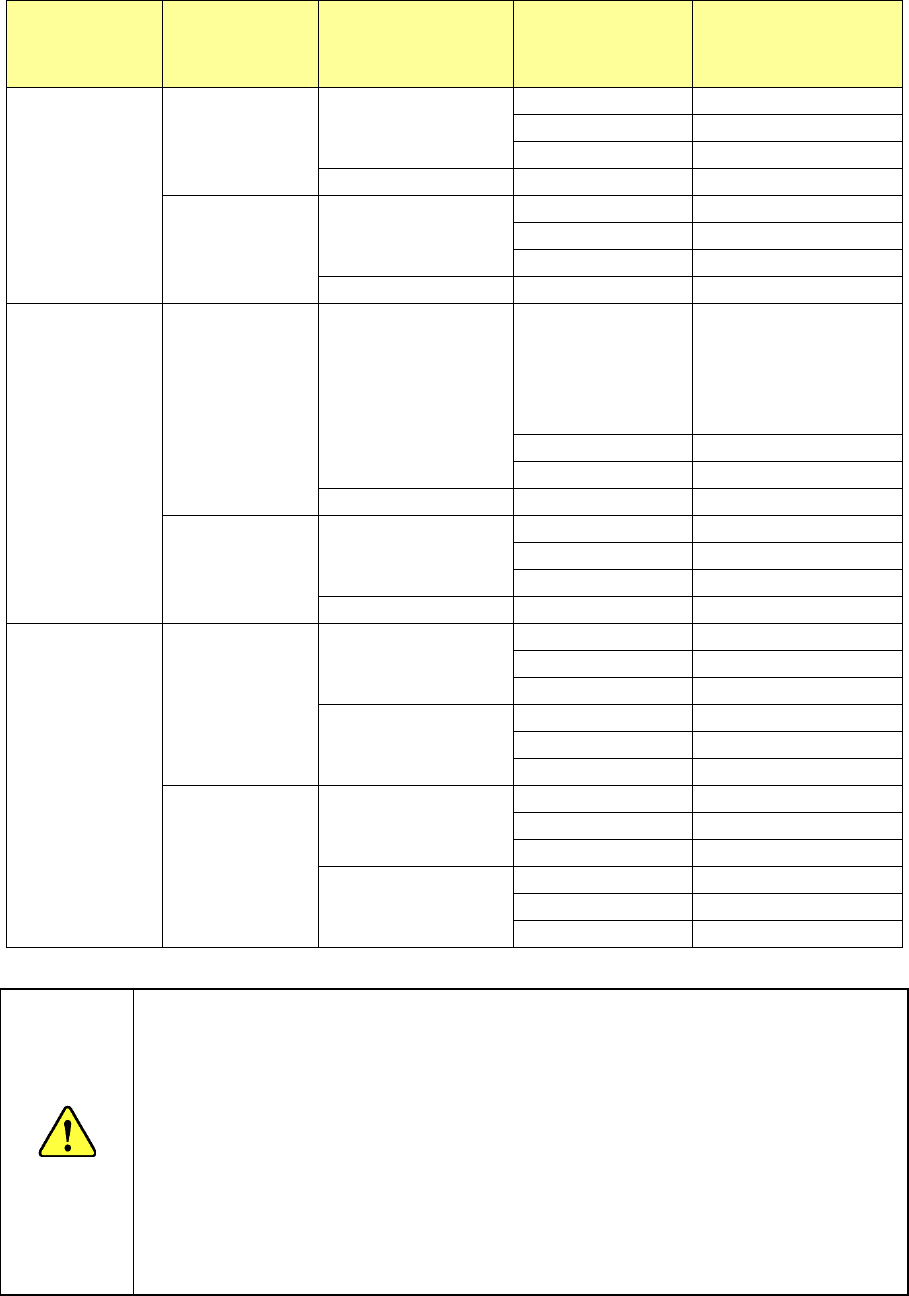
Whether a board can be re-clamped or transported and/or which board condition is displayed are
(is) decided according to selection of the continuous production, information on the transport path of
the conveyor and/or continuous production data. The relation among these factors is summarized
on the next page.
Part 1 Basic Operation Chapter 2 Production
2-138
Continuous
production
Operation for
production
Information on the
board transport
path of the
conveyor
Continuous
production data
Operation to be
performed
Yes
Re-clamp PWB A board exits.
A board exits.
②
No board
Not selectable
No board
③
* See Caution 1.
No board
-
①
, Error
Load PWB A board exits.
A board exits.
Not selectable
No board
⑤
No information
⑥
* See Caution 2.
No board
-
①
No
Re-clamp PWB A board exits. A board exits.
Not selectable
(Continuous
production)
③ (Production is
resumed.)
*See Requirement 1.
No board
③
* See Caution 1.
No information
③
* See Caution 1.
No board
-
①
, Error
Load PWB A board exits.
A board exits.
⑥
* See Caution 2.
No board
⑥
* See Caution 2.
No information
⑥
* See Caution 2.
No board
-
①
No data
Re-clamp PWB A board exits.
A board exits.
②
No board
Not selectable
No information
③
* See Caution 1.
No board
A board exits.
④
, Error
No board
①
, Error
No information
Normal production
Load PWB A board exits.
A board exits.
Not selectable
No board
⑤
No information
⑥
* See Caution 2.
No board
A board exits.
①
No board
①
No information
Normal production
CAUTION
Note 1: Since there is no information on how the conveyor was when production is
interrupted, some components may be missing or may be placed on wrong
positions when the system produces a PWB after re-clamping the board.
Be careful to decide whether to re-clamp a board
Note 2: Since there is no information on how the conveyor was when production
was interrupted, the system operates supposed that there is a board
produced with the previous production on the conveyor. Be careful to
check the ejected PWB because some components may be missing.
Requirement 1: You cannot select “Start New” as “Continuous production” and
“Re-clamp PWB” as “Processing before production begins” at the
same time. When you select “Resume,” you can select
“Re-clamp PWB,” but there is no information obtained when
production was interrupted. Therefore, “Note 1” is applied to the
system operation.
Part 1 Basic Operation Chapter 2 Production
2-139
Checking the re-clamping operation
When you press the <START> switch at the board re-clamping position, the system performs a
check for continuous PWB production.
CAUTION
- When you resume production without loading a new board into the
machine after loading a production program to the machine again or
after quitting the production screen, the system does not know how
the conveyor was when the production was interrupted. Therefore,
some components may be missing or may be placed at wrong
positions.
- When the system re-clamps a board without loading a new board, it
may fail to re-clamp the board if the board is heavy. (If the board is
very big or many components are already placed on the board)
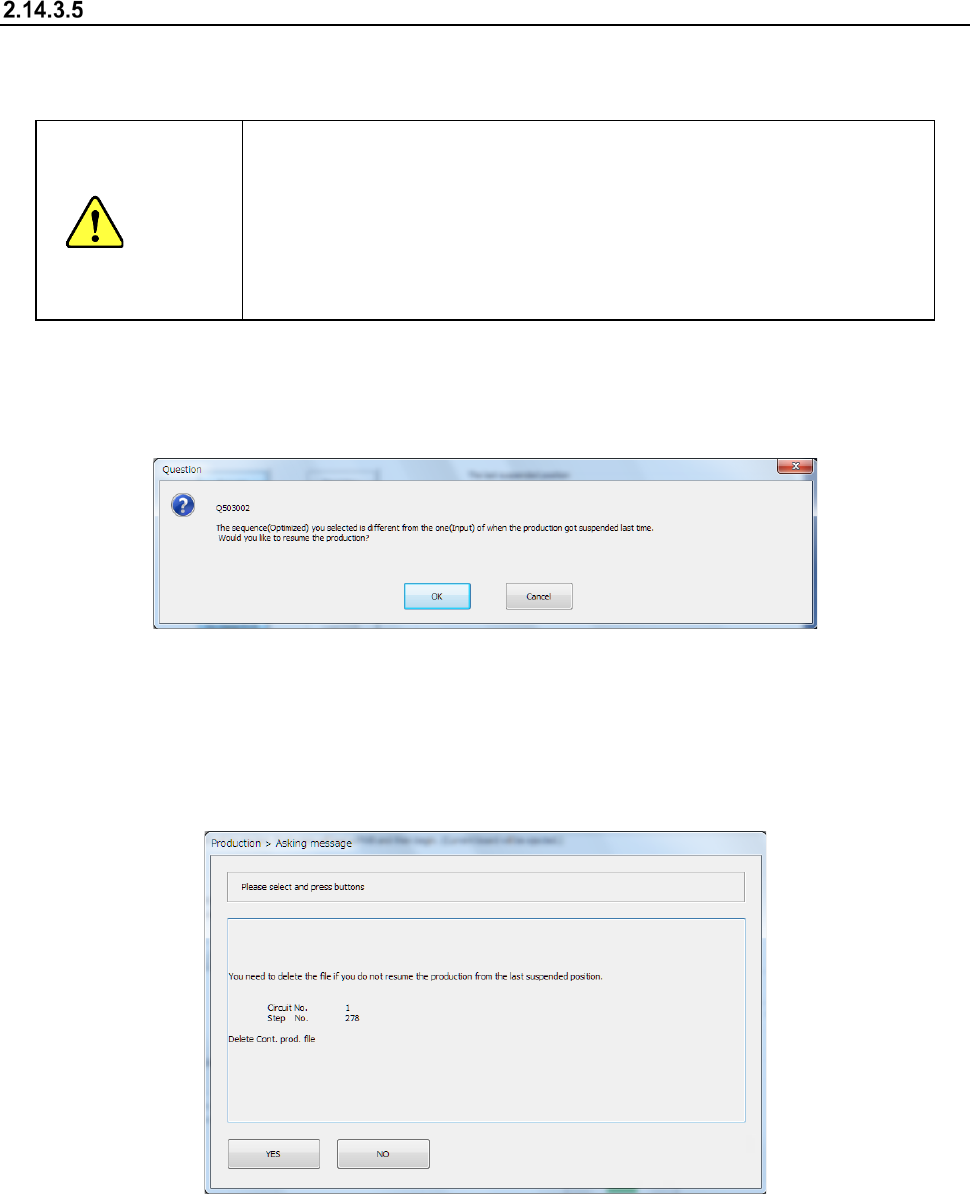
(1) If the sequence (input order/optimized order), one of the production conditions, which was
applied when the last production finished, is different from one to be applied when the current
production is started, the confirmation message for changing the sequence appears on the
screen.
When you press the <OK> button, the system starts continuous production.
When you press the <Cancel> button, the “Re-clamp” dialog box reappears.
(2) When you select the <Start New> button as the “Continuance Production” although the system
can perform continuous production, the confirmation message for deleting a continuous
production file appears on the screen.
When you press the <YES> button, the system deletes the continuous production file, and you
cannot perform the continuous production for the suspended production.
When you press the <NO> button, the continuous production file is not deleted.
However, if the current PWB production is suspended, the continuous production file is
overwritten.