RS-1_instruction manual.pdf - 第135页
Part 1 B asic O peration Chapter 2 Pr oduction 2- 24 <Overvie w of the PWB tr ansport un it construction> Attach the co nveyor stoppers on t he right side when t he PW B fee ding directi on is L t o R; attach them …
Part 1 Basic Operation Chapter 2 Production
2-23
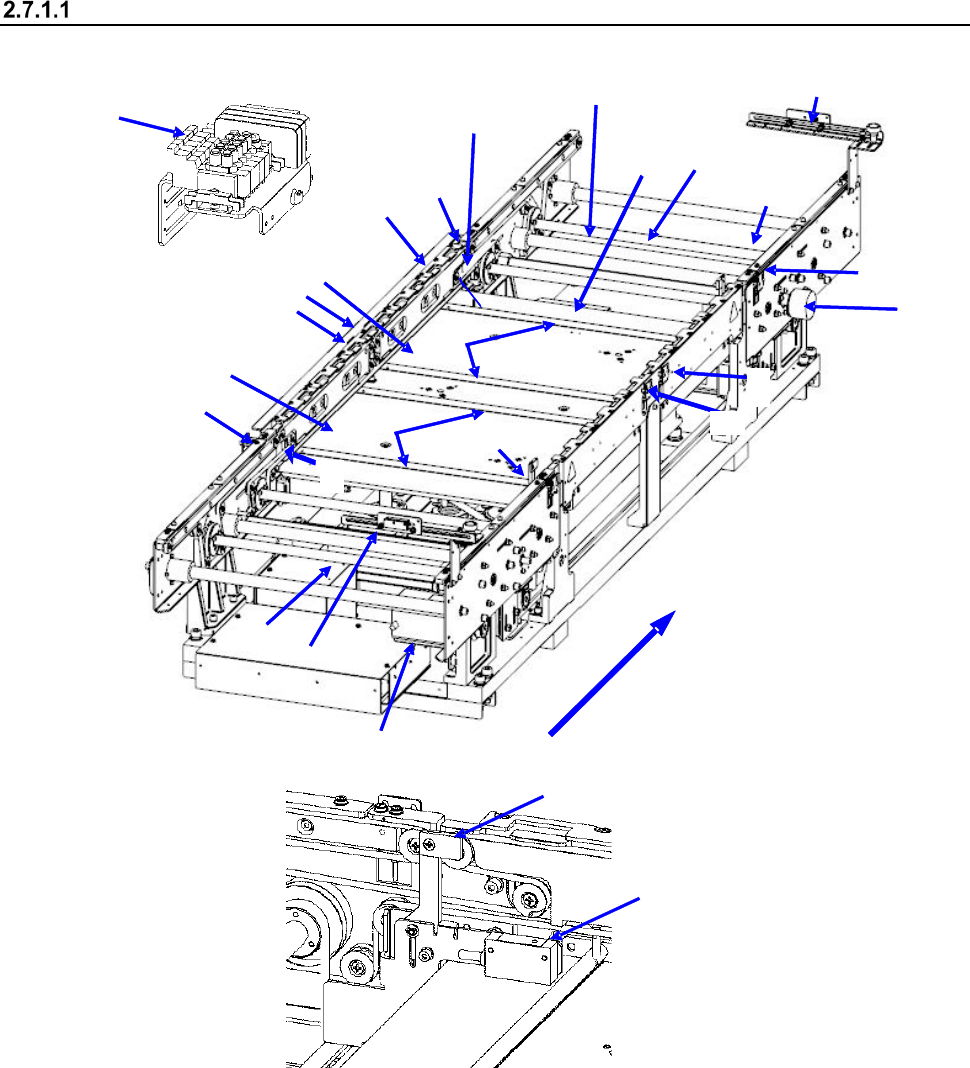
Configuration of the PWB transport unit
<Name of each part of the conveyor (PWB transport unit)>
2
1
15
11
3
4
8
10
11
12
10
13
14
17
16
18
11
7
5
9
12
6
21
20
22
23
Board transfer direction
1 IN sensor
9 Board transport electromagnetic
valve
17 Support pin detection sensor light receiving
section
2 OUTsensor
10 Conveyor motor
18 Stopper sensor
3 WAIT sensor fiber light receiving section
11 Drive shaft
19 Stopper
4 WAIT sensor fiber light emitting section
12 Side beam
20 (WAIT2 sensor fiber light receiving section)
5 C-OUT sensor fiber light receiving section
13 Support table IN
21 (WAIT2 sensor fiber light emitting section)
6 C-OUT sensor fiber light emitting section
14 Support table OUT
22 (WAIT2 sensor fiber light receiving section)
7 PWB guide
15 Automatic width adjustment motor
23 (WAIT2 sensor fiber light emitting section)
8 Support table origin sensor
16 Support pin detection sensor light
emitting section
18
19
Part 1 Basic Operation Chapter 2 Production
2-24
<Overview of the PWB transport unit construction>
Attach the conveyor stoppers on the right side when the PWB feeding direction is L to R; attach
them on the left side when the PWB feeding direction is R to L. When conveyor stoppers are used,
the PWB is clamped at the position where the front end of the PWB comes in contact with the
conveyor stopper on the downstream (i.e. OUT) side.
1) When a board is loaded to the machine, and the IN sensor ① detects it, the conveyor motor
⑩ drives the drive shaft ⑪ to cause the conveyor belt to start transporting it. Additionally, the
stopper 19 turns ON at the same time.
2) When the PWB reaches the stopper 19, the STOP sensor 18 detects it and the support tables
13 and 14 move up. At this time, the outer shape of the PWB is fixed by the stopper 19 and
support pin. After the PWB has been fixed temporarily, the stopper 19 turns OFF to finish fixing
the PWB.
3) After the PWB has been fixed, the next PWB is carried in in the same manner and it waits at the
position of the WAIT sensor 3.
4) When the system finishes producing a PWB, the fixed board (PWB) starts being ejected.
5) When the first PWB passes through the C-OUT sensor 5, the stopper 19 turns ON again to
make the preparations for fixing the next PWB.
Part 1 Basic Operation Chapter 2 Production
2-25
Adjusting the PWB transport rail width
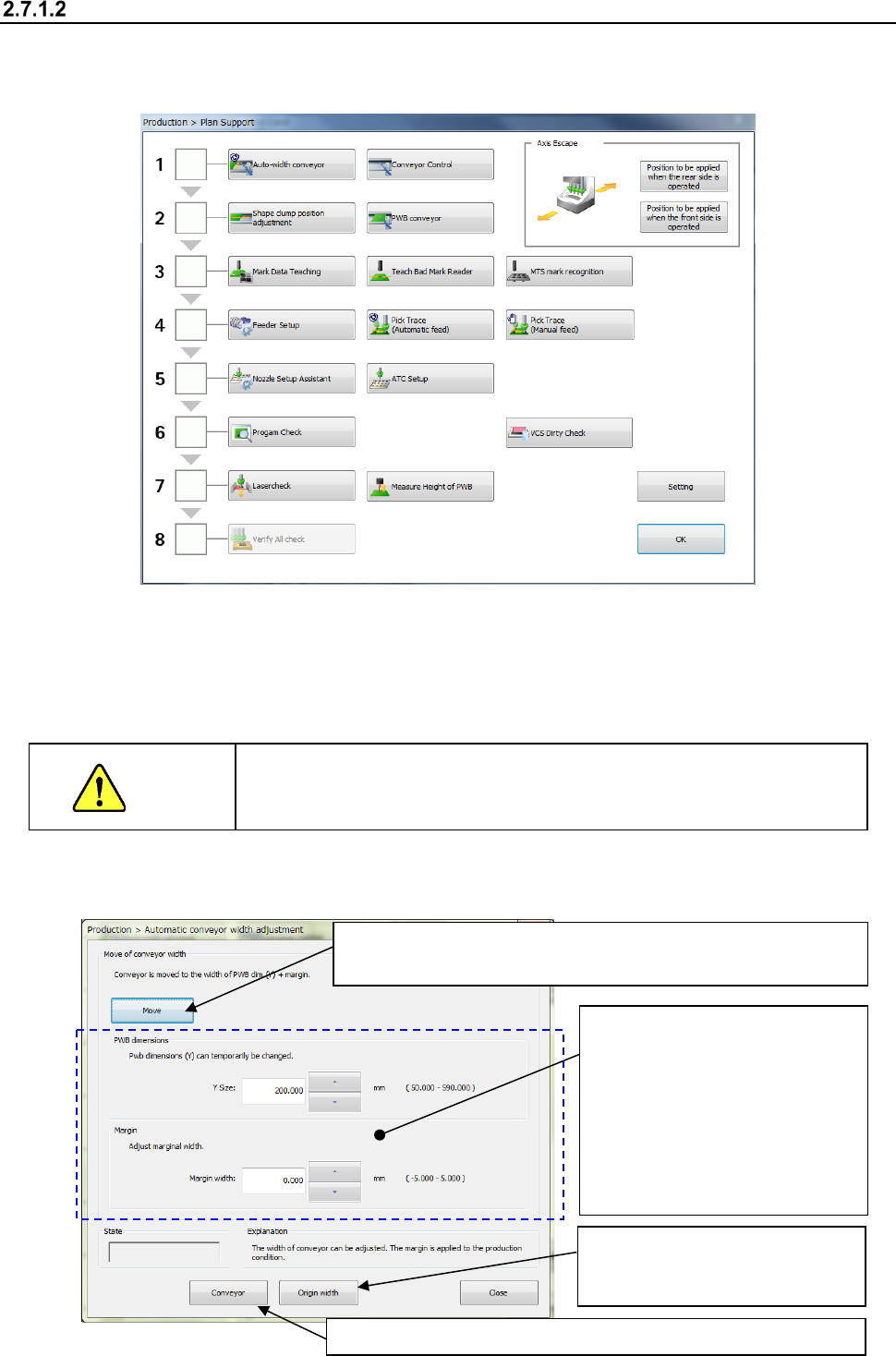
<How to adjustment the rail width on the “Automatic conveyor width adjustment” screen>
(1) Select the “Product” button from the main menu, the [Support] command, and then the [Plan
support] command.
(2) Adjust the conveyor width.
When you press the <Auto-width conveyor> button, the “Automatic conveyor width adjustment”
screen appears.
The operation for “Automatic board width adjustment” varies depending on the conveyor lane
configuration, a single-lane conveyor or a dual-lane conveyor.
CAUTION
When you click the <Move> button with following the instruction below,
the conveyor starts operating. Before clicking this button, be sure to
check to see if there is no obstacle in the conveyor movable section.
1) Automatic board width adjustment
③ Select the <Move> button to adjust the conveyor width.
The motor rotates and the machine adjusts the conveyor width.
④ Check to see if a PWB is transported with the conveyor smoothly.
②
Enter the desired value into the
“Y Size” field and the “Margin
width” field respectively.
(If the conveyor width is not
appropriate for a board to be
transported, be sure to enter
the appropriate value into the
“Margin width” (the allowable
input value range: from - 0.5
mm to 0.5 mm).
①
Select the <Origin width>
button to return the conveyor to
its origin.