RS-1_instruction manual.pdf - 第595页
Part 1 B asic O peration Chapter 4 Cr eating a Produc tion Progra m 4- 260 2) Conditions f or teaching a component ① B GA and FBGA Contrast All ball s - PWB o r All land ( “ Out -PWB,” “ Out - Ceram ic ” and “ All balls …
Part 1 Basic Operation Chapter 4 Creating a Production Program
4-259
4.5.7.6 Vision teaching
This function attaches on the head a component actually used for production, and measures a
lead of lead component (general-purpose vision) and a ball of a ball component
(general-purpose vision component, BGA or FBGA).
When you open the cover to, for example, pick up a component
manually, make sure that any operation of the machine will not
cause any injuries.
Be careful so that your hand or cloth cannot be hooked over the
feeder bank or you cannot bang your head against the cover.
1) Component teaching
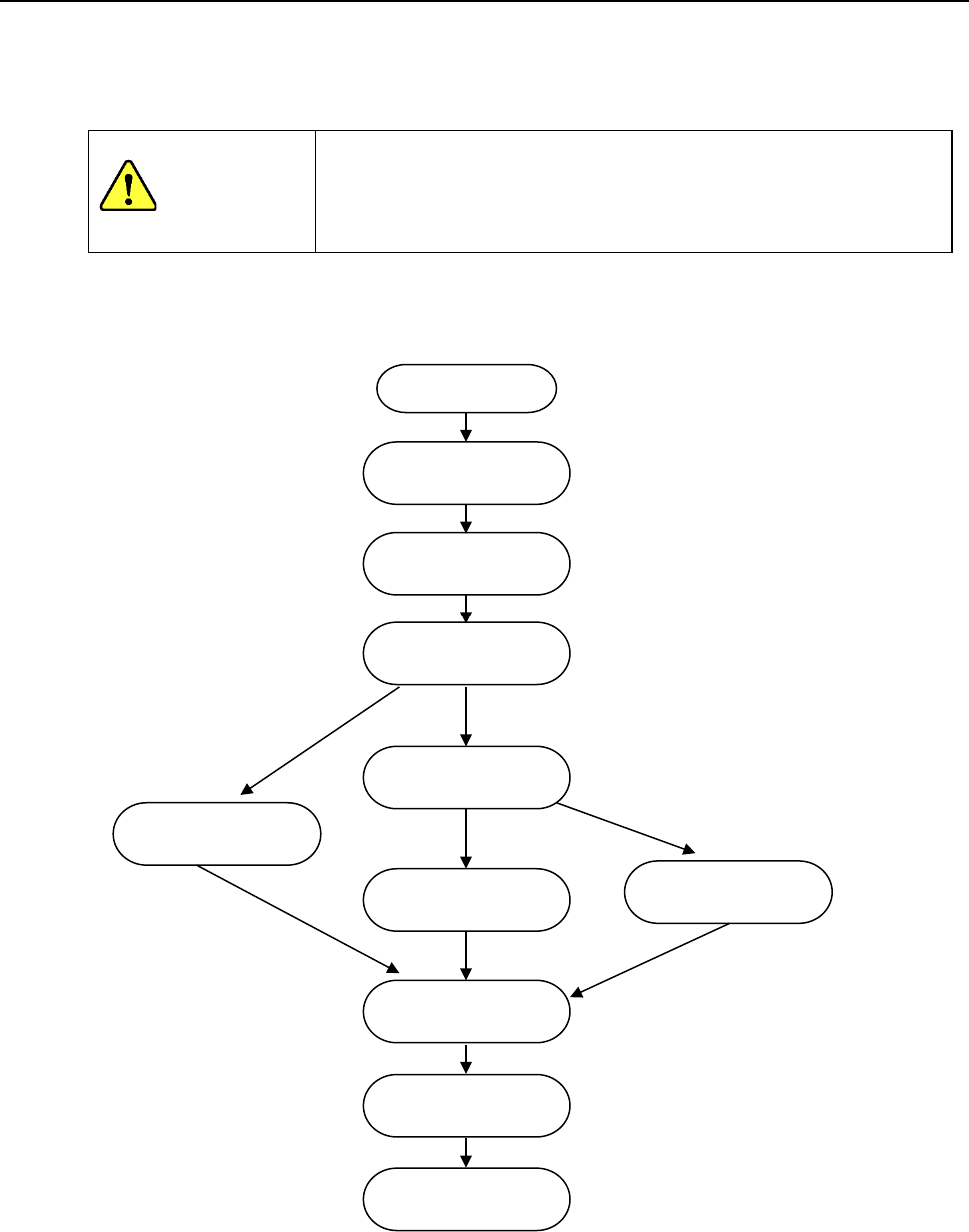
A general flow chart of measuring operations is shown below.
CAUTION
Start
Component
measurement
Lighting setting
Inclination correction
Ball area setting
Center setting
Component
recognition
Electrode information
measurement
End
BGA component
Ball and
land
Exclusion area setting
General-purpose
vision component
Outline and lead
Element editing
Part 1 Basic Operation Chapter 4 Creating a Production Program
4-260
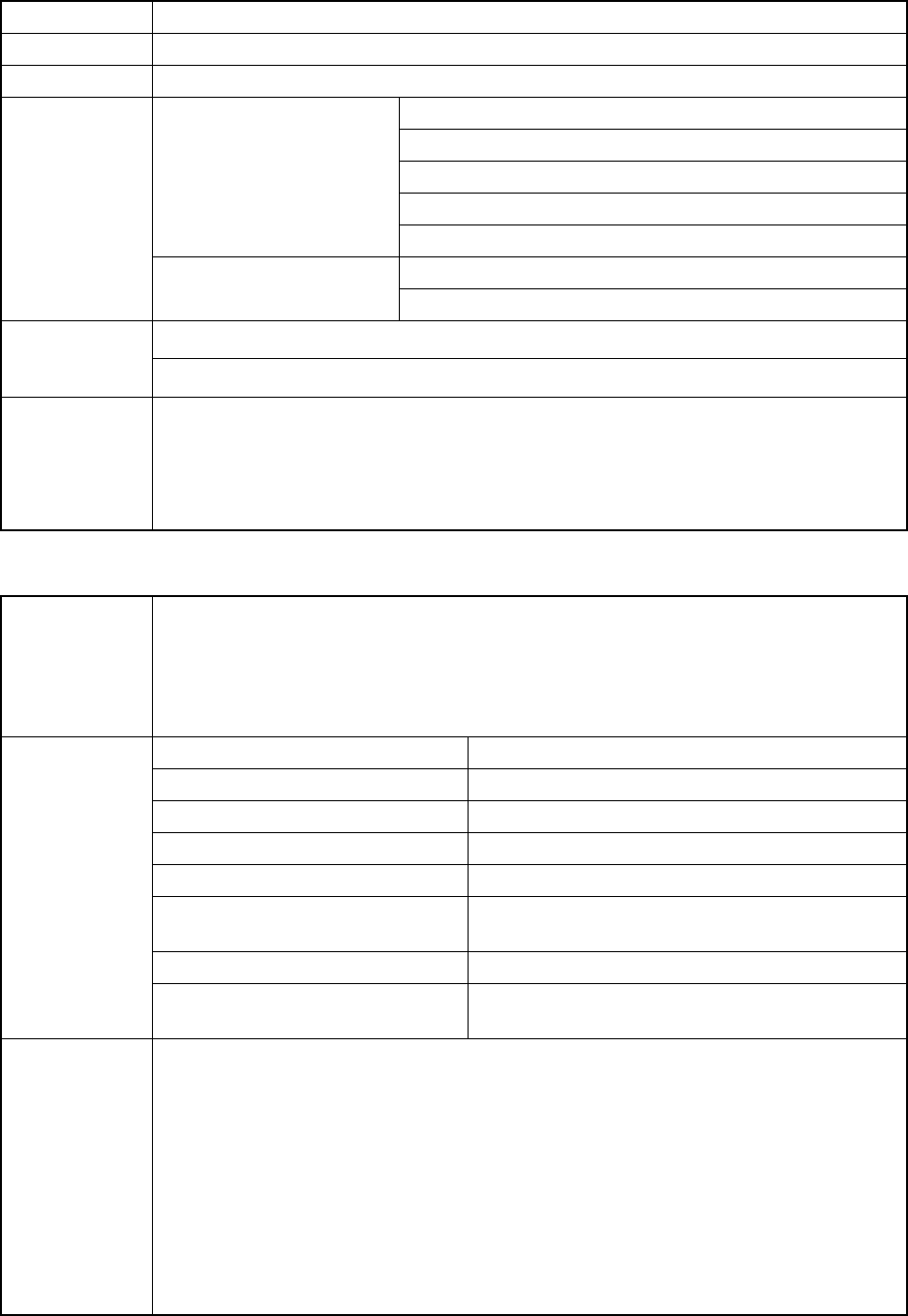
2) Conditions for teaching a component
① BGA and FBGA
Contrast All balls-PWB or All land (“Out-PWB,” “Out-Ceramic” and “All balls-Ceramic” are not available.)
Base Style Standard and Mark overspill type 1
Ball Pattern User pattern
Measured
parameters
Vision recognition
Pitch (vertical, horizontal)
Diameter
Number of rows (vertical, horizontal)
Base style
Arrangement pattern (user pattern)
Others
Component height
Vacuum pressure
Parameters not
to be measured
Outer dimensions
Vision control data
Restrictions
1. The size of a component should be able to be recognized at a time, and the component
should satisfy the conditions for recognition within the measurement field view.
2. Only electrodes whose diameter is the same are arranged in a reticular pattern, and look
brighter sufficiently than the background.
3. All parts that look bright except for electrodes are specified as “an eliminated area.”
② General-purpose vision component, ball component types (Extended array)
Measured
parameters
1. Number of extended array groups
2. Number of balls in an extended array group
3. XY coordinates of a ball in an extended array group (for all balls of a group)
4. Diameter of a ball in an extended array group
* The system measures the items 2, 3 and 4 per group.
Parameters not
to be measured
Outer dimensions of a component The input value is used.
Element data type Ball components
Data format definition Extended array data format
Extended array group name Numbered in ascending order from a default number.
Element type Ball, land
Light Blue side light (for a ball)
Reflective LGA light (for a land)
Field of view 54mm、27mm、10mm
Others Default parameters applied when the Component
data was created
Restrictions
1. The size of a component should be able to be recognized at a time, and the component
should satisfy the conditions for recognition within the respective measurement field view.
2. Only electrodes whose diameter is the same should look bright with good contrast in the
teaching window.
3. The maximum number of groups that can be created is 20, and the maximum number of
elements in one group is 256. However, if the number of elements in the teaching window
exceeds 256, the group is divided. Therefore, the number of teaching windows you can
set may be limited to less than 20.
4. Since the data is created with teaching operation, the center of a component may be offset
by approximately one pixel at worst. A theta coordinate may be offset in the same
manner.
Part 1 Basic Operation Chapter 4 Creating a Production Program
4-261
3) Operations during teaching of a component
① Head to be used for pickup
Regarding selection of a head to be used for pickup, the head is automatically selected.
The existing mounted nozzle has priority so that the frequency of nozzle replacement
may be reduced.
A different head may be used for each measurement in some nozzle mounting
conditions.
When the MNVC function is effective and inspection components are assigned to the
left head, it is possible to select a head for inspection.
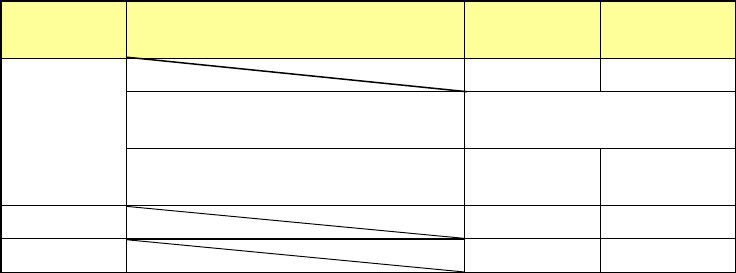
② Return of components after inspection
After inspection, components may be returned to the original position or discarded.
This depends on the packaging style as shown in the following table.
For discarding, components are discarded according to the "Component reject to"
setting in the component data.
Since a component whose size is 1 mm or less may be placed on its side or turned
upside down when it is returned, the system displays the message so that you can
select how to handle it.
Packaging
style
Condition 2
Returning a
component
Discarding a
component
Tepe
― ○
The shorter side length of the outer
dimensions is 1 mm or less.
Query * 1
The shorter side length of the outer
dimensions is 1 mm or more.
○ ―
Tray ○ ―
Stick ― ○
*1 The system displays the message that asks you whether to return a component or
discard it. The system displays this message before it starts continuous measurement
of components in Continuous Measurement mode.
③ Selection of component supply unit for pickup
If two or more component supply units are assigned to the same type of component in Pick
data, you can change the supply unit. A component starts being picked up based on the
data you entered first by default.
④ Change of pick coordinates
In case pickup cannot be performed satisfactorily, change the pick coordinates by manual
input or coordinate teaching.
⑤ Manual pickup
When there is no pickup data, a component can be attached manually onto the nozzle. In
this case, the pick coordinates cannot be input. The feeder cannot be operated either.