RS-1_instruction manual.pdf - 第564页
Part 1 B asic O peration Chapter 4 Cr eating a Produc tion Progra m 4- 229 4.5.7 Measurem ent/Inspect ion No. Submenu Overview 1 Current compone nt Measures ea c h deta il ed v alue of the Comp onent dat a 2 All compone …
Part 1 Basic Operation Chapter 4 Creating a Production Program
4-228
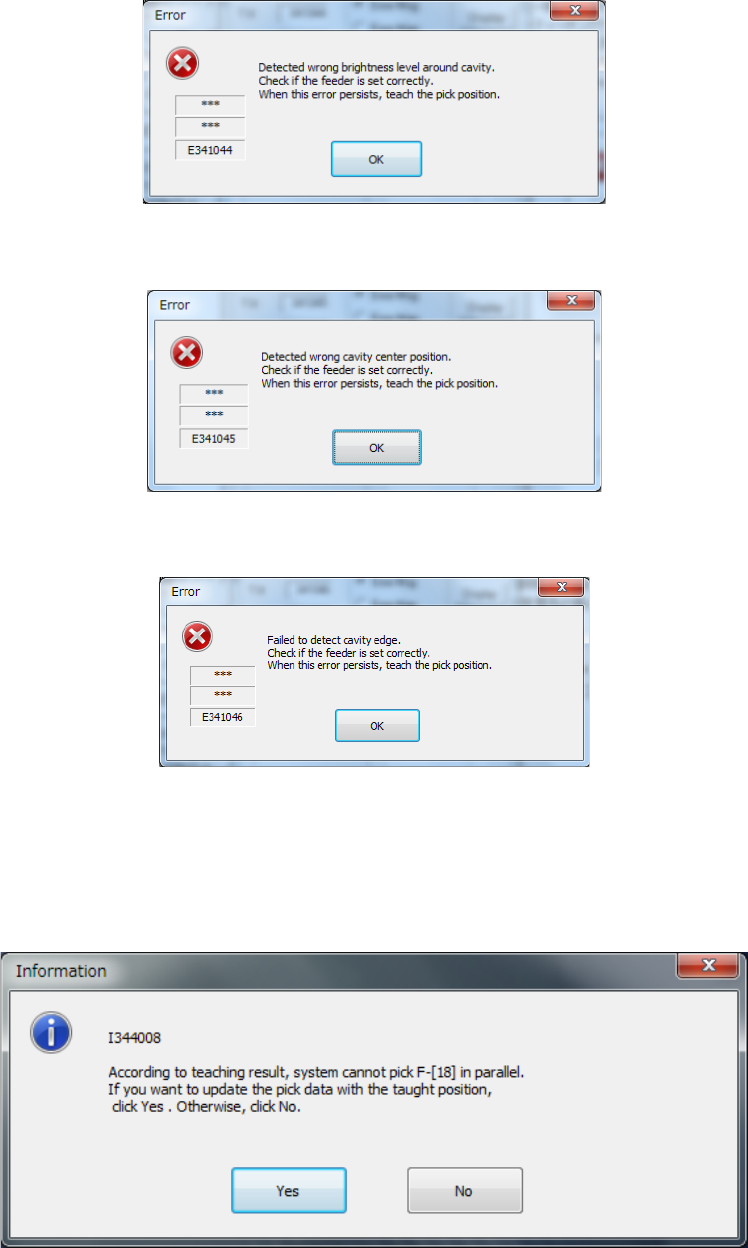
2) If the density is abnormal
The following error message appears if the shadow density of the cavity is abnormal.
3) If the center of the cavity is shifted from the regulated position
The following error message appears if the pick data you set is quite different from the pick
data corrected with the automatic teaching function.
4) If the system failed to detect the cavity edge
The following error message appears if the system fails to detect the cavity shadow
rectangular frame.
5) If the system cannot pick up two or more components simultaneously after performing the
automatic teaching function
The following question message appears if the system cannot pick up two or more
components simultaneously.
If you give preference to the accuracy over the cycle time, select the <Yes> button.
Otherwise, select the <No> button.
Part 1 Basic Operation Chapter 4 Creating a Production Program
4-229
4.5.7 Measurement/Inspection
No.
Submenu
Overview
1
Current component
Measures each detailed value of the Component data
2
All component
Measures each detailed value of two or more Component data records.
3
PWB Height
Measures the height of the surface of a PWB at a component placement position.
4 Recognize
Recognizes a component with a VCS to check to see if the component can be
centered.
5 Verify speed
Performs quasi-production operation to check errors of the moving XYθ-axes
during operation.
6 Vision teaching
Measures a ball of a ball component (general-purpose vision component, BGA
and FBGA).
7 Bad mark teaching
Use the OCC unit to teach a mark in order to determine whether to produce a
circuit.
To avoid a risk of injury, do not put your hands inside the machine or move
your face or head close the machine while the system is teaching data.
4.5.7.1 Current component/All component (Single measurement/Continuous measurement)
These functions cause the system to pick up an actual component to measure it with laser or a
VCS, and then reflect the measured data into a production program.
(1) Measurement mode
Two types of modes are provided for measurement operation: “Continuous Measurement” and
“Single Measurement.” Select the desired mode from the menu.
The command and its corresponding measurement mode are shown in Table below:
Measurement mode Description
Single Measurement Measures a component displayed on the Component "Form" screen.
Continuous Measurement Measures all components/components which satisfy the conditions specified in a
production program. In Single Measurement mode, you can measure a
component which failed to be measured for some reason individually.
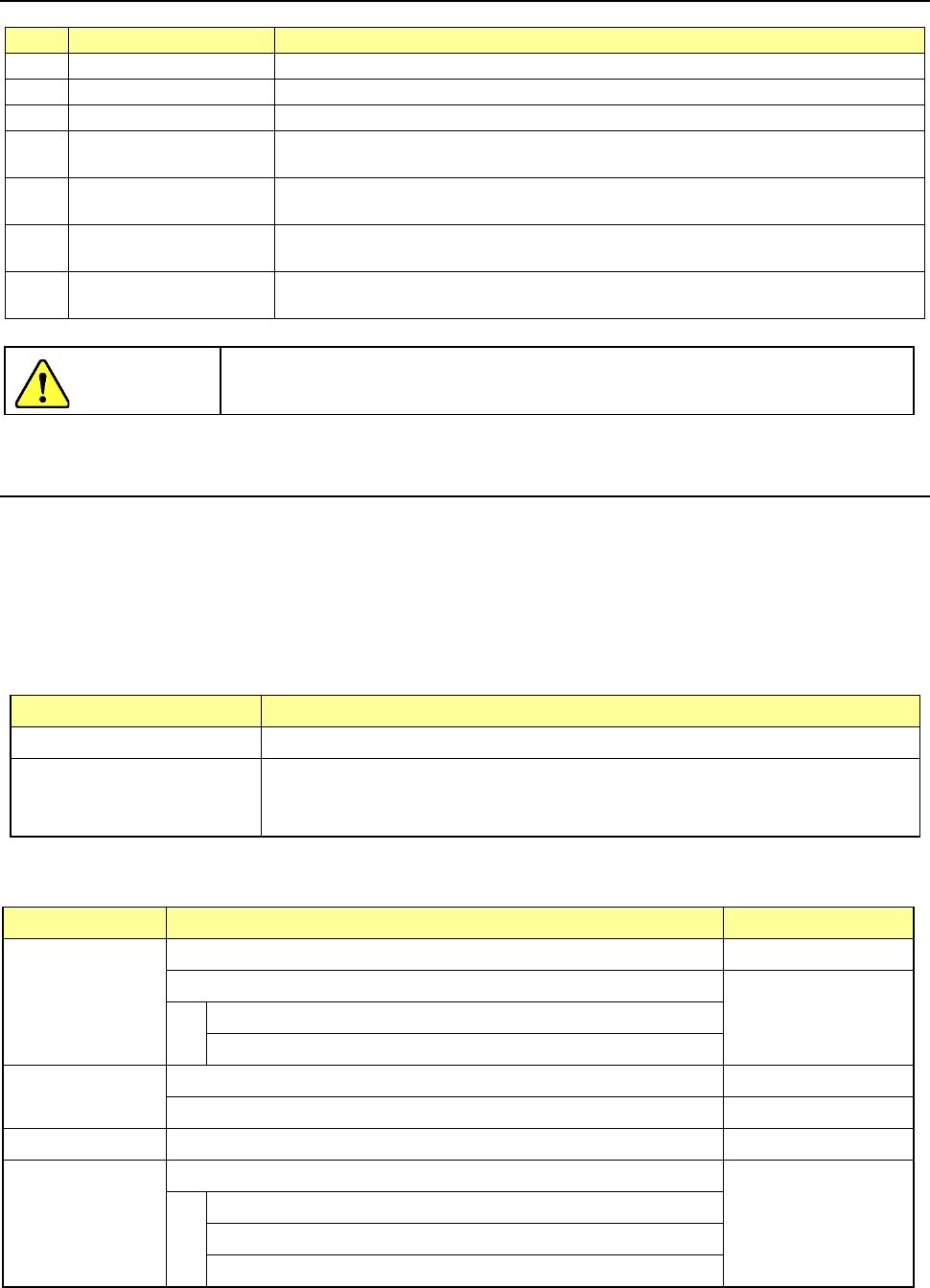
(2) Measurement items
The items to be measured are outlined in the table below.
Measure item What to measure Remarks
Comp. height
Component height -
Calculation of the optimal laser centering value
Components to be
centered with laser
only
Laser height
Threshold value for a chip tombstone error
Outline
Outer dimensions of a component (length and width) -
Calculation of the optimal nozzle number -
Vacuum level Vacuum level to be applied when an actual component is picked up -
Lead Information
Dimensions of a lead of a component
Components to be
centered with a VCS
only
Lead pitch
Lead length
Number of leads/information on a missing lead(s)
CAUTION

Part 1 Basic Operation Chapter 4 Creating a Production Program
4-230
1) Comp. height
This function measures the height of a component with laser.
At the same time, the system automatically calculates the optimum laser height and the value to
be used for judging if a chip is placed on its side (if a tombstone error occurs).
The measuring methods are shown below.
Target component
Method
Laser recognition component
Vision recognition component
① The component is moved up and down.
②
The shadow range of the component is specified as the height.
2) Outline
The length and the width of a component are measured with laser or a vision recognition unit.
The optimal nozzle number is automatically calculated also. The measuring methods are shown
below.
Target component
Method
Laser recognition component ① The current component angle is obtained by laser.
② By rotating the component at a 0-degree angle in the theta direction, the
obtained laser width is specified as the crosswise dimension.
③ By rotating the component at a 90-degree angle in the theta direction, the
obtained laser width is specified as the lengthwise dimension.
Vision recognition component
① The component is recognized with a vision recognition unit to obtain its outer
dimensions.
② The values obtained from a response is specified as crosswise and
lengthwise dimensions.
3) Vacuum level
This function measures the vacuum pressure used to pick up a component. The measuring
methods are shown below.
Target component Method
Laser recognition component
Vision recognition component
1. The component is picked up to obtain the vacuum pressure of the head
2. The obtained value is specified as the vacuum pressure for picking up a
component.
4) Lead Information
The lead information is measured by a vision recognition unit. This measurement can be
executed only for vision centering components to be centered with a VCS.
The measuring method is shown below.
Target component
Method
Vision recognition component
1. A component is recognized with a vision recognition unit to obtain the lead
information.
2. The obtained values are specified as the lead dimensions.
(3) Measurement restrictions to be imposed depending on the component type
Items the system can measure are restricted according to the component type of the Component
data to be measured as shown in the table below.
No Component type
Centering
method
Measurement items
Component
height
Laser
height
Dimensions
of a
component
Vacuum
pressure for
picking up a
component
Lead
information
1
Square chip
Laser
○
○
○
○
Vision
○
○
2
MELF
Laser
○
○
○
○
3
Aluminum
electrolytic
capacitor
Laser
○
○
○
Vision
○ ○
4
GaAsFET
Laser
○
○
○