RS-1_instruction manual.pdf - 第666页
Pa r t 2 D et ai l ed Des c r i pt i o n of Ea c h F unc t i o n Chapte r 6 G e neral - Purpose Vision Co mpone nt 6- 35 Bottom View 1 3 2 4 5 1 2 3 4 5 6 ① Nam e N a m e an el em ent g roup to b e handl ed. W hen you w …
Part 2 Detailed Description of Each Function Chapter 6 General-Purpose Vision Component
6-34
Ball components (Element group/Element format) 6.5.2
This section describes the procedure for creating data on ball components (complex array
components).
1. Operation on the “Element Data” screen
- Select “Ball Component” from the “Component Type” combo box.
- Check the “Element group/Element format” check box in the “Define data format” field.
- Click the <Add> button on the “Element Group List.”
2. Operation on the “Element Group” screen
Define an element group.
An element group consists of components whose size and pitch is the same as each other.
A complex array component refers to an area array component whose size is different or
whose ball/land pitch is different from each other.
When the lead pitch is not the same even though the polarity is the same, set element
groups separately. If the polarity is the same, the size and shape of the polarity is the same
also.
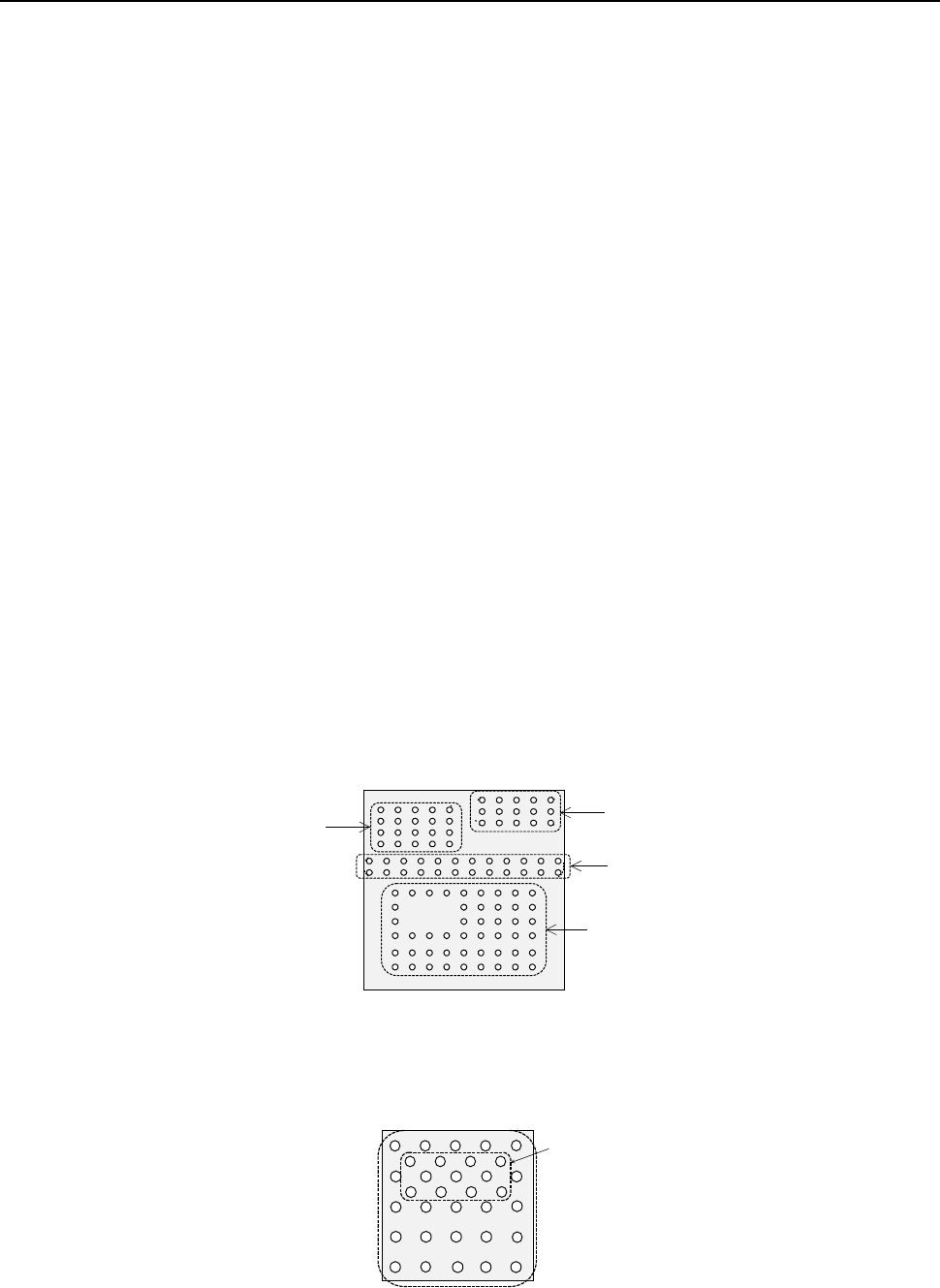
In the example shown a complex array component that consists of four element groups is
shown.
◆ Description
The procedure for creating data on this component is to be described below.
The element size and pitch of the second and third element groups are the same as each
another. However, columns of elements are not aligned with each another. Define them as
two different element groups.
The posture of a complex array component is viewed from the bottom in the same manner as
an area array component such as a BGA and FBGA.
When a component has a staggered pattern of elements partially as shown in the figure, divide
them into two grid arrangement groups, then define them.
Bottom View
Third element group
Fourth element group
Second element group
First element group
Element group 1
Element group 2
Part 2 Detailed Description of Each Function Chapter 6 General-Purpose Vision Component
6-35
Bottom View
1
3
2
4
5
1
2
3
4
5
6
①
Name
Name an element group to be handled. When you want to change an element group,
specify its name to edit it.
A name is automatically assigned with serial numbers. Users can change this numbered
name to an alphanumeric name (up to 32 characters).
- In the example, the numbered name is used.
②
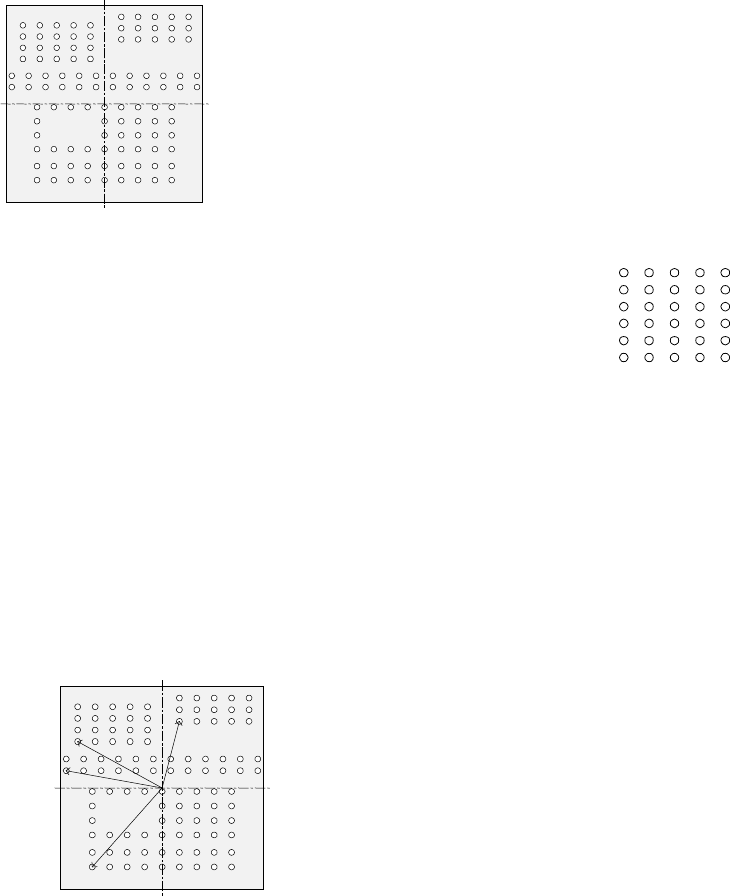
First element position
Specify the position (X, Y) and direction (Theta) of an element group.
As the position, specify the distance (offset) from the center of a component. Normally, the
center of a component is the center of the component outline.
- If the placement coordinates set in Placement data of a production program is not based
on the center of the component outline, you can specify the coordinates of the reference
component center with coordinates different from the center of the component outline.
The figure indicates that the center of the component outline is the center of a
component.
To be precise, the “First element position” is the distance
(offset) from the center of a component to the first element.
The direction (angle) of the element group is basically 0 degrees.
The figure shows the relation between the lines (rows) and
columns.
The first (ball or land) element positions at the coordinates of
the element (ball/land) at the lower left corner.
- This layout of elements is different from that of a standard
BGA component having balls on the outer frame.
The figure shows the first element (ball/land) position of the component shown in the
example above.
For a ball/land element, the center of the first ball/land viewed from the center of a
component becomes the coordinates of the first (ball/land) element.
Line (row) number
Column number
Bottom View
Center of a component (Center of
the component outline)
Bottom View
Center of a component
(Center of the component outline)
Part 2 Detailed Description of Each Function Chapter 6 General-Purpose Vision Component
6-36
③
When the end position of the first ball is (-6.0 mm, -5.0 mm) in the example in “First
element arrangement.”
Offset X : - 6.0
Offset Y : - 5.0
Offset Z : 0 (not used)
Offset Theta: 0
- Normally, enter “0” to each field of the setting item “Tolerance.”
• Next, set the element group arrangement.
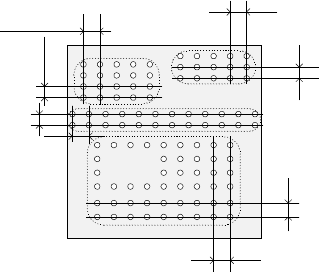
To set the arrangement, the setting items “Dimension”(Point, 1D, 2D), and “Count” and
“Pitch” of the “Column” and “Row” are provided.
④
Dimension (Point, 1D, 2D),
For a ball/land element, the dimension is two. Select “2D.”
Note: For arrangement of only one column and one row, specify “2D” also.
◆ The figure shows the pitch of each element group.
- In the example, the number of lead columns located in the first element group is nine.
Enter “9” to the “Count” field displayed under the setting item “Column.”
Note: For arrangement of only one line, enter “1.”
- When the pitch is 1.5 mm, enter “1.5” to the “Pitch” of the “Column” field.
Note: For arrangement of only one line, enter “1.5” also.
- Normally, enter “0” to the “Tolerance” field.
- Since the number of lead rows located in the first element group is six, enter “6” to the
“Count” field of the “Row” setting item.
Note: For arrangement of only one row, enter “1” to the “Count” field.
- When the pitch is 1.27 mm, enter “1.27” to the “Pitch” field of the “Row” setting item.
Note: For an arrangement of one row only, enter “1.27” to the “Pitch” field too.
- Normally, set “0” to the “Tolerance” field.
Bottom View
Pitch of the “Column” of the third
element group
Pitch of the “Row” of the third
element group
Pitch of the “Row” of the second
element group
Pitch of the “Column” of the
second element group
Pitch of the “Column” of the
fourth element group
Pitch of the “Row” of the fourth element
group
Pitch of the “Row” of the
first element group
Pitch of the “Column” of
the first element group