RS-1_instruction manual.pdf - 第814页
Pa r t 2 Det ai l ed Des c r i pti on o f Ea c h Fu nc ti on Chapter 10 M ach i ne Manage m e nt Infor m ation 10 -1 Chap ter 1 0 Mach i ne Mana g emen t Informatio n 10. 1 Over view This m enu displ ays the m achi ne op…

Part 2 Detailed Description of Each Function Chapter 9 Manual Control
9-41
(4) Control items
Select control items with the radio button.
Control each light status by pressing the <ON>, <OFF>, or <ON/OFF> button.
1) Back up light control
Controls back up light ON/OFF.
2) Side light control
Controls ON/OFF of side lights.
3) Bottom light control
Controls ON/OFF of bottom light.
4) Front light control
Controls ON/OFF of front light.
5) All light control
Controls ON/OFF of back up, side, bottom and front lights.
Necessary setting items for each light
a) Brightness control
Brightness is controlled by moving the slide bar.
b) Back up light
Make settings with the check box.
c) Side light
Make settings with the check box.
Select the light color with the radio button.
d) Bottom light
Make settings with the check box.
6) Polarity control
Controls normal and reverse of polarity.
Control the polarity by pressing the <Positive> button, <Negative> button, or
<Position/Negative> button.
7) Light unit position
Moves the light unit to the left and right sides. Control the light unit by pressing the
<Right> button, <LEFT> button, or <Right/LEFT> button.
The position of the light unit cannot be selected if two VCSs have not been set in the
MS parameter.
8) Light unit vertical position
Moves the light unit to the <Up> and <Down> sides. Control the light unit by pressing
the <Up> button, <Down> button, or <Up/Down> button.
9.6.10 Simple Control
When you press the <Simple Control> button, you can move each axis with the corresponding
button displayed in the Operation area.
See the section “8-4 Simple Control” of Chapter 8 “Machine Setup” for details.
Part 2 Detailed Description of Each Function Chapter 10 Machine Management Information
10-1
Chapter 10 Machine Management Information
10.1 Overview
This menu displays the machine operation time (total PWB production time), the number of times
a nozzle was removed and mounted, and the operation information unique to the machine.
10.2 Starting Up and Quitting
10.2.1 Starting up
When you select [Preparation/Adjustment] – [Machine preparation information] in the operation
menu of the main screen, the machine operation information is started.
When you select [Machine] in the local menu, an optional operation information screen is started.
10.2.2 Quitting the utility
When you press the close button [x] in the upper right part of the screen or press the “Exit” button
in the information area, the machine operation information is finished.
Part 2 Detailed Description of Each Function Chapter 10 Machine Management Information
10-2
10.3 Machine
10.3.1 Machine Operation Information
(1) Time
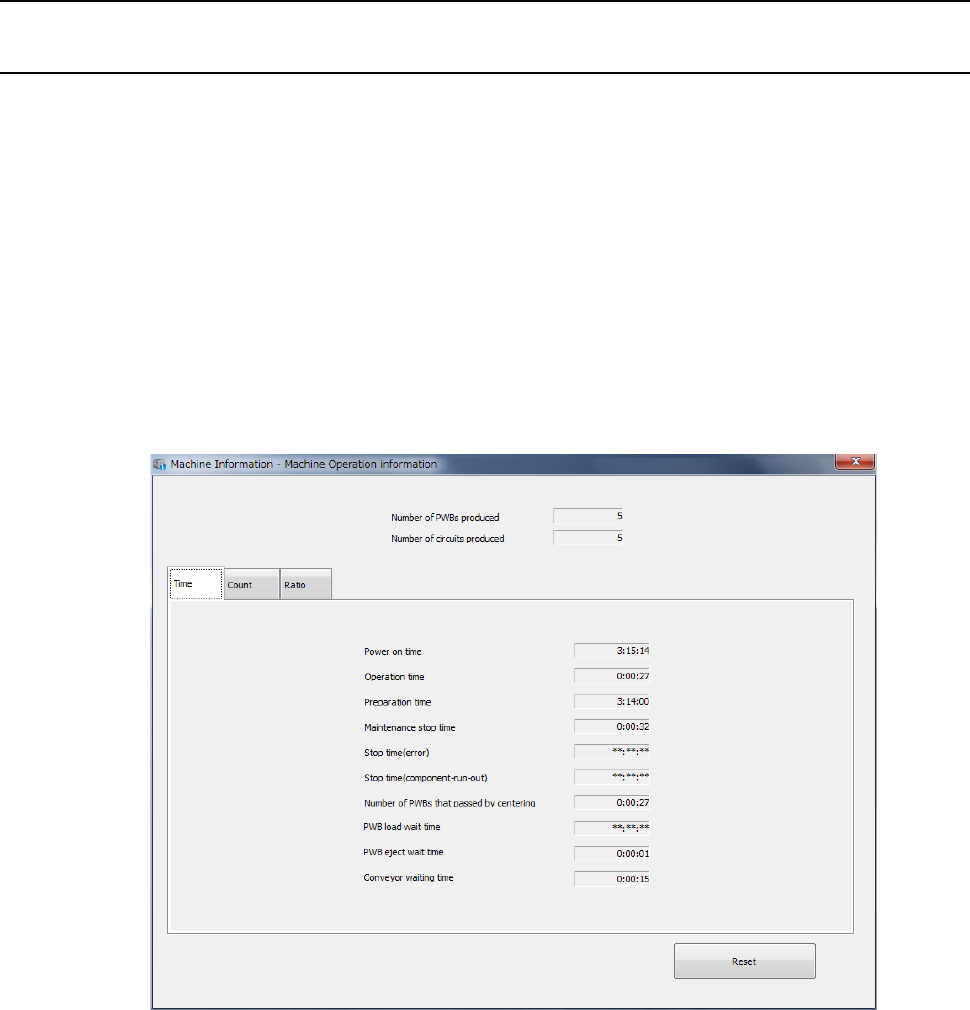
When you select [Machine] – [Machine operation information] in the main menu or select the
“Time” tab in the machine operation information screen, the machine operation information
(time) screen appears and the following items are displayed.
The operation information is cleared by pressing the <Reset> button.
Its details will be described in each sub-item.
* Unlike other conventional machines, this machine is not equipped with an external device
(hour meter) that counts how long the machine has been turned on. Therefore, even
though you press the <Reset> button, the “Power on time” is not cleared. Since the
“Preparation time” is calculated based on the “Power on time,” it is displayed even though
you press the <Reset> button unlike the other operation time.