RS-1_instruction manual.pdf - 第432页
Part 1 B asic O peration Chapter 4 Cr eating a Produc tion Progra m 4- 97 7) BGA , FBGA The “V ision 1” tab allows you to set the ba l l pitch, t he contrast ( recognit ion type), the base style, the ba ll pattern and ea…
Part 1 Basic Operation Chapter 4 Creating a Production Program
4-96
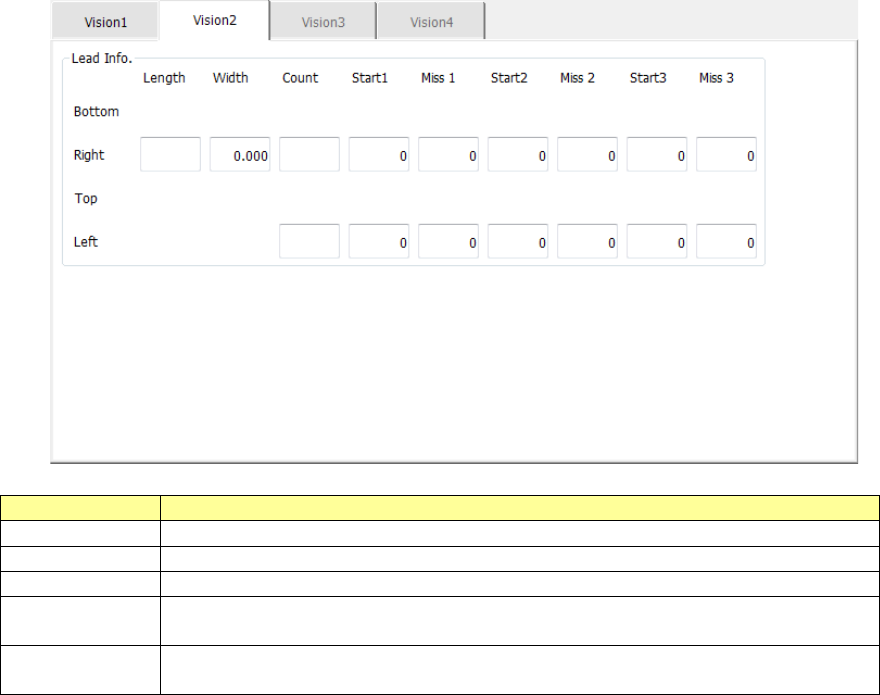
The “Vision 2” tab allows you to set information on leads located on each of the left and right sides.
Menu item
Overview
Length
Enter the length of a section of a lead that is in contact with a board.
Width
Enter the width of a lead.
Count
Enter the number of leads when a component type is a lead component.
Start 1 to 3
Enter the position of a missing lead.
The input range is from 0 to the number of leads (default: 0).
Miss 1 to 3
Enter the number of missing leads.
The input range is from 0 to the number of leads (default: 0).
Part 1 Basic Operation Chapter 4 Creating a Production Program
4-97
7) BGA, FBGA
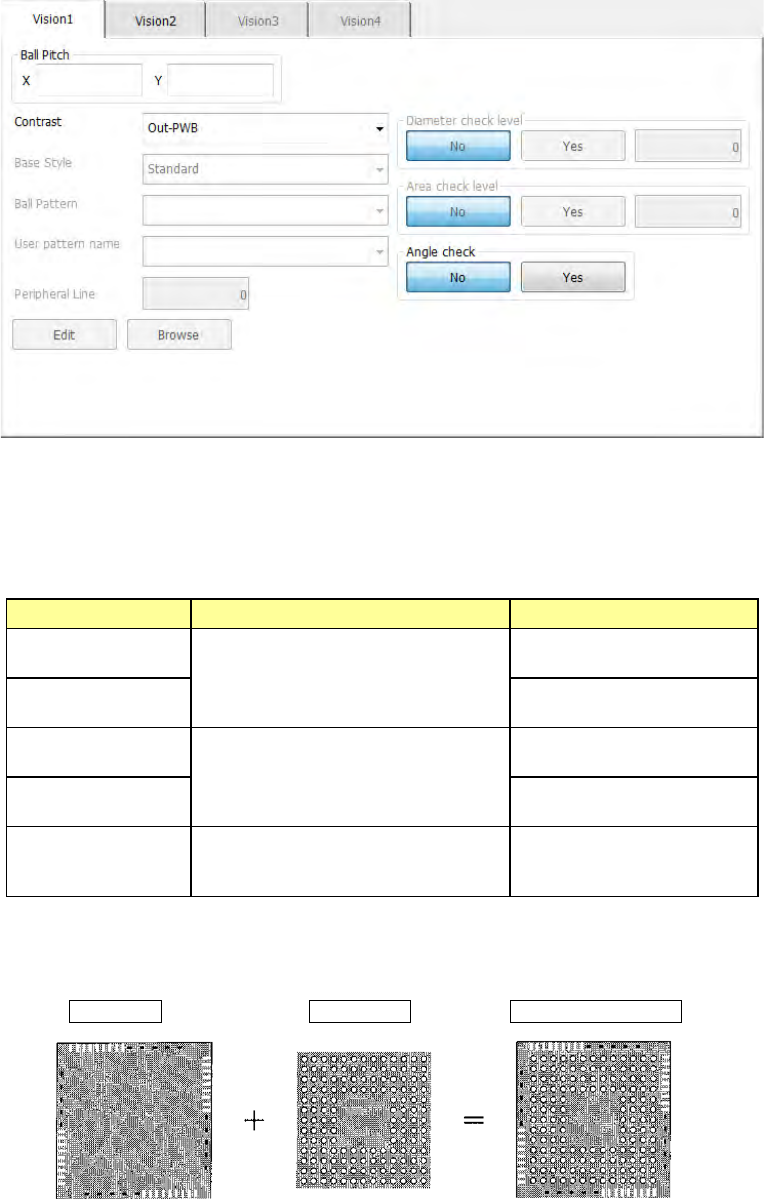
The “Vision 1” tab allows you to set the ball pitch, the contrast (recognition type), the base
style, the ball pattern and each check.
① Ball Pitch
Enter the distance between two consecutive balls.
② Contrast (recognition type)
Set the recognition type.
Choice Recognition range Type
Out – PWB
Only balls on the outer periphery of
a component are recognized.
(This cannot be selected for an
FBGA component.)
Board type whose mold
section looks black
Out–Ceramic
Ceramic type whose mold
section looks white
All balls–PWB
All balls of a component are
recognized.
Board type whose mold
section looks black.
All balls–Ceramic
Ceramic type whose mold
section looks white
All land
All lands of a component are
recognized. (This choice is for an
LGA component.)
Board type whose mold
section looks black
When you select "All balls," the recognition pattern can be set by setting "Base style"
and "Ball pattern."
Base Style + Ball Pattern → Recognition pattern
Part 1 Basic Operation Chapter 4 Creating a Production Program
4-98
③ Base style
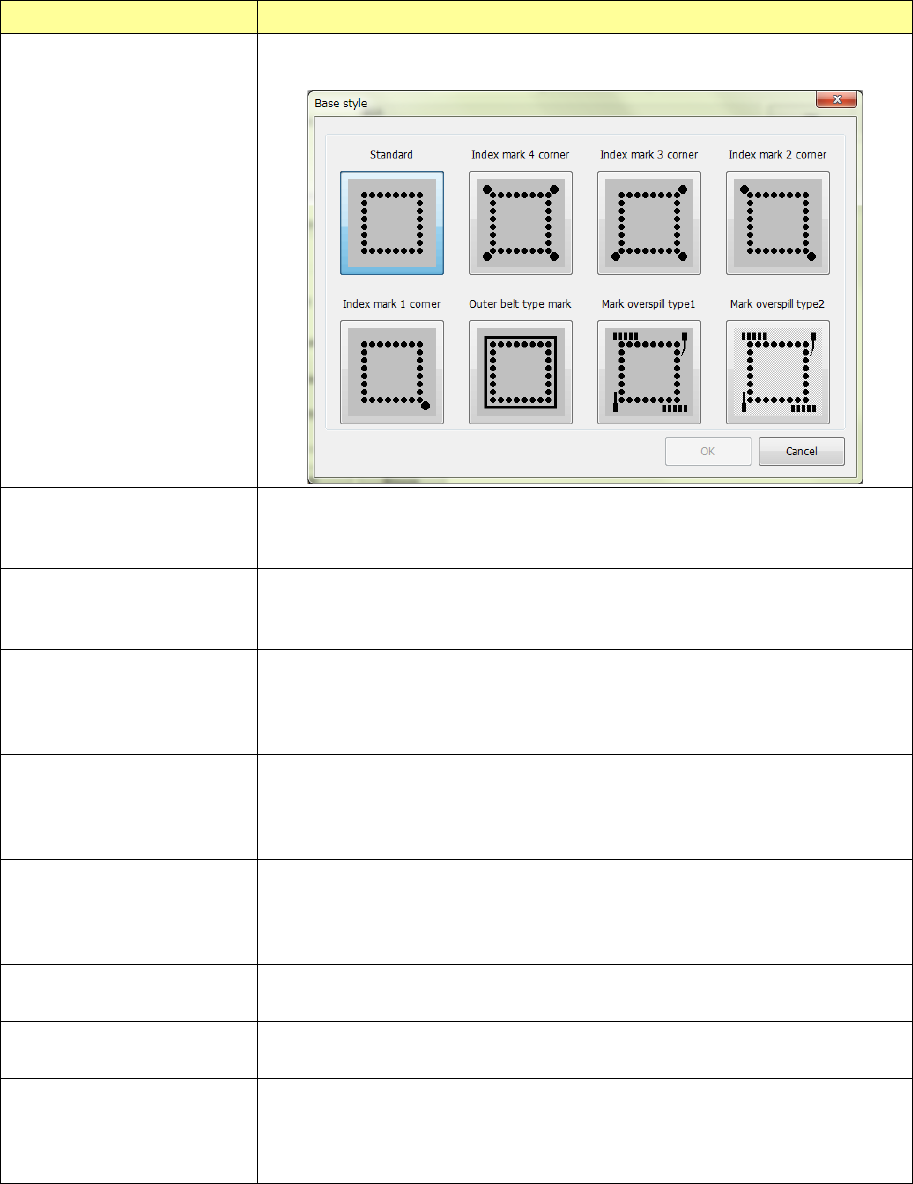
Set a base style (mark arrangement pattern).
Combination of a base style and a ball pattern is to be used as a recognition pattern.
Base style selection item Contents
Browse
This item allows you to select a base style from the “Standard” type to the
“Mark overspill type” from the sample diagram.
Standard There is not anything other than balls on the outer periphery of the package.
Conventional BGA with a narrow pitch and small balls
Index balls may be on lattices.
Index marks 4 corners There is not anything other than balls and index balls on the outer periphery of
the package and the index balls exist outside of lattices. Index balls are
arranged on 4 corners outside lattices.
Index marks 3 corners There is not anything other than balls and index balls on the outer periphery of
the package and the index balls exist outside of lattices. Index balls are
arranged on 3 corners outside lattices. (The status where there is no index ball
on the upper left corner is specified as 0°.)
Index marks 2 corners There is not anything other than balls and index balls on the outer periphery of
the package and the index balls exist outside of lattices. Index balls are
arranged on 2 corners outside lattices. (It is supposed to be 0 degrees when
an index ball exists in the upper left and lower right corners.)
Index mark 1 corner There is not anything other than balls and index balls on the outer periphery of
the package and the index balls exist outside of lattices. Index balls are
arranged on 1 corner outside lattices. (It is supposed to as 0 degree when an
index ball exists in the lower right corner.)
Outer belt type mark Materials with a density level close to balls are arranged in a belt form on the
outer periphery of the package.
Mark overspill type 1 Materials other than balls are scattered over the outer periphery of the
package. (Normally, select this.)
Mark overspill type 2 Materials other than balls are scattered over the outer periphery of the
package.
(Select this when there is a narrow and long base style whose diameter is the
same as that of a ball to be recognized.)