RS-1_instruction manual.pdf - 第456页
Part 1 B asic O peration Chapter 4 Cr eating a Produc tion Progra m 4- 121 The range of sl ots of a feeder bank to be occu pied varies depend ing on the tape widths and t he tape feeder mo dels. * T o attach an EF series…
Part 1 Basic Operation Chapter 4 Creating a Production Program
4-120
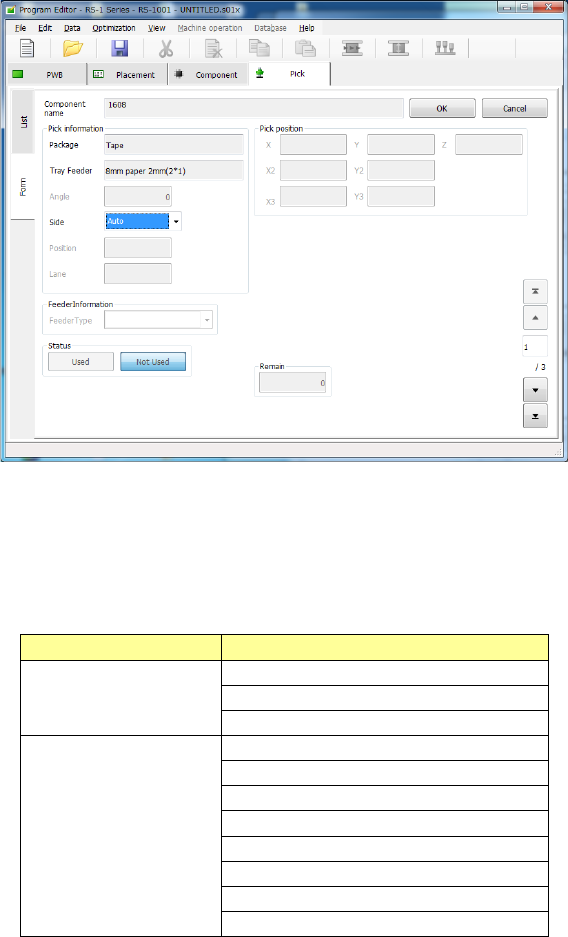
When you select the “Form” tab on the “List” screen or when you double-touch the “List” screen,
the “Form” screen opens showing the corresponding data about the line where the focus is
located.
Values you entered on the “Placement” and “Component” data screens are displayed in the fields
of “Component name,” “Package” and “Tray Feeder” respectively.
You can edit the eight items, “Angle,” “Side,” “Position,” “Lane,” “Feeder Type,” “Status,” “Pick
position,” and “Remain” on the “Form” screen.
Editable or not
Menu item
Not editable
Component name
Package
Tray Feeder
Editable
Angle
Side
Position
Lane
Feeder Type
Status
Pick position
Remain
Part 1 Basic Operation Chapter 4 Creating a Production Program
4-121
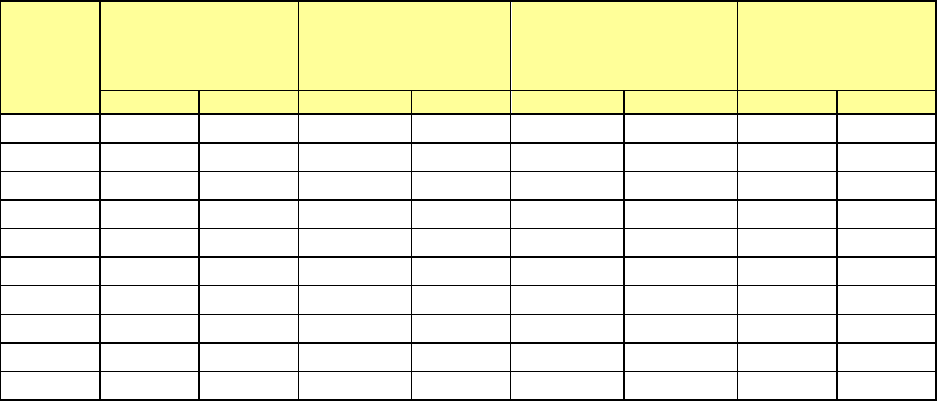
The range of slots of a feeder bank to be occupied varies depending on the tape widths and the
tape feeder models.
* To attach an EF series electric feeder on the machine, you have to install the RF-ETF
attachment on it.
Tape
width
Number of feeders
that can be
attached on the RF
bank
Number of feeders
that can be attached
on the RF/EF bank
Maximum number of
feeders that can be
attached on the bank
Number of
occupied slots
RF
EF
RF
EF
RF
EF
RF
EF
4 mm
56
-
56
-
112
-
1
-
8 mm
56
-
56
28
112
56
1
2
12 mm
28
-
28
28
56
56
2
2
16 mm
28
-
28
18
56
36
2
3
24 mm
18
-
18
18
36
36
3
3
32 mm
14
-
14
14
28
28
4
4
44 mm
11
-
11
11
22
22
5
5
56 mm
9
-
9
9
18
18
6
6
72 mm
6
-
6
-
12
-
9
-
88 mm
5
-
5
-
10
-
10
-
Part 1 Basic Operation Chapter 4 Creating a Production Program
4-122
4.3.6.2 Creating Pick data
(1) Angle
Specify the component picking angle.
When “Auto” is selected for the menu item “Side,” you do not have to enter this item. In this case,
“*” is displayed on the “List” screen, while this menu item itself is dimmed on the “Form” screen.
When “Front” or “Rear” is selected for the menu item “Side” and some value is specified in the
“Position” field, you can change the value already set for this item. The angle set on the
"Component" data screen is set here by default.
To change the value, move the input focus to the “Angle” field, and then enter the desired value.
Even though you enter a value into this “Angle” field on the “Pick” data screen, the
corresponding angle is not changed on the “Component” data screen or database.
(2) Side
Specify on which side to set a feeder, on the front side or on the rear side.
“Auto” is selected in this field as the initial value.
When “Auto” is selected, the Optimization function assigns a feeder.
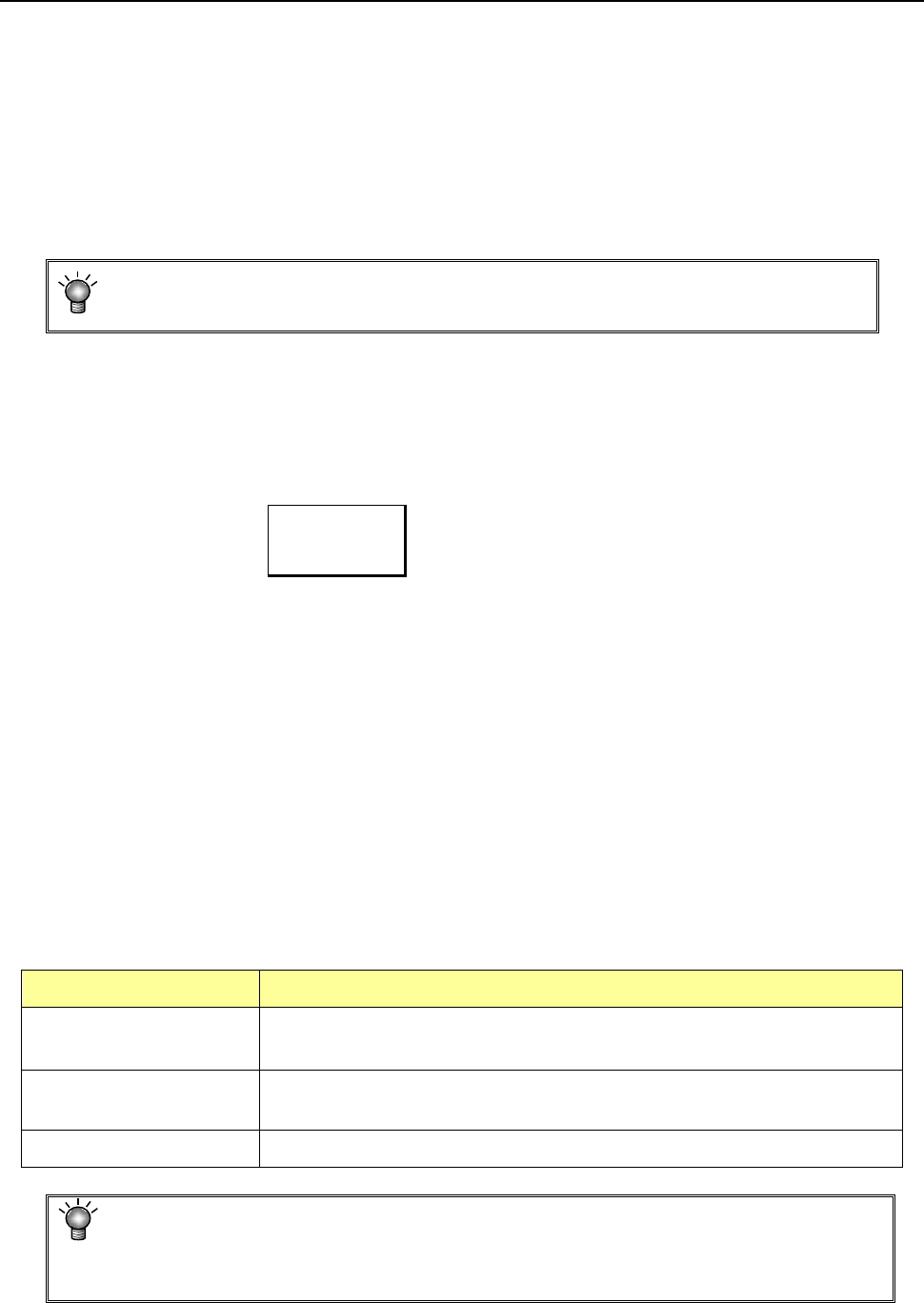
Auto
The Optimization function assigns a feeder.
Front
Components are supplied on the front bank.
Rear
Components are supplied on the rear bank
When “Tray” is selected as the “Package,” you cannot select “Front.”
To assign an electric feeder (EF) to the machine, you have to select the side on which the electric
bank (RF/EF) is attached.
You have to specify this “Side” menu item together with the next item “Position.”
When you select two or more pick data records to change the setting of the menu item “Side,” you
can select “Auto” only.
8mm-width-1mm-feed pitch and 12mm-2mm-feed pitch can be selected only for the electric feeder
(RF).
To use the electric feeder (EF) for the electric bank (RF), an attachment (option) is needed.
(3) Position
Enter the position for mounting a component supply unit.
Component supply unit Number to be specified
Tape feeder
Stick feeder
Number of a feeder mounting hole to which the fixing pin at the front-end of the
machine is inserted.
Tray holder Number of a feeder mounting hole indicated with the mounting marker of a tray
holder
DTS/MTC/MTS Number of the level on which a tray is stored
You cannot specify another type of component supply unit on the position whose
number was already specified for one type of component supply unit.
Example: If you specify “Front 10” in this field for an RF 12-mm tape feeder, you
cannot specify any other feeder at the positions from Front 10 to 11.