RS-1_instruction manual.pdf - 第835页
Pa r t 2 Det ai l ed Des c r i pti on o f Ea c h Fu nc ti on Chapter 10 M ach i ne Manage m e nt Infor m ation 10 - 22 (2) < Reset > b utton W hen you p res s the < R eset > b utton or pr ess [Ini tial iz e] …
Part 2 Detailed Description of Each Function Chapter 10 Machine Management Information
10-21
10.3.7 Conveyor information
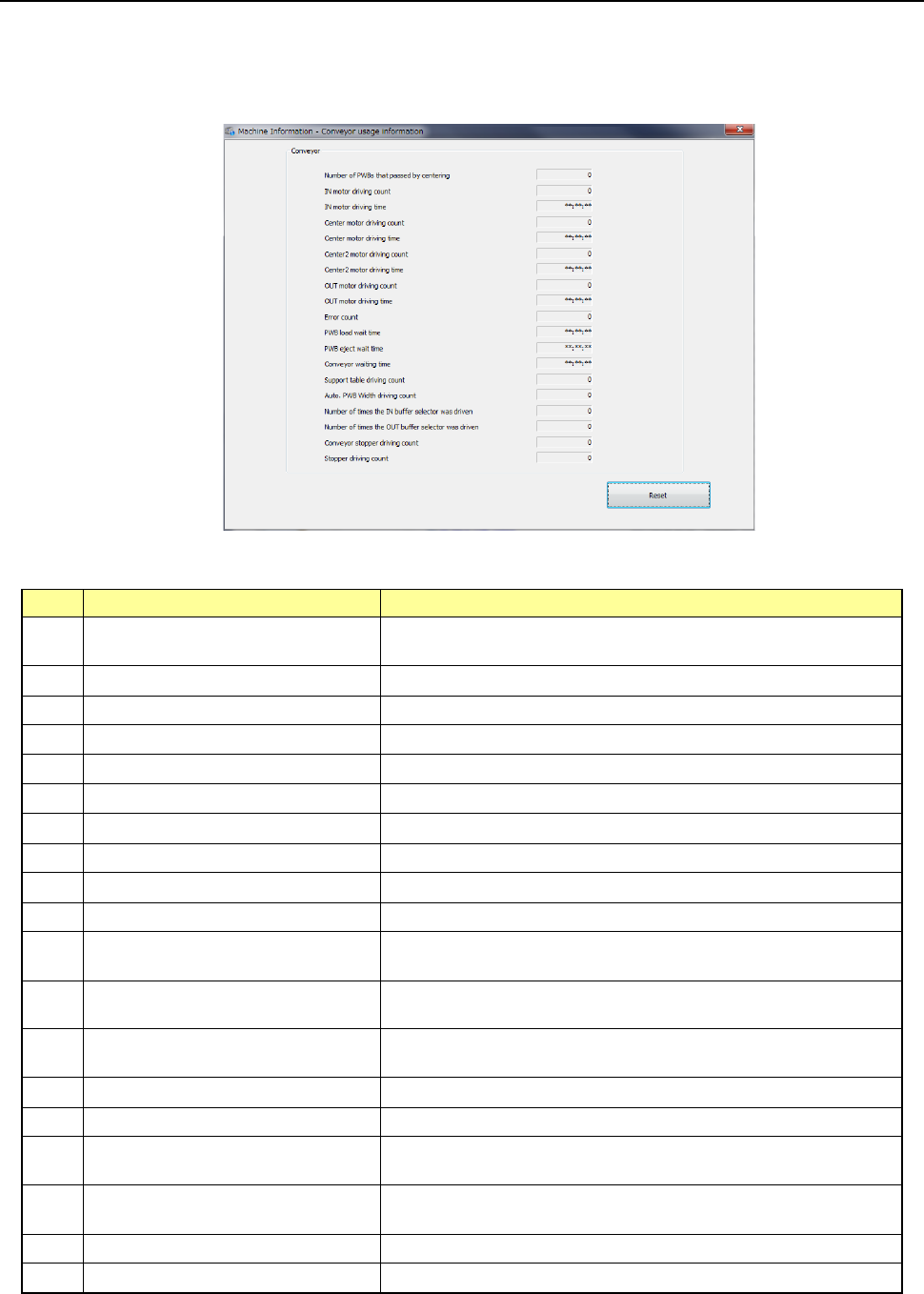
When you press [Machine] – [Conveyor usage information] in the main menu, the conveyor
usage information screen appears.
(1) Conveyor
No.
Item
Description
1 Number of PWBs that passed by
centering
Displays the total number of PWBs that passed through.
2 IN motor driving count Displays how many times the IN motor operated totally.
3 IN motor driving time Displays the total time the IN motor operated.
4 CENTER motor driving time Displays the total time the CENTER motor operated.
5 CENTER motor driving count Displays how many times the CENTER motor operated totally.
6 CENTER 2 motor driving time Displays the total time the CENTER 2 motor operated.
7 CENTER 2 motor driving count Displays how many times the CENTER 2 motor operated totally.
8 OUT motor driving count Total of times OUT motor has been used
9 OUT motor driving time Total time OUT motor has been used
10 Transport error count Total of times there have been transport errors
11 PWB load wait time Total time from when a PWB was ready for loading until the next
PWB was clamped
12 PWB eject wait time Total time from the board conveyance enable status to the start
of carrying-out
13 PWB conveyor wait time Total time from the release of a clamped board to the completion
of clamp/carrying-out
14 Support table driving count Total of times support table has been used
15 Auto PWB width driving count Total time auto PWB width adjustment has been used
16 Number of times the IN buffer
selector was driven
Total number of times the IN buffer selector was driven
17 Number of times the OUT buffer
selector was driven
Total number of times the OUT buffer selector was driven
18 Conveyor Stopper driving count Tot al number of times the conveyor stopper operated
19 Stopper driving count Total number of times the support table stopper operated
Part 2 Detailed Description of Each Function Chapter 10 Machine Management Information
10-22
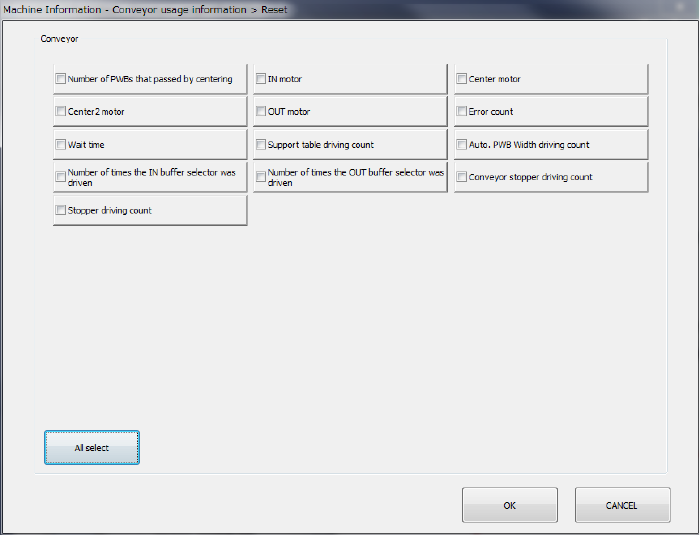
(2) <Reset> button
When you press the <Reset> button or press [Initialize] – [Reset] in the main menu, the
following screen appears.
This operation allows you to clear the certain data or all data displayed in the list.
- The <All select> button allows you to select all check boxes displayed on the screen.
- When you press the check box of the item whose data you want to reset, and press the
<OK> button, the “Question” dialog box for asking you whether to reset data appears on
the screen. When you press the <OK> button on this “Question” message, the system
resets the checked items of data, and closes the screen.
- When you press the <CANCEL> button, the system does not reset any data and the
current data is still displayed.
Part 2 Detailed Description of Each Function Chapter 10 Machine Management Information
10-23
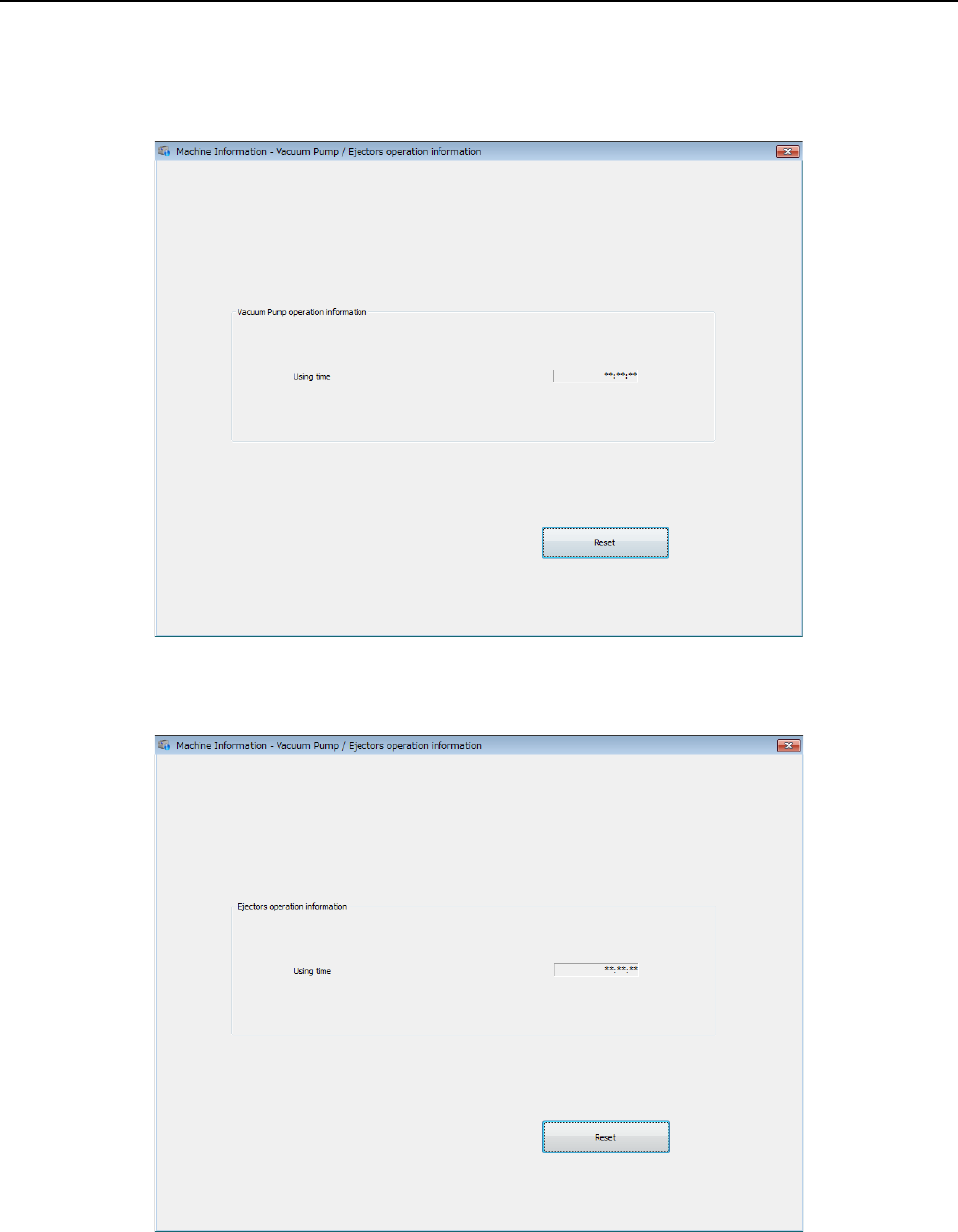
10.3.8 Vacuum pump/Ejector operation information
When you select [Machine] – [Vacuum pump/Ejector operation information] in the main menu, the
vacuum pump/Ejector operation information screen appears.
・In case of Vacuum pump
・In case of Ejector