RS-1_instruction manual.pdf - 第709页
Part 2 D etaile d Descript ion of E ach Functi on Chapter 8 Machine S etup 8-1 Chapt er 8 Mach ine Set up 8.1 Ove rvi ew The basic con f igurat i on of the machine suc h as the nozzle lay out is set on this “ Machine set…

Part 2 Detailed Description of Each Function Chapter 7 Operation Option
7-33
No.
Menu item
Description
Status
Operation and detailed explanation
1
Pick start position
Specify the tray component pick start position.
Start position
Select the left rear, left front, right rear, and
right front.
2 Pick direction
Specify the tray component pick direction.
Pick direction Select the Y-direction and X-direction.
3
Enable Auto Compo. presence check
of MTC
Specify a component check to be run when a component is picked
up from an MTC.
You can set this item only when “TR6D” is selected for the menu
item “MTC” on the “Machine Setup” screen.
Do not check
The system does not detect any
component.
When you refill the MTC with components,
the machine always starts picking up
components from the first component
position of a tray.
Read file
The system detects a component when a
production program is changed.
Supply component
The system detects a component when the
MTC finishes being refilled with
components in response to pressing of the
SUPPLY switch of the MTC.
If you select the <Read file> button or the <Supply component>
button, the HMS inside of the MTC detects whether there is a
component on a tray, and the system starts picking up an existing
component when it is to pick up a component from a tray of the MTC
refilled with components.

Part 2 Detailed Description of Each Function Chapter 8 Machine Setup
8-1
Chapter 8 Machine Setup
8.1 Overview
The basic configuration of the machine such as the nozzle layout is set on this “Machine setup” menu.
You do not have to change the settings you have made on this menu until the system configuration
changes.
When you add a nozzle or change the machine configuration, set the corresponding changed portions
on this menu again.
Note that you have to check the settings in order to the periodic inspection also after cleaning the
nozzles.
No.
Operation
group
Setting item Description
1 Device enable
Head Use or no use of the head-related unit
Base Use or no use of the base-related unit
Use or no use of a transcription unit and setting of its type
Conveyor
Use or no use of the conveyor-related unit
MTC/MTS
Use/no use of MTS
VCS
Use/no use of VCS
2 Nozzle
Registered nzl. No. table
Design value data of registered nozzle
Read nzl. data
Nozzle data
ATC nozzle setup ATC nozzle setup
Vacuum value without nozzle
Vacuum value when no nozzle is attached
Read ATC Data Reads ATC data from the regulated INI file.
* Available with an RS-1R only.
ATC Setting
Setting of an ATC to be mounted on the machine, browsing
of information and discrimination of an ATC
* Available with an RS-1R only.
3 Conveyor
Conveyor setting
Conveyor operation setting
Support table
Support table operation setting
Shape clamp position adjustment
Setting of the board shape reference position viewed
from the origin
4 Position setting
Component reject position
Component reject position setting
IC collection belt position
IC collection belt position setting
Head wait position
Head wait position setting
MTS position offset
MTS assembly position setting
MTC shuttle pick position
MTC component supply position setting
5 Function setting
Pick error condition setting
Pick error condition setting
Mark recognition speed setting
Speed setting at mark recognition
Solder Print Misalignment Correction
Position correction value setting at solder print recognition
Pre-pick feed setting
Pre-pick feeder setting
Setting for changing the head height
Component height setting
Bad mark information setting
This setting is performed when the bad mark
propagation is effective.
Nozzle sliding fail check
Nozzle sliding fail check use/not use setting
Splicing setting Splicing use/not use setting
6 Unit setting
Signal light
Signal light pattern setting
Bad mark teaching
Setting at bad mark teaching
Superimpose setting Superimpose setting
Host Line Connection Online connection setting to the host
Coplanarity Setting when the coplanarity option is valid.
Verification
Setting when the component verification is valid.
Part 2 Detailed Description of Each Function Chapter 8 Machine Setup
8-2
8.2 Starting Up or Exiting the Machine Setup Utility
8.2.1 Starting up the Machine setup utility
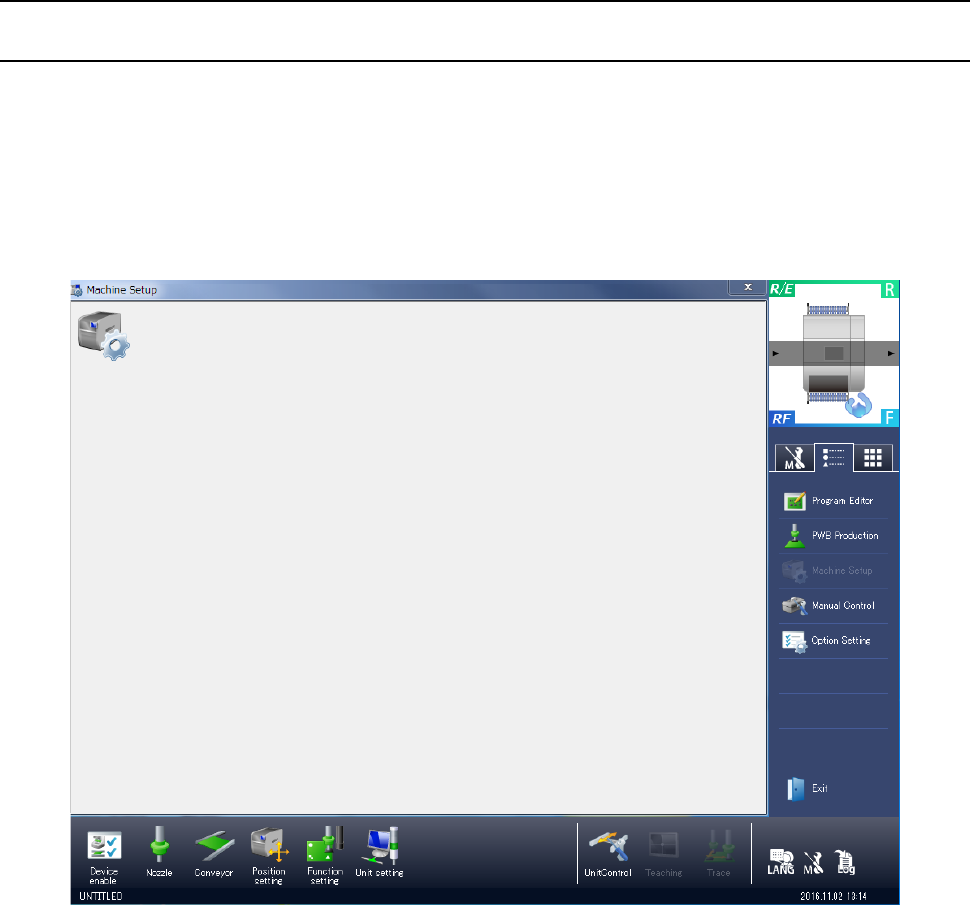
When you select “Machine setting” from the operation area in the lower part of the screen and
then [Machine setup], or when you select “Machine setup” in the information area at the right of
the screen, the following “Machine Setup” initial screen appears.
In the initial screen for machine setup, the shortcut keys are displayed on the right side.
In the shortcut keys, functions to be frequently used are registered.
When you press each of them, the screen corresponding to each key can be displayed.
In the initial screen, the icons for machine setup are displayed.
When you press a shortcut key in the information area on the right side, the screen of “Program
editing”, “PWB production”, “Manual control”, or “Operation option” can be displayed. To display
a screen, terminate Machine setup and then call the selected function.
In the lower operation area, a table of items that can be set in the machine setup is displayed.
Furthermore, simple control call, language changeover, self-diagnostic display, and maintenance
log output are enabled.
The setting items are classified into “Device enable”, “Nozzle”, “Conveyor”, “Position setting”,
“Function setting”, and Unit setting.” For details, refer to “8.3. Setting Items.”