RS-1_instruction manual.pdf - 第802页
Part 2 D etaile d Descript ion of E ach Functi on Chapter 9 M anual Control 9- 30 9.6 Others 9.6.1 ATC control When you se lect [Other ] – [ AT C cont rol ] in the m enu , the A TC control dial og appears. The unit contr…
Part 2 Detailed Description of Each Function Chapter 9 Manual Control
9-29
9.5.3 MTC control
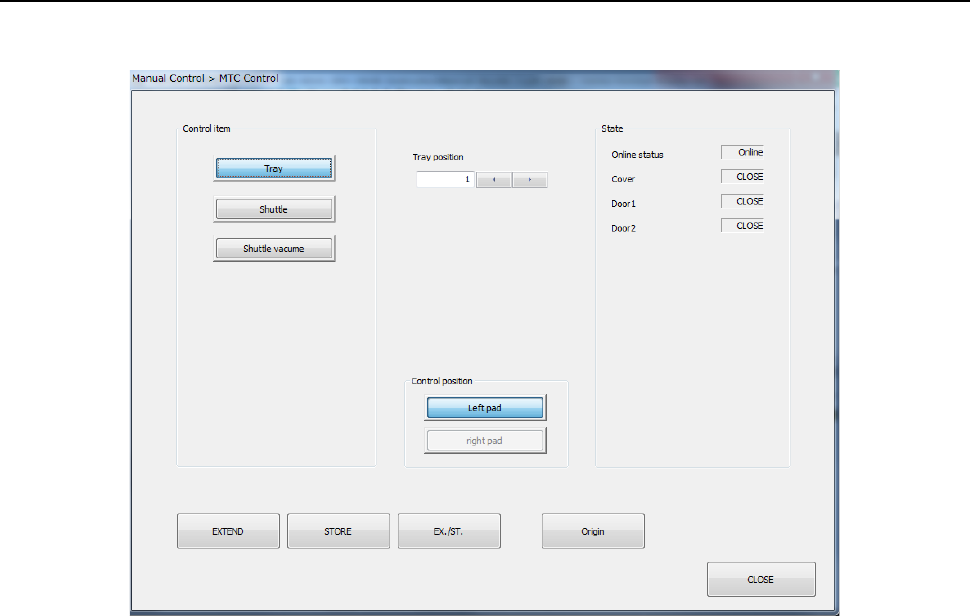
When you select [Feeder] – [MTC control] in the menu, the MTC control dialog appears.
(1) Control item
Select the desired control item with the corresponding push button.
1) Tray
This item controls pulling-out/storage of a tray.
Which operation is to be performed is controlled with selecting the <EXTEND> button,
the <STORE> button, the <EX./ST.> (extend/storage) button or the <Origin> button.
2) Shuttle
This item controls pulling-out/storage of a shuttle
Which operation is to be performed is controlled with selecting the <EXTEND> button,
the <STORE> button, the <EX./ST.> (extend/storage) button or the <Origin> button.
3) Shuttle vacuum
Vacuuming up of a shuttle is controlled with the <ON> button, the <OFF> button, the
<ON/OFF> button or the <Origin> button.
(2) Control position
Select the position to be applied when the selected item is controlled with the corresponding
push button.
You can select the position only when the control item <Shuttle Vacuum> is selected.
(3) State
The state of each unit is displayed here when the corresponding item finishes being
controlled.
The online status is displayed in the “Online status” field, the open/close state of the door is
displayed in the “Door 1” and “Door 2” fields, and the open/close state of the cover is
displayed in the “Cover” field.
Part 2 Detailed Description of Each Function Chapter 9 Manual Control
9-30
9.6 Others
9.6.1 ATC control
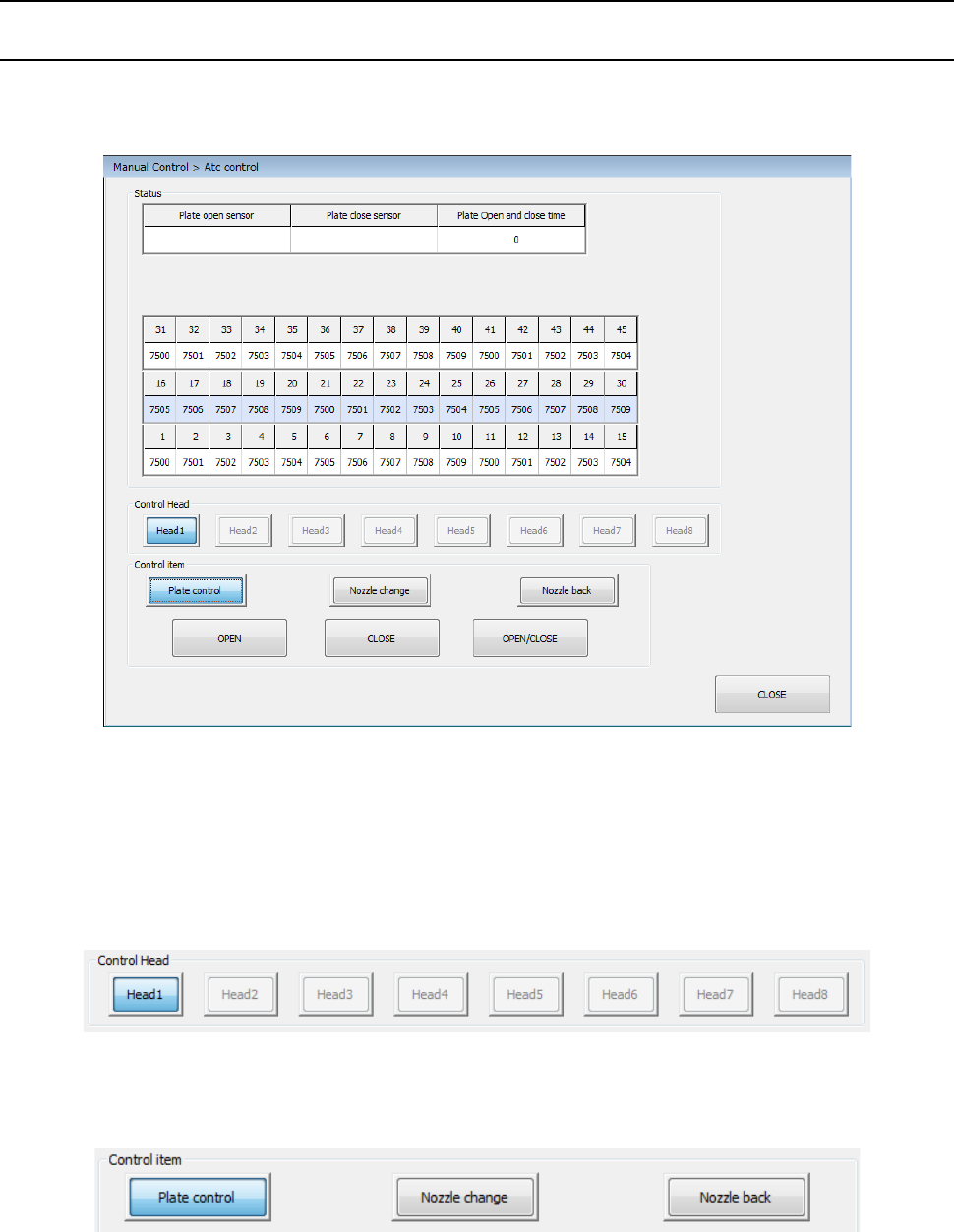
When you select [Other] – [ATC control] in the menu, the ATC control dialog appears.
The unit control of each band can be selected by the device select button.
(1) Status
The status of each unit is displayed at completion of control.
(2) Control Head
Select a head to be controlled by radio button. This has no effect on “Device enable” in
Machine setup.
(3) Control item
Select a control item by radio button.
Part 2 Detailed Description of Each Function Chapter 9 Manual Control
9-31
(4) Control button
Control is executed by the control button. The control button display varies depending on
the control item.
1) Plate control
The open/close operation of the ATC slide plate is controlled.
Control the open/close operation by pressing the <OPEN> button, <CLOSE> button, or
<OPEN/CLOSE> button when the control item “Slide plate control” is selected.
2) Nozzle change
The nozzle is changed.
This change is controlled by pressing the <EXEC>button when the control item “Nozzle
change” is selected.
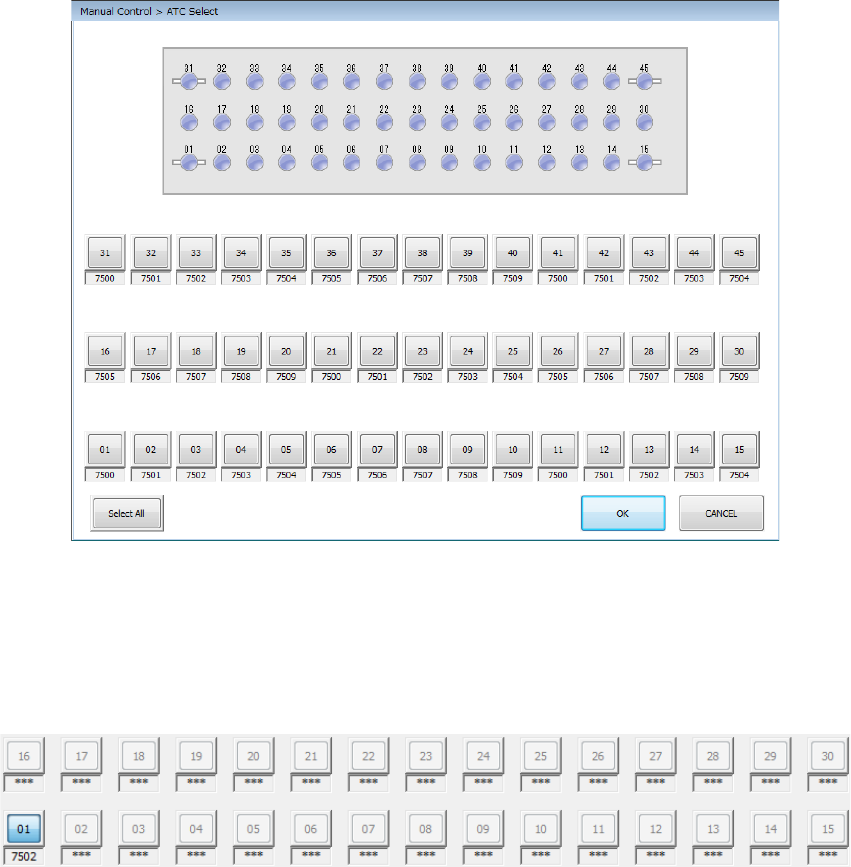
When you press the <Select All> button, all the selectable ATC numbers are selected.
When you press the <OK> button, the nozzle is taken out from the selected ATC.
If a nozzle is already provided in the specified head, the nozzle is returned to the ATC.
After the nozzle is normally installed, the corresponding ATC cell is displayed in color by the
head unit.
3) Nozzle back
The nozzle is returned to the ATC. Select the control item “Nozzle back” and press the
<EXEC> button for control.