RS-1_instruction manual.pdf - 第614页
Part 1 B asic O peration Chapter 4 Cr eating a Produc tion Progra m 4- 279 2) Recognizing a bad m ark with the O CC (setting the l ights) When you perf orm teac hing operat ion for the “S et OCC Ba d Mark Threshold” f ie…
Part 1 Basic Operation Chapter 4 Creating a Production Program
4-278
4.5.7.7 Bad mark teaching
This command uses the OCC unit to check whether to produce each circuit, and teaches the
coordinates of a bad mark.
(1) Operation for teaching a bad mark
1) Teaching a bad mark
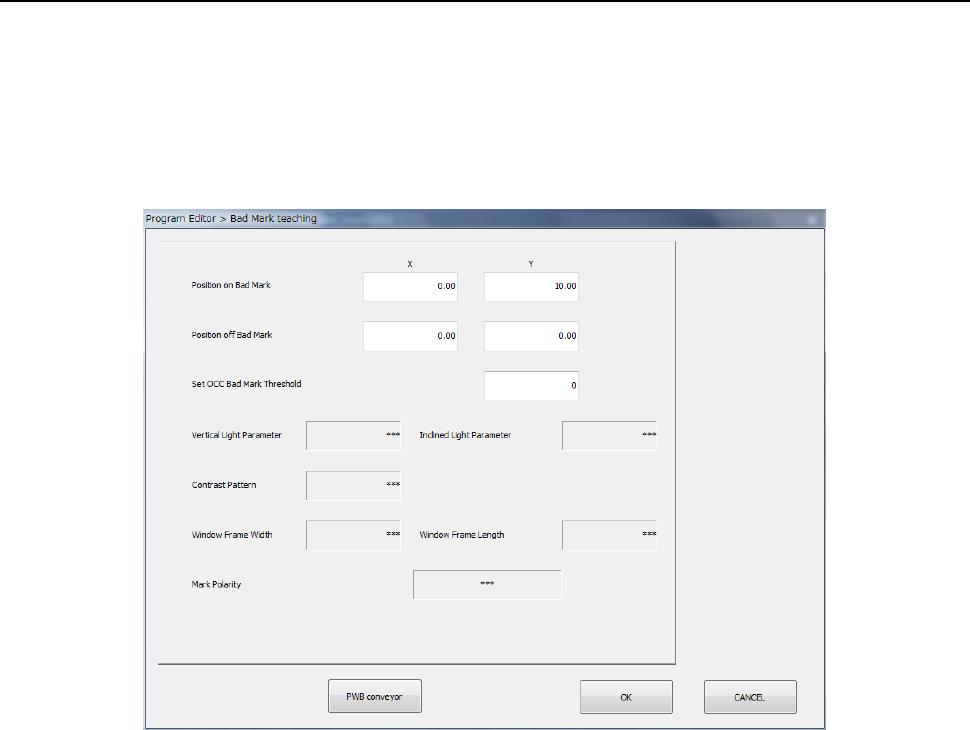
When you select the [Bad mark teaching] command, the following dialog box appears on the
screen.
① Position on Bad Mark
Specify the coordinates of the position at which a bad mark is located on a board. You can
set these coordinates by teaching them.
② Position off Bad Mark
Specify the coordinates of the position at which no bad mark is located on a board. You
can set these coordinates by teaching them. As this position, specify the position
between which the system can distinguish the contrast and that of a bad mark.
③ Set OCC Bad Mark Threshold
Set a threshold value for recognizing a bad mark.
The system automatically determines the threshold value by recognizing a position of a bad
mark and that where no mark is located with teaching operation.
④ Vertical Light Parameter
⑤ Inclined Light Parameter
⑥ Contrast Pattern
⑦ Window Frame (Width, Length)
⑧ Mark Polarity
As an initial value, “***” appears in each of the fields above.
If the system obtains the threshold value successfully when you perform teaching operation
for the “Set OCC Bad Mark Threshold” field to recognize a position of a bad mark and that
where no bad mark is located, the recognized value is set in each of these fields.
Part 1 Basic Operation Chapter 4 Creating a Production Program
4-279
2) Recognizing a bad mark with the OCC (setting the lights)
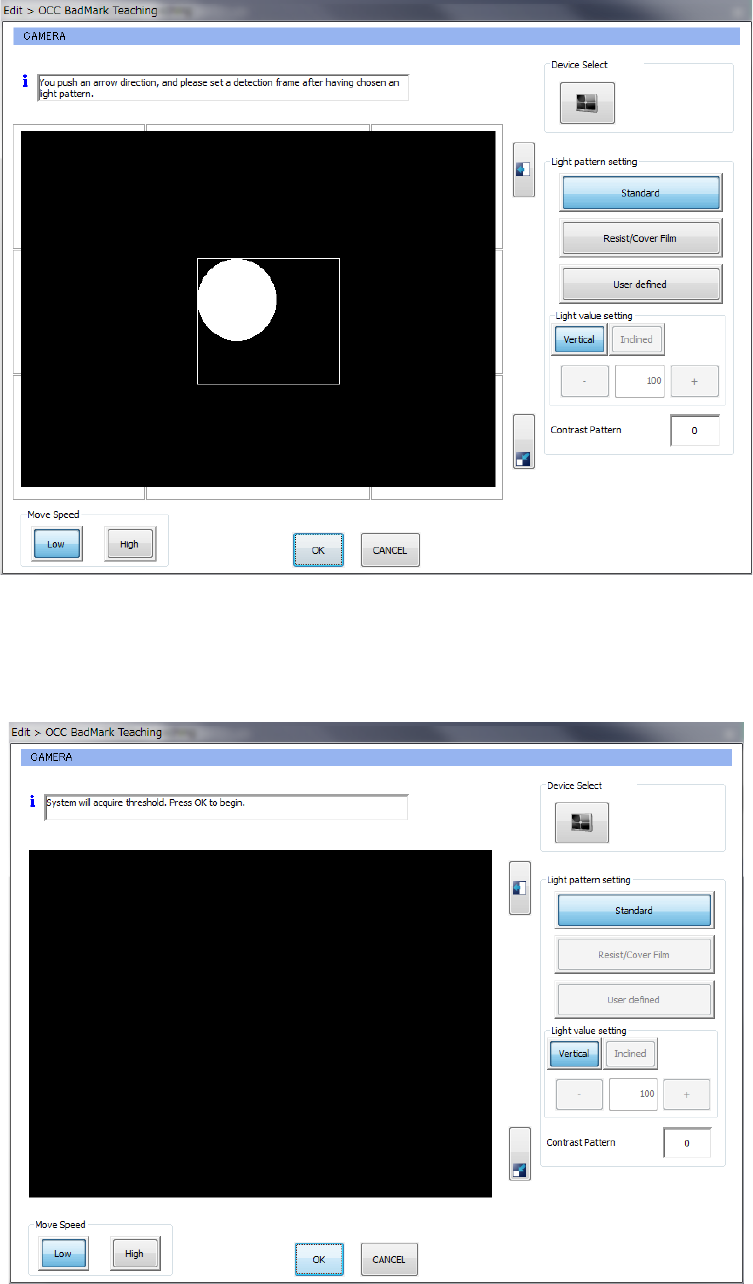
When you perform teaching operation for the “Set OCC Bad Mark Threshold” field on the
“Bad Mark teaching” screen shown above, the following dialog box appears on the screen.
After selecting the light in the “Light pattern setting” column, press the arrow mark button to
set the detection frame. Then, press the <OK> button.
3) Recognizing a bad mark with the OCC (to set the threshold value)
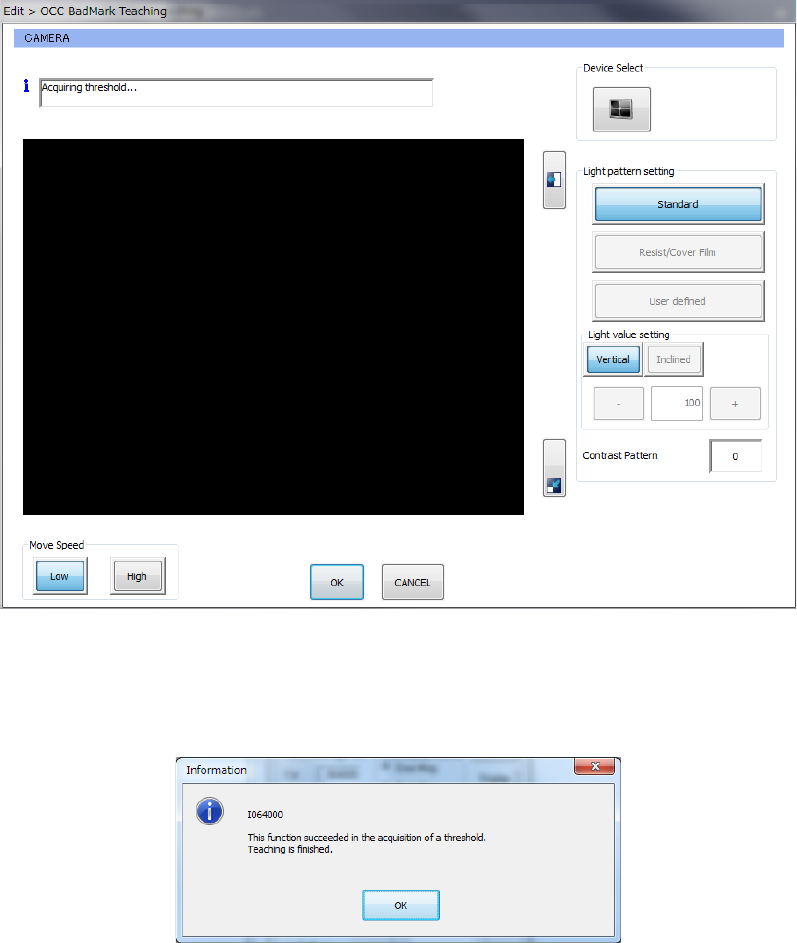
When you select the light pattern, set the detection frame, and press the <OK> button, the
following dialog box appears on the screen.
When you press the <OK> button on this dialog box, the system obtains the threshold value.
Part 1 Basic Operation Chapter 4 Creating a Production Program
4-280
4) Recognizing a bad mark with the OCC (while the system is obtaining the threshold value)
When you press the <OK> button on the screen for obtaining the threshold value for
recognizing a bad mark with the OCC, the system is obtaining a threshold value.
5) Recognizing a bad mark with the OCC (to set a threshold value)
When you perform a teaching operation for the menu item “Set OCC Bad Mark Threshold”
field on the “Bad Mark teaching” screen, the following dialog box appears on the screen.
When you press the <OK> button on this dialog box, the system finishes teaching.