RS-1_instruction manual.pdf - 第566页
Part 1 B asic O peration Chapter 4 Cr eating a Produc tion Progra m 4- 231 No Component type Centering method Measurement items Component height Laser height Dimen sions of a component Vacuum pressure for picking up a co…
Part 1 Basic Operation Chapter 4 Creating a Production Program
4-230
1) Comp. height
This function measures the height of a component with laser.
At the same time, the system automatically calculates the optimum laser height and the value to
be used for judging if a chip is placed on its side (if a tombstone error occurs).
The measuring methods are shown below.
Target component
Method
Laser recognition component
Vision recognition component
① The component is moved up and down.
②
The shadow range of the component is specified as the height.
2) Outline
The length and the width of a component are measured with laser or a vision recognition unit.
The optimal nozzle number is automatically calculated also. The measuring methods are shown
below.
Target component
Method
Laser recognition component ① The current component angle is obtained by laser.
② By rotating the component at a 0-degree angle in the theta direction, the
obtained laser width is specified as the crosswise dimension.
③ By rotating the component at a 90-degree angle in the theta direction, the
obtained laser width is specified as the lengthwise dimension.
Vision recognition component
① The component is recognized with a vision recognition unit to obtain its outer
dimensions.
② The values obtained from a response is specified as crosswise and
lengthwise dimensions.
3) Vacuum level
This function measures the vacuum pressure used to pick up a component. The measuring
methods are shown below.
Target component Method
Laser recognition component
Vision recognition component
1. The component is picked up to obtain the vacuum pressure of the head
2. The obtained value is specified as the vacuum pressure for picking up a
component.
4) Lead Information
The lead information is measured by a vision recognition unit. This measurement can be
executed only for vision centering components to be centered with a VCS.
The measuring method is shown below.
Target component
Method
Vision recognition component
1. A component is recognized with a vision recognition unit to obtain the lead
information.
2. The obtained values are specified as the lead dimensions.
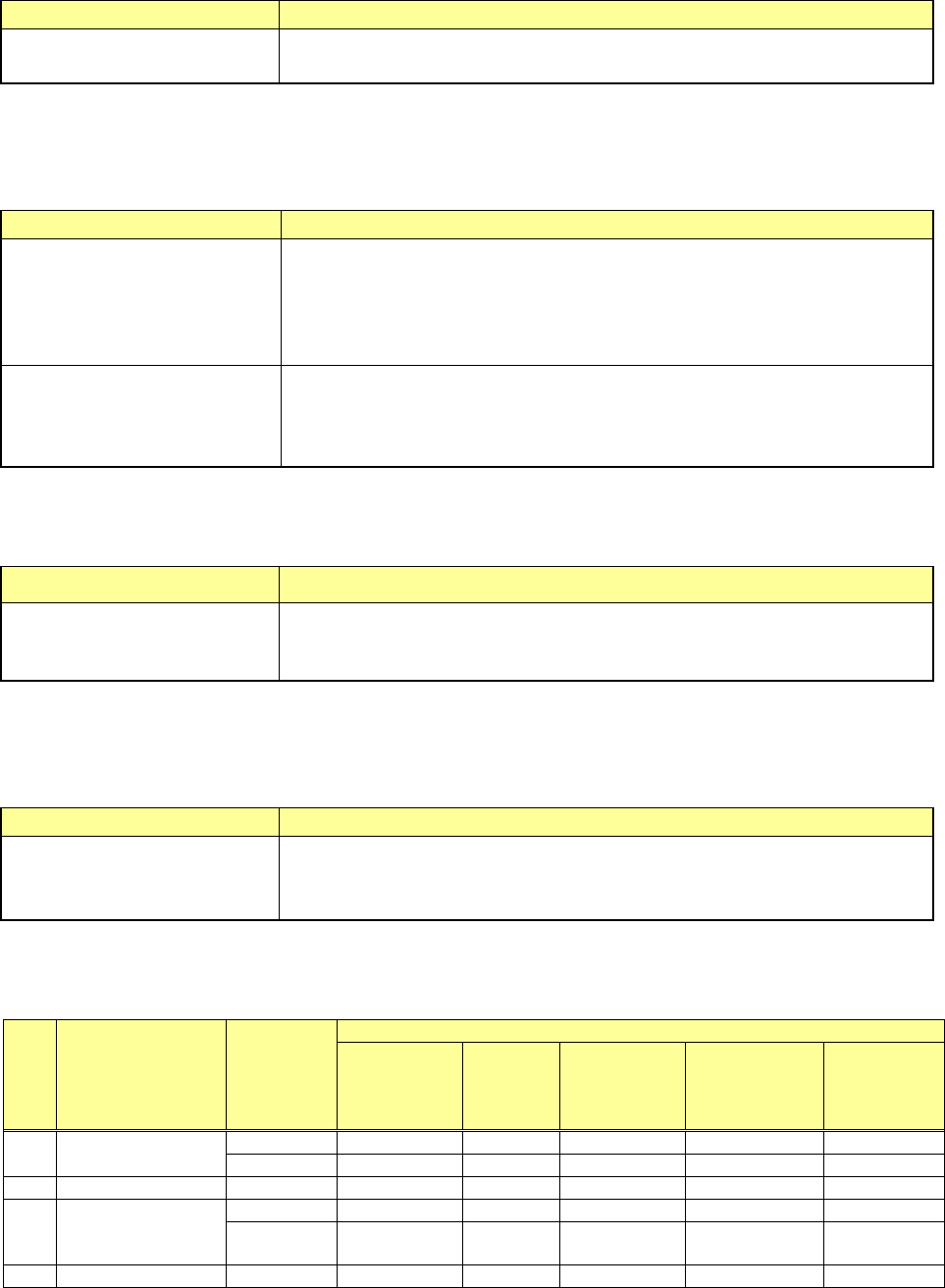
(3) Measurement restrictions to be imposed depending on the component type
Items the system can measure are restricted according to the component type of the Component
data to be measured as shown in the table below.
No Component type
Centering
method
Measurement items
Component
height
Laser
height
Dimensions
of a
component
Vacuum
pressure for
picking up a
component
Lead
information
1
Square chip
Laser
○
○
○
○
Vision
○
○
2
MELF
Laser
○
○
○
○
3
Aluminum
electrolytic
capacitor
Laser
○
○
○
Vision
○ ○
4
GaAsFET
Laser
○
○
○

Part 1 Basic Operation Chapter 4 Creating a Production Program
4-231
No Component type
Centering
method
Measurement items
Component
height
Laser
height
Dimensions
of a
component
Vacuum
pressure for
picking up a
component
Lead
information
Vision
○
○
5
SOT
Laser
○
○
○
○
6 SOP
Laser
○
○
△
○
Vision
○
○
*1
○
○
*1
7 SOJ
Laser
○
○
○
Vision
○
○
8 QFP
Laser
○
○
△
○
Vision
○
○
*1
○
○
*1
9 PLCC(QFJ)
Laser
○
○
○
Vision
○
○
10 PQFP(BQFP)
Laser
○
○
△
○
Vision
○
○
*1
○
○
*1
11 TSOP
Laser
○
○
△
○
Vision
○
○
*1
○
○
*1
12 TSOP2
Laser
○
○
△
○
Vision
○
○
*1
○
○
*1
13 BGA
Laser
○
○
○
Vision
○
○
14
Network resistor
Laser
○
○
○
15
Trimmer
Laser
○
○
○
16
Unidirectional
lead connector
Laser
○
○
○
○
*2
Vision
○
○
○
*1, *2
17 J-lead connector
Laser
○
○
○
Vision
○ ○
18 Gull-wing socket
Laser
○
○
○
Vision
○
○
19
Key socket with
bumper
Laser
○
○
○
Vision
○
○
20
Other
components
Laser ○ ○ ○
21
Bidirectional lead
connector
Laser
○
○
△
○
○
*2
Vision
○
○
*1
○
○
*1, *2
22
SOP with heat
sink
Laser
○
○
△
○
Vision
○
○
*1
○
23
FBGA
Vision
○
○
24 Z-lead connector
Laser
○
○
○
Vision
○
○
25
Extended lead
connector
Vision ○ ○
26
General-purpose
vision component
Vision ○ ○
27
Square chip
(LED)
Laser ○ ○ ○ ○
28
QFN
Laser
○
○
○
29
Outline
recognition
component
Vision ○ ○
〇: Measurable
△: The measurement result obtained by setting the centering method to "Vision" can be used.
*1 Only components having 7 leads or more per column. (SOP 14-pin can be measured.)
*2 Components composed of the same lead shape and provided with no arm or metal in the lead
both-end section.
The lead information may not be measured depending on the lead conditions of the component to
be measured.
The measurement function is to be executed for components whose outer dimension is 33.5 mm
or less.
Part 1 Basic Operation Chapter 4 Creating a Production Program
4-232
(4) Actions taken during measurement
1) Head used to pick up a component
The system automatically selects a head used to pick up a component so that a nozzle can
be replaced with another one lest frequently by attempting to use a nozzle already attached
on a head. The system may use a different head every time it measures a component
depending on the nozzle attachment conditions.
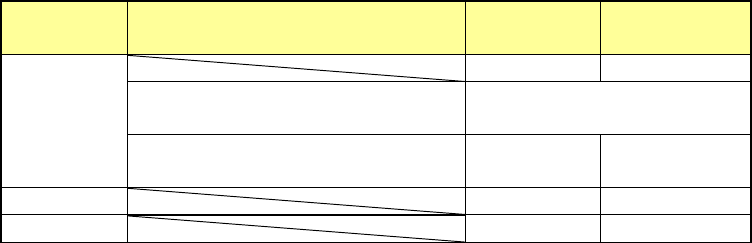
2) Return of a component after measurement
This setting decides whether to return a measured component to the previous position or
discard it. Selection is limited depending on the packaging style of a component (see the
table below).
Since a component whose size is 1 mm or less may be placed on its side or turned upside
down when it is returned, the system displays the message so that you can select how to
handle it.
Packaging
style
Condition 2
Returning a
component
Discarding a
component
Tepe
――
○
The shorter side length of the
outer dimensions is 1 mm or less.
Query * 1
The shorter side length of the
outer dimensions is 1 mm or more.
○ ○ *2
Tray
○
○
*2
Stick
―
○
Where to discard a component is determined according to the setting of the menu item
“Component reject to.”
*1 The system displays the dialog box on which you have to select whether to return a
component or discard it. The system displays this dialog box before it starts continuous
measurement of components in Continuous Measurement mode.
*2 When you select the “IC collection belt” or “Protect” for the menu item “Component reject
to,” the system operates according to the corresponding setting.
3) Selecting a feeder which is used to pick up a component
If there are two or more feeders assigned to the same type of component in Pick data, a
component starts being picked up based on the data you entered first as the default setting.
4) Changing the coordinates of a component pick-up position
If the system cannot pick up a component normally, you can manually input a component
pick-up position or teach the coordinates of the pick-up position to change it.
5) Manual component pick-up
If there is no Pick data created, you can manually attach a component to the nozzle. In this
case, any pick-up coordinates are not entered. You cannot operate a feeder either.