RS-1_instruction manual.pdf - 第148页
Part 1 B asic O peration Chapter 2 Pr oduction 2- 37 ( 2) Tr i a l No. Item Description 1 Tr ial circuit Select th e desired circuit for tr ial produ ction. Y ou do not have t o make a select ion if you are to produce a …
Part 1 Basic Operation Chapter 2 Production
2-36
♦When a BOC mark is used: The entered value is used as an offset for finding a BOC mark.
Even though you enter the offset value, the placement result is
not affected. If the absolute position of a BOC mark is shifted
due to the change of the lot or other reason, so the BOC mark
is out of the camera window, enter an offset value so that the
BOC mark can come to the center of the camera window.
(7) Stop
This item shows whether to stop the current PWB production temporarily if components run out
or if an error occurs.
Individual setting items
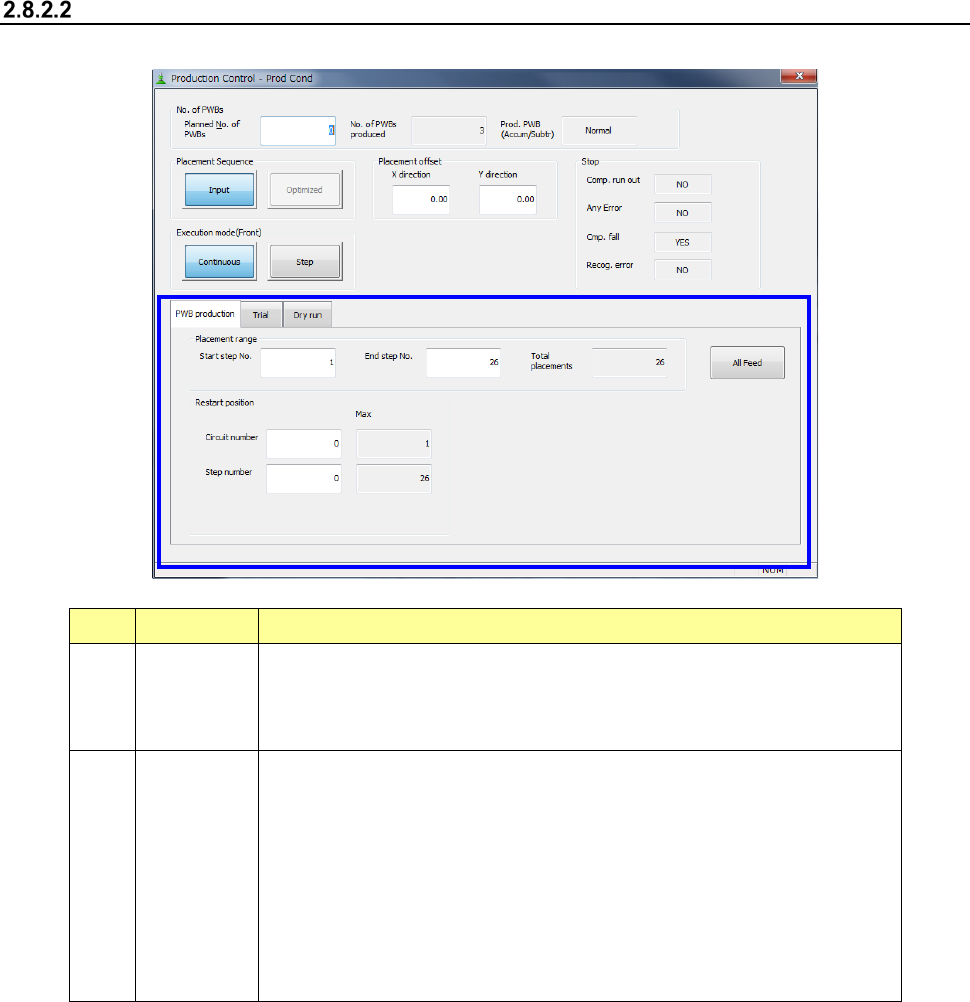
(1) PWB production
No. Item Description
1
Placement
range
To limit the area on which components are placed, enter the “Start step No.”
and “End step No.” The total number of placement steps per circuit is
displayed in the “Total placements” field. You can specify this item only when
you select the Input order as the “Placement Sequence.”
2
Restart
position
You have to set the restart position on the front side and that on the rear side
respectively for the simultaneous PWB production.
If production is suspended for any reason, and the clamped board is released,
specify this option to produce the PWB completely by placing the remaining
components onto it. You can start placing components from the specified
area of a board.
This setting is valid for the first board only. This starting position is ignored for
the second and following boards, and components are placed on all of
placement positions.
This setting is initialized at start of production.
Part 1 Basic Operation Chapter 2 Production
2-37
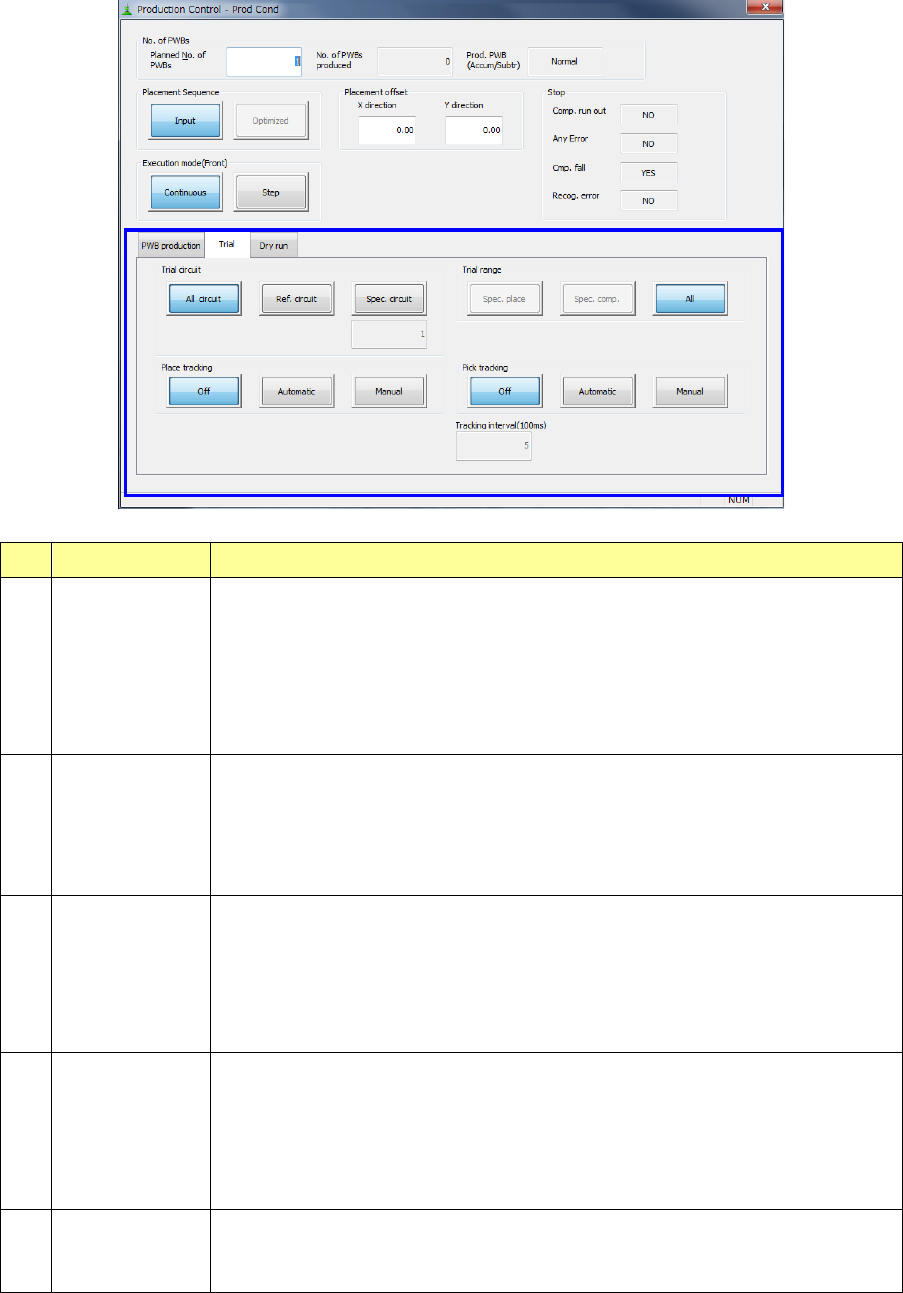
(2) Trial
No. Item Description
1 Trial circuit
Select the desired circuit for trial production. You do not have to make a selection if
you are to produce a single plane PWB.
- All circuit: Components set for trial production are placed on all circuits.
- Ref. circuit: Components set for trial production are placed on reference circuits
only.
- Spec. circuit: Components for trial production are placed on the specified circuits
only
The specified circuit number is shown here.
2 Trial range
Specify the range for trail production.
- Spec place: Components are placed on the placement positions for which “YES”
is selected in the “Trial” field on the Placement data menu.
- Spec comp: All components for which “YES” is selected in the “Trial” filed on the
Component data menu are placed.
- All: Components are placed on all placement positions.
3 Place tracking
After components are placed on a board with trial production, designate whether or
not to perform placement-tracking operation by the camera. If performed, select
whether it is manual or automatic.
- Off: Placement tracking operation is not performed.
- Automatic: Placement tracking is performed automatically.
- Manual: Stops at each placement position, and then goes to the next
placement position in response to input by an operator.
4 Pick tracking
Before components are placed on a board with trial production, designate whether
or not to perform pickup-position tracking operation by the camera. If performed,
select whether it is manual or automatic.
- Off: Pickup-tracking operation is not performed.
- Automatic: Pickup-tracking operation is performed automatically.
- Manual: Stops at each pickup position, and then goes to the next pickup
position in responses to input by an operator.
5 Tracking
When tracking is performed automatically, designate the stop time duration at a
stop position.
The unit is in 100 ms, and 1 is equivalent to 100 ms (0.1 second).
Part 1 Basic Operation Chapter 2 Production
2-38
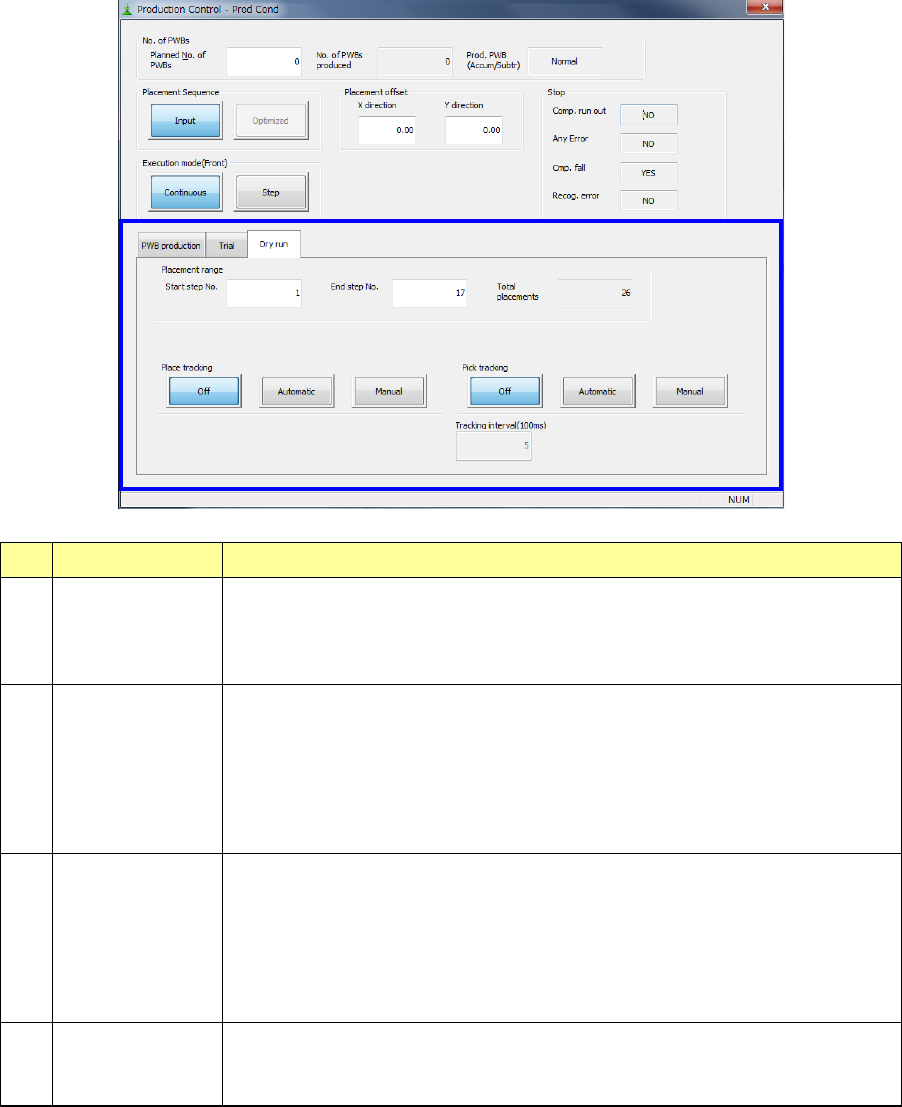
(3) Dry run
No. Item Description
1 Placement range
To limit the area on which components are placed, enter the “Start step No.” and
“End step No.”
The total of step numbers per circuit is displayed in the “Total placements” field.
You can specify this item only when “Input” is selected as “Placement Sequence.”
2 Place tracking
After dry run operation of a board, designate whether or not to perform
placement-tracking operation by the camera. If performed, select whether it is
manual or automatic.
- Off: Placement-tracking operation is not performed.
- Automatic: Placement-tracking operation is performed automatically.
- Manual: Stops at each placement position, and then goes to the next
placement position in response to input by an operator.
3 Pick tracking
Before dry run operation of a board, designate whether or not to perform pickup
position tracking operation by the camera. If performed, select whether it is
manual or automatic.
- Off: Pickup-tracking operation is not performed.
- Automatic: Pickup-tracking operation is performed automatically.
- Manual: Stops at each pickup position, and then goes to the next pickup
position in responses to input by an operator.
4 Tracking
When tracking is performed automatically, designate the stop time duration at a
stop position.
The unit is in 100 ms, and 1 is equivalent to 100 ms (0.1 second).