RS-1_instruction manual.pdf - 第369页
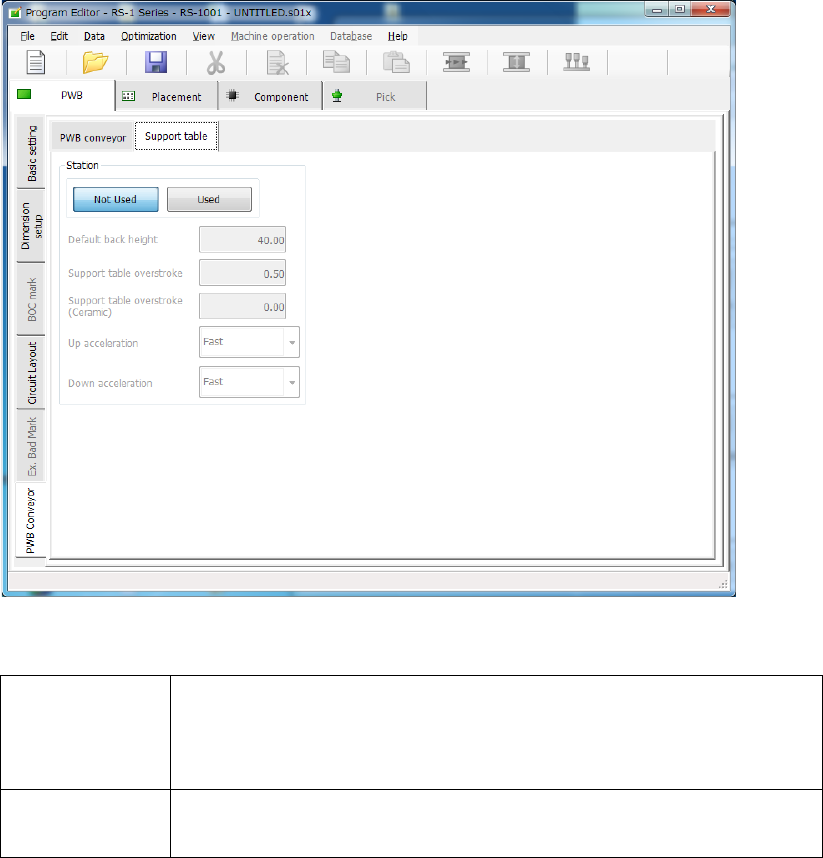
Part 1 B asic O peration Chapter 4 Cr eating a Produc tion Progra m 4- 34 (2 ) “ Support table ” scr een If you select t he “ Suppor t table ” tab when the “ PWB Convey or ” tab is selected , the f ollowing screen appe a…

Part 1 Basic Operation Chapter 4 Creating a Production Program
4-33
3) “Option” group
① Not Used/Used
Select whether to use the data set in the “Option” group or not.
Not Used
Select this button when you do not use the setting made in the
“Option” group. The system operates according to the settings of
the main unit.
Used
Select this button when you use the setting made in the “Option”
group. The system operates according to the board stop setting
made in a production program.
② Hold Wait Sensor active until PWB moves out
Checking on the check box will enable this function.
Checking off the check box will disable this function.
4) “Other” group
① Long-sized board divide position
Enter the size for dividing the component placement area in the X direction if a board is to
be clamped twice. This means that you have to enter the distance from the edge point of
the board layout in the X direction. When the size of a board does not have to cause the
board to be clamped twice, this setting is ignored.
Part 1 Basic Operation Chapter 4 Creating a Production Program
4-34
(2) “Support table” screen
If you select the “Support table” tab when the “PWB Conveyor” tab is selected, the following
screen appears.
1) Not Used/Used
Select whether to use the settings in the “Left station” group/“Right station” group or not.
Not Used
Select this radio button if you do not use the settings made in the
“Left station” group or the “Right station” group respectively.
The system operates according to the settings made with the main
unit(“Machine setup” – “Set contents of transport”).
Used
Select this radio button if you are to use the settings made in the
“Left station” group or the “Right station” group respectively.
2) Default back height
This item sets the lower limit of the support table for moving down a board. The allowable
value range is from 5.0 to 40.0 (mm).
3) Support table overstroke
4) Support table overstroke (Ceramic)
Enter an offset value to be applied when the support table moves up.
The support pin holds a board upwards by the value set in this field.
The allowable value range is from 0.0 to 5.0 (mm).
5) Up acceleration
Set the accelerated speed to be applied when the support table moves up.
6) Down acceleration
Set the accelerated speed to be applied when the support table moves down.
Part 1 Basic Operation Chapter 4 Creating a Production Program
4-35
4.3.4 Placement data
Enter information on the coordinates of positions on which the system is to place components.
For a multi-plane PWB, enter the information on the “reference circuit.”
Number of component placements:
Number of placement points: Regardless of single-circuit PWB or
multi-circuit PWB, up to 10,000 points can be entered in total.
4.3.4.1 Viewing the placement data screen
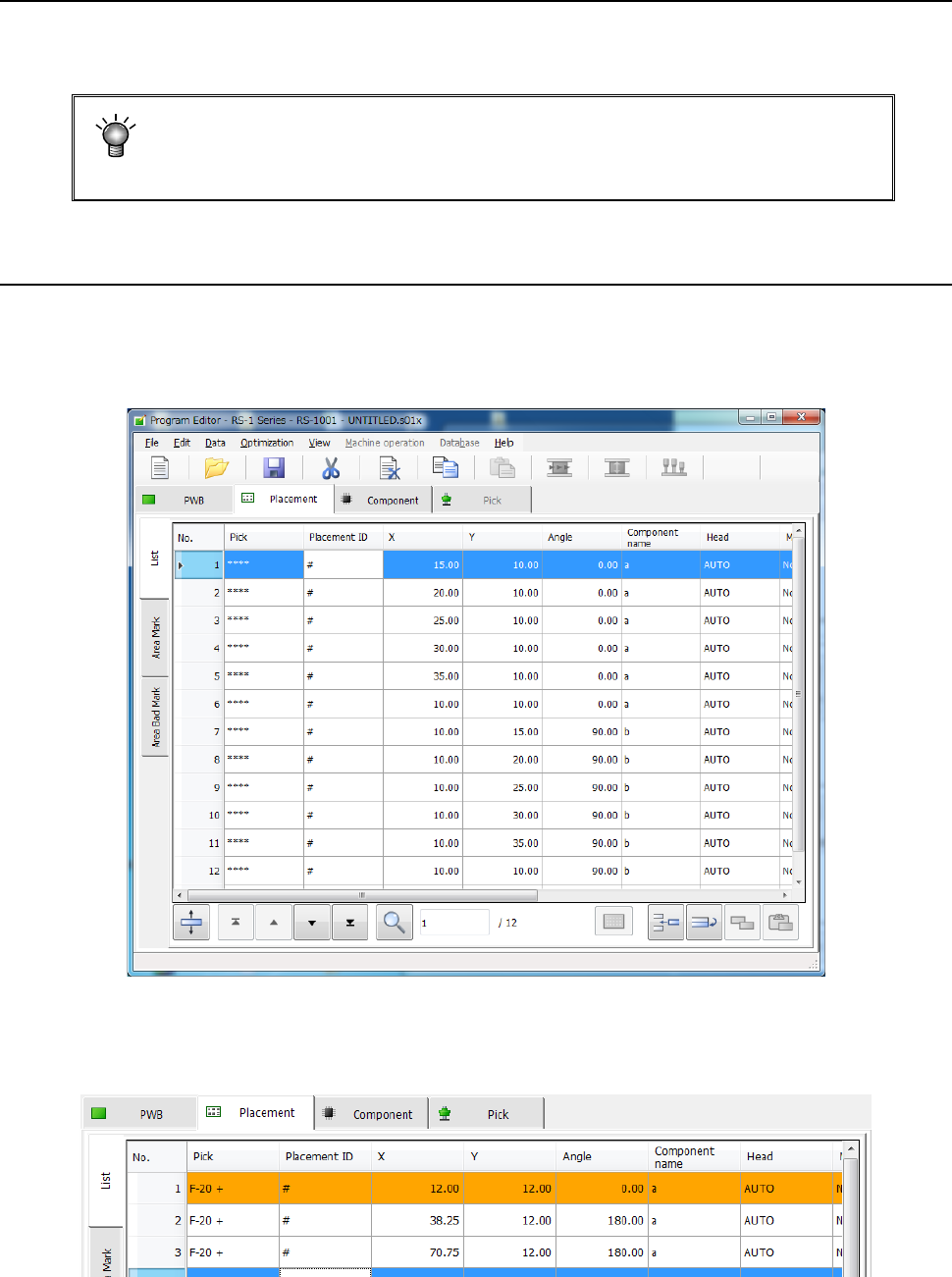
When you select the “Placement” tab displayed on the screen after creating PWB data completely,
the “Placement” data screen for creating Placement data (the following figure is an example
indicating that Placement data was already created) appears on the screen.
When any skip setting (including component data skip setting) is performed, the indication is
changed into orange as shown below.