RS-1_instruction manual.pdf - 第706页
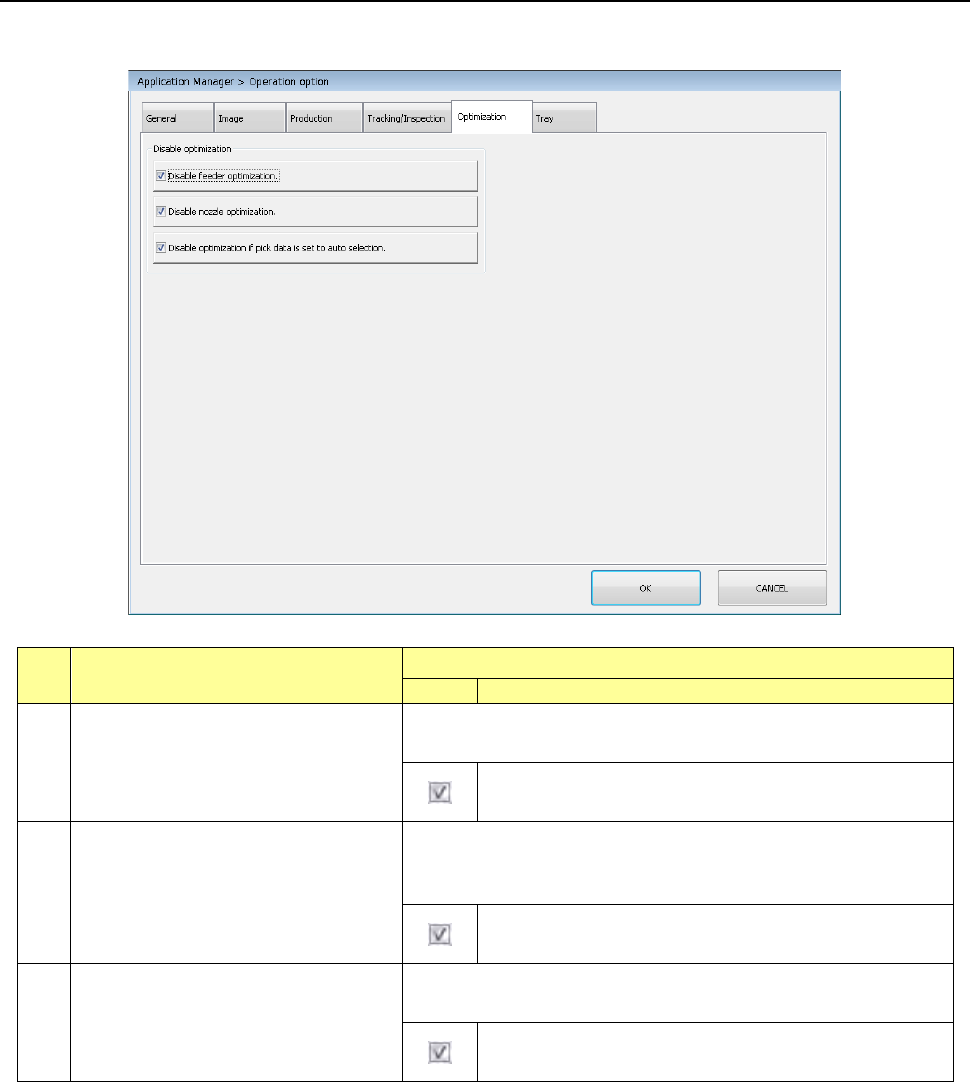
Part 2 D etaile d Descript ion of E ach Functi on Chapter 7 Operation Option 7- 31 7.6 Optim izatio n Specify op eration opti ons to be optimized. No. Menu item Description Status Operation an d detailed expl anation 1 D…

Part 2 Detailed Description of Each Function Chapter 7 Operation Option
7-30
No. Menu item
Description
Operation and detailed explanation
1
Perform pick tracking at a start after
occurrence of no components.
Select Retry in the temporary stop status where “no components”
and
laser retry over occur. Specify whether to execute pick tracking
before retry execution when the <START> switch is pressed.
Pick tracking is executed before retry execution. At this
time, the [Feeder unit to undergo pick tracking] combo box
is
enabled and this item can be selected. The specifying
condition is as follows.
Pick tracking is not executed. At this time, the [Feeder unit
to undergo pick tracking] combo box is disabled and this
item cannot be selected.
2
Feeder unit to undergo pick tracking
Specify the feeder unit to undergo pick tracking at a start after
occurrence of no components. Only when [Pick tracking at a start
after occurrence of components] is checked off, this item can be
selected.
Feeder unit in the
no-component status
Only the feeder unit in the no-
component status
can undergo pick tracking.
Every feeder unit in
which no
components or an
error occurs
Only the feeder unit in which
no components or
an error occurs can undergo pick tracking.
Every feeder unit in
which the
components as the
feeder unit in which
no components occur
Every feeder unit in which the same
components as the feeder unit in which no
components occur are set can undergo pick
tracking.
3
Cursor shape at component pick
tracking
Select the cursor shape at component pick tracking from outer
square/outer circle.
Outer square
The cursor shape at component pick tracking is
set to outer square.
Outer circle
The cursor shape at component pick tracking is
set to outer circle.
Part 2 Detailed Description of Each Function Chapter 7 Operation Option
7-31
7.6 Optimization
Specify operation options to be optimized.
No.
Menu item
Description
Status
Operation and detailed explanation
1
Disable feeder optimization.
(Optimization disabled)
When this item is checked off, “Pick data” of “Split option” is fixed to
“Distribute automatic selection.”
At optimization, “Pick data” of “Split option” is fixed to
“Distribute automatic selection.”
2
Disable nozzle optimization.
(Optimization disabled)
When this item is checked off, the “Nozzle to be used” of “Split
option” is fixed to “Use the ordinarily equipped nozzle” at
optimization.
At optimization, the “nozzle to be used” of “Split option” is
fixed to “Use the ordinarily equipped nozzle.”
3
Disable optimization if pick data is set
to auto selection. (Optimization
disabled)
Specify a function to disable optimization when the pick data is set
to “Automatic selection.”
When the pick data is set to “Automatic selection”,
optimization is disabled.
Part 2 Detailed Description of Each Function Chapter 7 Operation Option
7-32
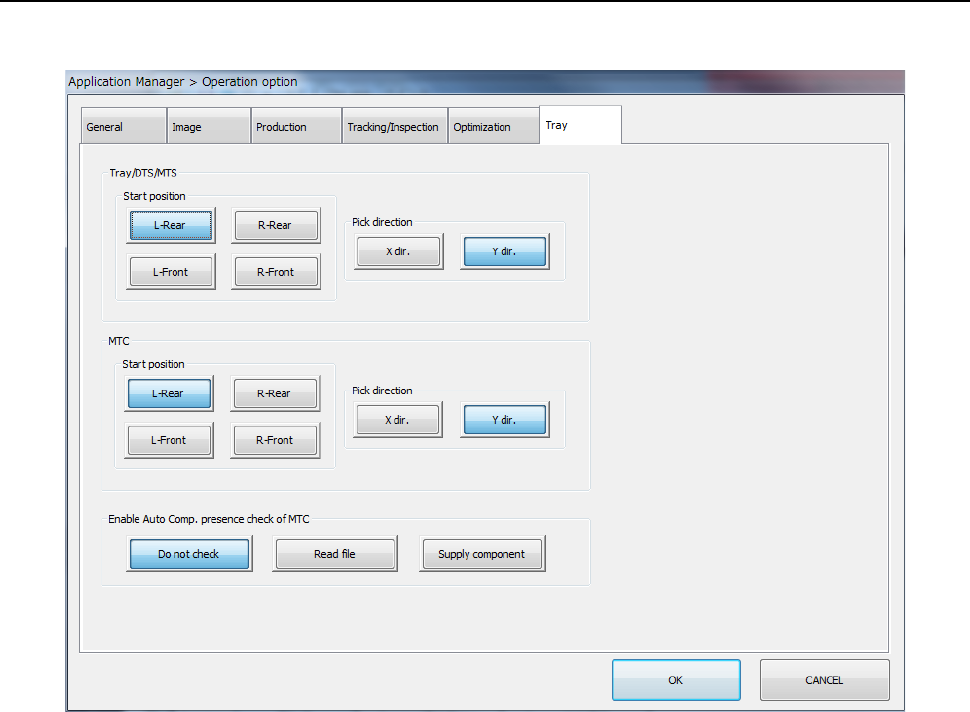
7.7 Tray
Specify operation options for the tray.