RS-1_instruction manual.pdf - 第444页
Part 1 B asic O peration Chapter 4 Cr eating a Produc tion Progra m 4- 109 * Recogn izing cond i tions for outline reco gnition com ponents • Side recognit ion ① C ompon ent whose shape is rect angular or square ② C ompo…
Part 1 Basic Operation Chapter 4 Creating a Production Program
4-108
12) Aluminum electrolytic capacitor
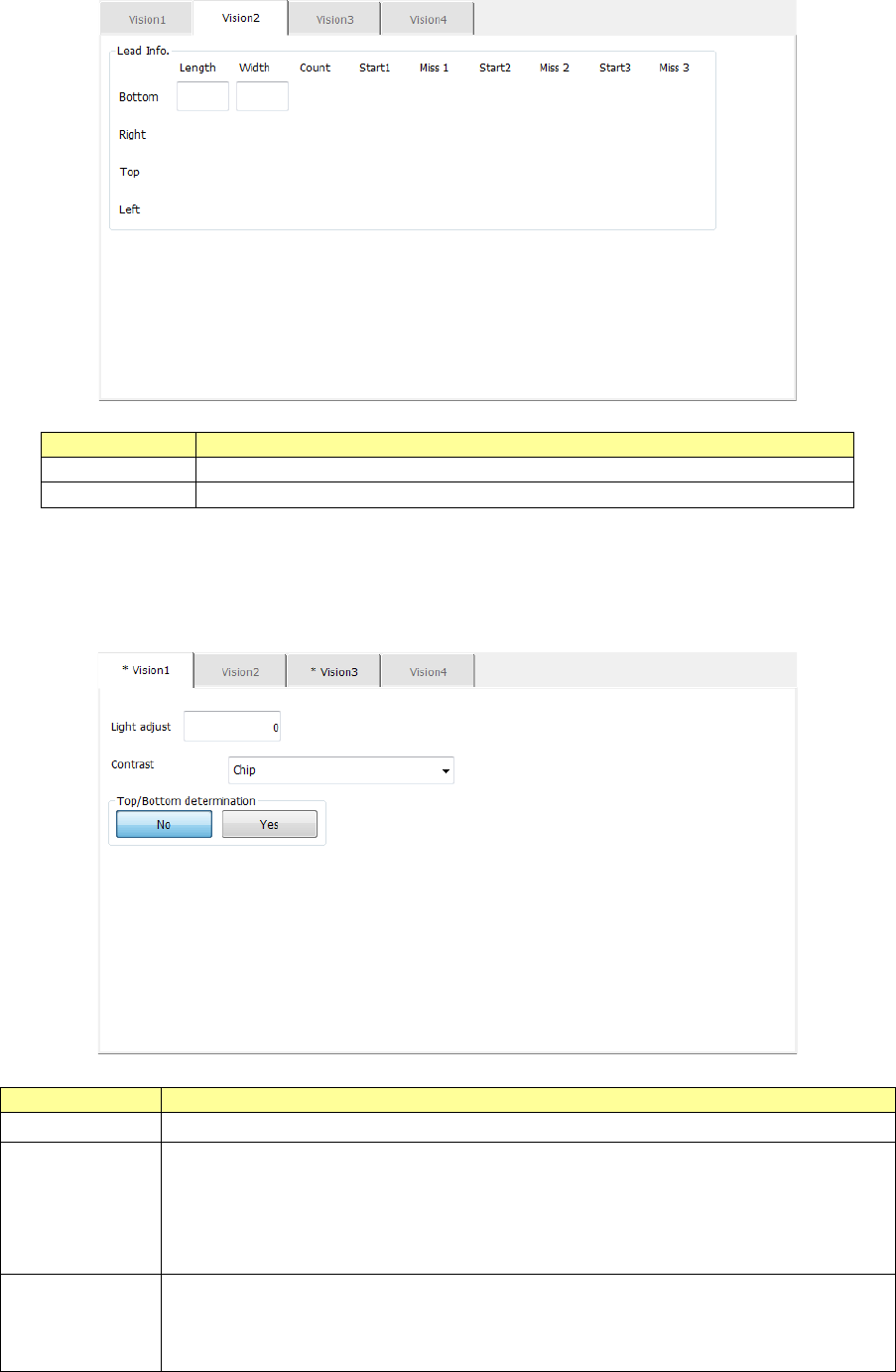
The “Vision 2” tab allows you to set information on leads only.
Menu item
Overview
Length
Enter the length of a section of a lead that is in contact with a board.
Width
Enter the width of a lead.
13) Square chip and outline-recognized component
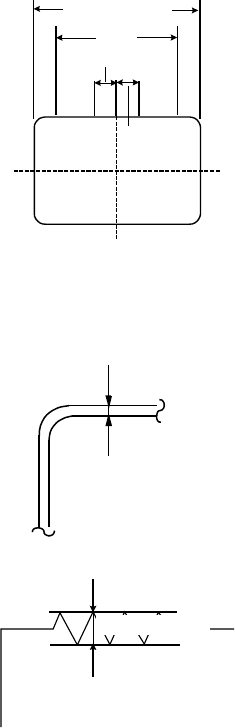
Specify the brightness correction with the menu item “Light adjust,” the recognition type with
the menu item “Contrast” and whether to determine the side, the top or the bottom with the
menu item “Top/Bottom detection.”
Menu item
Overview
Light adjust
Enter the correction value for the contrast when a component is irradiated.
Contrast
Select one of the following recognition patterns from the combo box: “4
sides,” “4 corners”, “Square chip” and “Center.”
“4 sides” is selected by default.
Note that you can select only “Chip” (square chip) here when the component
type is “Chip.”
Top/Bottom
determination
Only when the component type is “Chip” (square chip), select whether to
determine the side of a component, the top or the bottom.
When you select the <Yes> button, the “Vision 4” tab is enabled, and you can
make the detailed settings for determining the side, the top or the bottom.
Part 1 Basic Operation Chapter 4 Creating a Production Program
4-109
* Recognizing conditions for outline recognition components
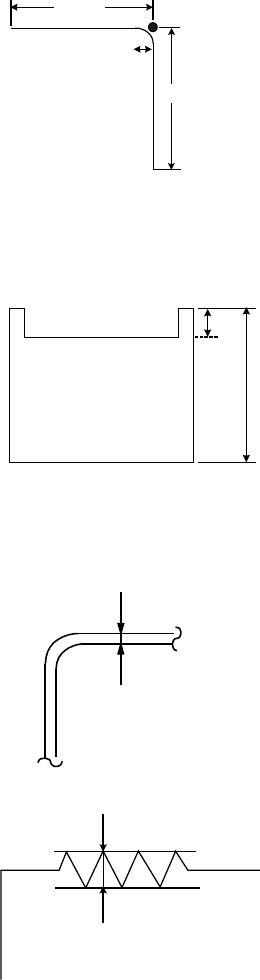
• Side recognition
① Component whose shape is rectangular or square
② Component whose linear part of sides corresponds to 1/2 or more of the outer dimension
and yet whose straight line part (linear part) is 3 mm or more
③ Component in which the center part of sides is linear in the range of ±1.5 mm from the
center
Line
segmen
t
1.5mm
1.5mm
Dimension of a
component
④ Component whose component angle is 90° ± 5°
⑤ Component provided with a side part of 0.3 mm or more when the inside of the
component is imaged darkly at photographing (The inner part of the sides may be a
cavity.)
0.3mm以上
⑥ Component in which the roughness of the sides forming a linear part is 0.1 mm or less
0.1mm以下
⑦ Component whose shape is not convex
0.3 mm or more
0.1 mm or less
Part 1 Basic Operation Chapter 4 Creating a Production Program
4-110
2.00mm
2.00mm
0.5mm
L1
L2
• Corner recognition
① Component whose shape is square or rectangular
② Component in which the corner forming angle (R) is 0.5 mm or less
③ Component in which the length of the linear part forming sides is 2 mm or more
④ Component in which the 4 points of corners form a vertex of a square or rectangle
⑤ Component whose outline is not convex
⑥ Component with concave parts in which L1 is 10% or less of L2
⑦ Component provided with a side part of 0.3 mm or more when the inside of the
component is imaged darkly at photographing (The inner part of the sides may be a
cavity)
0.1 mm
or shorter
⑧ Component in which the roughness of the side forming a linear part is 0.1 mm or less
0.3 mm or longer
• Center-of-gravity recognition
① Component in which the vertical/horizontal ratio is 1:2 or higher
② Component provided with a side part of 0.3 mm or more when the inside of the
component is imaged darkly at photographing
14) General-purpose vision component
See Chapter 6 “General-Purpose Vision Component” for how to create data on a
general-purpose vision component.