RS-1_instruction manual.pdf - 第125页
Part 1 B asic O peration Chapter 2 Pr oduction 2- 14 2.4 Warming Up W arm up the mach ine mainly aft er holidays or in col d climates im mediate l y after you t urn on the machine. The time requ i red to war m up the m a…
Part 1 Basic Operation Chapter 2 Production
2-13
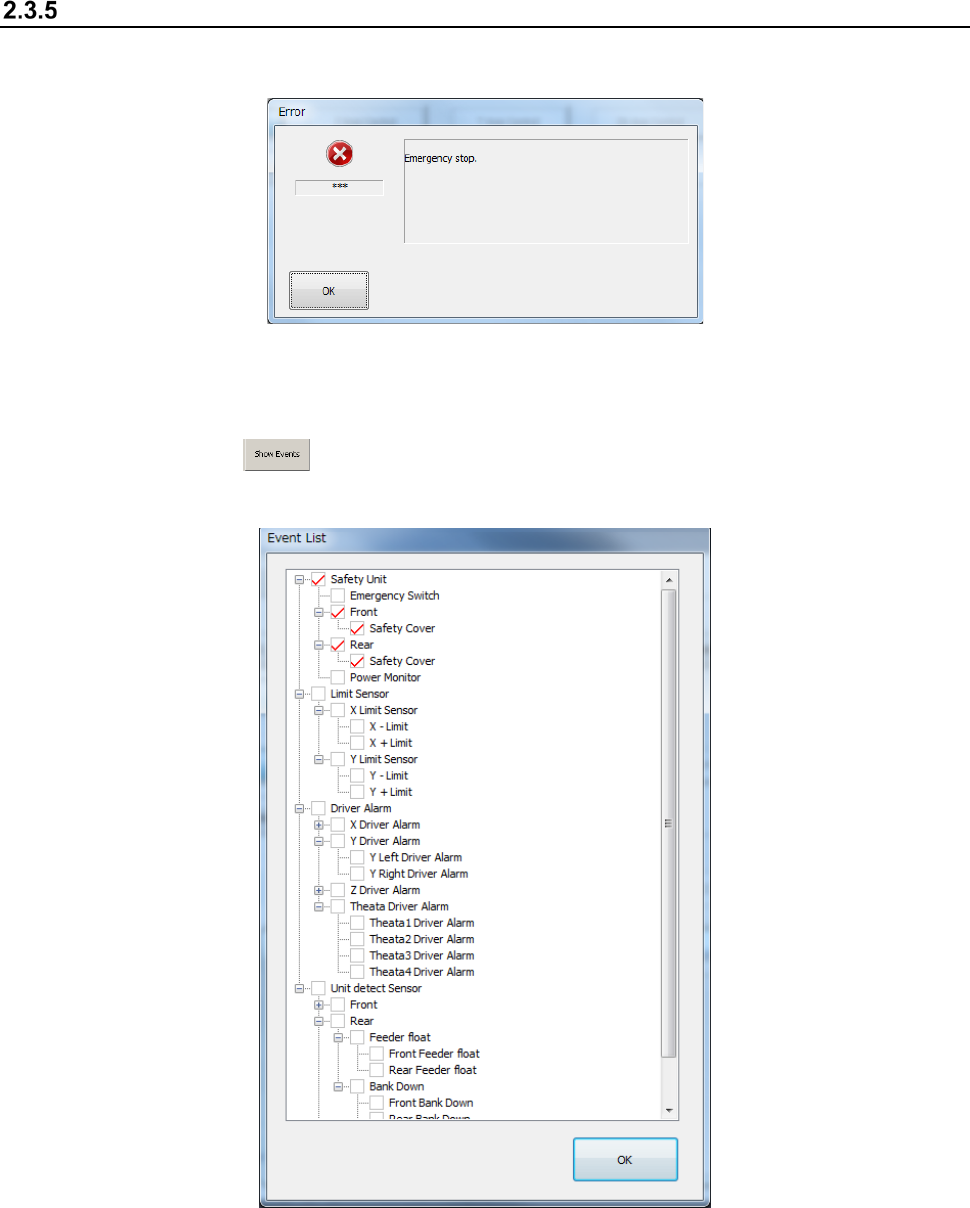
“EVENT VIEW” screen
When you open the safety cover, when you push the Emergency Stop switch or when the machine
detects a servo driver alarm of each axis, the following screen appears.
If two or more events occur at the same time, the event whose priority is highest is displayed as an
error.
When you press the button, the events that have occurred are displayed in the hierarchical
structure. A check mark appears in the front of the events that have occurred.
Part 1 Basic Operation Chapter 2 Production
2-14
2.4 Warming Up
Warm up the machine mainly after holidays or in cold climates immediately after you turn on the
machine.
The time required to warm up the machine is approximately 10 minutes, but varies depending on
the surrounding conditions.
Initial screen
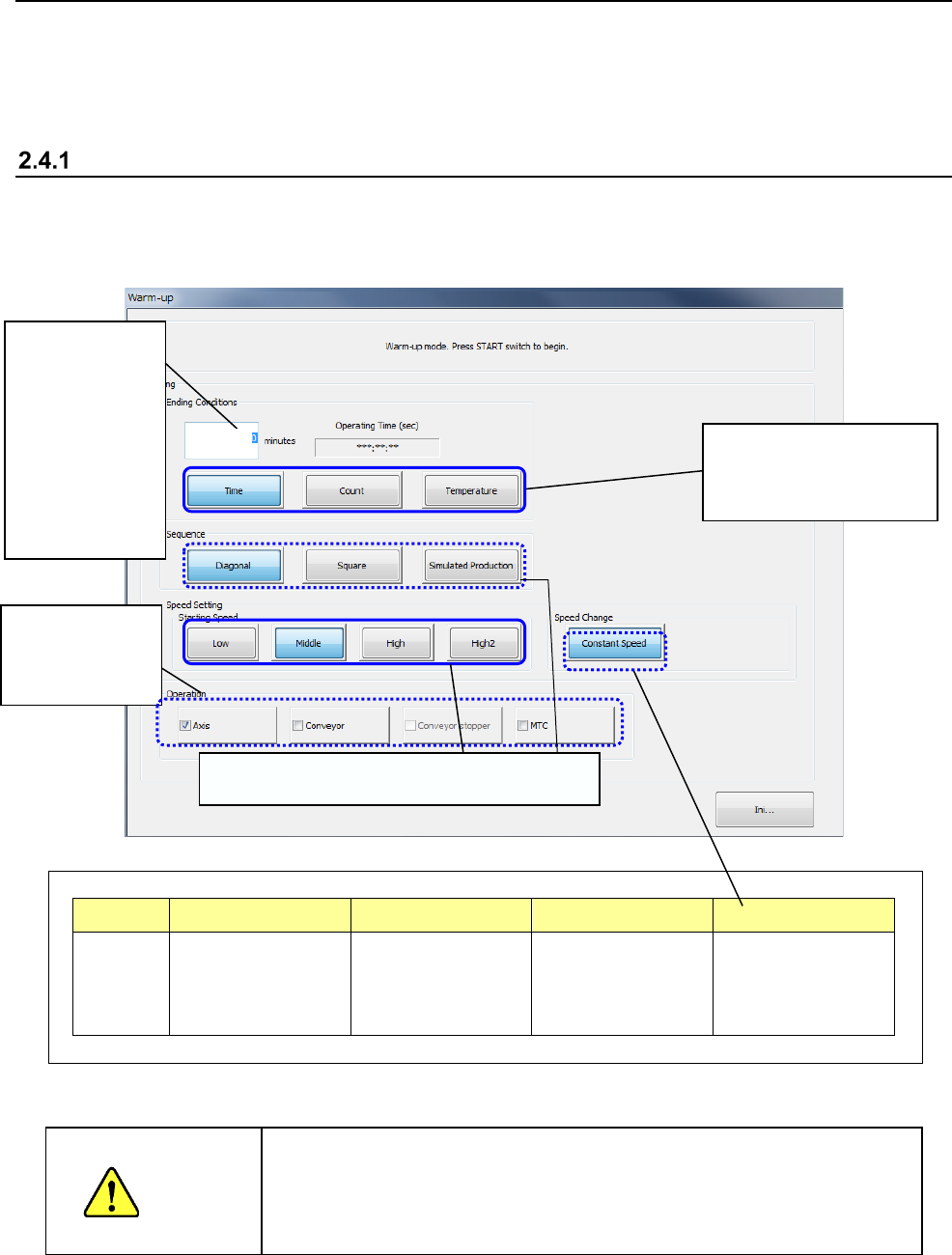
When you select the "Product" button from the menu displayed on the main menu, then the
[Warm-up] command, the following warm-up initial window appears on the screen so that you can
set the warming-up conditions.
Part of the display changes depending on user groups as follows:
Item Sequence Station Speed Speed Change
Display Hidden for an
operator whose user
level is lower than
“Service Engineer.”
Hidden for an
operator whose user
level is lower than
“Service Engineer.”
Grayed out for
groups lower than
“Service Engineer.”
Hidden for an
operator whose user
level is lower than
“Service Engineer.”
When you press the <START> button, the machine starts warming up.
WARNING
When you press the <START> switch, the axis starts moving to warm
up. Be sure to check to see if any person is not operating the inside
of the machine before pressing the <START> switch. Keep your
hands, face or head away from the machine while the machine is
warming up to avoid injuries
Select the conditions for
finishing the warming-up
operation.
Enter the time
the machine
finishes warming
up, the number
of times it has to
warm up, or the
temperature at
which it finishes
warming up.
You can select
which part to be
warmed up.
Settings restricted depending on user groups
Part 1 Basic Operation Chapter 2 Production
2-15
Setting the warming-up conditions
(1) Which part to be warmed up
Select which part to be warmed up, “Axis”, “Conveyor”, “Conveyor stopper” or “MTC”(Initial
selection: Axis).
You can select “Conveyor stopper” when “Conveyor” has been selected.
(2) Selecting the condition for finishing warming up
Click one of the buttons: <Time (min)>, <Count> and <Temperature> to select the condition
for finishing warming up: warming-up time, number of times the machine has to warm up or
temperature (Initial selection: Time (min)).
(3) Setting the mode
Enter the time the machine finishes warming up, the number of times it has to warm up, or the
temperature at which it finishes warming up in the edit box.
The range of available values is as follows (Initial value: “0”).
Time (min) : 0 to 9999 (minutes)
* When you enter “0,” the machine will not stop warming up until you forcibly stop it.
Count : 1 to 999999 (times)
Temperature : 10 to 60 (°C)
* The system recommended 25°C (the temperature that guarantees placement accuracy),
and set it as the initial temperature. However, as the environments around the machine
changes, the ranges of temperatures change based on temperatures inside the
machine.
Temp. Inside Machine
Initial Temperature
Settable Temp. Range
Lower than 10
°
C
25
°
C
10
°
C - 60
°
C
10°C - below 25°C 25°C Temp. inside + 1 - 60°C
25
°
C - below 30
°
C
Temp. inside + 1
°
C
Temp. inside + 1 - 60
°
C
30°C - 60°C Temp. inside + 1°C Temp. inside + 1 - 60°C
60
°
C or higher
Temp. inside + 1
°
C
Temp. inside + 1 - + 2
°
C
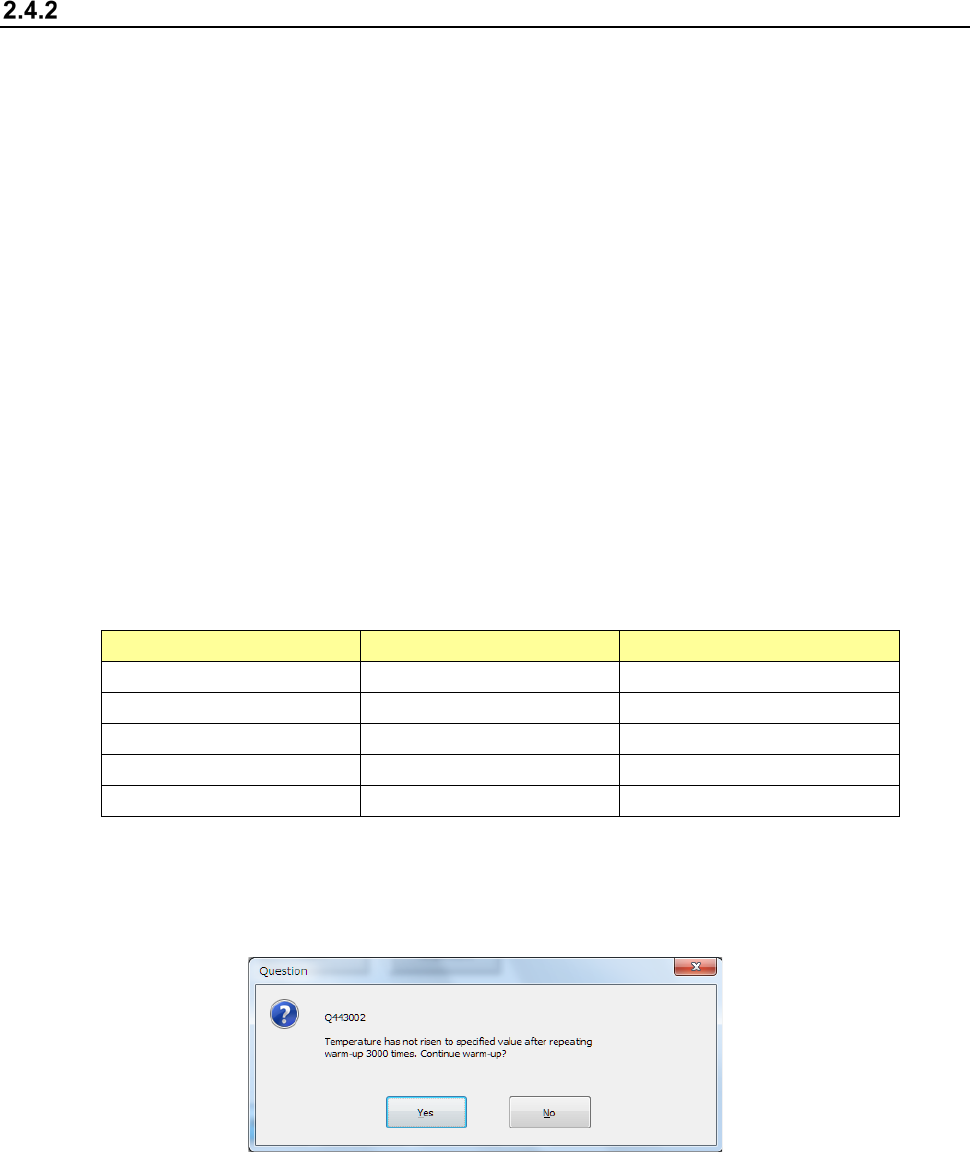
This temperature setting mode allows the machine to continue warming up until the
temperature inside the machine reaches the temperature you set.
If the temperature does not reach the set temperature, the machine displays the "Question"
screen that asks you whether to continue warming up every time it performs a warming-up
operation 3000 times.
(4) Setting the speed (Your user level should be a service man level or higher.)
Specify the axis moving speed here.
Select the speed among “Middle,” “High,” “High 2.” (Initial setting: “High 2”).
(5) Setting the sequence (Your user level should be a service man level or higher.)
Select the warming-up sequence: “Diagonal,” “Square” and “Simulated production” (Initial
setting: “Diagonal”).
(6) Setting of Speed change (Your user level should be “Service Engineer” or higher.)
Select whether to change the speed during warming-up.
This setting item allows the machine to warm up at the certain speed only at the present.