RS-1_instruction manual.pdf - 第284页
Part 1 B asic O peration Chapter 2 Pr oduction 2- 173 <Feeder Bank Enable> button The <Fee der Bank Enable> but ton allows you to select whether to pick up components from th e correspond ing feeder bank, fro…
Part 1 Basic Operation Chapter 2 Production
2-172
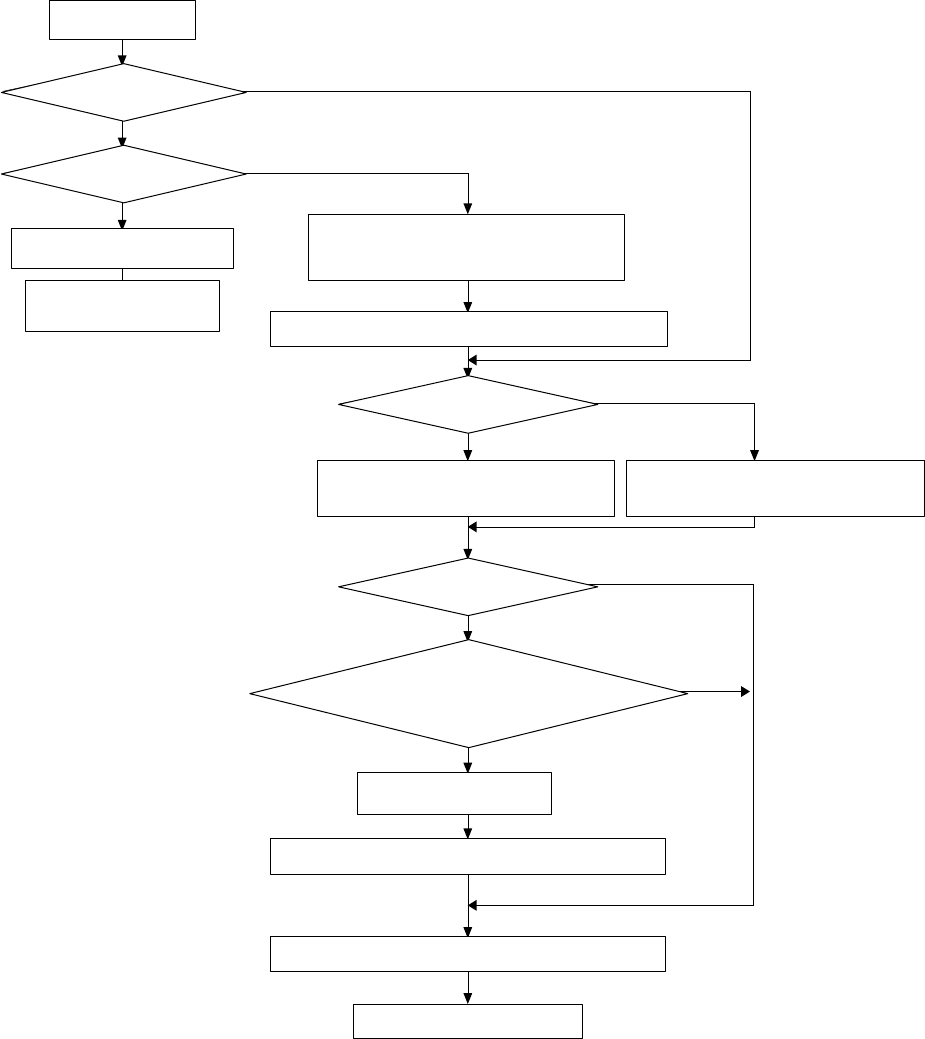
● Operation flow
生産開始
前側フィーダバンクは有効か?
後側フィーダバンクは有効か?
エラーログ画面表示
マシンは一時停止状態
「段取り替えが完了していません。フィーダバンクを有効
にして下さい」メッセージ表示
メッセージを消去し、スタートキーを押してください
マスタフィーダバンクは有効か?
部品吸着のフィーダバンクをマスタ側にする
段取り替え直後か?
セットアップの「一括交換台」あるいは「フィーダ浮き」
がチェックされていないか?
メッセージ表示
メッセージを消去し、スタートキーを押してください
指定フィーダバンクから部品吸着を行います
生産動作開始
部品吸着のフィーダバンクをサブ側にする
Yes
Yes
Yes
Yes
Yes(少なくともどちらかが
チェックされている)
No
No
No
No(すべてチェックされている)
No
Is the front feeder bank
enabled?
Is the rear feeder bank
enabled?
Start of production
Display of the error log screen
The machine is put in the
pause state.
Display of the message “No completion
change plan. Please use Feeder Bank.”
Clear the displayed message and press the Start key.
Is the master bank enabled?
Specify the master bank as the feeder bank
for picking up components.
Specify the sub bank as the feeder bank for
picking up components.
Has changeover just finished?
Is the “Feeder trolley” check box or the
“Feeder Float Detector” check box checked
off on the “Machine Setup” screen?
No (Everything has been checked.)
Yes (At least one of them is
checked off.)
Display of the message
Clear the displayed message, and then press the Start key.
Components are picked up from the specified feeder bank.
Start of production operation
Part 1 Basic Operation Chapter 2 Production
2-173
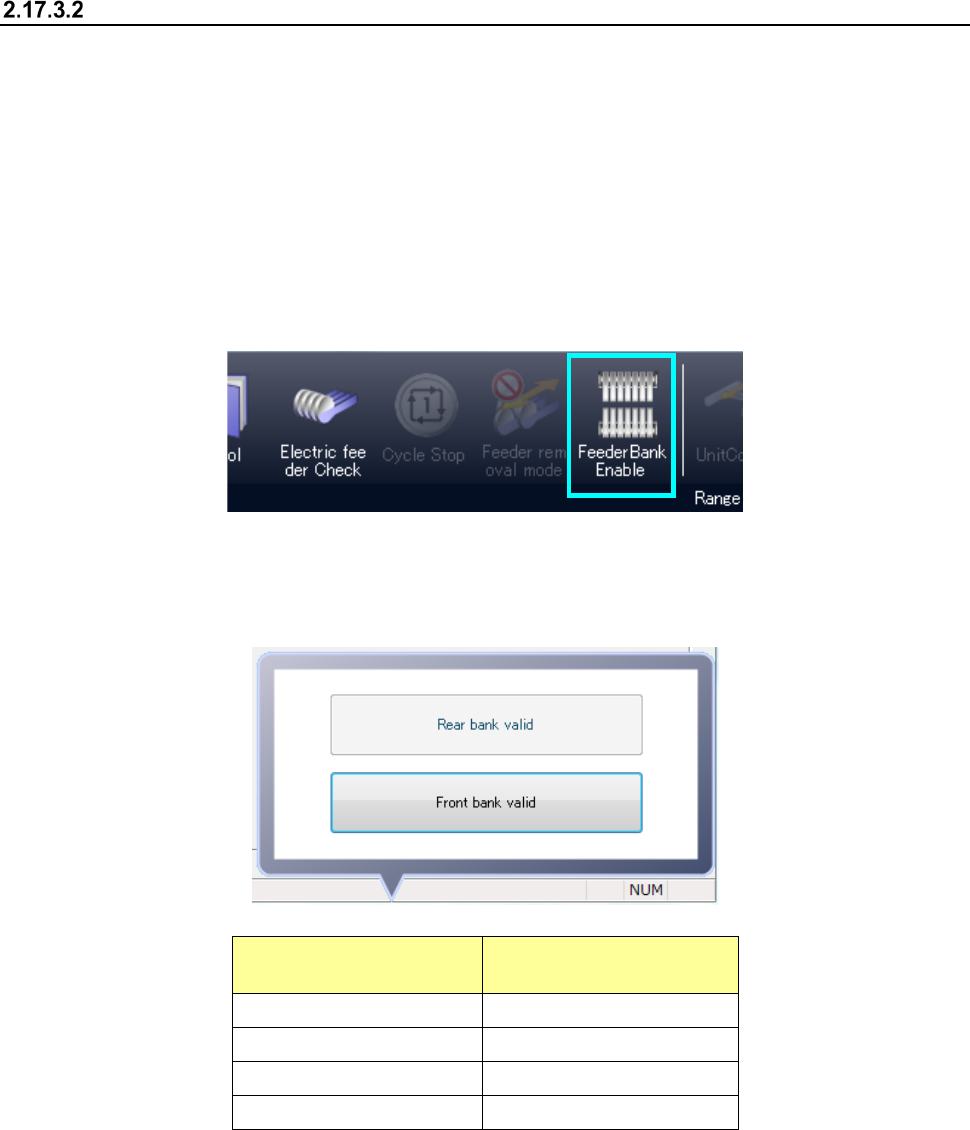
<Feeder Bank Enable> button
The <Feeder Bank Enable> button allows you to select whether to pick up components from the
corresponding feeder bank, front or rear.
(1) If you press this button when the feeder bank is enabled, the bank is disabled.
(2) If you press this button when the feeder bank is disabled, the bank is enabled.
When the feeder bank is enabled, it indicates that components can be picked up from the bank.
When the feeder bank is disabled, it indicates that components will not be picked up from the bank.
Every time you press this button, the bank condition is switched between the enabled condition and
the disabled condition.
When you press the <Feeder Bank Enable> button, the submenu appears on the screen. The
current condition of the feeder bank is displayed on this submenu.
You can select each of the menu items on this menu from the current operation side only.
Item displayed on the
submenu
Condition
Front bank valid The front bank is enabled.
Rear bank valid The rear bank is enabled.
Front bank invalid The front bank is disabled.
Rear bank invalid The rear bank is disabled.
Part 1 Basic Operation Chapter 2 Production
2-174
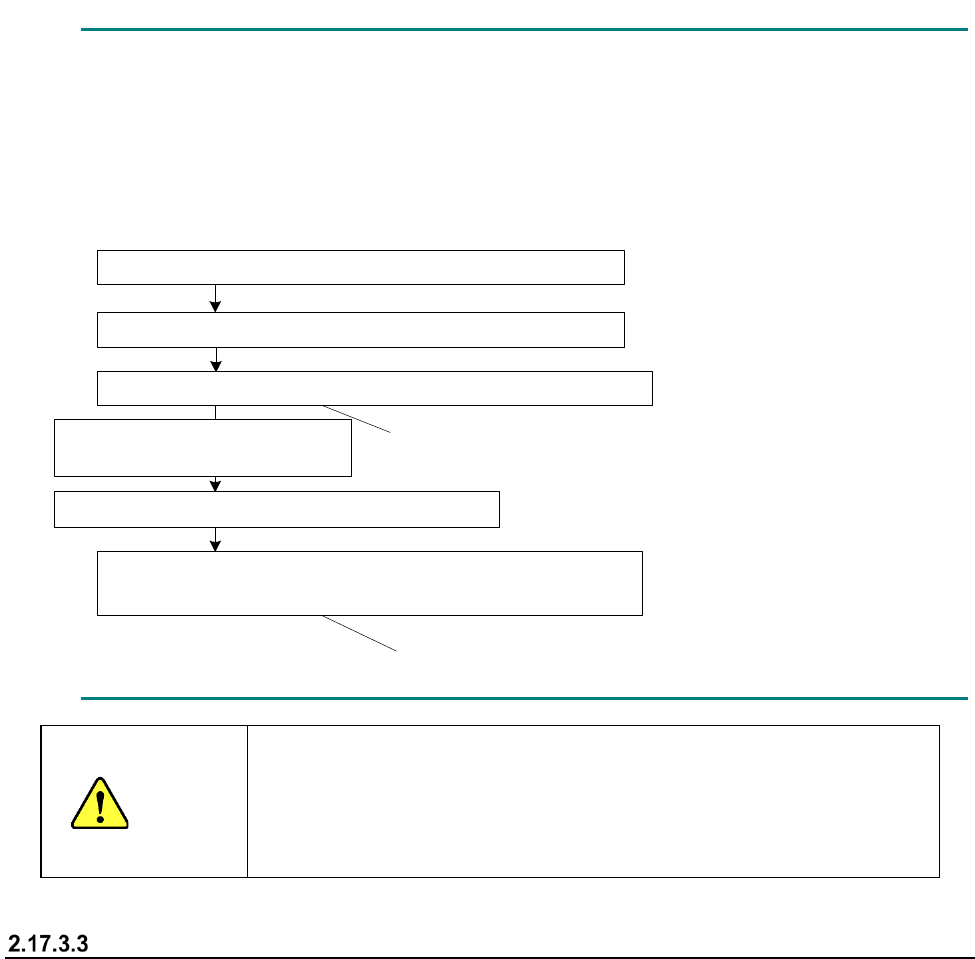
For example, if you disable the feeder bank while a component is being picked up, you may have
to stop picking up the component from the corresponding feeder bank immediately.
In such a case, the feeder bank from which the next component will be picked up is changed to
the enabled one after the component(s) already picked up is (are) placed on a board.
- Example: When components are placed after two components are picked up
1点目の部品吸着(マスタ側のフィーダバンクからの吸着)
このタイミングではスレーブ側には切り替わりません
このタイミングからスレーブ側からの吸着となります
マスタ
側のフィーダバンクを無効化
2点目の部品吸着(マスタ
側のフィーダバンクからの吸着)
1点目の部品搭載
2点目の部品搭載
次シーケンス
1点目の部品吸着(スレーブ
側のフィーダバンクからの吸着)
CAUTION
Even though the feeder bank is moved down during production in
Non-stop operation mode, a head(s) move(s) at high speed when a
feeder bank on one side is enabled.
Never put your hand or face in the machine or move it closer to the
machine.
When components run out
The mini signal lamp corresponding to the feeder bank on which components run out lights, and the
feeder bank is disabled.
When you detach the feeder bank, set it on the machine again, and then enable it, the
corresponding mini signal lamp goes off.
Note that this mini signal lamp works also as an indicator for indicating that the corresponding
feeder bank is set on the machine correctly. Therefore, if you fail to set the feeder bank on the
machine normally, the corresponding mini signal lamp remains lit even though you enable the
feeder bank.
Even though you enable the feeder bank without detaching the feeder bank while the mini signal
lamp is lighting, the mini signal lamp goes off.
Pick-up of the first component (from the master feeder bank)
Disabling of the master feeder bank
Pick-up of the second component (from the master feeder bank)
Placement of the second component on a board
Next sequence
Pick-up of the first component (from the slave feeder bank)
Components are picked up from the slave feeder
bank at this point.
The feeder bank for picking up a component is not
switched to the slave feeder bank at this point.
Placement of the first component
on a board