RS-1_instruction manual.pdf - 第98页
Part 1 B asic O peration Chapter 1 Overv iew of the Machine 1- 80 Get and S ave Machine D ata This functio n collects machine infor mation files, compresses t he collected machine infor mation fi le s, and saves it int o…

Part 1 Basic Operation Chapter 1 Overview of the Machine
1-79
(2) Items output to a text file
No. Item to be output Detailed item Description
1 Optimization data
Optimization option Outputs the list of the optimization options.
Number supplied
Outputs the number of the supplied components
of each type.
Nozzle optimization Outputs the nozzle assignment state.
2
Production
Information
Production Information
Outputs the management information obtained
during PWB production.
Production Conditions Outputs the PWB production conditions.
Number of components Outputs the number of components.
Ratio of Pick-up Outputs each component pick-up ratio.
Unplaced list Outputs of the list of unplaced components..
Feeder information Outputs information on feeders.
3
Machine
Management
Output the operation state of the following
devices:
Machine operation information
Nozzle operation information
Head operation information
Signal light operation information
Mini signal light operation information
OCC operation information
Other unit operation information
Application operation information
4 Machine setup Outputs the information set for each machine.
5 Operation options Outputs the settings of the operation options.
6 PWB data Outputs the PWB data.
7 Placement data
- Input
- Optimized
Outputs the Placement data in the input order or
in the optimized order.
8 Component data
- Detail
- List
Outputs the Component data in the form of
details or in the form of a list.
Vision data Outputs the Vision data.
9 Pick data
Extended Component Outputs a component name.
- Input
-Layout
- Feeder setup sheet (with
comment)
- Feeder setup sheet (without
comment)
Outputs the Pick data in the input order/in the
form of a layout/in the form of the feeder setup
sheet.
You can specify whether to append a comment
to a feeder-setup sheet.
10
Production Program
List
Production Program List
Specifies a production program folder, and then
outputs the list of production programs in the
folder.
To print production program data, start up the Program Editor and
then print it from the displayed menu.
Part 1 Basic Operation Chapter 1 Overview of the Machine
1-80
Get and Save Machine Data
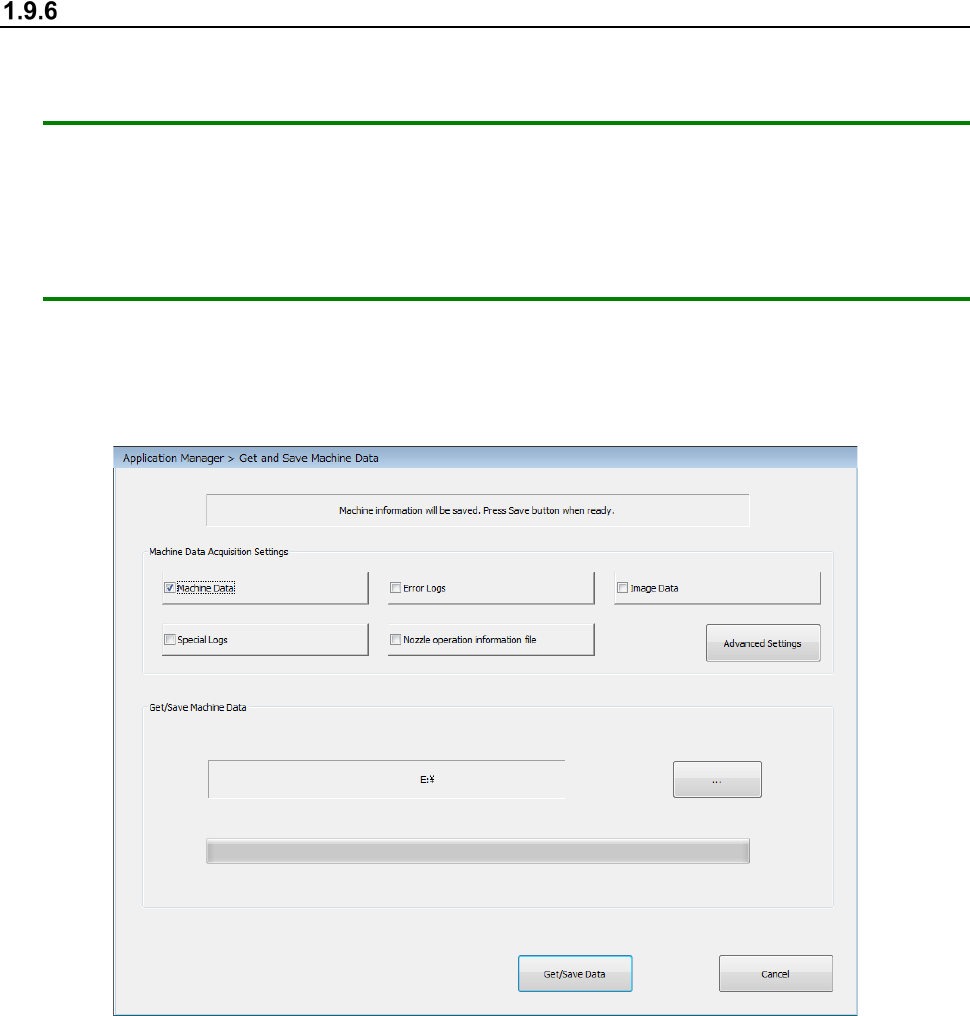
This function collects machine information files, compresses the collected machine information files,
and saves it into a desired folder.
Note: Regularly save a nozzle operation information file in memory such as USB memory when
you change the nozzle allocation or clean a nozzle. (Only when an individual nozzle
management system is attached on the machine.)
Use this function if our service personnel or your dealer tells you to do so except for when
handling of a nozzle operation information file.
Handle the obtained file as instructed too.
How to operate the function
① Select the “Arrange” button from the menu, and then the [Get and Save Machine Data]
command.
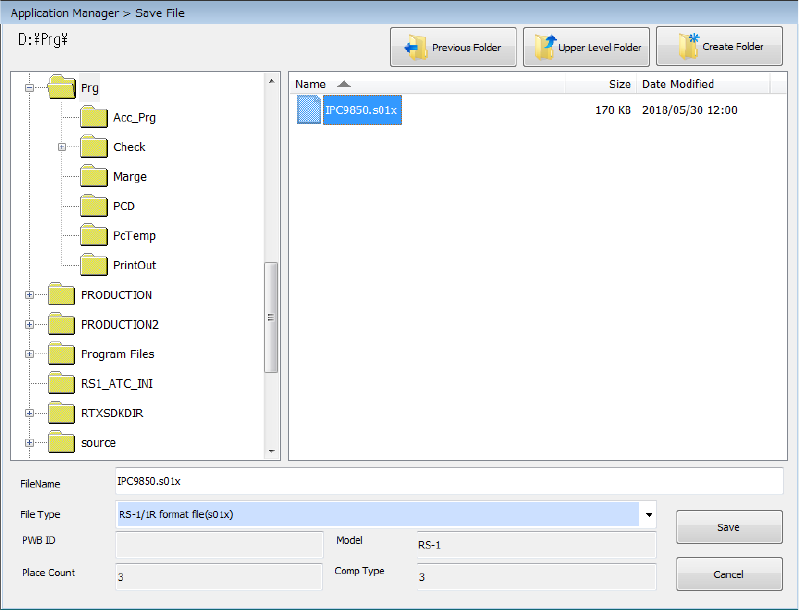
② Press the <…> button to specify where to save the file.
③ When you click the <Get/Save Data> button, the system gets appropriate machine
information files, compresses the obtained files, and saves it.
Part 1 Basic Operation Chapter 1 Overview of the Machine
1-81
④ When the machine information files have been obtained and compressed successfully, the
screen display is changed as follows.
To close this dialog box, press the <Close> button.
If you check off the desired information check boxes in the “Machine Data Acquisition Settings”
area, you can get more information.
(For more information, see the item (1) “Machine Data Acquisition Settings” of Section 1.9.6
“Machine Data Acquisition Settings”.)
If you click the <Advanced Settings> button, you can make more selections of the information
you have set in the “Machine Data Acquisition Settings” area to obtain necessary information.
(For more information, see the item (2) “Advanced Settings of Machine Data Acquisition Settings”
of Section 1.9.6 “Advanced Setting of Machine Data Acquisition Settings”.)